Read the statement by Michael Teeuw here.
PIR / MQTT - Presence sensor(s) revived
-
@htilburgs cool!
happy, that you are satisfied!Warm regards,
Ralfinteresting that you are poistion this counterbar on thr right side of the screen.
For me it feels/looks more natural on the left side.
May this is the reason for my “acceptance” of the colorFrom / colorTo - “mismatch” you had reported … -
@rkorell
My current mirror
This is why I have it on the right. For me this feels better.
On the left side there comes the Spotify information, when I play music.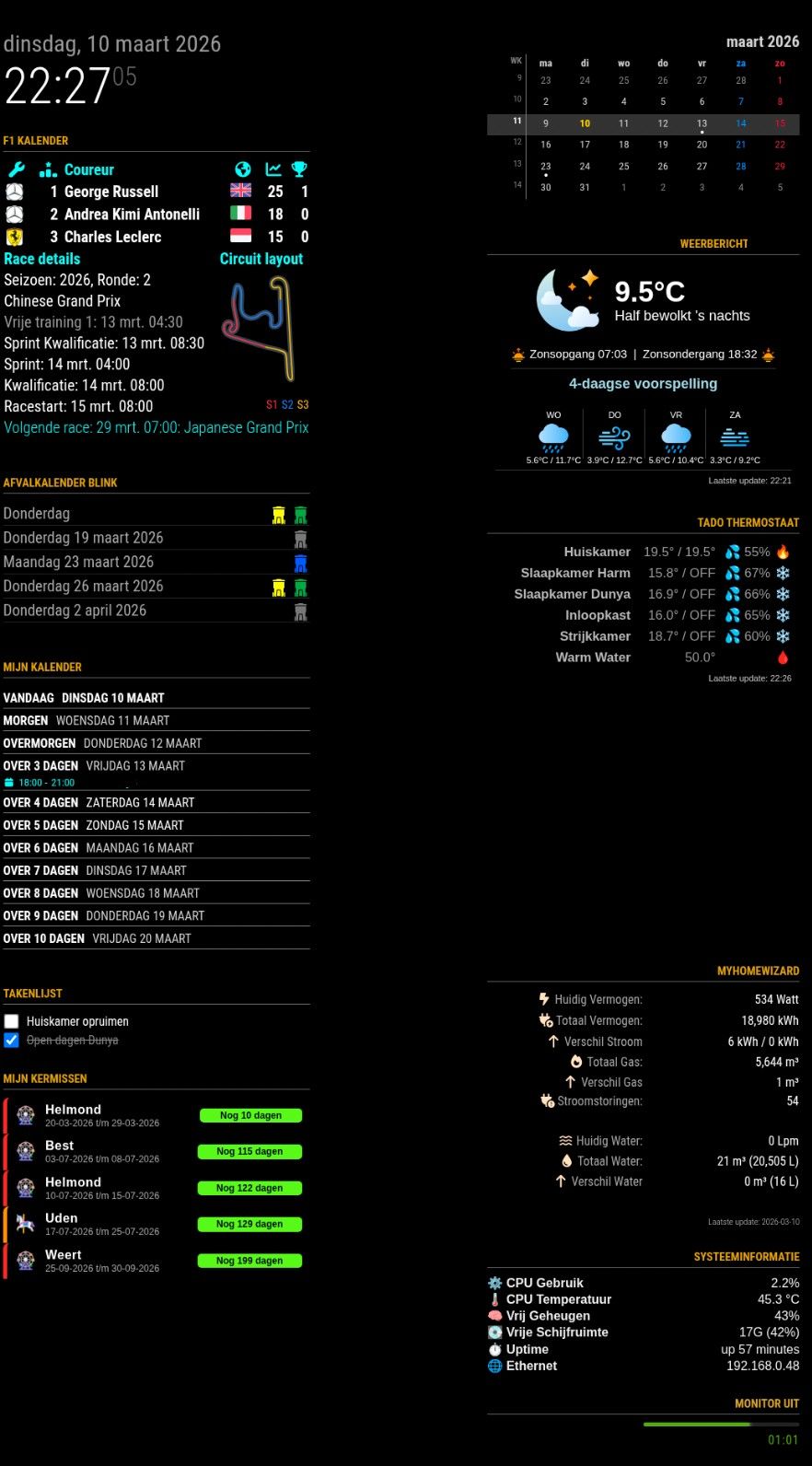
-
@htilburgs

I have a quite similar layout.
My MusicPlayer (Volumio) is on the left side, too but is spreading the region if cover-art is appearing…
Warmest regards,
Ralf -
@rkorell
I see you’re even using one of my Modules (MMM-MyGarbage)My MusicPlayer (Volumio) is on the left side, too but is spreading the region if cover-art is appearing…Did you do something special for this, or is this an option in de Module?
Because when MMM-OnSpotify appears, it just go over everything that is standing there.
So for now I’ve disabled it and looking for a solution. -
Dear @htilburgs,
Yes, I Like your garbage module - it’s really great - thanks for this!
I’m using MMM-NowPlayingOnSpotify …
This has exactly the behavioour as described.
Shows a spotify logo - which I had replaced with Volumio logo (which is my favourite spotify player) and only expands if something is played.
In this case the left corner looks like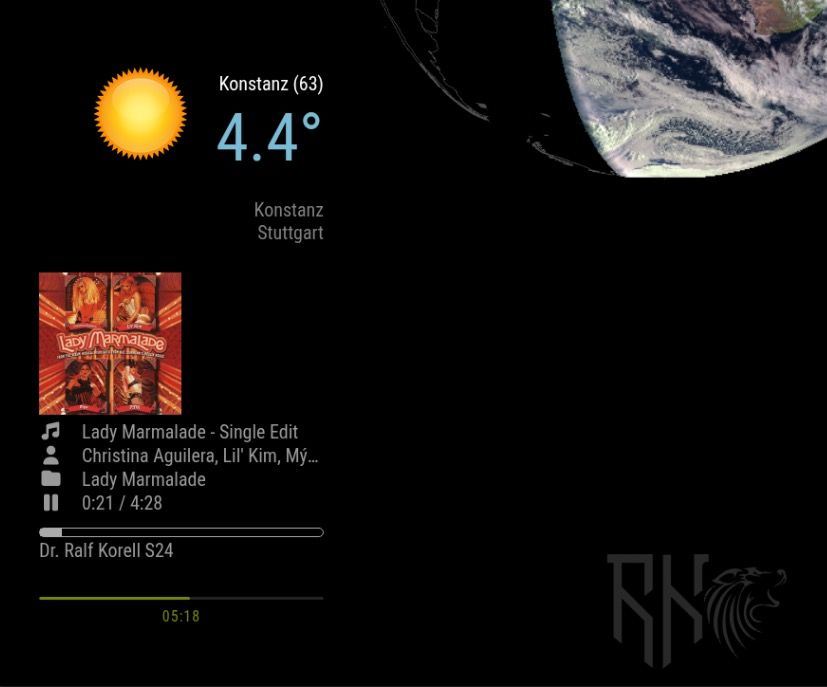
Warm regards,
Ralf -
I’ve just seen that you had invented a solution for your problem - MMM-HideModulesOnSpotify :-)
Cool!Ralf
-
@rkorell
That’s correct!
At the end, because it currently just works with MMM-OnSpotify, it was not so difficult.I Will look into this in the near future to support other Player also.
-
MMM-PresenceScreenControl — two new releases (ecoMode + Notification API)
Dear all
a small but meaningful round of updates for MMM-PresenceScreenControl just landed on main. Both started from a single GitHub issue, so I thought I’d write up the chain of reasoning rather than just drop a changelog — maybe useful for anyone evaluating a migration from MMM-Pir, and definitely useful as a reminder to myself to check the parent project’s feature surface more carefully when forking.
Part 1 — ecoMode (Issue #5)
Rocket78 opened issue #5 with a really well-argued request: even with the screen physically off, Electron keeps repainting hidden DOM. On a Pi 3 with X11, MMM-PresenceScreenControl was leaving things like Newsfeed cross-fades running every 20 seconds — and those repaints showed up clearly as CPU spikes in his graph. He asked for an equivalent of MMM-Pir’s ecoMode, which hides every other module while the screen is off, so the browser skips layout/paint/composite for them.
So I built it, but tried to keep it lean:ecoMode: false, // opt-in, default off → no surprise ecoModeIgnore: [] // module names to keep visibleImplementation notes that might interest other module authors:
Rocket78 also dropped a great ddcutil snippet in the issue for monitors that show a “no signal” splash when the video output is cut — that splash is genuinely immersion-breaking, and ddcutil setvcp D6 sends the actual DDC/CI power command, which is much closer to pressing the hardware power button:
onCommand:  ddcutil setvcp D6 1 --skip-ddc-checks
offCommand: ddcutil setvcp D6 5 --skip-ddc-checks
Added to the README’s offCommand examples. The --skip-ddc-checks is needed because some monitors stop responding to DDC queries when powered off but still process incoming power-on commands — so the check would fail before the command is even sent.
→ Issue #5 closed, commit 42b68a6.
Part 2 — what else did I miss?
Closing the issue could have been the end of it. But Rocket78’s request raised an uncomfortable question: I never used ecoMode in MMM-Pir myself, so I didn’t notice it was missing. What else did I overlook when reviving MMM-Pir?
Three items jumped out as actual gaps that other modules in the ecosystem could legitimately depend on:
-
MMM_PIR-USER_PRESENCE — MMM-Pir broadcasts this notification on presence transitions. Other modules (Remote-Control, voice assistants, smart-home bridges) can listen for it.
-
MMM_PIR-WAKEUP / LOCK / UNLOCK / END — incoming notifications that let other modules control the screen logic externally.
-
MMM_PIR-SCREEN_POWERSTATUS — broadcast when the physical screen turns on or off.
Without these, anyone migrating from MMM-Pir to my fork would suddenly find their automations dead — because they’d be listening for MMM_PIR-USER_PRESENCE and nothing was coming through. Even worse, they wouldn’t know why it stopped working; the screen-on/off behavior would seem fine, but cross-module integration would be silently broken.
So I built a parallel notification API, namespaced MMM_PSC-* rather than impersonating MMM-Pir’s MMM_PIR-*:
Outgoing notifications — emitted on state transitions only:
MMM_PSC-USER_PRESENCE       payload: true / false
                            fires when combined presence changes

MMM_PSC-SCREEN_POWERSTATUS  payload: true / false
                            fires when physical screen turns on/off
Both fire only on actual transitions — no spam every poll cycle.
Incoming notifications — consumed by the module
MMM_PSC-WAKEUP   wake screen, reset timer (equivalent to a touch)

MMM_PSC-END      force screen off immediately

MMM_PSC-LOCK     freeze presence handling — sensors are still tracked internally, but no longer change screen state

MMM_PSC-UNLOCK   resume normal presence handling and re-evaluate the current sensor state
Implementation detail worth flagging: the LOCK guard sits in updatePresence(), which is the single funnel through which all sensor inputs (PIR, MQTT, touch, external wakeup socket) eventually pass. So whatever the trigger source, it’s correctly suppressed while locked. UNLOCK calls updatePresence() again, which re-evaluates the current sensor state — so if you’ve unlocked while a person is still in front of the PIR, the screen comes back on immediately. No need for the caller to send a WAKEUP after UNLOCK.
Useful patterns this enables:
// Wake the mirror when a doorbell event arrives:
this.sendNotification("MMM_PSC-WAKEUP");

// Force-off cleanly from outside (smart-home rule, etc.) without
// bypassing the module and going straight to the screen command:
this.sendNotification("MMM_PSC-END");

// Take exclusive control of the display for a video call,
// then hand it back when done:
this.sendNotification("MMM_PSC-LOCK");
// ... your module is showing its full-screen content ...
this.sendNotification("MMM_PSC-UNLOCK");
END is the clean way to force-off the screen from outside without touching offCommand directly — the module’s internal state stays consistent, all the right outgoing notifications still fire, and any other listeners (logging, analytics, smart home) see the transition.
Tested live end-to-end via MMM-Remote-Control’s notification API:
curl -X GET "http://localhost:8080/api/notification/MMM_PSC-LOCK"
curl -X GET "http://localhost:8080/api/notification/MMM_PSC-END"
    → screen off, stays off
curl -X GET "http://localhost:8080/api/notification/MMM_PSC-WAKEUP"
    → ignored (locked)
curl -X GET "http://localhost:8080/api/notification/MMM_PSC-UNLOCK"
    → screen back on
All four routes verified, log trace clean, outgoing notifications fired in the right order on every transition.
→ Commit 10000ca.
Update / install
If you’re already on the module:
cd ~/MagicMirror/modules/MMM-PresenceScreenControl
rm -rf node_modules
git pull
npm install
Both changes are backwards-compatible. ecoMode is opt-in (default false), and the new notifications are additive — nothing existing is modified. So you can update without touching your config and pick up only what you need.
A genuine thank-you to Rocket78 for the well-reasoned issue and the ddcutil tip — it triggered the full audit, which in turn closed a much bigger latent gap.
Exactly the kind of feedback that improves a fork. If you’ve migrated from MMM-Pir and notice anything else missing that you’d consider load-bearing, please open an issue.
Hope you find it useful.
Warmest regards,
Ralf -
-
For some reason, my mirror is not able to turn on thru MQTT. Below is most of the detail from the log file. MQTT explorer is showing that HomeAssistant is publishing via MQTT “true”. Do you have any suggestions?
[2026-05-22T21:32:28.750Z] PresenceControl: Received config: {“mode”:“MQTT”,“pirGPIO”:4,“mqttServer”:“mqtt://192.168.4.160:1883”,“mqttTopic”:“sensor/presence”,"mqttPayloadOccupancyF>
[2026-05-22T21:32:28.910Z] PresenceControl: [updateScreen] on=true, cmd=“wlopm --on HDMI-A-2”
[2026-05-22T21:32:29.211Z] PresenceControl: [updateScreen] SUCCESS: executed “wlopm --on HDMI-A-2”
[2026-05-22T21:32:29.357Z] PresenceControl: [updatePresence] pirPresence=false, touchPresence=false, presence=false, newPresence=false, locked=false
[2026-05-22T21:32:29.359Z] PresenceControl: Subscribed to MQTT topic: sensor/presence
[2026-05-22T21:33:02.189Z] PresenceControl: [startCounter] Counter expired: presence=false, pirPresence=false, calling updateScreen(false)
[2026-05-22T21:33:02.190Z] PresenceControl: [updateScreen] on=false, cmd=“wlopm --off HDMI-A-2”
[2026-05-22T21:40:24.572Z] PresenceControl: [updatePresence] pirPresence=false, touchPresence=false, presence=false, newPresence=false, locked=false
[2026-05-22T21:40:25.575Z] PresenceControl: [startCounter] Counter expired: presence=false, pirPresence=false, calling updateScreen(false)
[2026-05-22T21:40:25.576Z] PresenceControl: Counter expired, set presence to FALSE and stopped timer. -
Dear @atwist,
first of all apologies for long delay - I was on vacation and offline.
A small disclaimer upfront: I haven’t seen your actual MQTT traffic, so the following is a hypothesis based on the log excerpt you posted. It fits the symptoms cleanly, but please verify before changing anything.
What I see in your log:
- The module connects to the broker fine
- It subscribes successfully to
sensor/presence [updatePresence]fires (so messages ARE arriving — otherwise you wouldn’t see those entries triggered)- But no parse error is logged, which means JSON.parse() did not throw
- The result is consistently
mqttPresence=false, screen turns off after the counter or even never turns on.
Most likely cause: HomeAssistant publishes the value
truedirectly (a JSON primitive), not a JSON object like{"presence": true}.
The module currently expects an object and reads the field onfigured inmqttPayloadOccupancyField(default: “presence”).JSON.parse("true")succeeds and returns the booleantrue, buttrue["presence"]isundefined— which evaluates to no presence.
No exception, no parse error log, just silent false.Quick way to verify what HA actually sends:
mosquitto_sub -h 192.168.4.160 -t sensor/presence -vThat’ll print one line per message. You’ll see exactly what arrives.
If the payload turns out to be a bare value (justtrue,"ON", etc.), there are two paths forward:Either:
1. Update the module — I just pushed support for bare-string payloads exactly because of this case:cd ~/MagicMirror/modules/MMM-PresenceScreenControl git pullThen add to your module config:
mqttPayloadOn: "true"(or whatever HA actually publishes —
"ON","on", etc.; check with the mosquitto_sub command above). With this set, the module compares the raw MQTT payload exactly against your string. Match → presence detected. Anything else → no presence.Or:
2. Configure HA to publish a JSON object like{"presence": true}/{"presence": false}instead of the bare value (e.g. via thepayloadtemplate of your MQTT publish action). Then your existing config works unchanged.The new release also adds two diagnostic improvements that would have made this immediately visible:
- A new
[MQTT] received (field/bare mode): mqttPresence=true/falselog line on every message (debug level “complex”) - The
[updatePresence]line now includesmqttPresence=alongside the other sources
Sorry for the silent-fail behavior in the previous version — that’s been a documentation gap as well as a feature gap. Let me know if my hypothesis turns out to be wrong; if HA publishes something else entirely, the diagnosis would change.
Good luck.
Warmest regards,
Ralf -
That got me fixed up!. Thanks!

Hello! It looks like you're interested in this conversation, but you don't have an account yet.
Getting fed up of having to scroll through the same posts each visit? When you register for an account, you'll always come back to exactly where you were before, and choose to be notified of new replies (either via email, or push notification). You'll also be able to save bookmarks and upvote posts to show your appreciation to other community members.
With your input, this post could be even better 💗
Register Login