Read the statement by Michael Teeuw here.
Wunderlist - your todos on the mirror
-
OK strike that it does work, there seemed to be an issue with the browser version of wanderlist not syncing, which meant that despite it appearing to have content on it wasn’t sending it to the mirror.
All good now.
-
Glad you figured out how to fix it :)
-
Greetings,
first of all, thanks for making the module!
Sadly I can’t really appreciate your work, because it doesn’t work for me. :(I’m running magicMirror on a Contos7 VM on my Homeserver.
The code in the Line 42 always returns me “undefined”.
this.tasks[this.config.lists[i]]However retrieving the tasks via curl seems fine.
Here is my Config:
{
			module: 'MMM-Wunderlist',
			position: 'top_right',
			header: 'To-Do Liste',
			config: {
				accessToken: '*********************************',
				clientId: '*********************',
				lists: ['inbox'],
				interval: 5,
				maximumEntries: 5,
				fade: true
			}
}
I’m really looking forward to hear from you. :)
-
Are you sure this has nothing to do with your setup? Centos 7 is not officially supported.
-
@paviro I know that it’s not officially supported but everything else seems fine.
Maybe any dependencies I’m not awayre of? I already installed npm request manually. -
Not sure this error seems off to me since I check if the variable is undefined… Well I am on holiday right now so I can’t really check anything, sorry :/
-
@paviro No Problem at all, hope you enjoy you holidays! :)
-
@paviro After further inspection it seems like the array this.tasks = []; is always empty. which is why if (typeof this.tasks[this.config.lists[i]] != “undefined”) is always false. Any Ideas? :(
-
Please try using the fetcher_debug_client.js. You have to fill in your data in
createFetcher("id", "Inbox", 1000, accessToken, clientID);at the bottom :) You can then run it withnode fetcher_debug_client.jsfrom the module directory. -
@paviro Did exactly what you said. I ran node fetcher_debug_client.js from the /opt/MagicMirror/modules/MMM-Wunderlist/ directory and it seems to have worked.
Create new todo fetcher for list: Inbox - Interval: 1000 -
@paviro said in Wunderlist - your todos on the mirror:
Please try using the fetcher_debug_client.js. You have to fill in your data in
createFetcher("id", "Inbox", 1000, accessToken, clientID);at the bottom :) You can then run it withnode fetcher_debug_client.jsfrom the module directory.Any progress so far?
-
Hey all,
Love this module, just got it working and i think it is going to be really helpful staying organized. I am having one issue i was hoping to get some assistance with. New todo’s show up fine, however when one is marked as done, it does not disappear from the mirror, it will disappear from the phone app if i do it on the computer and vice versa. If i remove an item (or multiple items) and add something new then the completed items are removed. Any thoughts? -
Has anyone encountered an issue where Wunderlist freezes? I am getting the module to show with my todo’s but they do not update after the magicmirror application has been running for more than about 18 hours. If i restart the magic mirror application it does update. As a side note, other modules on the mirror do update as well, so i am thinking it is possibly some freezing issue rather than a communication one.
-
So I could not figure out why Wunderlist is freezing so just did a workaround by setting up a cron job to reset the pi twice a day and start up the mirror. So far that is working for me.
-
@Sunburned I was having this problem where I would mark an item on my phone complete and it didn’t update on the mirror. I just did a git pull on the module (seems like it was updated) and its now working again.
-
Was anyone able to come up with a solution to the blank todo list? I am also having that problem where it displays the Header but no actual tasks. I get the same curl error as @mikmonken but I didn’t find what his solution was. I also tried running the fetcher.js files listed below but truth be told, I am a linux noob and I don’t know how to install requireJS. Any suggestions?
-
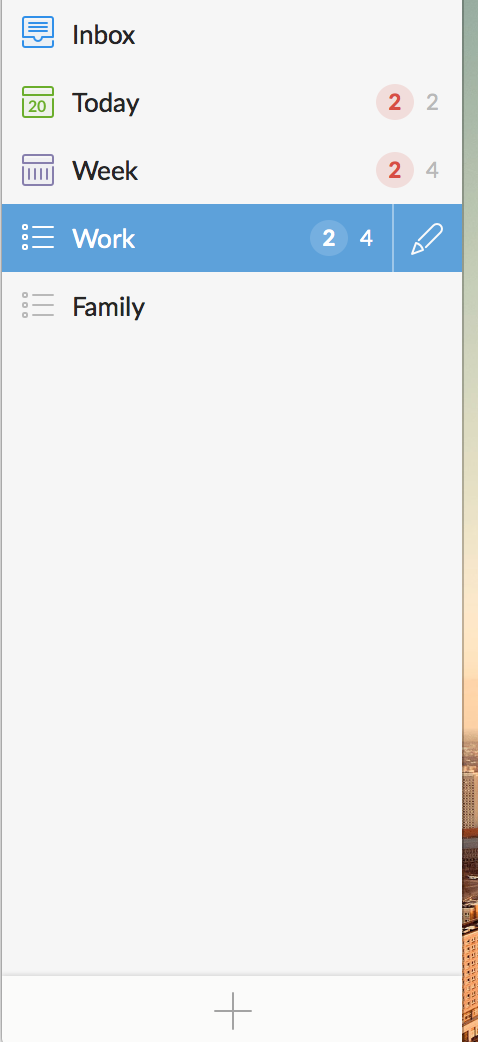
This module is working perfectly for me. As others mentioned it doesn’t work for the filters like Today, Week, etc. you can only assign it to specific lists that you create like “Work” for example.
-
@carteblanche I’ve moved all my tasks to the inbox and tried using that. Still cant get a list to show. Other todo modules have worked immediately though so I may have to just switch over to one of them.
-
@SexyTrogg You don’t need any of the tasks to be in the Inbox folder. You just need to create a new custom list of your todos separate from the auto generated folders that Wunderlist creates and call that list name out in the module config file.
See a screenshot of my lists here…I can have either Work or Family show up on my mirror if I choose those names in the config file. But be careful it is case sensitive.
-
@carteblanche
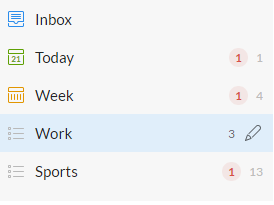
My set up is as follows:
module: 'MMM-Wunderlist',
                       position: 'top_left',
                       header: 'Get this ish done',
                       config: {
                       accesToken: '----',
                       clientID: '----',
                       lists: ["Sports","Work"],
                       interval: 60,
                       fade: true
                       }
Everything looks like it should work for me but again still just the black screen. Raspberry Pi 3 with the newest Wunderlist repo and updates.

Hello! It looks like you're interested in this conversation, but you don't have an account yet.
Getting fed up of having to scroll through the same posts each visit? When you register for an account, you'll always come back to exactly where you were before, and choose to be notified of new replies (either via email, or push notification). You'll also be able to save bookmarks and upvote posts to show your appreciation to other community members.
With your input, this post could be even better 💗
Register Login