MagicMirror Forum
    • Recent
    • Tags
    • Unsolved
    • Solved
    • MagicMirror² Repository
    • Documentation
    • 3rd-Party-Modules
    • Donate
    • Discord
    • Register
    • Login
    A New Chapter for MagicMirror: The Community Takes the Lead
    Read the statement by Michael Teeuw here.

    MMM-awesome-alexa

    Scheduled Pinned Locked Moved Utilities
    241 Posts 43 Posters 391.7k Views 47 Watching
    Loading More Posts
    • Oldest to Newest
    • Newest to Oldest
    • Most Votes
    Reply
    • Reply as topic
    Log in to reply
    This topic has been deleted. Only users with topic management privileges can see it.
    • B Offline
      bumrocks @sdetweil
      last edited by

      @sdetweil , you are a good guy. Much appreciated all that you obviously do and in areas that you don’t necessarily have to. Thank you very much 😁

      1 Reply Last reply Reply Quote 0
      • U Offline
        uok825
        last edited by

        Can anyone fix this pm2 issue?

        S 1 Reply Last reply Reply Quote 0
        • S Offline
          sdetweil @uok825
          last edited by

          @uok825 i don’t see any info on a pm2 issue

          Sam

          How to add modules

          learning how to use browser developers window for css changes

          U 1 Reply Last reply Reply Quote 0
          • U Offline
            uok825 @sdetweil
            last edited by

            @sdetweil
            First Page

            PM2 problems
            For some reason, running MagicMirror on PM2 with this module doesn’t seem to work on Raspberry Pi. The mic does not pick up. If anyone has a solution or cause for this, it would be greatly appreciated. I would recommend to start the MagicMirror the traditional way of npm start.
            

            I have that issue.

            S 1 Reply Last reply Reply Quote 0
            • S Offline
              sdetweil @uok825
              last edited by

              @uok825 can u show the pm2 logs during this kind of launch

              pm2 stop  0
              pm2 flush
              pm2 start 0
              

              do your tests

              pm2 logs --lines=100
              pm2 info 0
              

              Sam

              How to add modules

              learning how to use browser developers window for css changes

              U 1 Reply Last reply Reply Quote 0
              • U Offline
                uok825 @sdetweil
                last edited by

                @sdetweil
                0|mmstart | [2020-06-26 14:34:32.173] [LOG] Starting MagicMirror: v2.11.0
                0|mmstart | [2020-06-26 14:34:32.272] [LOG] Loading config …
                0|mmstart | [2020-06-26 14:34:32.332] [LOG] Loading module helpers …
                0|mmstart | [2020-06-26 14:34:32.646] [LOG] Initializing new module helper . …
                0|mmstart | [2020-06-26 14:34:32.666] [LOG] Module helper loaded: updatenoti fication
                0|mmstart | [2020-06-26 14:34:32.703] [LOG] No helper found for module: hell oworld.
                0|mmstart | [2020-06-26 14:34:32.710] [LOG] All module helpers loaded.
                0|mmstart | [2020-06-26 14:34:33.525] [LOG] Starting server on port 8080 …
                0|mmstart | [2020-06-26 14:34:33.667] [LOG] Server started …
                0|mmstart | [2020-06-26 14:34:33.676] [LOG] Connecting socket for: updatenot ification
                0|mmstart | [2020-06-26 14:34:33.684] [LOG] Sockets connected & modules star ted …
                0|mmstart | [2020-06-26 14:34:33.691] [LOG]
                0|mmstart | Ready to go! Please point your browser to: http://localhost:8080

                pm20|mmstart | X.Org X Server 1.19.2
                0|mmstart | Release Date: 2017-03-02
                0|mmstart | X Protocol Version 11, Revision 0
                0|mmstart | Build Operating System: Linux 4.9.41-v7+ armv7l Raspbian
                0|mmstart | Current Operating System: Linux raspberrypi 4.19.66+ #1253 Thu Aug 15 11:37:30 BST 2019 armv6l
                0|mmstart | Kernel command line: coherent_pool=1M 8250.nr_uarts=0 bcm2708_fb.fbwidth=1440 bcm2708_fb.fbheight=900 bcm2708_fb.fbswap=1 smsc95xx.macaddr=B8:27:EB:C2:8B:EA vc_mem.mem_base=0x1ec00000 vc_mem.mem_size=0x20000000 dwc_otg.lpm_enable=0 console=ttyS0,115200 console=tty1 root=PARTUUID=00dad306-02 rootfstype=ext4 elevator=deadline fsck.repair=yes rootwait
                0|mmstart | Build Date: 18 October 2017 04:55:30PM
                0|mmstart | xorg-server 2:1.19.2-1+rpt1+deb9u2 (https://www.debian.org/support)
                0|mmstart | Current version of pixman: 0.34.0
                0|mmstart | Before reporting problems, check http://wiki.x.org
                0|mmstart | to make sure that you have the latest version.
                0|mmstart | Markers: (–) probed, (**) from config file, (==) default setting,
                0|mmstart | (++) from command line, (!!) notice, (II) informational,
                0|mmstart | (WW) warning,
                0|mmstart | (EE) error, (NI) not implemented, (??) unknown.
                0|mmstart | (==) Log file: “/var/log/Xorg.0.log”, Time: Fri Jun 26 14:34:56 2020
                0|mmstart | (==) Using system config directory “/usr/share/X11/xorg.conf.d” 0|mmstart | Fontconfig warning: “/etc/fonts/fonts.conf”, line 100:
                0|mmstart | unknown element “blank”
                0|mmstart | [5863:6076:0626/143511.431135:ERROR:bus.cc(396)] Failed to connect to the bus: Could not parse server address: Unknown address type (examples of valid types are “tcp” and on UNIX “unix”)
                0|mmstart | [5863:5890:0626/143514.718350:ERROR:simple_backend_impl.cc(118)] Failed to create directory: /dev/null/Default/Cache
                0|mmstart | [5863:5890:0626/143514.729068:ERROR:simple_backend_impl.cc(728)] Simple Cache Backend: wrong file structure on disk: 1 path: /dev/null/Default/Cache
                0|mmstart | [5863:5882:0626/143514.730785:ERROR:cache_util.cc(140)] Unable to move cache folder /dev/null/Default/Cache to /dev/null/Default/old_Cache_000
                0|mmstart | [5863:5882:0626/143514.731049:ERROR:disk_cache.cc(184)] Unable to create cache
                x0|mmstart | ATTENTION: default value of option force_s3tc_enable overridden by environment.
                0|mmstart | [1:8:0626/143529.824588:ERROR:command_buffer_proxy_impl.cc(124)] ContextResult::kTransientFailure: Failed to send GpuChannelMsg_CreateCommandBuffer.

                S 1 Reply Last reply Reply Quote 0
                • S Offline
                  sdetweil @uok825
                  last edited by sdetweil

                  @uok825 said in MMM-awesome-alexa:

                  pm20|mmstart | X.Org X Server 1.19.2
                  0|mmstart | Release Date: 2017-03-02

                  what is all that?

                  what device is this on? pi 0?

                  I don’t see the alexa module being loaded

                  Sam

                  How to add modules

                  learning how to use browser developers window for css changes

                  U 1 Reply Last reply Reply Quote 0
                  • U Offline
                    uok825 @sdetweil
                    last edited by

                    @sdetweil Yes pi0 and not desktop system.

                    S 1 Reply Last reply Reply Quote 0
                    • S Offline
                      sdetweil @uok825
                      last edited by

                      @uok825

                      0|mmstart | [2020-06-26 14:34:32.173] [LOG] Starting MagicMirror: v2.11.0
                      0|mmstart | [2020-06-26 14:34:32.272] [LOG] Loading config …
                      0|mmstart | [2020-06-26 14:34:32.332] [LOG] Loading module helpers …
                      0|mmstart | [2020-06-26 14:34:32.646] [LOG] Initializing new module helper . …
                      0|mmstart | [2020-06-26 14:34:32.666] [LOG] Module helper loaded: updatenoti fication
                      0|mmstart | [2020-06-26 14:34:32.703] [LOG] No helper found for module: hell oworld.
                      0|mmstart | [2020-06-26 14:34:32.710] [LOG] All module helpers loaded.
                      0|mmstart | [2020-06-26 14:34:33.525] [LOG] Starting server on port 8080 …
                      0|mmstart | [2020-06-26 14:34:33.667] [LOG] Server started …
                      0|mmstart | [2020-06-26 14:34:33.676] [LOG] Connecting socket for: updatenot ification
                      0|mmstart | [2020-06-26 14:34:33.684] [LOG] Sockets connected & modules star ted …
                      0|mmstart | [2020-06-26 14:34:33.691] [LOG]
                      0|mmstart | Ready to go! Please point your browser to: http://localhost:8080
                      

                      I don’t see the alexa node_helper being loaded.
                      also this config.js has the hello word sample module

                      Sam

                      How to add modules

                      learning how to use browser developers window for css changes

                      U 1 Reply Last reply Reply Quote 0
                      • U Offline
                        uok825 @sdetweil
                        last edited by

                        @sdetweil I installed new module can you wait for a moment i configure my config file and install awesome alexa. I will reply.

                        S 1 Reply Last reply Reply Quote 0
                        • S Offline
                          sdetweil @uok825
                          last edited by

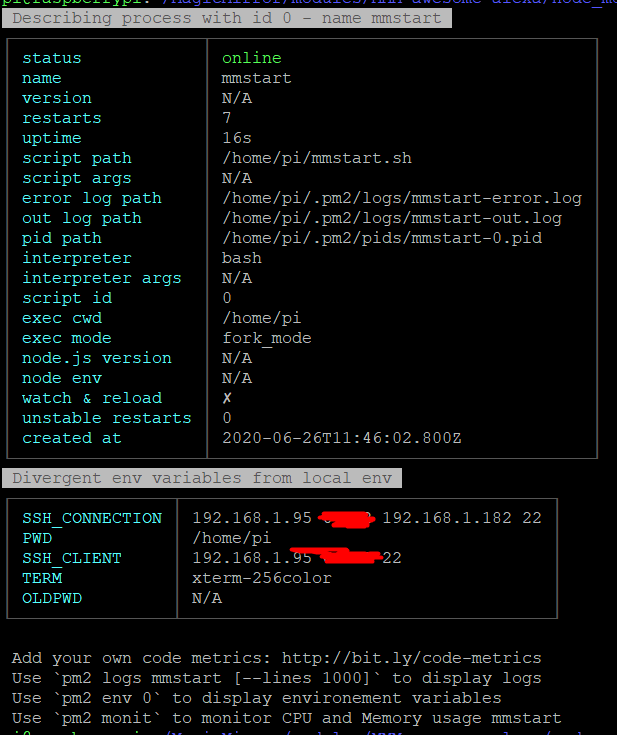
                          @uok825 also show output of pm2 info 0

                          Sam

                          How to add modules

                          learning how to use browser developers window for css changes

                          U 1 Reply Last reply Reply Quote 0
                          • U Offline
                            uok825 @sdetweil
                            last edited by

                            @sdetweil 5e4ede04-ca7d-4ab2-a39e-6a0f9975d8fa-image.png

                            S 1 Reply Last reply Reply Quote 0
                            • S Offline
                              sdetweil @uok825
                              last edited by

                              @uok825 and show /home/pi/mmstart.sh please

                              Sam

                              How to add modules

                              learning how to use browser developers window for css changes

                              U 1 Reply Last reply Reply Quote 0
                              • U Offline
                                uok825 @sdetweil
                                last edited by

                                @sdetweil
                                mmstart

                                #!/bin/bash
                                cd ~/MagicMirror
                                node serveronly &
                                sleep 30
                                xinit /home/pi/chromium_start.sh


                                chromium_start

                                #!/bin/sh
                                xset -dpms # disable DPMS (Energy Star) features.
                                xset s off # disable screen saver
                                xset s noblank # don’t blank the video device
                                matchbox-window-manager &
                                #midori -e Fullscreen -a http://localhost:8080
                                chromium-browser http://localhost:8080/ --window-size=1920,1080 --start-fullscreen --kiosk --incognito --noerrdialogs --disable-translate --no-first-run --fast --fast-start --disable-infobars --disable-features=TranslateUI --disk-cache-dir=/dev/null
                                
                                
                                S 1 Reply Last reply Reply Quote 0
                                • S Offline
                                  sdetweil @uok825
                                  last edited by

                                  @uok825 such a shame you rebuilt all this yourself… if u had used my install script it would have set it all up for you…

                                  just use raspian buster full and voila…

                                  Sam

                                  How to add modules

                                  learning how to use browser developers window for css changes

                                  U 1 Reply Last reply Reply Quote 0
                                  • U Offline
                                    uok825 @sdetweil
                                    last edited by

                                    @sdetweil Sorry i saw this first http://emmanuelcontreras.com/how-to/how-to-create-a-magic-mirror-2-with-pi-zero-w/

                                    S 1 Reply Last reply Reply Quote 0
                                    • S Offline
                                      sdetweil @uok825
                                      last edited by

                                      @uok825 yeh, old stuff…

                                      Sam

                                      How to add modules

                                      learning how to use browser developers window for css changes

                                      U 1 Reply Last reply Reply Quote 0
                                      • U Offline
                                        uok825 @sdetweil
                                        last edited by

                                        @sdetweil Can you share link your script i flash another sd card raspian and try yourse thx for the help

                                        S 1 Reply Last reply Reply Quote 0
                                        • S Offline
                                          sdetweil @uok825
                                          last edited by sdetweil

                                          @uok825 all my scripts are here
                                          https://github.com/sdetweil/MagicMirror_scripts
                                          just copy/paste the command for install

                                          use raspian buster
                                          https://www.raspberrypi.org/downloads/raspberry-pi-os/

                                          i test on my pi0w all the time

                                          Sam

                                          How to add modules

                                          learning how to use browser developers window for css changes

                                          U 1 Reply Last reply Reply Quote 0
                                          • U Offline
                                            uok825 @sdetweil
                                            last edited by

                                            @sdetweil okey thx the raspian is downloading
                                            S 1 Reply Last reply Reply Quote 0

                                            Hello! It looks like you're interested in this conversation, but you don't have an account yet.

                                            Getting fed up of having to scroll through the same posts each visit? When you register for an account, you'll always come back to exactly where you were before, and choose to be notified of new replies (either via email, or push notification). You'll also be able to save bookmarks and upvote posts to show your appreciation to other community members.

                                            With your input, this post could be even better 💗

                                            Register Login

                                            • 1
                                            • 2
                                            • 3
                                            • 4
                                            • 5
                                            • 6
                                            • 7
                                            • 8
                                            • 12
                                            • 13
                                            • 6 / 13
                                            • First post
                                              Last post
                                            Enjoying MagicMirror? Please consider a donation!
                                            MagicMirror created by Michael Teeuw.
                                            Forum managed by Sam, technical setup by Karsten.
                                            This forum is using NodeBB as its core | Contributors
                                            Contact | Privacy Policy