MagicMirror Forum
    • Recent
    • Tags
    • Unsolved
    • Solved
    • MagicMirror² Repository
    • Documentation
    • 3rd-Party-Modules
    • Donate
    • Discord
    • Register
    • Login
    A New Chapter for MagicMirror: The Community Takes the Lead
    Read the statement by Michael Teeuw here.

    MMM-uber and MMM-lyft

    Scheduled Pinned Locked Moved Transport
    40 Posts 8 Posters 32.2k Views 7 Watching
    Loading More Posts
    • Oldest to Newest
    • Newest to Oldest
    • Most Votes
    Reply
    • Reply as topic
    Log in to reply
    This topic has been deleted. Only users with topic management privileges can see it.
    • S Offline
      shashank @onetwankyfive
      last edited by

      @onetwankyfive
      hi, i am unable to use ride_type: ‘Pool’, always shows uberX

      kalK 1 Reply Last reply Reply Quote 0
      • O Offline
        onetwankyfive @kal
        last edited by

        @kal Its to hacked together to post and it cuts off the module above it without adding a blank space header to your module… I just set top margin to -40px.

        1 Reply Last reply Reply Quote 0
        • kalK Offline
          kal @shashank
          last edited by

          @shashank it’s a typo in the documentation but 'POOL' should work.

          S 1 Reply Last reply Reply Quote 0
          • S Offline
            shashank @kal
            last edited by

            @kal no luck, still Uber X default

            kalK 1 Reply Last reply Reply Quote 0
            • kalK Offline
              kal @shashank
              last edited by kal

              @shashank Can you post the mmm-uber portion of your config file? It’s working for me.

              You may want to delete and re-download the repo in your Modules folder. I’ve pushed some changes since the first post.

              S 1 Reply Last reply Reply Quote 0
              • S Offline
                shashank @kal
                last edited by

                @kal hi, I deleted and reloaded the modules, still same issue, below my config

                {
                module: ‘MMM-uber’,
                position: ‘top_left’,
                header: ‘Uber (DC)’,
                ride_type: ‘pool’,
                config: {
                lat: XX.XXXX, // use your exact pickup loaction
                lng: XX.XXXX, // use your exact pickup loaction
                uberServerToken:
                }
                },

                kalK 1 Reply Last reply Reply Quote 0
                • kalK Offline
                  kal @shashank
                  last edited by kal

                  @shashank like I mentioned, your ride type needs to be capitalized. Use 'POOL' like shown below. Also, the ride_type: needs to be placed into the config portion. You can put it under the uberServerToken.

                  		{
                  			module: 'MMM-uber',
                  			position: 'top_left',
                  			header: 'Uber (DC)',
                  			config: {
                  				lat: XX.XXXX,  // use your exact pickup loaction
                  				lng: XX.XXXX, // use your exact pickup loaction
                  				uberServerToken: 'your_uberServerToken',
                  				ride_type: 'POOL'
                  			}
                  		},
                  
                  S 3 Replies Last reply Reply Quote 0
                  • S Offline
                    shashank @kal
                    last edited by

                    @kal said in MMM-uber and MMM-lyft:

                    ride_type: 'POOL

                    hi, i did the changes now it displays as “POOL in null min”

                    {
                    module: ‘MMM-uber’,
                    position: ‘top_left’,
                    header: ‘Uber (DC)’,
                    config: {
                    lat: xx.xxxx, // use your exact pickup loaction
                    lng: xx.xxxx, // use your exact pickup loaction
                    uberServerToken: ’ ',
                    ride_type: ‘POOL’
                    }
                    }

                    kalK 1 Reply Last reply Reply Quote 0
                    • kalK Offline
                      kal @shashank
                      last edited by

                      @shashank That means that no uber pool is available in your area. This is an error case that I haven’t dealt with explicitly.

                      To confirm this is the error, you need to look at the console log. You’ll see the ProcessUber returns ‘Time’ and then an object. Go through the object and look for pool as a ride type. It should look like this:
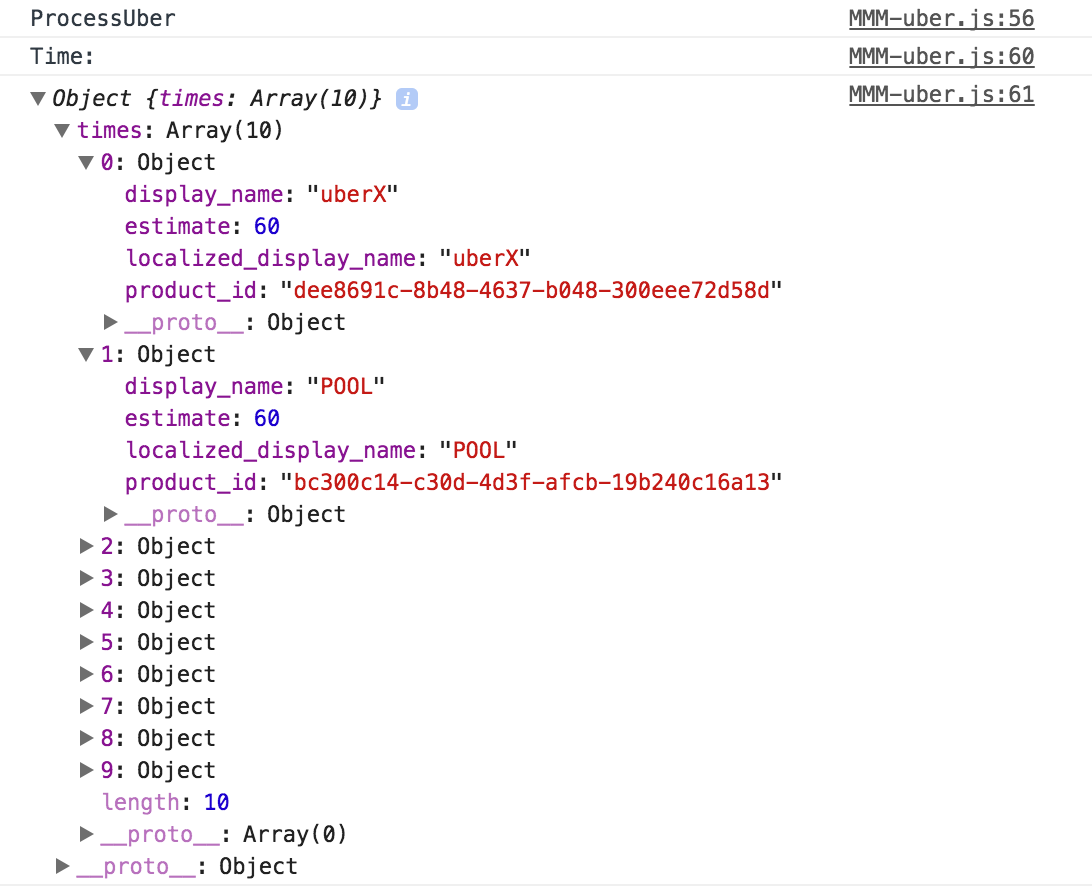
                      0_1499873781733_Screen Shot 2017-07-12 at 11.35.41 AM.png

                      You can also try to order an uber pool on your phone to confirm that one is not available.

                      S 1 Reply Last reply Reply Quote 1
                      • S Offline
                        shashank @kal
                        last edited by

                        @kal
                        ok, Thank you , let me check

                        1 Reply Last reply Reply Quote 0
                        • S Offline
                          shashank @kal
                          last edited by

                          @kal hi, i tried changing the location even then POOL not working, i mobile same location POOL is working

                          kalK 1 Reply Last reply Reply Quote 0
                          • kalK Offline
                            kal @shashank
                            last edited by

                            @shashank can you post the log from your console? I want to help you resolve this issue but I need more information.

                            Anything related to uber in your log should be posted. Please post in detail the things that you have tried. Any config file changes, etc.

                            Just saying that it’s not working does not help me help you

                            1 Reply Last reply Reply Quote 1
                            • S Offline
                              shashank @kal
                              last edited by

                              @kal hi, Earlier i had issues using POOL, mention ride_type: ‘uberPOOL’ , now working fine

                              kalK 1 Reply Last reply Reply Quote 0
                              • kalK Offline
                                kal @shashank
                                last edited by

                                @shashank that’s weird…the API calls out ‘POOL’. Do you mind if I ask what country you are in?

                                S 1 Reply Last reply Reply Quote 0
                                • S Offline
                                  shashank @kal
                                  last edited by

                                  @kal Singapore

                                  1 Reply Last reply Reply Quote 0
                                  • S Offline
                                    Sarb
                                    last edited by

                                    @kal Thank you very much for creating these modules! For some reason I am unable to get both the Uber or Lyft module to return any results. The only thing displayed is their respective logos and “Checking for Uber/Lyft status…” messages. It’s been displaying this for hours now. Is there anything special I need to do once I have registered as a developer and gotten the server tokens?

                                    kalK 1 Reply Last reply Reply Quote 0
                                    • kalK Offline
                                      kal @Sarb
                                      last edited by

                                      @Sarb Can you post your config file and log? It sounds like a REST API failure…

                                      S 1 Reply Last reply Reply Quote 0
                                      • S Offline
                                        Sarb @kal
                                        last edited by

                                        @kal Please see my config entries below:

                                        	{
                                        		module: 'MMM-uber',
                                        		position: 'top_right',
                                        		header: 'Uber & Lyft',
                                        		config: {
                                        			lat: <>, 
                                        			lng: <>, 
                                        			uberServerToken: '<>',
                                        			}
                                        	},
                                        	{
                                        		module: 'MMM-uber',
                                        		position: 'top_right',
                                        		config: {
                                        			lat: <>,
                                        			lng: <>,
                                        			uberServerToken: '<>',
                                        			ride_type: 'uberXL',
                                        			}
                                        	},
                                        	{
                                        		module: 'MMM-lyft',
                                        		position: 'top_right',
                                        		config: {
                                        			lat: <>, 
                                        			lng: <>, 
                                        			clientID: '<>',
                                        			clientSecret: '<>',
                                        			}
                                        	},
                                        

                                        Sorry for being such a noob but I am not sure where to pull my log file from. I ran a quick search and I read that it is supposed to be in a folder named pm2 in my pi folder but I do not see a folder with that name (even when showing hidden items). I did however notice this in my console window:

                                        Whoops! There was an uncaught exception…
                                        TypeError: Cannot read property ‘statusCode’ of undefined
                                        at Request._callback (/home/pi/MagicMirror/modules/MMM-lyft/node_helper.js:43:97)
                                        at self.callback (/home/pi/MagicMirror/node_modules/request/request.js:188:22)
                                        at emitOne (events.js:96:13)
                                        at Request.emit (events.js:191:7)
                                        at Auth.basic (/home/pi/MagicMirror/node_modules/request/lib/auth.js:24:18)
                                        at Auth.onRequest (/home/pi/MagicMirror/node_modules/request/lib/auth.js:137:23)
                                        at Request.auth (/home/pi/MagicMirror/node_modules/request/request.js:1360:14)
                                        at Request.init (/home/pi/MagicMirror/node_modules/request/request.js:378:10)
                                        at new Request (/home/pi/MagicMirror/node_modules/request/request.js:130:8)
                                        at request (/home/pi/MagicMirror/node_modules/request/index.js:54:10)
                                        MagicMirror will not quit, but it might be a good idea to check why this happened. Maybe no internet connection?
                                        If you think this really is an issue, please open an issue on GitHub: https://github.com/MichMich/MagicMirror/issues

                                        kalK 1 Reply Last reply Reply Quote 0
                                        • kalK Offline
                                          kal @Sarb
                                          last edited by

                                          @Sarb your config looks good, but I want to see your log before I open an issue.

                                          We need to view your JavaScript console. Access the mirror directly or whitelist the IP of another computer to access via a browser. Then, go to https://IP.of.Raspberry.Pi:8080 in Chrome and View>Developer>JavaScript Console.

                                          See this this thread for more info.

                                          S 1 Reply Last reply Reply Quote 0
                                          • S Offline
                                            Sarb @kal
                                            last edited by

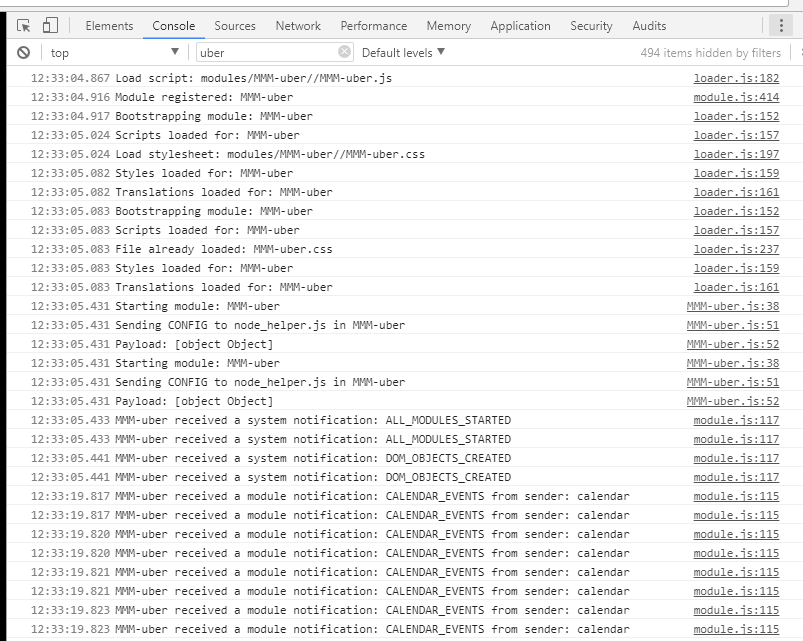
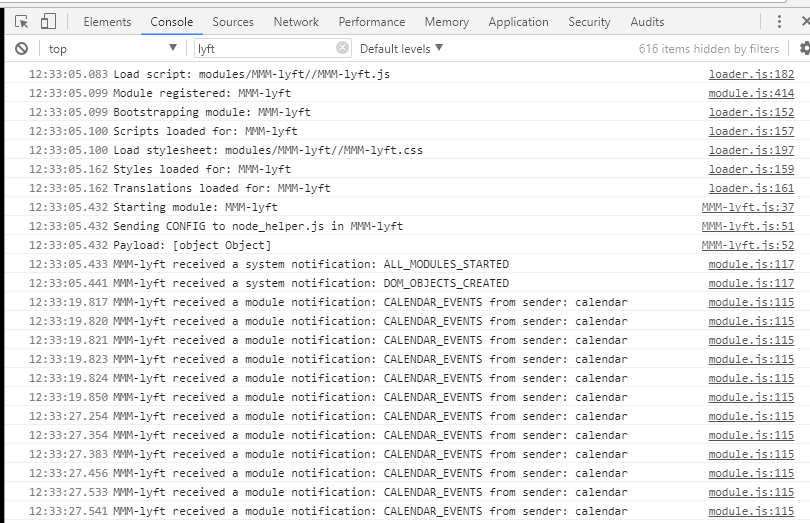
                                            @kal Please see below:

                                            Filtering for Uber
                                            0_1505504659650_72d7325e-139c-4e90-809c-0a7a53b05826-image.png

                                            Filtering for Lyft
                                            0_1505504708574_82cb4f71-5093-4f50-a2ec-9852d8c1e0af-image.png

                                            kalK 1 Reply Last reply Reply Quote 0

                                            Hello! It looks like you're interested in this conversation, but you don't have an account yet.

                                            Getting fed up of having to scroll through the same posts each visit? When you register for an account, you'll always come back to exactly where you were before, and choose to be notified of new replies (either via email, or push notification). You'll also be able to save bookmarks and upvote posts to show your appreciation to other community members.

                                            With your input, this post could be even better 💗

                                            Register Login

                                            • 1
                                            • 2
                                            • 1 / 2
                                            • First post
                                              Last post
                                            Enjoying MagicMirror? Please consider a donation!
                                            MagicMirror created by Michael Teeuw.
                                            Forum managed by Sam, technical setup by Karsten.
                                            This forum is using NodeBB as its core | Contributors
                                            Contact | Privacy Policy