Read the statement by Michael Teeuw here.
MMM-uber and MMM-lyft
-
@kal Thank you for all your help. After a bunch of troubleshooting I was finally able to notice that I was using “clientID” instead of “clientId” in my config file. It is working now.
-
@Sarb yea that was a confusing thing for me to do (I’ll consider changing in the next version). In the future make sure to just copy and paste from the GitHub page.
Glad you’re all sorted out!
-
My MMM-uber has been fine for weeks, but just says “uberX in undefined min” for the last couple of days. Anybody else have this issue?
-
@twosquirrels I’m having the same issue as you. An issue with the Uber API perhaps?
-
@jdahli1 I tried deleting my uber api key and generating a brand new key and it didn’t help. I reinstalled my magicmirror from scratch and it didn’t help. The API must have changed.
-
I completely deleted the uber module folder and reinstalled. That fixed it. I could have sworn I tried that, but it worked just now.
-
I now get this bizarre issue where Lyft shows the times in minutes down to 15 decimal places. Anybody else?
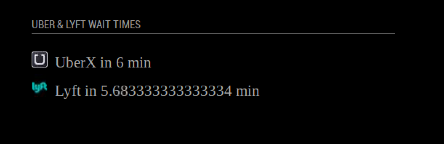
-
Hi all. Is this still working?
I installed the module as directed and added the module to config. I moved some stuff around to confirm it was actually affecting the mirror but the Uber module doesn’t appear no matter that I do.
In the past when I had an error the place holder would pop up but It’s loading just fine just not this module (Uber in particular).
-
Right after posting I figured it out. When you download/clone the git it has a -master at the end. In the config the module name is “mmm-uber” and as that wasn’t matching up to the folder in the modules folder (in case anyone else experiences this) it wasn’t coming up.
-
does the Uber and Lyft modules still work?
Thanks

Hello! It looks like you're interested in this conversation, but you don't have an account yet.
Getting fed up of having to scroll through the same posts each visit? When you register for an account, you'll always come back to exactly where you were before, and choose to be notified of new replies (either via email, or push notification). You'll also be able to save bookmarks and upvote posts to show your appreciation to other community members.
With your input, this post could be even better 💗
Register Login