MagicMirror Forum
    • Recent
    • Tags
    • Unsolved
    • Solved
    • MagicMirror² Repository
    • Documentation
    • 3rd-Party-Modules
    • Donate
    • Discord
    • Register
    • Login
    A New Chapter for MagicMirror: The Community Takes the Lead
    Read the statement by Michael Teeuw here.

    Trafficmaps

    Scheduled Pinned Locked Moved Development
    63 Posts 11 Posters 82.6k Views 12 Watching
    Loading More Posts
    • Oldest to Newest
    • Newest to Oldest
    • Most Votes
    Reply
    • Reply as topic
    Log in to reply
    This topic has been deleted. Only users with topic management privileges can see it.
    • KirAsh4K Offline
      KirAsh4 Moderator @shgmongohh
      last edited by

      @shgmongohh, I do not. However, Google is your friend. W3Schools is another.

      A Life? Cool! Where can I download one of those from?

      1 Reply Last reply Reply Quote 1
      • KirAsh4K Offline
        KirAsh4 Moderator @tyho
        last edited by

        @tyho, there is a huge difference on how you use the Google Maps API to display a map in a browser, compared to how it needs to be done within the core module system of MagicMirror. MagicMirror isn’t simply a browser that displays HTML or JS … it processes the information fed to it, and that information needs to be in a very specific format to be processed successfully. This is why my recommendation to you was to try and understand the core system first, before you try to integrate something as complex as any of the Google APIs, not just the maps one.

        A Life? Cool! Where can I download one of those from?

        1 Reply Last reply Reply Quote 0
        • T Offline
          tyho
          last edited by tyho

          in basics i untherstand the concept of node.js. It’s not like a website where you can load a page from a server. node js is basicly the server that creates and push the website when requested.

          I will have to learn some more i guess ^^ I always want to go the fast way :P

          1 Reply Last reply Reply Quote 0
          • T Offline
            tyho
            last edited by

            I have to give up on this one. I found topics where people said its really hard to call the google maps js api in nodejs environment. Even just only displaying a map. That explains why there are no codes of others available to learn from.
            I think i just go for the static map (image) url from the google api. But that won’t be a trafficmap couse that’s not possible.
            @KirAsh4 Thanks for your motivating words and help. I will expand my notification module for the voicecontrol module from alexyak96, that is working very well!. Maybe i come back later on this one when i got more knowledge or if someone else made a basic map module that i can expand for traffic ^^.

            1 Reply Last reply Reply Quote 0
            • MichMichM Offline
              MichMich
              last edited by

              More importantly, It’s not just a Node.js environment. It’s a frontend framework that does most of the UI work for you.

              T 1 Reply Last reply Reply Quote 0
              • T Offline
                tyho @MichMich
                last edited by

                @MichMich yea i noticed that. But it’s still too hard for me to implent a simple javascript like google maps js api. The js code is simple to untherstand but i still need the node-modules that are used by it. And it’s still not as straight forward because node is server sided. I got the idea but not the knowledge.

                1 Reply Last reply Reply Quote 0
                • T Offline
                  tyho
                  last edited by

                  Does anybody know what modules i have to use to get the maps js api working? Angular? Async? Express? Or somerhing like a google api module?

                  MichMichM 1 Reply Last reply Reply Quote 0
                  • MichMichM Offline
                    MichMich @tyho
                    last edited by

                    @tyho you don’t need no modules. The only thing that is important is that you fully understand the MagicMirror framework. As told, the best way to learn this, is by start building a real simple module.

                    1 Reply Last reply Reply Quote 0
                    • KirAsh4K Offline
                      KirAsh4 Moderator
                      last edited by

                      You could also look at what’s already been done, such as https://github.com/moshen/node-googlemaps …

                      A Life? Cool! Where can I download one of those from?

                      1 Reply Last reply Reply Quote 0
                      • T Offline
                        tyho
                        last edited by

                        @KirAsh4 i’ve seen that one ;) but i don’t know where to start. That module uses some different dependeties that are already in magicmirror. As suggested by @MichMich i should first build a simple module. (Well i’ve build one already that works very well but i don’t know if thats the right way of writing code and if it’s fail proof). Anyway i will keep try some stuff. I die got a map on my mirror with static map. But i want this trafficlayer. So i need to use the javascript api.
                        On the mirror i can already see what i have to wear, where i have to go (appointments), and what happend in the world before i go. Wouldn’t it be cool if we can display traffic info and map before we leave to work. :D

                        1 Reply Last reply Reply Quote 0
                        • T Offline
                          tyho
                          last edited by tyho

                          anyone who want to show a google staticmap on there mirror. Here is the code:
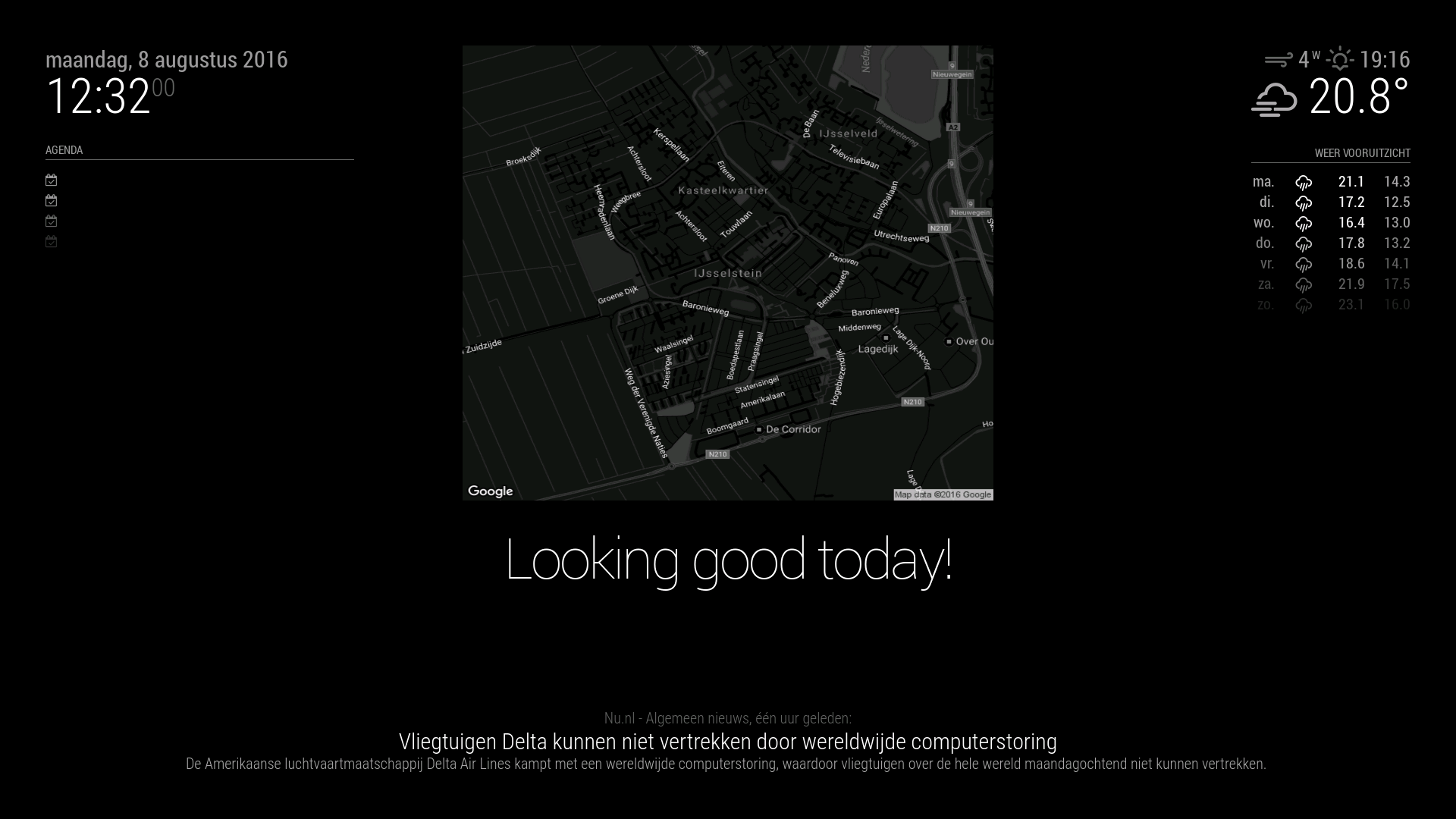
                          0_1470659814707_screenshot.png

                          /* global Module */
                          
                          /* Magic Mirror
                           * Module: staticmap
                           *
                           */
                            
                          Module.register("staticmap",{
                          	defaults: {
                          		center: "new york",
                          		zoom: 14,
                          		mapwidth: 600,
                          		mapheight: 500,
                          		highway: "on",
                          		arterial: "on",
                          		local: "on"
                          	},
                          
                          start: function(){
                          	Log.info('Starting module: ' + this.name);
                          },


                          	getDom: function() {
                          		var wrapper = document.createElement("div");
                          		var img = document.createElement("img");
                          		img.src = "https://maps.googleapis.com/maps/api/staticmap?center=" + this.config.center + 
                          		"&zoom=" + this.config.zoom +
                          		"&size=" + this.config.mapwidth + "x" + this.config.mapheight + 
                          		"&maptype=roadmap" +
                          		"&style=feature:road.highway|visibility:" + this.config.highway +			  
                          		"&style=feature:road.arterial|visibility:" + this.config.arterial +	
                          		"&style=feature:road.local|visibility:" + this.config.local + 
                          		"&style=feature:road|invert_lightness:true|saturation:-100|weight:1|lightness:1" +
                          		"&style=feature:administrative|invert_lightness:true|saturation:-100|weight:1|lightness:1|visibility:on" + 
                          		"&style=feature:poi|invert_lightness:true|weight:1|saturation:-100|lightness:1|visibility:on" +
                          		"&style=feature:transit|invert_lightness:true|saturation:-100|lightness:1|weight:1|visibility:on" +
                          		"&style=feature:landscape|invert_lightness:true|weight:1|saturation:-100|lightness:1|visibility:on" +
                          		"&style=feature:water|invert_lightness:true|weight:1|saturation:-100|lightness:1|visibility:on" +
                          		"&style=feature:road|element:labels.text.fill|lightness:100" +
                          		"&style=feature:road|element:labels.text.stroke|lightness:-100";
                          		img.width = this.config.mapwidth;
                          		img.height = this.config.mapheight;
                          		wrapper.appendChild(img);
                          		return wrapper;
                          	}
                          });
                          
                          1 Reply Last reply Reply Quote 1
                          • A Offline
                            alexyak
                            last edited by alexyak

                            Instead of Google, you could also use Microsoft’s Bing service to get a map with accidents:

                            https://msdn.microsoft.com/en-us/library/hh441726

                            https://msdn.microsoft.com/en-us/library/hh305205.aspx

                            1 Reply Last reply Reply Quote 0
                            • T Offline
                              tyho
                              last edited by tyho

                              Good one! i will see if i can get something working.

                              What i try to do is:

                              • Get a map with a route to my work.

                              • Get traffic status along this route.

                              • Style the maps so it’s nice visable through the mirror. (black/white maps and red lines/triangels for traffic jam.

                              • Abillity to switch route with @alexyak voicecontrol module. (work me = to amsterdam) (work girlfriend = to utrecht)

                              This are a few wishes. But i am happy already if i get the first two working ^^ i am not skilled at node and js at all… any help is appreciated.

                              1 Reply Last reply Reply Quote 0
                              • T Offline
                                tyho
                                last edited by

                                ok just for the record. if i got the most simple maps js api code:

                                <!DOCTYPE html>
                                <html>
                                  <head>
                                    <title>Simple Map</title>
                                    <meta name="viewport" content="initial-scale=1.0">
                                    <meta charset="utf-8">
                                    <style>
                                      html, body {
                                        height: 100%;
                                        margin: 0;
                                        padding: 0;
                                      }
                                      #map {
                                        height: 100%;
                                      }
                                    </style>
                                  </head>
                                  <body>
                                    <div id="map"></div>
                                    <script>
                                      var map;
                                      function initMap() {
                                        map = new google.maps.Map(document.getElementById('map'), {
                                          center: {lat: -34.397, lng: 150.644},
                                          zoom: 8
                                        });
                                      }
                                    </script>
                                    <script src="https://maps.googleapis.com/maps/api/js?key=YOUR_API_KEY&callback=initMap"
                                    async defer></script>
                                  </body>
                                </html>
                                

                                can i just create a module with:
                                var x = document.getElementById("map").id;for the div?
                                var x = document.createElement("SCRIPT");for the script tags? (w3schools said it supports async and defer)
                                and then create 2 functions. 1 for the src api url that i can callback within the script tags and 1 for the initMap that i can callback after the scr url?
                                Is this good thinking or is it not that simple?

                                1 Reply Last reply Reply Quote 0
                                • T Offline
                                  tyho
                                  last edited by tyho

                                  i am feeling close but also so far far away ^^ ghehe

                                  Module.register("trafficmaps",{
                                  	defaults: {
                                  	},
                                  
                                  	start: function(){
                                  		Log.info('Starting module: ' + this.name);
                                  	},
                                  
                                  	initMap: function(){
                                  		var map;
                                          map = new google.maps.Map(document.getElementById('map'), {
                                            center: {lat: -34.397, lng: 150.644},
                                            zoom: 8
                                          });
                                  	},
                                  
                                  
                                  	getDom: function() {
                                  		var wrapper = document.createElement("div");
                                  		var mapdiv = document.getElementById("map");	
                                  		wrapper.appendChild(mapdiv);
                                  		var maps = document.createElement('script');
                                  		maps.type = 'text/javascript'; maps.async = true; maps.defer = true;
                                  		maps.src="https://maps.googleapis.com/maps/api/js?key=YOUR_API_KEY&callback=" + this.initMap;
                                  		wrapper.appendChild(maps);
                                  		return wrapper;
                                  	}
                                  });
                                  

                                  This script hangs… and it prevents other modules loading…

                                  1 Reply Last reply Reply Quote 0
                                  • T Offline
                                    tyho
                                    last edited by

                                    I am also trying the bing option seperately but also no result. I’ll keep trying. I am wondering why there arn’t any scripts on the web yet. I think this is for there experts among us ^^

                                    1 Reply Last reply Reply Quote 0
                                    • T Offline
                                      tyho
                                      last edited by

                                      i found a example of bing maps: https://github.com/jwalgran/bing

                                      Anyone who can turn this into a module? I already tried but no succes :(

                                      A 1 Reply Last reply Reply Quote 0
                                      • A Offline
                                        alexyak @tyho
                                        last edited by

                                        @tyho so what exactly you’re trying to implement? What would be a use case here for the MM?

                                        1 Reply Last reply Reply Quote 0
                                        • T Offline
                                          tyho
                                          last edited by tyho

                                          @alexyak What i tried to create is a map view from my home to my work. With on this map the trafficjam/delay. (google can do with the red orange green lines and bing with the triangles). With this map i can see in the morning when i wake up, if i have to leave earlier because of traffic jam. This where my first thoughts for the module. (but with my ms frontpage experience i can’t get this working ^^)

                                          As a second thought i had in mind to use your voice module (or facial recgnition module) to switch between my map and that of my girlfriend. So another map is loaded.

                                          In the google static map that i already created there is no option to add a traffic layer.

                                          In both google maps and bing maps there are style options to make the map black and white for better display. and for example the traffic jam could be red displayed.

                                          A 1 Reply Last reply Reply Quote 0
                                          • A Offline
                                            alexyak @tyho
                                            last edited by

                                            @tyho alright, now I understand your requirements… I can’t promise, but will try to have a look at this over a few coming days.

                                            1 Reply Last reply Reply Quote 0

                                            Hello! It looks like you're interested in this conversation, but you don't have an account yet.

                                            Getting fed up of having to scroll through the same posts each visit? When you register for an account, you'll always come back to exactly where you were before, and choose to be notified of new replies (either via email, or push notification). You'll also be able to save bookmarks and upvote posts to show your appreciation to other community members.

                                            With your input, this post could be even better 💗

                                            Register Login

                                            • 1
                                            • 2
                                            • 3
                                            • 4
                                            • 2 / 4
                                            • First post
                                              Last post
                                            Enjoying MagicMirror? Please consider a donation!
                                            MagicMirror created by Michael Teeuw.
                                            Forum managed by Sam, technical setup by Karsten.
                                            This forum is using NodeBB as its core | Contributors
                                            Contact | Privacy Policy