Read the statement by Michael Teeuw here.
MMM-Hive
-
I’ve added some slight changes and I am going to leave it running today. I did see the same issue as you are having last night. Not sure why yet, but at least I am seeing the same. Once I’ve tested the changes for a day or so, I will update github and let you know.
-
@randomnoise I’ve updated github with the changes. Can you update and enable debug. I’ve added a timestamp so if you have developer tools open, you should see the errors. Let me know. I will keep it running overnight to see whether I am still experiencing the problem. Thanks
-
@mongo116 Cheers, have updated & will keep an eye on it.
FWIW it hadn’t thrown the error again since I restarted it yesterday either.
-
I came back from work and had loads of the uncaught exception errors, but the module was not showing any error on the screen. Apparently the internet had been down since 2pm, so looks like that was the cause. Hopefully the errors being seen are just down to the Hive site not being available, so the changes I have made should prevent these from generating errors. If you have debug on though you will see them. Hopefully it’s sorted now :)
-
Hi
Thanks so much for building this module from the screenshots it looks excellent. I am getting a null value for the internal temperature from my thermosta, any ideas why this might be? I have double checked my username and password and proven this works by putting in a dummy value and it then refuses to authenticate so I don’t believe its that.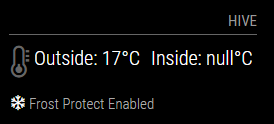
Maybe its a case of RTFM??
Thanks in advance
Stephen -
@spwood100 Hi, can you connect to the magicmirror via Chrome or some other browser and enable developer tools (F12). Refresh the page and you should see information shown in the developer tools window. If you set debug: true in the config.js that will output more details. If your username / password are wrong, then it should show that on the magic mirror screen.
-
@mongo116 Thanks for the quick response. No error messages are showing in the console and I have also enabled verbose mode as well as debug mode. One thing I did notice is that I am running this on my dev server which is a few releases behind so I will try it on my prod which is at the latest release.
Cheers -
@spwood100 Ok, let me know. Thanks…
-
Hi
Just tested it on an up to date version of MM and still the same issue. The logs do not show anything out of the ordinary/home/pi/.pm2/logs/MagicMirror-out-0.log last 15 lines:
0|MagicMir | Starting server on port 8080 …
0|MagicMir | Server started …
0|MagicMir | Connecting socket for: updatenotification
0|MagicMir | Connecting socket for: calendar
0|MagicMir | Starting node helper for: calendar
0|MagicMir | Connecting socket for: MMM-Hive
0|MagicMir | Starting node helper for: MMM-Hive
0|MagicMir | Connecting socket for: newsfeed
0|MagicMir | Starting module: newsfeed
0|MagicMir | Sockets connected & modules started …
0|MagicMir | Launching application.
0|MagicMir | Create new calendar fetcher for url: http://www.calendarlabs.com/templates/ical/US-Holidays.ics - Interval: 300000
0|MagicMir | Create new news fetcher for url: http://www.nytimes.com/services/xml/rss/nyt/HomePage.xml - Interval: 300000
0|MagicMir | Use existing news fetcher for url: http://www.nytimes.com/services/xml/rss/nyt/HomePage.xml
0|MagicMir | Use existing news fetcher for url: http://www.nytimes.com/services/xml/rss/nyt/HomePage.xmlhowever in developer mode I can see the the payload for the inside temp is not getting generated where as the outside temp is

Do I have to enable something on my Hive account to let the API be called on it?
Cheers
-
@spwood100 Can you add deb: true, to your config.js under the MMM-Hive configuration options, and then reload and check the developer tools console. It should show more detailed information.
-
Hi Mongo
Thanks for your continued help on this. This is my config for this module and it doesnt give more detailed information in developer tools than already shown. Is there something worng with how I am calling it?
{
module: “MMM-Hive”,
header: “Hive”,
position: “top_right”,
config: {
temperatureSuffix: “°C”,
username: “myusername”,
password: “mypassword”,
postcode: ‘whereIlive’,
showNext: true,
debug: true,
animatedLoading: true,
highestTemp: ‘22’,
highTemp: ‘20’,
lowTemp: ‘16’,
lowestTemp: ‘14’,
},
},nothing in the pm2 error logs either it just does not look to be calling the payload for the INTERNAL temp.
Cheers
-
@mongo116 , If I click into the output in developer tools I get the following (not sure if thats any help?)
socketNotificationReceived: function(notification, payload) {
var dt = new Date();
var utcDate = dt.toUTCString();
if (notification === “INSIDE”) {
if (this.config.debug == true) {
Log.log(utcDate + " " + this.name + " received notification: " + notification);
this.processData(“INSIDE”, JSON.parse(payload));
this.updateDom(this.config.animationSpeed);
this.loaded = true;
this.error = false;
this.error401 = false;
} -
@spwood100 It looks like it should be working. I’ve just updated the module though and added the payload when debug is true. This should now output a load of text when in the console. Which is the JSON response from the Hive server relating to your receiver. You should see something like the following:
“name”:“Your Receiver”,“nodeType”:“http://alertme.com/schema/json/node.class.thermostat.json#”
I am using the “name”:“Your Receiver” to find the correct node (as this is the one that holds the temperature info). Could be that your’s is called something else. I’d say attach the complete JSON here, but I cannot be sure there isn’t anything in there that you wouldn’t want to put on a public website! So best bet is to copy / paste the text (starting with {“meta”:{},“links”:{},“linked”:{},“nodes”:[ and ending with }}}]}) into notepad++, and use the JS Tool plugin, which has a very good JSON viewer. If you run the JSON viewer, you will then see meta, links, linked, nodes etc on the left pane. If you can expand Nodes and then go into each one (0, 1, 2, etc) and let me know the ‘name:’ for each node (with the corresponding node number).
Thanks
-
Hey
Yes I saw that suddenly pop up on my screen and I know have a bunch more information. My receiver and thermostat are named “downstairs” but I can rename those as thats not critical seeing as there is only one Hive thermostat in the house. So I have renamed this and cannot see the old name in the payload but I do see the first node which has a name of Your Receiver and if I drill down into that it does have a bunch of attributes one of which is Thermostat and has a Reported value in there.In terms of the information you want though:
Node
Array > Object 1: Hall Light
-
Node > Array > Object 2 - Your Reciever
Node > Array > Object 3 - Landing Light
Node > Array > Object 4 - Receiver 3 ( I think this is the hot water reciever)
Node > Array > Object 5 - Hub
Node > Array > Object 6 - This seems to be an API call
Node > Array > Object 7
Node > Array > Object 8 - Your Receiver
Node > Array > Object 9 - Receiver 2Hope this helps
-
@spwood100 Thanks for the info. I’ve updated the module and added a new config setting (‘nodeName’). Can you copy the debug text from the INSIDE debug info into notepad++ again, and using the JSON viewer drill down into each of the nodes. Only one should have stateHeatingRelay under attributes. Assuming only one does, make a note of the ‘name’ of this node and then add the following to the config section of the MMM-Hive section in your config.js:
nodeName: "value from above here",Hopefully this should then pick up the inside temperature from your thermostat. If more than one have a stateHeatingRelay, then it’s back to the drawing board! As that’s not mentioned in any of the api details on the web :)
-
@spwood100 If I look at the payload from my Hive, I’m only seeing 5 nodes:
0: Your Receiver
1: Heating (thermostat)
2: Signal Booster
3: Your Hub
4: Heating (receiver)My system is only heating, so maybe that’s the issue. It may be that both the hot water and heating receiver have stateHeatingRelay in the JSON response. Let me know how you get on with the updated version though. Thanks
-
BINGO!!
It works, thanks so mych for your help on this (and obviously developing the module in the first place), its very much appreciated. Nice solution as well!
Cheers
S -
@spwood100 Fantastic news :)
So what was the nodeName you have used to get this working? -
Its Receiver 2 which I guess is a standard if its a multi node set-up as you cannot rename it.
Thanks again

Hello! It looks like you're interested in this conversation, but you don't have an account yet.
Getting fed up of having to scroll through the same posts each visit? When you register for an account, you'll always come back to exactly where you were before, and choose to be notified of new replies (either via email, or push notification). You'll also be able to save bookmarks and upvote posts to show your appreciation to other community members.
With your input, this post could be even better 💗
Register Login