Read the statement by Michael Teeuw here.
MMM-CalendarExt
-
@vauxdvihl
Show me the full config of this module. -
@Sean
Here u rThanks
{ module: 'MMM-CalendarExt', position: "lower_third", //anywhere. It is not related to real position of view config: { // Read below system: { show: [/*'current','upcoming',*/'weeks'], locale: 'de', //when omitted, default value would be your system default locale by moment.js showEmptyView: 0, fullDayEventLocalize: 1, redrawInterval: 30*60*1000, //minimum 60000 useProfileConfig: 0, startProfile: '' }, views: { current: { position: "top_center", title: "Heute", limit: 2, }, upcoming: { position: "top_center", title: "Demnächst", limit: 2, }, weeks: { position: "bottom_bar", title: "Überblick", counts: 2, } }, calendars: [ { name: "Ferien Bayern", url: "http://localhost:8080/modules/bayern_gf.ics", styleName: "style1", symbol: 'de@em', maxEntries: 50, maxDays:365, interval: 24*60*60*1000, }, { name: "Müllabfuhr", url: "http://localhost:8080/modules/abfallkalender.ics", classPattern: [["/Gelber Sack/g", "style7"], ["/Restmülltonne/g", "style18"], ["/Biotonne/g", "style20"],["/Papiertonne/g", "style5"],["/Problemabfälle/g", "style1"]], symbol: 'put_litter_in_its_place@em', maxEntries: 50, maxDays:365, interval: 24*60*60*1000, }, { name: "Sascha", url: "https://calendar.google.com/calendar______", styleName: "style19", symbol: 'guitar@em', maxEntries: 50, maxDays:365, interval: 24*60*60*1000, }, { name: "Familie Warneke", url: "https://calendar.google.com/calendar______", styleName: "style6", symbol: 'man-woman-boy-boy@em', maxEntries: 50, maxDays:365, interval: 24*60*60*1000, }, { name: "Benjamin", url: "https://calendar.google.com/calendar_____", styleName: "style11", symbol: 'bike@em', maxEntries: 50, maxDays:365, interval: 24*60*60*1000, }, { name: "Geburtstag", url: "https://calendar.google.com/calendar_____", styleName: "style12", symbol: 'birthday@em', maxEntries: 50, maxDays:365, interval: 24*60*60*1000, }, { name: "Steffi", url: "https://calendar.google.com/calendar______", styleName: "style12", symbol: 'crown@em', maxEntries: 50, maxDays:365, interval: 24*60*60*1000, }, { name: "Elyas", url: "https://calendar.google.com/calendar____", styleName: "style11", symbol: 'baby@em', maxEntries: 50, maxDays:365, interval: 24*60*60*1000, }, ], }, -
@vauxdvihl
Hmmm, in my memory of last test, there is no event of Byern holiday in September. Your config would show events in 2 weeks. I think it seems to be normal. Isn’t it? -
@Sean
Sorry no
Currently school is out (summer)
Starts again on tuesday next week
So there should be an entry called “Sommerferien” in the calendar for this week and for next monday.
But i will set it like your requestThanks
-
@vauxdvihl I’ve found what was wrong and fixed it. sorry. update and try again.
-
Hi all,
stupid question for you guys. How do I update the module? My mirror says I’m behinde two updates. Thanks! -
cd ~/MagicMirror/modules/MMM-CalendarExt git pull -
Hi all!
Is there way to format the date of current and upcoming views? I used
          titleFormat: "dddd",
          overTitleFormat : "dddd",
But still date format is unchanged.
-
-
@sean said in MMM-CalendarExt:
@tabbe
https://github.com/eouia/MMM-CalendarExt/wiki/Configuration#defaultviewUse dateFormat
I did try with that but still it remains unchanged.
        current: {
                        title: "Test",
                        dateFormat: "dddd",
                        titleFormat: "dddd",
                        overTitleFormat : "dddd",
                        position: 'top_left',
                        useRelative: 0,
                        limit:2
          },
I also tried without other formating and with basic M.D format.

-
@tabbe ‘dddd’ means the weekday name of target date/time. What exactly do you want to display as?
-
@sean
I want to display weekday name, like saturday. -
@tabbe
I think you’ve misseduseRelativefield in your config. the default value ofuseRelativeofcurrent&upcomingis1ortrue.
Set it as0.upcoming: { position: "top_left", dateFormat: "dddd", timeFormat: "HH:mm", limit: 5, useRelative: 0 }If you want to display only “Saturday” without time, unfortunately it is not supported. (Do you need? e.g. only starting time?)
-
@tabbe
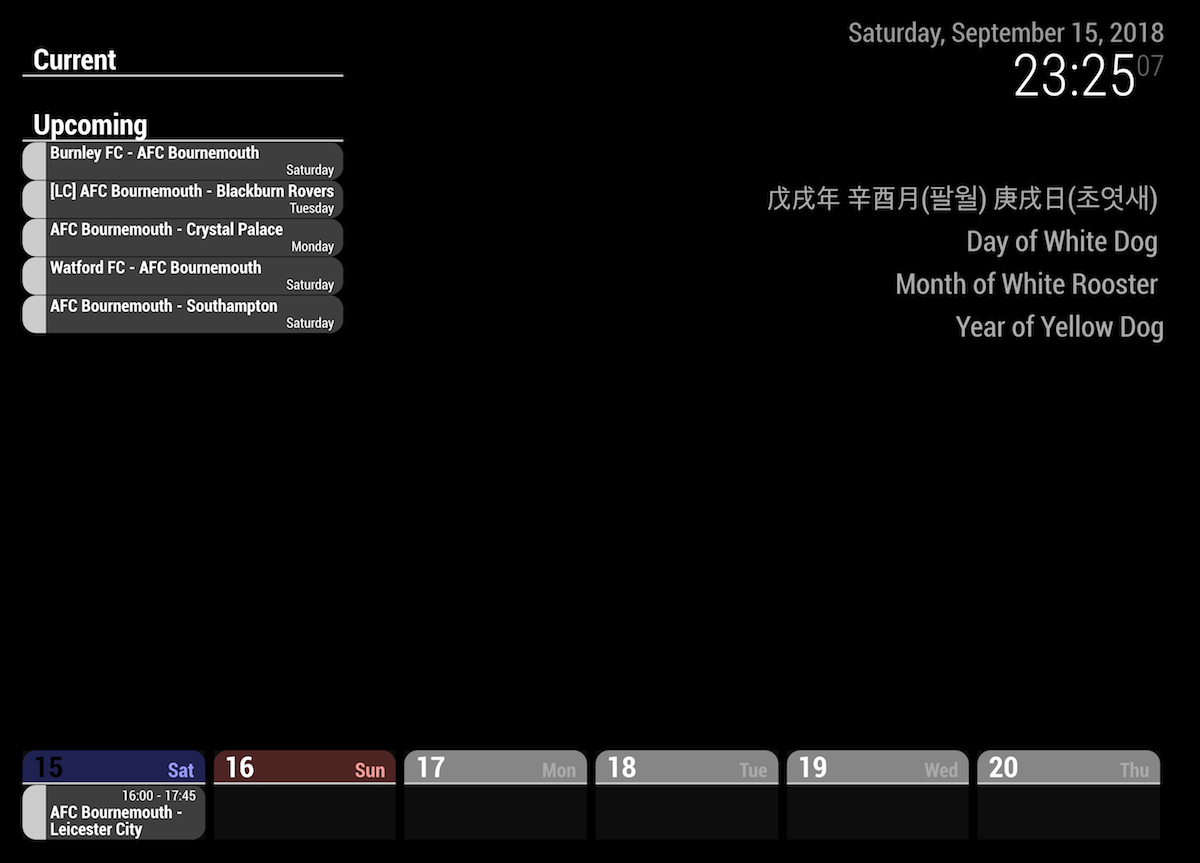
Now, I’ve updated module to display only starting time.
You can set like this;upcoming: { position: "top_left", dateFormat: "dddd", timeFormat: " ", // don't use `""` instead `" "` limit: 5, useRelative: 0, onlyStartingTime: 1, }And you can see like this.
-
@sean
This is weird. I did update module and still not getting like that.:~/MagicMirror/modules/MMM-CalendarExt$ git pull Already up-to-date.Also, I would like it to be on current since it shows current date event. What I am trying to show is birthdays and suchs.
-
@tabbe
Hmmm. weird,
As you can see on github page, 40mins ago I updated the module.
And you can use that config incurrentview also.(above is just sample) -
@sean
Ah, somehow it is now working. Thanks! -
Hi all,
I love the ‘daily’ view (as seen in the post just above), as it presents both events for 7 days and times. However, I want them it to stay at a “Monday to Sunday” order. Is this possible with the daily view? Thanks -
@sk4018
I think you can useweeksview insteaddailyview. But starting weekday depends on which locale are you using. -
@sean
Thx a lot
It works
Greetz
Hello! It looks like you're interested in this conversation, but you don't have an account yet.
Getting fed up of having to scroll through the same posts each visit? When you register for an account, you'll always come back to exactly where you were before, and choose to be notified of new replies (either via email, or push notification). You'll also be able to save bookmarks and upvote posts to show your appreciation to other community members.
With your input, this post could be even better 💗
Register Login