Read the statement by Michael Teeuw here.
[octomirror-module] Monitor & Control an OctoPrint 3D Printer Server
-
Try open octoprint > go to webcam > then open image in new tab. and copy http address from web browser to your config file in octomirror-module.
-
@michael24h said in [octomirror-module] Monitor & Control an OctoPrint 3D Printer Server:
Looks like link isn’t complete. Should looks like this http://ip_address/webcam/?action=stream
Nope, that shouldn’t be it. He said his stream was working and the
urlparameter is just for the octopi instance, not the stream. The module assumes it needs to add/webcam/?action=stream”unlessstreamUrlis provided. -
Just confirming: you are using my version https://github.com/shbatm/octomirror-module not the original, correct?
-
@shbatm let me check and yes u are correct I do have my stream no problem but no info and I would only expect it to give me stats when printing
-
@shbatm yes shbatm/octomirror-module
-
This post is deleted! -
Any help
-
@citizendevpi said in [octomirror-module] Monitor & Control an OctoPrint 3D Printer Server:
Any help
Sorry, I haven’t had a chance to fire up my printer and take a look yet. Going to try in the next few days. They’ve probably updated something in Octoprint that broke it.
One thing I did think of to have you check on: make sure you have Allow CORS turned on in your Octoprint settings.
-
@michael24h @citizendevpi Please update the module to the latest version and give it a try.
Short version: OctoPrint changed the way the API login works.
Long version: The new bundled OctoPrint plugin ForceLogin now requires the API to get a session ID and send it back to the socket before it will send any detailed messages. Detailed here and here. -
@shbatm so how do i fix it? add some more info in config or ???
-
@citizendevpi said in [octomirror-module] Monitor & Control an OctoPrint 3D Printer Server:
how do i fix it?
Update the module. You shouldn’t need to add anything else.
cd ~/MagicMirror/modules/octomirror-module git fetch git pull -
Hey @shbatm Thanks for the module! It is soo great! But i have one question. When the Printer and Octoprint is Offline, but my MM runs, it is offline ok but when i start the Printer and octoprint it says in MM that the printer is offline. How can i fix that ? :) Hope u see this :D
-
Is there a way to hide the module when the printer is offline?
-
@jay-j-flynn Hi if you still have this running did you actually get it to work? I can’t get mine to display anything. It’s like it doesn’t connect to octopi.
-
@TheMysticle First I also couldn’t make the module work until I did the following:
- Entered in config.js the IP-address of the RPi OctoPrint runs on
- Enter the API key without any brackets (the ReadMe.md was a bit misleading)
My config looks like this:
{ module: "octomirror-module", position: "middle_center", config: { url: "http://192.168.0.123", printerName: "Ender 3 Pro", interactive: false, // Set to false to hide the file drop down and only show the stream. api_key: "1234567890ABCDEFGHI" } }, -
Hi, I have the same problem as @TheMysticle . I have tried changing nearly everything, but the only thing i got is the Camera Stream. The Api must be working, because i use this also in my Home Assistant and there i got all the Informations.
The Installation was made from https://github.com/shbatm/octomirror-moduleHere is my config
{
				module: "octomirror-module",
				position: "bottom_left",
				config: {
					url: "http://192.168.0.97",
					api_key: "1234567890ABCDEF",
					printerName: "Ender 3",
					showTemps: true,
					showDetailsWhenOffline: true,
					interactive: false, // Set to false to hide the file drop down and only show the stream.
						}
				},
Maybe someone has an Idea
-
So i found the solution if anyone needs this.
To show the details you only have to activate “Allow Cross Origin Resource Sharing (CORS)” in Octoprint API Key Settings -
@barnosch said in [octomirror-module] Monitor & Control an OctoPrint 3D Printer Server:
Awesome. Thanks, dude.
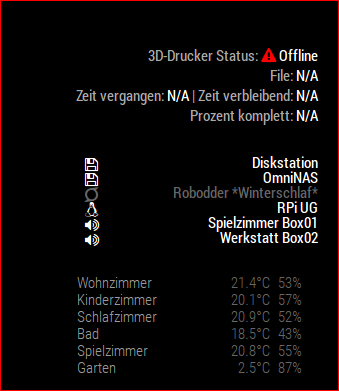
made some little adustments to fit my needs.
The only thing which i think could be also interesting is maybe the temperatures of the nozzle and the bed?Hello, how did you do to resize the modules ?, I just could modify the viedeo stream but not the lettering. : D
-
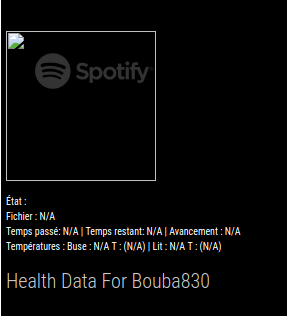
 Hello, are you able to get the “showDetailsWhenOffline” option to work I have the latest version of Octoprint and the “CORS” option check, when Octoprint is off the display remains on the mirror.
-
Hi There,
That module is really great job !!
But i have one thing i cannot solve. How can i resize the module especially the size from the video stream ??
I tried with “width: XXX” but it doesn´t change anything. Also i can´t find a .css file to adjust.Maybe someone can help me? Because i don´t want to miss this module.
Thanks
MArcus



Hello! It looks like you're interested in this conversation, but you don't have an account yet.
Getting fed up of having to scroll through the same posts each visit? When you register for an account, you'll always come back to exactly where you were before, and choose to be notified of new replies (either via email, or push notification). You'll also be able to save bookmarks and upvote posts to show your appreciation to other community members.
With your input, this post could be even better 💗
Register Login