MagicMirror Forum
    • Recent
    • Tags
    • Unsolved
    • Solved
    • MagicMirror² Repository
    • Documentation
    • 3rd-Party-Modules
    • Donate
    • Discord
    • Register
    • Login
    A New Chapter for MagicMirror: The Community Takes the Lead
    Read the statement by Michael Teeuw here.

    Any MMM-Hive Users that can help, please?

    Scheduled Pinned Locked Moved Troubleshooting
    34 Posts 4 Posters 20.3k Views 4 Watching
    Loading More Posts
    • Oldest to Newest
    • Newest to Oldest
    • Most Votes
    Reply
    • Reply as topic
    Log in to reply
    This topic has been deleted. Only users with topic management privileges can see it.
    • D Offline
      Damian @mongo116
      last edited by

      @mongo116

      Thanks very much … I realise you do not use Hive now, so it will be hard for you to test out changes, but I will try out everything you suggest and report back so you will know if they work or not.

      Agree it will be tough this way, but if this is what your module needs in order to function, then it may be the only way to keep your module alive for Hive users eh?

      M 1 Reply Last reply Reply Quote 0
      • M Offline
        mongo116 Module Developer @Damian
        last edited by

        @Damian I think I am making some headway into this issue. I will spend a bit of time when I can and hopefully get a new version out soonish

        Cheers

        1 Reply Last reply Reply Quote 1
        • M Offline
          mongo116 Module Developer
          last edited by

          I have got the temperature showing now (borrowed a hive login for testing) and I am looking at now adding whether hot water is on or off, and also a battery icon for the thermstat. I cannot for the life of me remember how to use github, but I will get these changes made, tested and update the module. No telling how long I will take, but it shouldn’t take too long - just need to find some time to finish coding and tidying it up.

          Thanks

          D 1 Reply Last reply Reply Quote 1
          • D Offline
            Damian @mongo116
            last edited by

            @mongo116

            Thanks very much for fixing it… look forward to getting it working on my mirror. Was it a simple fix, of sorts? I couldn’t fathom out how others got it working okay if there is/was a problem? Was it the change in the smartthings link I gave you?

            M 1 Reply Last reply Reply Quote 0
            • M Offline
              mongo116 Module Developer @Damian
              last edited by

              Looks like British Gas have just changed the way the api works, so there are changes to be made, not loads, but will take a bit of time. Got to fit it around DIY!

              D 1 Reply Last reply Reply Quote 1
              • D Offline
                Damian @mongo116
                last edited by

                @mongo116

                Thanks for your time o this. Glad I did indeed do the instal right and did everything as stated, as I did spend a lot of time going round and round with this on 2 seperate machines, thinking I did something wrong or missed something.

                M 1 Reply Last reply Reply Quote 0
                • M Offline
                  mongo116 Module Developer @Damian
                  last edited by

                  @Damian Hi, I’ve updated https://github.com/flick116/MMM-Hive, do you want to try it and let me know. I’ve added some test bits and bobs, but if you haven’t got the settings then these shouldn’t show up.

                  1 Reply Last reply Reply Quote 1
                  • M Offline
                    mongo116 Module Developer
                    last edited by

                    I was just testing and realised that when I was seeing the target temperature, it was when the system was in boost mode. So when not in boost mode, but the heating on, it’s not the same as previously, so it won’t show it’s heating. I need to look at how this is now working and update. You should see current temperature correctly using he updated code, but not target unless boost is on.

                    D 2 Replies Last reply Reply Quote 1
                    • D Offline
                      Damian @mongo116
                      last edited by

                      @mongo116

                      Thanks… but unfortunatly inside temp remains 0 :-(

                      I do now see battery icon, although Red… but would expect that seeing as it cannot access my thermostat ( Named as Hive, and put Hive as nodename into config )

                      Battery is good, only less than 6 months.

                      1 Reply Last reply Reply Quote 0
                      • D Offline
                        Damian @mongo116
                        last edited by

                        @mongo116

                        Just on the off chance I am missing the blatant obvious… can you please paste your full settings here that you made on yours? Obviously not your personal ones :-)

                        And your config to see what you put in there. … it’s always the smallest things that trip us up, so want to check everything 100% before I just give up on it.

                        M 1 Reply Last reply Reply Quote 0
                        • M Offline
                          mongo116 Module Developer @Damian
                          last edited by

                          @Damian I didn’t make any changes to the config really, apart from adding some other settings, but these default to false if not defined.

                          Could you enable debug in the config for MMM-Hive (debug: true,) and then load the magic mirror in a browser and enable developer tools (F12). In this window, ensure Console is the selected tab and then refresh the page (it’s easier to remove all other modules). When refreshed, you should then see a load of text when the hive module loads, something like the following:

                          Tue, 10 Apr 2018 14:45:16 GMT MMM-Hive received notification: INSIDE - Payload: [{“id”:“xxx”,“type”:“heating”,“sortOrder”:1,“created”:1521812393853,“parent”:“xxx”,“props”:

                          If you could copy / paste the text into notepad and then search for “type”

                          The bit I am interested in, is the text straight after “type” - so in the above example it’s “heating”

                          I am using the “type” to determine whether to pull back data for heating or hot water so if yours is named differently that is probably the issue. There might be more than one instance of “type”, so if you could let me know all.

                          Hopefully it’s just that and I can then add a new setting so you can choose the name.

                          Thanks

                          1 Reply Last reply Reply Quote 1
                          • M Offline
                            mongo116 Module Developer
                            last edited by

                            The config I have just tested with:

                            		{
                            			module: "MMM-Hive",
                            			position: "top_right",
                            			header: "Hive",
                            			config: {
                            				username: '',
                            				password: '',
                            				postcode: '',
                            				updateInterval: 10 * 60000,
                            				outsideUrl: 'http://weather-prod.bgchprod.info/weather?postcode=',
                            				temperatureSuffix: ' °C',
                            				showNext: true,
                            				highestTemp: '30',
                            				highTemp: '25',
                            				lowTemp: '20',
                            				lowestTemp: '15',
                            				animatedLoading: true,
                            				debug: true,
                            					},
                            
                            D 1 Reply Last reply Reply Quote 1
                            • M Offline
                              maccy99
                              last edited by maccy99

                              Had the same issue then restarted rpi then suddenly it appeared :-)
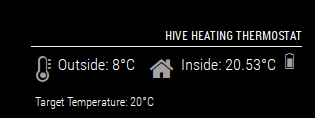
                              0_1523373716571_Capture.PNG

                              Thank you so much…

                              1 Reply Last reply Reply Quote 1
                              • D Offline
                                Damian @mongo116
                                last edited by Damian

                                @mongo116

                                Thanks so much… I deleted then re-installed, and it works :-) Top man!

                                Now… how do I set lowest Temp for outside so anything higher than my setting will color the thermoeter icon like your example?

                                I know the inside will show red as its heating, then go grey when target reached, but unsure how to adjust outside the same way?

                                M 1 Reply Last reply Reply Quote 0
                                • M Offline
                                  mongo116 Module Developer @Damian
                                  last edited by

                                  @Damian Hi, glad that it’s now working. I’m still going to work on it when I can, but at least no urgency now :)

                                  For the outside temperature thermometer, check the readme on the github page (https://github.com/flick116/MMM-Hive), specifically the following settings:

                                  highestTemp - Set the highest temperature value, which when reached will use the ‘full thermometer’ icon, plus turn the icon red

                                  highTemp - Set the high temperature value, which when reached will use the ‘three quarters full thermometer’ icon

                                  lowTemp - Set the low temperature value, which when reached will use the ‘half full thermometer’ icon

                                  lowestTemp - Set the lowest temperature value, which when reached will use the ‘quarter full thermometer’ icon
                                  (anything below this temperature will use the ‘empty thermometer’ icon)

                                  Only when the temperature equals or is greater than the highestTemp value will the icon turn red.

                                  D 1 Reply Last reply Reply Quote 1
                                  • D Offline
                                    Damian @mongo116
                                    last edited by

                                    @mongo116

                                    Ahhhh… thanks.
                                    I thought these referred to the inside temp? I will have another look at the config and see, but off hand I recall only 1 set? Those I thought were for inside… but will look more closely 2mor and play about.

                                    So yeah, very happy to have it actually working now, and that the link I gave you helped finding that BG changed things… and other MMM-Hive users on here will also appreciate the work you done to fix it.

                                    Thanks again…

                                    1 Reply Last reply Reply Quote 0

                                    Hello! It looks like you're interested in this conversation, but you don't have an account yet.

                                    Getting fed up of having to scroll through the same posts each visit? When you register for an account, you'll always come back to exactly where you were before, and choose to be notified of new replies (either via email, or push notification). You'll also be able to save bookmarks and upvote posts to show your appreciation to other community members.

                                    With your input, this post could be even better 💗

                                    Register Login

                                    • 1
                                    • 2
                                    • 2 / 2
                                    • First post
                                      Last post
                                    Enjoying MagicMirror? Please consider a donation!
                                    MagicMirror created by Michael Teeuw.
                                    Forum managed by Sam, technical setup by Karsten.
                                    This forum is using NodeBB as its core | Contributors
                                    Contact | Privacy Policy