MagicMirror Forum
    • Recent
    • Tags
    • Unsolved
    • Solved
    • MagicMirror² Repository
    • Documentation
    • 3rd-Party-Modules
    • Donate
    • Discord
    • Register
    • Login
    A New Chapter for MagicMirror: The Community Takes the Lead
    Read the statement by Michael Teeuw here.

    MMM-Navigate, Navigation inside MagicMirror with Rotary Encoder

    Scheduled Pinned Locked Moved System
    45 Posts 6 Posters 25.2k Views 5 Watching
    Loading More Posts
    • Oldest to Newest
    • Newest to Oldest
    • Most Votes
    Reply
    • Reply as topic
    Log in to reply
    This topic has been deleted. Only users with topic management privileges can see it.
    • A Offline
      AgP42 Project Sponsor Module Developer
      last edited by

      Great ! Thank you so much !

      But as said on the link you gave :

      @axled said in MMM-Navigate, Navigation inside MagicMirror with Rotary Encoder:

      Thanks to glitch452 who found the error, details see:
      https://github.com/Jopyth/MMM-Remote-Control/issues/76

      the line to replace is

      res.send({"status": "success"});
      

      and not

       self.sendSocketNotification(query.action, query.value);
      

      Then it is working perfectly !

      1 Reply Last reply Reply Quote 0
      • A Offline
        AxLed Module Developer
        last edited by

        @AgP42
        You are right, i told you the wrong line, i corrected my thread above.
        I am glad it is working on your MM as needed.
        AxLED

        1 Reply Last reply Reply Quote 0
        • A Offline
          AxLed Module Developer
          last edited by

          Hi to all MM Builders,

          i made an update to my module MMM-Navigate.

          1.2 Changelog:

          • tadded lock icon next to navigation alias, if locked
          • code cleaned

          Happy navigation.

          AxLED

          1 Reply Last reply Reply Quote 0
          • E Offline
            Eisblume
            last edited by

            Hi,

            i installed this module with the Rotary Encoder KY-040. Scroll through navigation work fine, but nothing happened, when I press the button on the encoder.

            Test with Url (yourmmip:8080/remote?action=NOTIFICATION&notification=PRESSED) works fine.

            What could be the problem ??

            1 Reply Last reply Reply Quote 0
            • A Offline
              AxLed Module Developer
              last edited by

              @Eisblume
              Did you use the right Pin (either in config or on the pi) for the ‘press’ signal of the rotary encoder?
              Is the module MMM-Remote-Control installed and working?
              AxLED

              1 Reply Last reply Reply Quote 0
              • E Offline
                Eisblume
                last edited by

                Hi,
                yes Pin 19, like you suggested. Everything else works fine, only the press action doesn’t work.
                MMM-Remote-Control is installed.
                I ordered a new Rotary Encoder, maybe this one I use has a defect .
                Eisblume

                1 Reply Last reply Reply Quote 0
                • A Offline
                  AxLed Module Developer
                  last edited by

                  @Eisblume
                  You can also try to put clockwise or counterclockwise signal on pin 19 for testing, so cw or ccw should send the press command. So you can make sure if press switch of your rotary encoder is bad.
                  AxLED

                  1 Reply Last reply Reply Quote 0
                  • E Offline
                    Eisblume
                    last edited by

                    Thx for support !!

                    I will try and report !!

                    1 Reply Last reply Reply Quote 0
                    • E Offline
                      Eisblume
                      last edited by

                      @AxLED
                      I bought some new Rotary Encoders and with each one i had the same result. No press result will send, when i press the button :-( !

                      But when i put cw or cww on pin 19, the press signal will send when i turn cw or cww.

                      I tried other Pins for the press Signal, but it also doesn´t work.

                      I am confused…! Any ideas what i can try to solve my Problem?

                      Greets
                      Eisblume

                      1 Reply Last reply Reply Quote 0
                      • A Offline
                        AxLed Module Developer
                        last edited by

                        @Eisblume
                        So the pin is correct. Some ideas.
                        Press contains two operations, pressing and release. Did you try press and release in different speeds?
                        How long are your cables between rotary and pi? Could also be a debouncing problem. Which pi are you using? (I tested the module on pi 1 and pi 3).
                        AxLED

                        1 Reply Last reply Reply Quote 0
                        • E Offline
                          Eisblume
                          last edited by

                          @AxLed
                          I use a Raspberry Pi 3 b+. The F2F cables between the rotary and the pi are 20cm long.
                          I tried different speeds for pressing and releasing.

                          When i debug the code, no action arrives when i press the button.

                          Is it possible that there are problem with other modules I use ??

                          Eisblume

                          1 Reply Last reply Reply Quote 0
                          • A Offline
                            AxLed Module Developer
                            last edited by

                            @Eisblume
                            Conflicts with other modules are possible, but i dont think so, because press on cw/ccw works. You can try to change debounce time in node helper (i think, i am not sure about as i am on the road right now). I will check for the final line in node helper and let you know if i am in front of my computer.
                            AxLED

                            1 Reply Last reply Reply Quote 0
                            • A Offline
                              AxLed Module Developer
                              last edited by

                              @Eisblume
                              I found the line in node_helper.js, its line 35

                              const C = new Gpio(self.config.GPIOPins[2], 'in', 'both',{debounceTimeout : 20 }); //BCM Pin 19
                              

                              Here you can try to increase/reduce the debounceTimeout between 10 and 50 (in steps of 10) and see if there is a difference for your “pressed” problem.

                              AxLED

                              1 Reply Last reply Reply Quote 0
                              • E Offline
                                Eisblume
                                last edited by Eisblume

                                @AxLed
                                I tried every very with different press speed. It doesn’t work. No press Signal will be sent :-(

                                I don´t understand why cw and cww works fine, but not the press - Button?

                                Edit:
                                I test the Rotary with this: https://github.com/martinohanlon/KY040
                                Here the press button works fine.

                                pi@raspberrypi:~/EncoderTest/KY040/examples $ python python3.py
                                turned - 0
                                turned - 0
                                turned - 1
                                turned - 1
                                button pressed
                                button pressed
                                button pressed
                                button pressed
                                button pressed
                                button pressed

                                1 Reply Last reply Reply Quote 0
                                • A Offline
                                  AxLed Module Developer
                                  last edited by

                                  @Eisblume
                                  Please post your config and make sure your private keys are x-ed. So i can try to copy your setup to my test pi and maybe find out whats the reason. That your rotary encoder generally works is good to know.
                                  AxLED

                                  1 Reply Last reply Reply Quote 0
                                  • E Offline
                                    Eisblume
                                    last edited by Eisblume

                                    Ok, thanks @AxLed !!

                                    config.js:

                                    /* Magic Mirror Config Sample
                                     *
                                     * By Michael Teeuw http://michaelteeuw.nl
                                     * MIT Licensed.
                                     *
                                     * For more information how you can configurate this file
                                     * See https://github.com/MichMich/MagicMirror#configuration
                                     *
                                     */
                                    
                                    var config = {
                                    	address: "0.0.0.0", // Address to listen on, can be:
                                    	                      // - "localhost", "127.0.0.1", "::1" to listen on loopback interface
                                    	                      // - another specific IPv4/6 to listen on a specific interface
                                    	                      // - "", "0.0.0.0", "::" to listen on any interface
                                    	                      // Default, when address config is left out, is "localhost"
                                    	port: 8080,
                                    	ipWhitelist: ["127.0.0.1", "::ffff:127.0.0.1", "::1", "::ffff:192.168.1.1/120", "192.168.1.1/24"], // Set [] to allow all IP addresses
                                    	                                                       // or add a specific IPv4 of 192.168.1.5 :
                                    	                                                       // ["127.0.0.1", "::ffff:127.0.0.1", "::1", "::ffff:192.168.1.5"],
                                    	                                                       // or IPv4 range of 192.168.3.0 --> 192.168.3.15 use CIDR format :
                                    	                                                       // ["127.0.0.1", "::ffff:127.0.0.1", "::1", "::ffff:192.168.3.0/28"],
                                    
                                    	language: "de",
                                    	timeFormat: 24,
                                    	units: "metric",
                                    
                                    	modules: [
                                    		{
                                    			module: "alert",
                                    		},
                                    		{
                                    			module: "clock",
                                    			position: "top_left"
                                    		},
                                    		{
                                    			module: "MMM-Navigate",
                                    			header: "Navigation",
                                    			position: "top_left",
                                    			config: {
                                    					Alias: [
                                    						'Seiten blättern',
                                    						'News (mehr/weniger Details)',
                                    						'Test notification',
                                    						'News - mehr Details',
                                    						'News - weniger Details',
                                    						'Neustart MagicMirror (PM2)',
                                    						'Neustart',
                                    						'Herunterfahren'
                                    					],
                                    					Action: [
                                    						[{notification:'PAGE_INCREMENT',payload:''},{notification:'PAGE_DECREMENT',payload:''}],//action array, first press locks menu, after this rotation CW/CCW executes, second press release lock mode
                                    						[{notification:'ARTICLE_MORE_DETAILS',payload:''},{notification:'ARTICLE_LESS_DETAILS',payload:''}],
                                    						{notification: "SHOW_ALERT", payload: {type:"notification",message:"Dies ist eine Testnachricht"}},//single action, execute on press
                                    						{notification:'ARTICLE_MORE_DETAILS',payload:''},
                                    						{notification:'ARTICLE_LESS_DETAILS',payload:''},
                                    						{notification: "REMOTE_ACTION", payload: {action: "RESTART"}},
                                    						{notification: "REMOTE_ACTION", payload: {action: "REBOOT"}},
                                    						{notification: "REMOTE_ACTION", payload: {action: "SHUTDOWN"}}
                                    					],
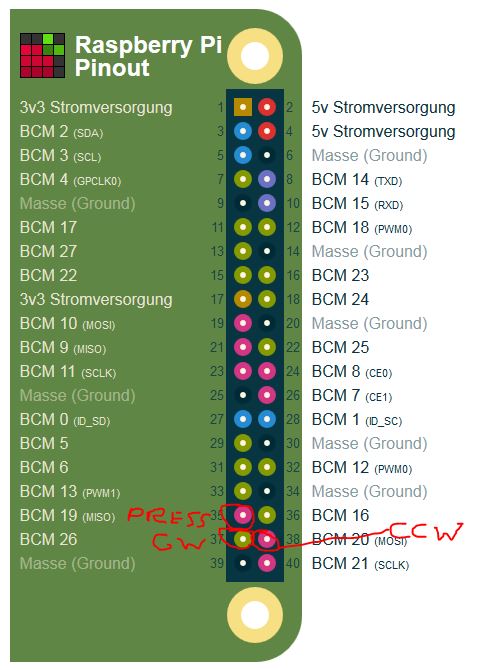
                                    					GPIOPins: [26,20,19]//rotary cw, rotary ccw, rotary press (BCM Numbering)
                                    					},
                                    },
                                    		{
                                        		module: 'MMM-Remote-Control',
                                        		// uncomment the following line to show the URL of the remote control on the mirror
                                        		// , position: 'bottom_left'
                                        		// you can hide this module afterwards from the remote control itself
                                        		config: {
                                            		customCommand: {},  // Optional, See "Using Custom Commands" below
                                            		customMenu: "custom_menu.json", // Optional, See "Custom Menu Items" below
                                            		showModuleApiMenu: true, // Optional, Enable the Module Controls menu
                                            		apiKey: ""         // Optional, See API/README.md for details
                                        		}
                                    		},
                                    		{
                                    			module: "updatenotification",
                                    			position: "top_bar"
                                    		},
                                    		{
                                    			module: "calendar",
                                    			header: "Familie Reetz",
                                    			position: "top_left",
                                    			config: {
                                    				calendars: [
                                    					{
                                    						symbol: "calendar-check",
                                    						url: "webcal://pxxxxxxm/xxxxxxxKSw_tdQ8WGeTZVjgr6Vwn1HDxxxxxxx5OuupPnKOIExxxx"
                                    					}
                                    				]
                                    			}
                                    		},
                                    //		{
                                    //			module: "compliments",
                                    //			position: "lower_third"
                                    //		},
                                    {
                                    			module: "currentweather",
                                    			position: "top_right",
                                    			config: {
                                    				location: "xxxx",
                                    				locationID: "xxx",  //ID from http://bulk.openweathermap.org/sample/; unzip the gz file and find your city
                                    				appid: "xxxxx"
                                    			}
                                    		},
                                    		{
                                    			module: "weatherforecast",
                                    			position: "top_right",
                                    			header: "Wettervorhersage",
                                    			config: {
                                    				location: "xxxx",
                                    				locationID: "xxxx",  //ID from https://openweathermap.org/city
                                    				appid: "xxxxx"
                                    			}
                                    		},
                                    		{
                                    			module: "newsfeed",
                                    			position: "bottom_bar",
                                    			config: {
                                    				feeds: [
                                    					{
                                    						title: "Tagesschau",
                                    						url: "http://www.tagesschau.de/xml/rss2"
                                    						//url: "http://www.nytimes.com/services/xml/rss/nyt/HomePage.xml"
                                    					}
                                    				],
                                    				showSourceTitle: true,
                                    				showPublishDate: true
                                    			}
                                    		},
                                    		{
                                        		module: "MMM-Fuel",
                                        		position: "bottom_left",
                                        		config: {
                                            			api_key: "xxxxx",
                                            			lat: 123456,
                                            			lng: 654321,
                                            			types: ["diesel"],
                                            			radius: 15,
                                            			max: 3     			
                                        				}
                                    		},
                                    		{
                                    	        module: 'MMM-Dreambox',
                                    			header: 'Vu+ Ultimo4K powered by VTi',
                                    			position: 'bottom_right',
                                    			config: {
                                    				apiBase: 'http://192.168.1.50:90',
                                    				//omxargs: ' --vol -6000 --win 0,625,590,957 --live ',
                                    				omxargs: ' --win 600,60,1490,940 -o both ',
                                    				refreshInterval: 1000 * 30, //refresh every 30 seconds
                                    				apibouquet: 0, //bouquet, if there is more than one under apiservices (/web/getallservices),
                                    				apiRecordingsID: 0, //which recording folder should be listed
                                    				listmax: 10,
                                    				apiabout: '/web/about',
                                    				apiservices: '/web/getallservices',
                                    				apiepgnow: '/web/epgnow?bRef=',
                                    				apizap: '/web/zap?sRef=',
                                    				apiTimerlist: '/web/timerlist',
                                    				apiServicelistplayable: '/web/servicelistplayable?sRef=',
                                    				apiLocations: '/web/getlocations', //where are the recording folders listed
                                    				apiMovielist: '/web/movielist?dirname=' //link for opening recording folder and list recordings
                                    				}
                                    		},
                                    	]
                                    
                                    };
                                    
                                    /*************** DO NOT EDIT THE LINE BELOW ***************/
                                    if (typeof module !== "undefined") {module.exports = config;}
                                    
                                    
                                    1 Reply Last reply Reply Quote 0
                                    • A Offline
                                      AxLed Module Developer
                                      last edited by

                                      @Eisblume
                                      I tested wih modules of your config.

                                      My testconfiguration:

                                      • Raspberry Pi 1
                                      • MagicMirror v2.7.1
                                      • npm v6.8.0
                                      • node v8.9.0
                                      • no electron (as i dont run/installable on Pi 1), i run node serveronly
                                      • display: Webbrowser

                                      My rotary encoder works as follows:

                                      • Seite blättern (press works and gives a red frame an a lock sign, cw an ccw dont work, as MMM-Pages isnt part of your config)
                                      • News (mehr/weniger Details) (press works and gives a red frame an a lock sign, cw an ccw works)
                                      • Test notification (press works, no cw or ccw functionality by design)
                                      • News - mehr Details (press works, no cw or ccw functionality by design)
                                      • News - weniger Details (press works, no cw or ccw functionality by design)
                                      • Neustart MagicMirror (PM2) (dont work in my testconfiguration, as i dont use PM on RPI1)
                                      • Neustart (press works, there is a pop up notification to press twice for reeboot, requires MMM-Remote-Control)
                                      • Herunterfahren (press works, there is a pop up notification to press twice for shutdown, requires MMM-Remote-Control)

                                      Two ideas:

                                      • wrong cabeling, here are the 3 pins for CW, CW and PRESS of your config.js (GPIOPins: [26,20,19])
                                        0_1558555492514_bmc.JPG
                                      • messed up setup, try to save your config and reinstall raspian an MM

                                      Greets

                                      AxLED

                                      1 Reply Last reply Reply Quote 0
                                      • E Offline
                                        Eisblume
                                        last edited by

                                        Thank you so much for your help. But It still doesn’t work.

                                        The cabeling is correct I checked it many times ;-)

                                        The crazy thing is, when I remove ground, the press button works, but not the cw and cww.

                                        I think, I will try a clean reinstall on my RPi3.

                                        1 Reply Last reply Reply Quote 0
                                        • E Offline
                                          Eisblume
                                          last edited by Eisblume

                                          @AxLed
                                          Also after clean install with nothing more, the default modules and MMM-Navigate and MMM-Remote-Controll it doesn’t work.

                                          Here you can see: https://youtu.be/G2eRoPxRPjU

                                          Only when I remove ground, the press action works. But then, the cw and cww doesn’t work…

                                          1 Reply Last reply Reply Quote 0
                                          • A Offline
                                            AxLed Module Developer
                                            last edited by

                                            @Eisblume
                                            Thanks for your reply, i tested at my pi with disconnected ground cable, but there is no press, cw or ccw working at all.
                                            My last ideas:

                                            • can you messure your 5 cables if maybe one is interrupted
                                            • maybe there are two versions of KY-040 on the marked, i have this one Amazon
                                            • is your second rotary encoder shows same symptoms?
                                            • did you connect + of rotary encoder to 5V once (which would be wrong and maybe damaged your GPIO PINs/chip)?

                                            AxLED

                                            1 Reply Last reply Reply Quote 0

                                            Hello! It looks like you're interested in this conversation, but you don't have an account yet.

                                            Getting fed up of having to scroll through the same posts each visit? When you register for an account, you'll always come back to exactly where you were before, and choose to be notified of new replies (either via email, or push notification). You'll also be able to save bookmarks and upvote posts to show your appreciation to other community members.

                                            With your input, this post could be even better 💗

                                            Register Login

                                            • 1
                                            • 2
                                            • 3
                                            • 1 / 3
                                            • First post
                                              Last post
                                            Enjoying MagicMirror? Please consider a donation!
                                            MagicMirror created by Michael Teeuw.
                                            Forum managed by Sam, technical setup by Karsten.
                                            This forum is using NodeBB as its core | Contributors
                                            Contact | Privacy Policy