Read the statement by Michael Teeuw here.
MMM-Page-Selector: A page switcher that can set positions of modules
-
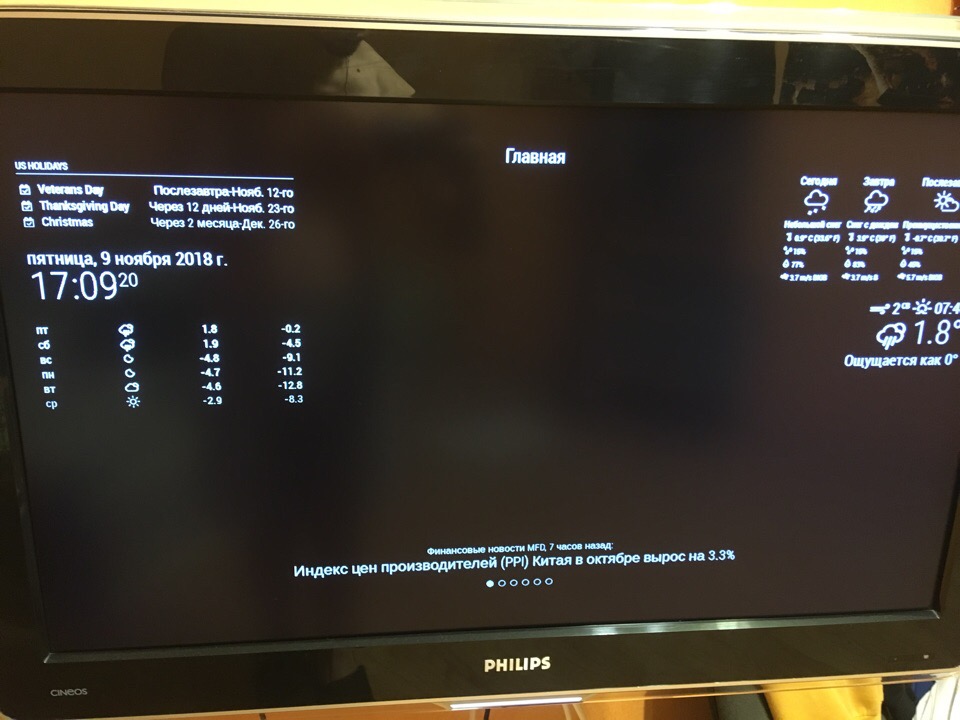
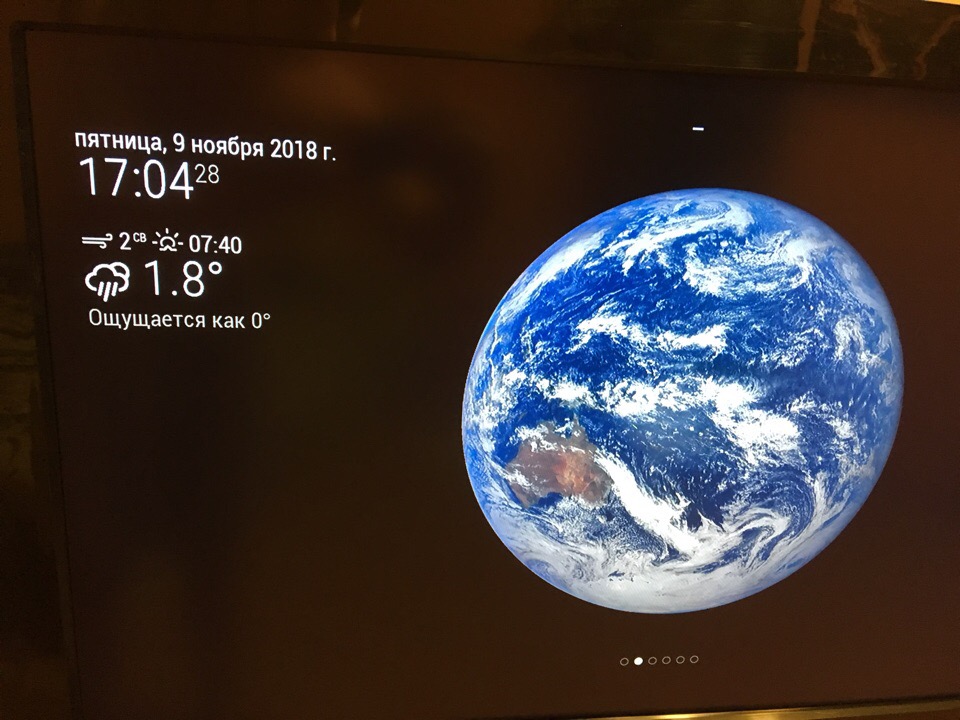
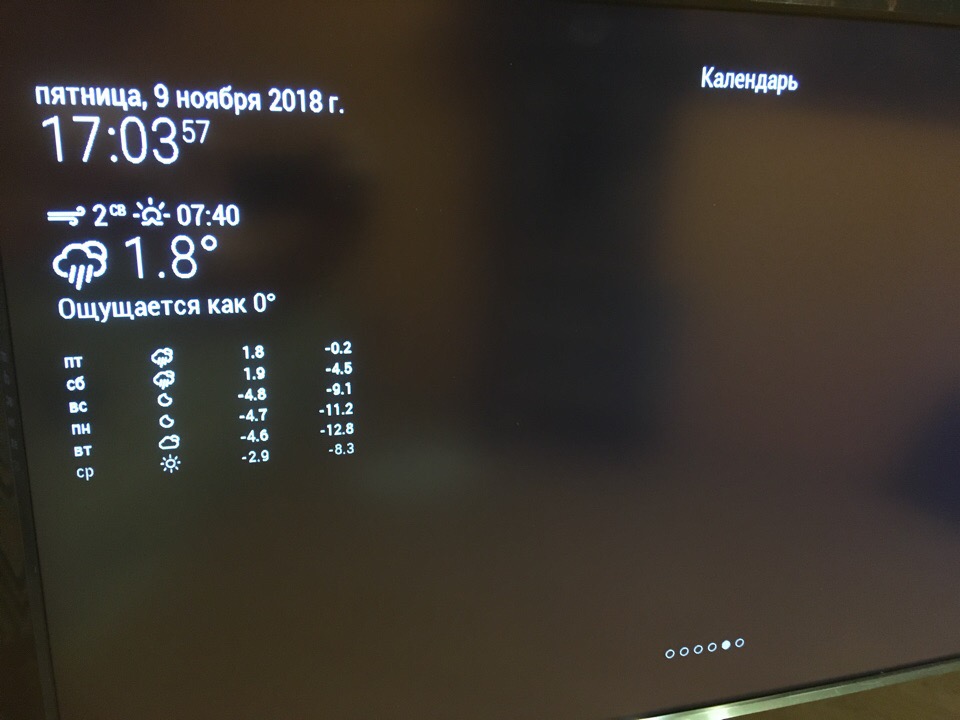
Hi @Veldrovive ! Can you help me to solve some problems with pages? The first is that it doesn’t swith sometimes. it works, but not the whole time. The second is rhat pages show modules while they don’t havw to. There are config file and examples. So the main page (главная) shows weather data but it doesn’t have to. The same situation with other pages (example - calendar “календарь”). While the weather page (with earth) doesn’t show these modules. Wrehe is the problem? Sorry for bad structure…
var config = { address: "localhost", // Address to listen on, can be: // - "localhost", "127.0.0.1", "::1" to listen on loopback interface // - another specific IPv4/6 to listen on a specific interface // - "", "0.0.0.0", "::" to listen on any interface // Default, when address config is left out, is "localhost" port: 8080, ipWhitelist: ["127.0.0.1", "::ffff:127.0.0.1", "::1"], // Set [] to allow all IP addresses // or add a specific IPv4 of 192.168.1.5 : // ["127.0.0.1", "::ffff:127.0.0.1", "::1", "::ffff:192.168.1.5"], // or IPv4 range of 192.168.3.0 --> 192.168.3.15 use CIDR format : // ["127.0.0.1", "::ffff:127.0.0.1", "::1", "::ffff:192.168.3.0/28"], language: "ru", timeFormat: 24, units: "metric", modules: [ { "module": "MMM-Page-Selector", "position": "top_center", "config": { "defaultPage": "главная", "displayTitle": true, "selectPageNotif": [], "incrementPageNotif": [], "decrementPageNotif": [] } }, { module: 'MMM-page-indicator', position: 'bottom_bar', "pages": "all", config: { pages: 6, activeBright: true, inactiveHollow: true, } }, { module: "alert", "pages": "all", }, { module: 'MMM-PIR-Sensor', "pages": "all", config: { sensorPIN: 22, powerSaving: true, powerSavingDelay: 120, // See 'Configuration options' for more information. } }, { module: 'MMM-3Day-Forecast', position: 'top_right', "pages": {"главная": "top_right"}, config: { api_key: '2f91769xxxxxxxxxxxxxxx', lat: 54.61972, lon: 39.740002, units: 'M', lang: 'ru', interval: 900000, } }, { module: "currentweather", position: "top_right", animationSpeed: 500, // This can be any of the regions. "pages": {"погода": "top_left"}, // Best results in left or right regions. config: { // See 'Configuration options' for more information. location: "Рязань", locationID: "500096", //Location ID from http://openweathermap.org/help/city_list.txt appid: "ab3164xxxxxxxxxxxx" //openweathermap.org API key. } }, { module: "MMM-EARTH", position: "bottom_center", "pages": {"погода": "middle_center"}, config: { mode: "Natural", rotateInterval: 5000, MaxWidth: "50%", MaxHeight: "50%", } }, { module: "weatherforecast", position: "left", // This can be any of the regions. colored: true, pages: {погода: "left"}, config: { // See 'Configuration options' for more information. location: "Рязань", locationID: "500096", //Location ID from http://openwea$ appid: "ab31646bxxxxxxxxxxxxx" //openweather } }, { module: "updatenotification", position: "top_bar", "pages": "all", }, { module: "clock", position: "top_left", "pages":{"главная": "top_left", "погода": "top_left", "почта": "top_left", "новости": "top_left", "календарь": "top_left", "фото": "top_left" }, }, { module: "calendar", header: "US Holidays", position: "top_left", "pages": {"календарь": "upper-third"}, config: { calendars: [ { symbol: "calendar-check-o ", url: "webcal://www.calendarlabs.com/templates/ical/US-Holidays.ics" } ] } }, { module: "newsfeed", position: "bottom_bar", "pages": {"главная": "bottom_bar", "новости": "bottom_bar"}, config: { feeds: [ { title: "Финансовые новости MFD", url: "http://mfd.ru/rss/news/handler.ashx" } ], showSourceTitle: true, showPublishDate: true } }, { "module": "MMM-Cursor", }, ] }; -
Hey @Banandze,
I have added a lockstring so that modules cannot show themselves which was causing the issue where the weather module showed itself. Pull the new changes to fix that issue.
The issue with the module not showing on the weather page I cannot replicate, but it is most likely due to the position being set toleftwhich is not a valid position in Magic Mirror. Refer to this this for a list of positions.
I am also unable to replicate the problem where the page switching does not work. When it fails to switch, is there any output to the console? -
Dear @Veldrovive,
thank you very much for this fantastic module! I am trying to use MMM-Remote-Control to control the currently shown page through notifications which are sent via HTTP from my home automation (FHEM), depending on who is in the bathroom.
These two calls work fine with MMM-Page-Selector: (I had to insert a space into the URL when pasting it here as “&n” is replaced with a newline character by this website")
http://192.0.0.60:8080/remote?action=NOTIFICATION& notification=PAGE_UPhttp://192.0.0.60:8080/remote?action=NOTIFICATION& notification=PAGE_DOWNBut i am struggling to use SELECT_PAGE to go directly to a desired page.
http://192.0.0.60:8080/remote?action=NOTIFICATION& notification=SELECT_PAGE&payload={"test"}This call returns
{"status":"success"}, but does not show the page “test”. Do you have an idea, what I am doing wrong? -
Hey @rudibarani,
Yea, that was completely on me. The new version should fix the issue. There was a really obvious bug that was stopping thePAGE_SELECTsystem from working. If it still does not work, make sure that the payload that is being sent is actually just the string name of the page and not an object. -
@veldrovive Thank you very much for the quick fix! Now everything works like magic :man_mage:
I am putting a working example here for others, if they want to use MMM-Remote-Control with MMM-Page-Selector as well:
http://192.0.0.60:8080/remote?action=NOTIFICATION& notification=SELECT_PAGE&payload="test" -
As an update, it is now possible to have your pages automatically rotate on a certain interval. Refer to usage and configuration in the Readme.
-
@Veldrovive thank you for reply! I will check the changes on the weekend. What shall I use to make weather data more structure? I want one module upper than another. I put first one upper in config file and wrote “top_left” for both modules but they are shown in wrong way. And another question about not swithing, I didn’t understand your question exactly. I turn ii on and it works four times, then it doesn’t swith and my screen becomes slightly darker, then after few munites it works again fout times.
-
@Banandze,
I’m going to address the issue with the switching only working four times before shutting down. First, are you using pm2 to manage you mirror? If that is the case, try just starting it from a terminal instance so it does not automatically restart if it crashes.
When I said “Is there any output to the console”, what I meant is, in the terminal window where you started magic mirror, is there any text that prints out when the issues start? Also, in your electron instance, in the top menu, when you click on view then toggle developer tools, it will bring up a window with a console in it. If there is anything in red there I would like to see it.
What I am assuming is happening is that magic mirror itself is running out of resources and causing the issues.I am not quite certain what you mean by:
“I put first one upper in config file and wrote “top_left” for both modules but they are shown in wrong way”
Are you saying that you want one module to appear above another, but it is instead appearing below? If that is the case then I will need to see your config again to know exactly what you mean and attempt to fix the problem. -
@Veldrovive I will try it on the weekend. Yes, you ynderstand me with the problem of appearing. There is my config
var config = { address: "localhost", // Address to listen on, can be: // - "localhost", "127.0.0.1", "::1" to listen on loopback interface // - another specific IPv4/6 to listen on a specific interface // - "", "0.0.0.0", "::" to listen on any interface // Default, when address config is left out, is "localhost" port: 8080, ipWhitelist: ["127.0.0.1", "::ffff:127.0.0.1", "::1"], // Set [] to allow all IP addresses // or add a specific IPv4 of 192.168.1.5 : // ["127.0.0.1", "::ffff:127.0.0.1", "::1", "::ffff:192.168.1.5"], // or IPv4 range of 192.168.3.0 --> 192.168.3.15 use CIDR format : // ["127.0.0.1", "::ffff:127.0.0.1", "::1", "::ffff:192.168.3.0/28"], language: "ru", timeFormat: 24, units: "metric", modules: [ { "module": "MMM-Page-Selector", "position": "top_center", "config": { "defaultPage": "главная", "displayTitle": true, "selectPageNotif": [], "incrementPageNotif": [], "decrementPageNotif": [] } }, { module: 'MMM-page-indicator', position: 'bottom_bar', "pages": "all", config: { pages: 6, activeBright: true, inactiveHollow: true, } }, { module: "alert", "pages": "all", }, { module: 'MMM-PIR-Sensor', "pages": "all", config: { sensorPIN: 22, powerSaving: true, powerSavingDelay: 120, // See 'Configuration options' for more information. } }, { module: 'MMM-3Day-Forecast', position: 'top_right', "pages": {"главная": "top_right"}, config: { api_key: '2f91769xxxxxxxxxxxxxxx', lat: 54.61972, lon: 39.740002, units: 'M', lang: 'ru', interval: 900000, } }, { module: "currentweather", position: "top_right", animationSpeed: 500, // This can be any of the regions. "pages": {"погода": "top_left"}, // Best results in left or right regions. config: { // See 'Configuration options' for more information. location: "Рязань", locationID: "500096", //Location ID from http://openweathermap.org/help/city_list.txt appid: "ab3164xxxxxxxxxxxx" //openweathermap.org API key. } }, { module: "MMM-EARTH", position: "bottom_center", "pages": {"погода": "middle_center"}, config: { mode: "Natural", rotateInterval: 5000, MaxWidth: "50%", MaxHeight: "50%", } }, { module: "weatherforecast", position: "left", // This can be any of the regions. colored: true, pages: {погода: "left"}, config: { // See 'Configuration options' for more information. location: "Рязань", locationID: "500096", //Location ID from http://openwea$ appid: "ab31646bxxxxxxxxxxxxx" //openweather } }, { module: "updatenotification", position: "top_bar", "pages": "all", }, { module: "clock", position: "top_left", "pages":{"главная": "top_left", "погода": "top_left", "почта": "top_left", "новости": "top_left", "календарь": "top_left", "фото": "top_left" }, }, { module: "calendar", header: "US Holidays", position: "top_left", "pages": {"календарь": "upper-third"}, config: { calendars: [ { symbol: "calendar-check-o ", url: "webcal://www.calendarlabs.com/templates/ical/US-Holidays.ics" } ] } }, { module: "newsfeed", position: "bottom_bar", "pages": {"главная": "bottom_bar", "новости": "bottom_bar"}, config: { feeds: [ { title: "Финансовые новости MFD", url: "http://mfd.ru/rss/news/handler.ashx" } ], showSourceTitle: true, showPublishDate: true } }, { "module": "MMM-Cursor", }, ] }; -
@Banandze,
I’ll take a look at it. It is very possible that I made a mistake while refactoring and module precedence has been swapped. -
Changes that edit the way users must set up their config.js file have been made to this module. The position prop is no longer necessary to have inside the module config and the way to exclusions are handled has changed. For more information, look at the updated readme in the development branch of the GitHub page.
These changes will be merged into the master branch in a couple of days which will cause errors if your config is not updated. -
Dear @Veldrovive,
would it be possible to add an option to make the current page persistent until the next page change?
I have to use cases where this would help:
- if the Pi restarts, the Mirror always shows the standard page - no matter what page was active before the restart.
- if you open the Mirror on a browser (e.g. mobile phone), you always see the standard page until the next page change happens.
In both cases, if would be great to see the currently “active” page. Maybe there is a way to store and restore the current page?
Thanks a lot for your active development of the module!
-
Persistent properties such as those could be achieved through a temp file so definitely something that could be implemented.
My reading week is over so I don’t have as much time to do development now, but I’ll get it done in some free time. -
@veldrovive That would be great - thanks a lot!!!
You could implement it as an option for the config part - maybe there are people out there that like to have a fallback to the standard page. -
Yea. I’m trying my best not to change base functionality so any sort of bells and whistles like this will have to be manually activated.
-
@Veldrovive If I got your new pages-implementation right, we define a name for a module which is later used to organize the page layout. Is that correct? Would it be possible to give multiple names to the same module (not have on module configured and shown multiple times via different names)?
It would be helpful for modules with rate-limited APIs, if different parts of one module should be shown at different locations on the same page. I would like to achieve this via a custom css which addresses your name-tag.
If this where possible, I would like to take this one step further in the future and implement a distance based layout which keeps the information most important to me readable throughout the room, when I prepare for my way to work. Changing the layout via css could be dynamic and would not involve a whole page refresh as it occurs when switching between pages.
-
Ok, I’ve implemented persistent pages. In order to access them right now, you need to be in the development branch since I don’t have the time to do extensive testing.
I’m not exactly sure what you mean when you say “not have on module configured and shown multiple times via different names”. You do not want to have the same module shown multiple times on the same page?
If the module was shown multiple times by this module, then all the instances would have the same config and I don’t see how that would help with rate-limited APIs.
Could you clarify? -
Thanks for the persistent pages. I can try them today or tomorrow.
Regarding showing one module multiple times: I do not want to put e.g. “clock” multiple times into the config.js and show it in different places on the screen.
My idea was - and I hope that I got the concept right - that if the same module (which is implemented only once in the config.js and calls the API only once) could be shown multiple times on one page. Then I could set multiple name-tags for that module and address each representation of this module separately via the name-tag in the custom.css file and show/hide/scale different parts of the module at different locations on the screen. This could be of general use for other people as well.
My next step after this would be to learn how to inject css info dynamically - e.g. to keep infos about my upcoming trains/flights, the traffic-map to the station and weather info at my destination at the same visual size as I move throughout the room. This I would like to achieve with a distance measurement via PIR or doppler-microwave-sensor.
I hope this helps to explain the idea I had.
-
The way that this system would have to work could not reduce API calls. Duplicating the module would simply send two calls instead of one. As I understand it, a large rework of how magic mirror works at a much baser level than what this module does would be necessary to change that.
It would be possible to have one module shown in different places by assigning it multiple names, but I don’t see how that would really be useful. -
OK - thank for your feedback.
Do you have any idea on how to change the css-info or the class of a module on the fly? Would this be possible through notifications?

Hello! It looks like you're interested in this conversation, but you don't have an account yet.
Getting fed up of having to scroll through the same posts each visit? When you register for an account, you'll always come back to exactly where you were before, and choose to be notified of new replies (either via email, or push notification). You'll also be able to save bookmarks and upvote posts to show your appreciation to other community members.
With your input, this post could be even better 💗
Register Login