MagicMirror Forum
    • Recent
    • Tags
    • Unsolved
    • Solved
    • MagicMirror² Repository
    • Documentation
    • 3rd-Party-Modules
    • Donate
    • Discord
    • Register
    • Login
    A New Chapter for MagicMirror: The Community Takes the Lead
    Read the statement by Michael Teeuw here.

    MMM-AssistantMk2

    Scheduled Pinned Locked Moved System
    421 Posts 61 Posters 632.0k Views 57 Watching
    Loading More Posts
    • Oldest to Newest
    • Newest to Oldest
    • Most Votes
    Reply
    • Reply as topic
    Log in to reply
    This topic has been deleted. Only users with topic management privileges can see it.
    • Cr4z33C Offline
      Cr4z33 @teitlebot
      last edited by

      @teitlebot oh OK.

      1 Reply Last reply Reply Quote 0
      • R Offline
        reddyman
        last edited by reddyman

        Thank you Sean/Eouia for all of your hard work, this is an absolutely amazing module!

        I do have two small issues ever since two major updates ago (when commands were added). Sorry!

        The first one is more significant. I can’t get the screen output to show unless the module is set to “top_right”. And when I do try to say something, it distorts the module above it (fig 3). A scroll bar also appears on the bottom of the screen output (fig 4). In addition, when I activate the voice command, all the modules on the top of the screen move down a few inches (1&2). They are all probably related to an issue with display size but I can’t figure out how to adjust it.

        It sounds somewhat similar to @teitlebot’s second issue. Did anyone ever figure it out?

        Fig 1: https://imgur.com/rNBMHEo
        Fig 2: https://imgur.com/EyY3htC
        Fig 3: https://imgur.com/0IC7pL9
        Fig 4: https://imgur.com/txuHkce

        My second issue is more minor. When I use the command HideAll, it works for several minutes, but then eventually the default current weather and weather forecast modules unhide themselves automatically. All other modules remain hidden, including newfeed. Any advice for this issue? Kinda stuck on where the issue is and how to address it.

        ? 1 Reply Last reply Reply Quote 0
        • ? Offline
          A Former User @reddyman
          last edited by

          @reddyman
          I can’t find exact reason, but It might seem CSS collision being happened with your other modules
          add this into your css/custom.css

          #ASSISTANT_SCREEN {
            width: 1000px;  // adjust for your screen resolution or your prefer values;
            height: 1000px;  // Here also.
          }
          

          For second issue; Are you using other module to control to hide and show modules? Maybe it makes to show specific module by force. There is no way to prevent force revealing by other module.

          https://github.com/MichMich/MagicMirror/blob/master/modules/README.md#visibility-locking

          ? R 2 Replies Last reply Reply Quote 0
          • ? Offline
            A Former User @Guest
            last edited by

            FIXED

            • In Italian language(or others), All results of Youtube Searching has no voice responses at all and that would interrupt YT playing; So I make a patch to ignore that error message. Now your YT won’t be interrupted.
            1 Reply Last reply Reply Quote 0
            • ? Offline
              A Former User
              last edited by

              UPDATED

              [2.1.2] - 2018.12.12

              • Fixed: Youtube playlist playing bug
              • Added:
                • youtubePlayerVars
                • youtubePlayQuality
              1 Reply Last reply Reply Quote 0
              • citizendevpiC Offline
                citizendevpi
                last edited by

                Updating c379637…3538008
                error: Your local changes to the following files would be overwritten by merge:
                MMM-AssistantMk2.js
                Please commit your changes or stash them before you merge.
                Aborting
                how do i get past this?

                ? 1 Reply Last reply Reply Quote 0
                • ? Offline
                  A Former User @citizendevpi
                  last edited by

                  @citizendevpi
                  You may have modified the source by yourself.
                  Read the answer of https://stackoverflow.com/questions/14318234/how-do-i-ignore-an-error-on-git-pull-about-my-local-changes-would-be-overwritt
                  Or you just remove that file than retry.

                  citizendevpiC 1 Reply Last reply Reply Quote 0
                  • citizendevpiC Offline
                    citizendevpi @Guest
                    last edited by

                    @sean thank you , yes i did set some preferences like my location and 8 sec response time which i reset after update thank you for your help(again)

                    ? 1 Reply Last reply Reply Quote 0
                    • ? Offline
                      A Former User @citizendevpi
                      last edited by

                      @citizendevpi
                      Oh, You don’t need to modify source itself. the everything you had to adjust for your environment should be done in config.js, not MMM-AssistantMk2.js. If you need more configuration options, tell me.

                      1 Reply Last reply Reply Quote 0
                      • A Offline
                        Arkitct
                        last edited by

                        @Sean this is awesome module, thanks! I have been successful in getting it installed and working with Hotword - responds and provides answers including integrating with calendar, etc. (can make appointment).

                        But when I attempt to proceed with the instructions for “Register your Mirror as Google Assistant related device.” I am not sure what input to provide in the deviceInstance.json file for the YOUR_MODEL_ID. I have tried various permutations of what I think it is, but no luck.

                        The instructions indicate it comes from the Google Project Console. Is this the Google Cloud Platform? There is a Project Name and Project ID listed on the Cloud Platform; are one of these the YOUR_MODEL_ID?

                        Thanks!

                        ? 2 Replies Last reply Reply Quote 0
                        • ? Offline
                          A Former User @Arkitct
                          last edited by

                          @arkitct
                          You’ve already made deviceModelId when you mad your credentials.json on first installation. (https://github.com/eouia/MMM-AssistantMk2/blob/master/INSTALL.md#get-auth-and-credentials-to-make-profile)
                          If you have forgotten your deviceModelId,
                          Go to Google Action console homepage(https://console.actions.google.com) Then find your project and the menu - Device Registration
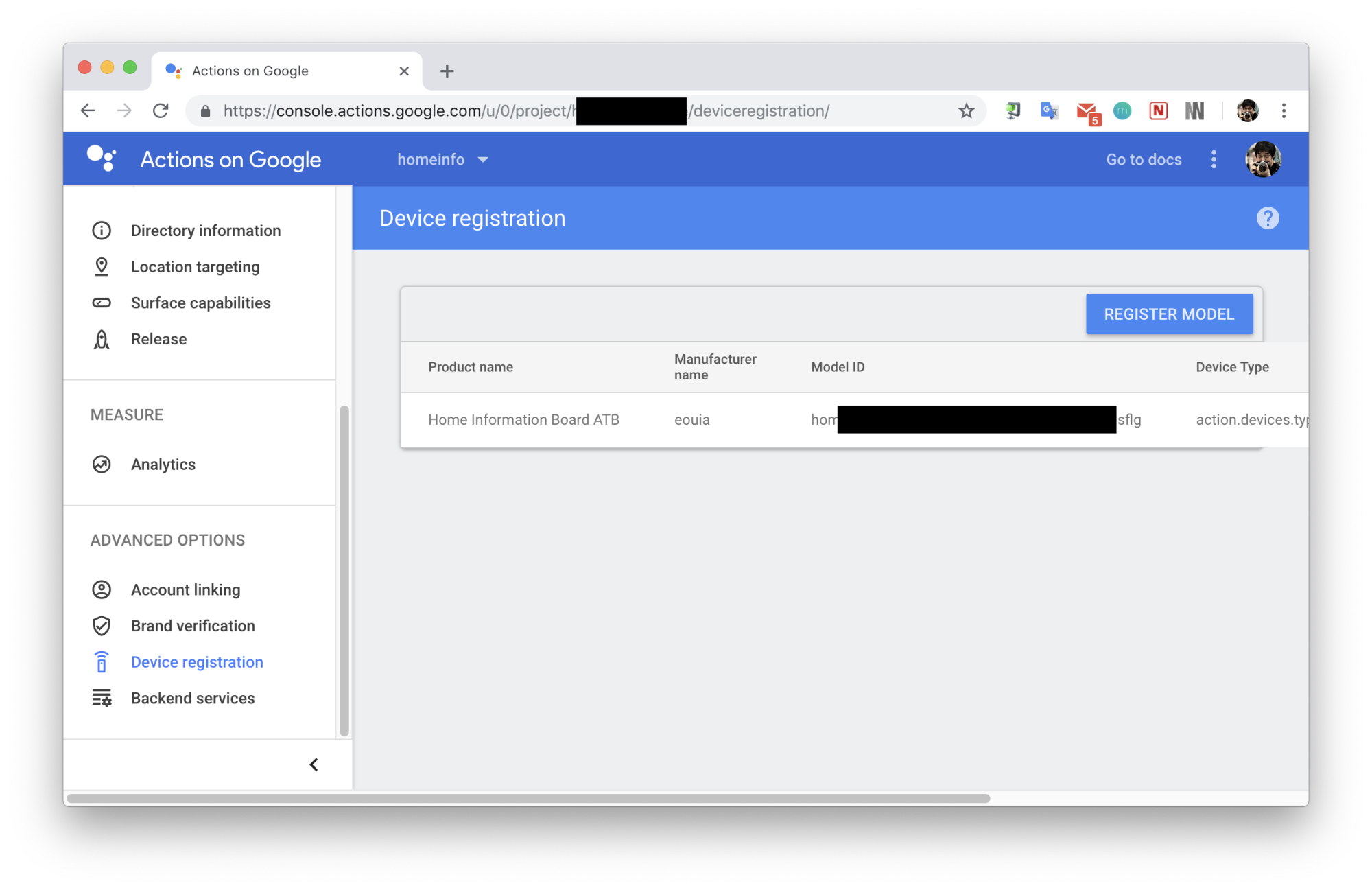
                          0_1544718591079_deviceRegistration.png

                          Of course, there are other methods to get Model Id (If you have a plan to get deviceInstanceId also, you need to use CLI. - See https://developers.google.com/assistant/sdk/reference/device-registration/register-device-manual

                          1 Reply Last reply Reply Quote 0
                          • ? Offline
                            A Former User @Arkitct
                            last edited by

                            @arkitct
                            But… many features are restricted in this SDK, So I think you don’t need to register Mirror to your Google Home network. Even though your mirror registered on your phone looks very nice, but that’s all. :D

                            1 Reply Last reply Reply Quote 0
                            • J Offline
                              Jmh474
                              last edited by

                              Sorry this is my first post, are there any guides for helping me install the MMM-assistantMK2 I’m a total beginner With the raspberry pi any help would be much appreciated

                              Cr4z33C 1 Reply Last reply Reply Quote 0
                              • Cr4z33C Offline
                                Cr4z33 @Jmh474
                                last edited by

                                @jmh474 Follow the link in the first post that bring you to GitHub.
                                Once there follow CAREFULLY the step-by-step installation & configuration.

                                Only then if there’s still anything not clear or not working ask here. ;)

                                J 1 Reply Last reply Reply Quote 0
                                • J Offline
                                  Jmh474 @Cr4z33
                                  last edited by

                                  @cr4z33 OK thanks mate

                                  1 Reply Last reply Reply Quote 0
                                  • R Offline
                                    reddyman @Guest
                                    last edited by

                                    For second issue; Are you using other module to control to hide and show modules? Maybe it makes to show specific module by force. There is no way to prevent force revealing by other module.

                                    https://github.com/MichMich/MagicMirror/blob/master/modules/README.md#visibility-locking

                                    No luck here, I ended up doing a fresh install with no other modules installed and it still happens. Can’t figure why it only applies to the default weather app, even if I move the position.

                                    I can’t figure out why no one else has this issue. Oh well, I guess I can just not use the “hide all” command though. Thanks!

                                    citizendevpiC 1 Reply Last reply Reply Quote 0
                                    • citizendevpiC Offline
                                      citizendevpi @reddyman
                                      last edited by

                                      @reddyman my mirror also pops up the default weather after hide all , I got use to it

                                      ? 1 Reply Last reply Reply Quote 0
                                      • ? Offline
                                        A Former User @citizendevpi
                                        last edited by

                                        @citizendevpi @reddyman
                                        I’ll check it as soon as possible.

                                        W 1 Reply Last reply Reply Quote 0
                                        • W Offline
                                          wearable9083 @Guest
                                          last edited by wearable9083

                                          @sean
                                          Thank you always for your complete modules.
                                          I have some questions about YouTube. The YouTube video screen is always full. Is there a way to reduce the size of a pop-up window?
                                          And one more thing: can’t I stop or give another command while watching the video?

                                          ? 1 Reply Last reply Reply Quote 0
                                          • ? Offline
                                            A Former User @wearable9083
                                            last edited by

                                            @wearable9083
                                            For Resizing Video Player; add this into your css/custom.css and adjust the values;

                                            #ASSISTANT_YOUTUBE {
                                              position:fixed;
                                              top:20px;
                                              left:20px;
                                              width:400px;
                                              height:300px;
                                            }
                                            

                                            And you can stop playing video by hotword waking with option pauseOnYoutube:false.

                                            W 1 Reply Last reply Reply Quote 1

                                            Hello! It looks like you're interested in this conversation, but you don't have an account yet.

                                            Getting fed up of having to scroll through the same posts each visit? When you register for an account, you'll always come back to exactly where you were before, and choose to be notified of new replies (either via email, or push notification). You'll also be able to save bookmarks and upvote posts to show your appreciation to other community members.

                                            With your input, this post could be even better 💗

                                            Register Login

                                            • 1
                                            • 2
                                            • 9
                                            • 10
                                            • 11
                                            • 12
                                            • 13
                                            • 21
                                            • 22
                                            • 11 / 22
                                            • First post
                                              Last post
                                            Enjoying MagicMirror? Please consider a donation!
                                            MagicMirror created by Michael Teeuw.
                                            Forum managed by Sam, technical setup by Karsten.
                                            This forum is using NodeBB as its core | Contributors
                                            Contact | Privacy Policy