MagicMirror Forum
    • Recent
    • Tags
    • Unsolved
    • Solved
    • MagicMirror² Repository
    • Documentation
    • 3rd-Party-Modules
    • Donate
    • Discord
    • Register
    • Login
    A New Chapter for MagicMirror: The Community Takes the Lead
    Read the statement by Michael Teeuw here.

    MMM-GooglePhotos

    Scheduled Pinned Locked Moved Entertainment
    294 Posts 56 Posters 341.2k Views 59 Watching
    Loading More Posts
    • Oldest to Newest
    • Newest to Oldest
    • Most Votes
    Reply
    • Reply as topic
    Log in to reply
    This topic has been deleted. Only users with topic management privileges can see it.
    • G Offline
      gonzonia @Guest
      last edited by roramirez

      @Sean It’s weird. I had it working. I went to adjust the settings (sizing didn’t look good) and then it stopped. Getting the network error consistently.

      This is my latest config. I’ve tried various configurations of showWidth/showHeight and originalWidthPx/originalHeightPx

      {
        module: "MMM-GooglePhotos",
        position: "top_left",
        config: {
          albumId: ["XXX"], // your album id(s) from result of 
         refreshInterval: 1000*60,  
          scanInterval: 1000*60*10, // too many scans might cause API quota limit also.
          //note(2018-07-29). It is some weird. API documents said temporal image url would live for 1 hour, but it might be broken shorter. So, per 10 min scanning could prevent dead url.
          sort: "random", //'time', 'reverse', 'random'
          showWidth: "800", // how large the photo will be shown as. (e.g;'100%' for fullscreen)
          showHeight: "600",
          originalWidthPx: 1920, // original size of loaded image. (related with image quality)
          originalHeightPx: 1080, // Bigger size gives you better quality, but can give you network burden.
          mode: "hybrid", // "cover" or "contain" (https://www.w3schools.com/cssref/css3_pr_background-size.asp)
          //ADDED. "hybrid" : if you set as "hybrid" it will change "cover" and "contain" automatically by aspect ratio.
        }
      
      ? 1 Reply Last reply Reply Quote 0
      • ? Offline
        A Former User @gonzonia
        last edited by

        @gonzonia
        There is nothing related to your network issue on this module. (At least, I think so)
        I carefully guess these things;

        1. WLAN sleeping feature might be activated in your RPI.
        2. Your other module or other background process would make this.
        G 2 Replies Last reply Reply Quote 0
        • G Offline
          gonzonia @Guest
          last edited by

          @Sean
          This module is the only one not working. though and you can see in the error I posted earlier it directly references the “photoslibrary.googleapis.com” which is why I suspected this module.

          Currently I’m not running over wifi so it’s not that it’s sleeping.

          I’ll keep trying things and see if I can find something with some consistency. Thanks for checking.

          1 Reply Last reply Reply Quote 0
          • G Offline
            gonzonia @Guest
            last edited by

            @Sean I’m starting to think the network error is irrelevant.
            I am seeing the error sometimes not related to googleapis.com. In those cases the CalendarExt2 data isn’t fully loaded, I refresh and all seems good.

            The config below seems to work.

            {
              module: "MMM-GooglePhotos",
              position: "fullscreen_below",
              config: {
                albumId: ["AD8YTEgKjrQhxAA_30358v4J7I7CXoa1_QIgcebrp1qLcFUvsIU5Hql3wPIvUDesZ72DYwbEhxSz"], // your album id(s) from result of `auth_and_test.js`
               refreshInterval: 1000*60,  
                scanInterval: 1000*60*10, // too many scans might cause API quota limit also.
                //note(2018-07-29). It is some weird. API documents said temporal image url would live for 1 hour, but it might be broken shorter. So, per 10 min scanning could prevent dead url.
                sort: "random", //'time', 'reverse', 'random'
                showWidth: "100%", // how large the photo will be shown as. (e.g;'100%' for fullscreen)
                showHeight: "100%",
                originalWidthPx: 1920, // original size of loaded image. (related with image quality)
                originalHeightPx: 1080, // Bigger size gives you better quality, but can give you network burden.
                mode: "hybrid", // "cover" or "contain" (https://www.w3schools.com/cssref/css3_pr_background-size.asp)
                //ADDED. "hybrid" : if you set as "hybrid" it will change "cover" and "contain" automatically by aspect ratio.
              }
              	},
            

            Change to

             position: "top_left",
            showWidth: "800",
            showHeight: "600",
            originalWidthPx: 800,
            originalHeightPx: 600,
            

            and it doesn’t

            ? 1 Reply Last reply Reply Quote 0
            • ? Offline
              A Former User @gonzonia
              last edited by

              @gonzonia
              Hmmmm…
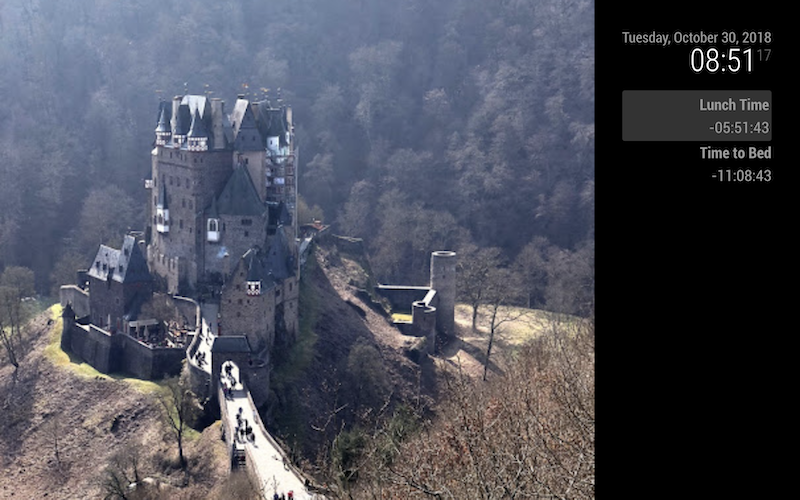
              0_1571069033879_95150df3-a2c4-4e9d-a846-9155ce6167f5-image.png
              With your config (but change albumId - I cannot use your albumId), I can display.

              Here is mine.

              {
                module: "MMM-GooglePhotos",
                position: "top_left",
                config: {
                  refreshInterval: 1000*60,
                  scanInterval: 1000*60*10, 
                  sort: "random", 
                  showWidth: "800px", 
                  showHeight: "600px",
                  originalWidthPx: 800, 
                  originalHeightPx: 600,
                  mode: "hybrid", 
                  albumId: ["AJQR3DjzfO6BkH5eSY1e6Dm3m49QVOmpmXgPy6BOecEwg-f_82H_UJ1v-dvzVIjuezDmb_snettC"],
                }
              },
              
              1 Reply Last reply Reply Quote 0
              • M Offline
                mosheva
                last edited by

                Hi,

                For some reason noting is showing on the MagicMirror… I’ve pass the Auth test but still nothing is happening…
                Here’s the test results:

                Messages : ABzt7NwkIe_XeUgaOezo-5u4fVUn5Gj7xhp1NfzTvGkZPLsd6Lw_99kXfEe1IOXnglPms7POrP4c
                July 29, 2018 : ABzt7Nx3bEIkcn3tX2FFVXsH2fzQVC4Os0CJhfS61mv6pvZSCXoMZymEaf-eZBBL08Lqw0_1fLSC
                July 29, 2018 : ABzt7NwUwbPw1vqCOC70DXZ0UuD8ajeummvi6bRvmEDl7TYDqVcQcHT9EfJfZj2St0TunweaEogm
                July 29, 2018 : ABzt7NzW5C6q_Z7A5tTgnGYkRfCvCb8KWMOYwmUDSPPco8JN9rFDRU-epLrkGyi-OSde2W0T25nB
                July 29, 2018 : ABzt7NyzrxVgSSQ71mMfiRkgnQ_ZbNL5chnZW49kkWE4reAdfakLBb5NJKz24pEYRH7uKlKIRvEQ
                July 29, 2018 : ABzt7NwyHnIh7XavY1dbWmsPQqHd34dwJzf0qpGGnZ6GnAiSRAdeooTjkZGPrxHMq0JwNw73AgiK
                July 29, 2018 : ABzt7NwVG_h0xWe01FlxcIdIzpTE6FoHnhWmOpiZf8lXQXxT-em4UIv_nR9RTbggkEqLuBqsPI4w
                July 29, 2018 : ABzt7NwAVoSsujJwotfz02G3sYbIFIEXh0aT3JjkeIeHvE_ztZJFFIQt0z9W0gLSQQNT_ZQtThrb
                July 29, 2018 : ABzt7NxopVxxPrdyilZ3q6OWmDeGEWgdt_KkPEUEYR-ttFS1EFBv37JtPI8E7-JodnNUI7P5N_H_
                July 29, 2018 : ABzt7NxbTlUlq0jiUBuNVNLLJt5dRYvIscSCRm0XUiJJEhfzrrRiem0OyuD0dj-cXZ9RNc_gsGal
                July 29, 2018 : ABzt7NzsLXU8kvxF8HZnXCBOVzInUhys3dFh5CEmF8YVgiQhWg8Qdv7LHSmF3pnV_EK–jfGTtTW
                July 29, 2018 : ABzt7Ny0jW0phJcKPrrCBdmbGKSkAKdXTFFNEAkdiO8apGut1FhIjonLWioEccQrtVSI-490XiPB
                July 29, 2018 : ABzt7Nz_iEDYQ4YDVE2BovRN3Ow6jDW7b9Ziu0ayQZqe6JKNSLS3UEUtn4O3A2ugn7BsucrBxR34
                July 29, 2018 : ABzt7NzRGIFYYRr2q7EmGopEiXVyUmV4MS-B0PDdnoC0a5nt2nmr00PgjxAxryOa51kCpRw2bUvQ

                and here’s my config… (the size is just for testing)

                {
                module: “MMM-GooglePhotos”,
                position: “top_left”,
                config: {
                albumId: “ABzt7NwkIe_XeUgaOezo-5u4fVUn5Gj7xhp1NfzTvGkZPLsd6Lw_99kXfEe1IOXnglPms7POrP4c”, // your album id(s) from result of auth_and_test.js
                refreshInterval: 100060,
                scanInterval: 1000
                60*10, // too many scans might cause API quota limit also.
                //note(2018-07-29). It is some weird. API documents said temporal image url would live for 1 hour, but it might be broken shorter. So, per 10 min scanning could prevent dead url.

                		sort: "random", //'time', 'reverse', 'random'
                		showWidth: "1001px", // how large the photo will be shown as. (e.g;'100%' for fullscreen)
                		showHeight: "1001px",
                		originalWidthPx: 1001, // original size of loaded image. (related with image quality)
                		originalHeightPx: 1001, // Bigger size gives you better quality, but can give you network burden.
                		opacity: 1, // target "opacity" property (https://www.w3schools.com/cssref/css3_pr_opacity.asp)
                		mode: "contain", // "cover" or "contain" (https://www.w3schools.com/cssref/css3_pr_background-size.asp)
                		//ADDED. "hybrid" : if you set as "hybrid" it will change "cover" and "contain" automatically by aspect ratio.
                	}
                	},	
                

                Hope you will be able to help me out…

                ? 1 Reply Last reply Reply Quote 0
                • ? Offline
                  A Former User @mosheva
                  last edited by

                  @mosheva
                  What log says?

                  1 Reply Last reply Reply Quote 0
                  • G Offline
                    guythnick
                    last edited by

                    I would have thought this had been asked, but I could not find it in this thread:

                    Is there any way to set the length of time (speed) the pictures will show for? I am using basically default settings in an album with 217 pictures, and the rate they display is very quick. Sometimes they will pop up several times a second, and then slow back down to around 10 seconds per picture. I would rather set it for 30 or even 60 seconds before it rotates. Is this possible?

                    M 1 Reply Last reply Reply Quote 0
                    • M Offline
                      mrdenmark @guythnick
                      last edited by

                      @guythnick
                      Try changing scaninterval and refreshinterval in the config

                      G 1 Reply Last reply Reply Quote 0
                      • G Offline
                        guythnick @mrdenmark
                        last edited by

                        @mrdenmark
                        My settings are as follows:

                        refreshInterval: 1000*60,  
                        scanInterval: 1000*60*10, // too many scans might cause API quota limit also.
                        

                        So, that should be 1 minute and 10 minutes for refresh and scan intervals, respectively. I have tried changing this, and it does not affect the speed at which the individual pictures themselves transition.

                        1 Reply Last reply Reply Quote 0
                        • M Offline
                          MisterT
                          last edited by

                          Hi @Sean, i have a question about MMM-GooglePhotos. It(s possible to display a lot of google photos locations ?
                          that’s to say i want to display like a mosaic of six google photos on a same page.
                          I try to add for exemple two MMM-google photos on my config.js with differents album paths but only one photo is shown.
                          Have you an idea ?

                          ? 1 Reply Last reply Reply Quote 0
                          • ? Offline
                            A Former User @MisterT
                            last edited by

                            @MisterT
                            No, impossible, sorry. It is not designed for that purpose.

                            1 Reply Last reply Reply Quote 0
                            • R Offline
                              rogogu
                              last edited by

                              Hey, first thank you for this great module!

                              Currently i have about 50 pictures in my google album and set the sorting to random. I think it all works as intendet but it would be nice if the pictures are only shown once until every picture in the album was displayed.

                              Do you think this is possible? Like assigning a specific number to each photo, putting it in an array when it was displayed and before the next one is shown it checks the array if the next photo was already displayed.

                              Greetings from Germany
                              Robert

                              S 1 Reply Last reply Reply Quote 0
                              • S Offline
                                sdetweil @rogogu
                                last edited by sdetweil

                                @rogogu I would do it a different way, saves work…

                                the list is already ramdomized, so the code just walks thru the list.

                                I would add another parm, refreshAtEnd = true/false(default)

                                if the parm is true, then do NOT start the timer in node_helper

                                at refresh on end of list in true, then this.scanPhotos()

                                Sam

                                How to add modules

                                learning how to use browser developers window for css changes

                                R 1 Reply Last reply Reply Quote 0
                                • R Offline
                                  rogogu @sdetweil
                                  last edited by

                                  @sdetweil okay this seems to do the job. but couldn´t this cause problems with the api limit or base url expiring when there are to many/less photos in the album? let´s say there are 100 photos and the refreshInterval is set to 1min. so it takes 100min before it scans the photos again…

                                  S 1 Reply Last reply Reply Quote 0
                                  • S Offline
                                    sdetweil @rogogu
                                    last edited by sdetweil

                                    @rogogu maybe… could be why it refreshes even tho not done

                                    my code gets next image, and if not connected redoes the authentication…
                                    I get the list and then walk the list

                                    but it looks like code tries to handle that

                                      scanPhotos: function() {
                                        this.tempItems = []
                                        var auth = new Auth(this.authConfig)
                                        auth.on('ready', (client) => {
                                          this.accessToken = client.credentials.access_token
                                          this.getPhotos()
                                        })
                                      },
                                    

                                    Sam

                                    How to add modules

                                    learning how to use browser developers window for css changes

                                    1 Reply Last reply Reply Quote 0
                                    • Alex2020A Offline
                                      Alex2020
                                      last edited by

                                      Mi è comparsa una scritta sul Mirror che è disponibile un aggiornamento del modulo MMM-GooglePhoto come si fa l’aggiornamento?Grazie.

                                      S 1 Reply Last reply Reply Quote 0
                                      • S Offline
                                        sdetweil @Alex2020
                                        last edited by

                                        @Alex2020 vai alla cartella del modulo nella finestra del terminale ed emetti, git pull. se il modulo ha un file package.json, eseguire anche ‘npm install’

                                        Sam

                                        How to add modules

                                        learning how to use browser developers window for css changes

                                        1 Reply Last reply Reply Quote 0
                                        • Alex2020A Offline
                                          Alex2020
                                          last edited by

                                          Salve mi compare un messaggio sul Mirror che ce una versione più recente come si aggiorna il modulo MMM-GooglePhotos ,come si fa l’aggiornamento?Grazie.

                                          1 Reply Last reply Reply Quote 0
                                          • S Offline
                                            Samwise
                                            last edited by Samwise

                                            my auth_and_test is not working. it worked like a year ago, but I haven’t used it since. I’m really new and don’t really know what I’m doing. this is what i get:

                                            pi@raspberrypi:~/MagicMirror/modules/MMM-GooglePhotos $ node auth_and_test.js
                                            (node:698) UnhandledPromiseRejectionWarning: Error: invalid_grant
                                            at createError (/home/pi/MagicMirror/modules/MMM-GooglePhotos/node_modules/axios/lib/core/createError.js:16:15)
                                            at settle (/home/pi/MagicMirror/modules/MMM-GooglePhotos/node_modules/axios/lib/core/settle.js:18:12)
                                            at IncomingMessage.handleStreamEnd (/home/pi/MagicMirror/modules/MMM-GooglePhotos/node_modules/axios/lib/adapters/http.js:201:11)
                                            at IncomingMessage.emit (events.js:198:15)
                                            at endReadableNT (_stream_readable.js:1139:12)
                                            at processTicksAndRejections (internal/process/task_queues.js:81:17)
                                            (node:698) UnhandledPromiseRejectionWarning: Unhandled promise rejection. This error originated either by throwing inside of an async function without a catch block, or by rejecting a promise which was not handled with .catch(). (rejection id: 2)
                                            (node:698) [DEP0018] DeprecationWarning: Unhandled promise rejections are deprecated. In the future, promise rejections that are not handled will terminate the Node.js process with a non-zero exit code.

                                            Any suggestions?

                                            S ? 2 Replies Last reply Reply Quote 0

                                            Hello! It looks like you're interested in this conversation, but you don't have an account yet.

                                            Getting fed up of having to scroll through the same posts each visit? When you register for an account, you'll always come back to exactly where you were before, and choose to be notified of new replies (either via email, or push notification). You'll also be able to save bookmarks and upvote posts to show your appreciation to other community members.

                                            With your input, this post could be even better 💗

                                            Register Login

                                            • 1
                                            • 2
                                            • 3
                                            • 4
                                            • 5
                                            • 14
                                            • 15
                                            • 3 / 15
                                            • First post
                                              Last post
                                            Enjoying MagicMirror? Please consider a donation!
                                            MagicMirror created by Michael Teeuw.
                                            Forum managed by Sam, technical setup by Karsten.
                                            This forum is using NodeBB as its core | Contributors
                                            Contact | Privacy Policy