Read the statement by Michael Teeuw here.
MMM-GooglePhotos
-
This working fine and solved my issue @Sean . Happy Holidays :)
-
Hi Sean,
I keep getting the “[GPHOTO] Scan finished : 0/There is no scanned photo currently.” error however there are 3000 photos in the folder. Sometimes it will successfully scan and display the photos fine but more and more recently it fails.
{
		module: "MMM-GooglePhotos",
		position: "fullscreen_below",
		disabled: false,
	config: {
		albumId: "xxxxx", // your album id from result of `auth_and_test.js`
		refreshInterval: 1000*60*5,
		scanInterval: 1000*60*10, // too many scans might cause API quota limit also.
			//note(2018-07-29). It is some weird. API documents said temporal image url would live for 1 hour, but it might be broken shorter. So, per 10 min scanning could prevent dead url.

		sort: "random", //'time', 'reverse', 'random'
		showWidth: "1380px", // how large the photo will be shown as. (e.g;'100%' for fullscreen)
		showHeight: "1060px",
		originalWidthPx: 1380, // original size of loaded image. (related with image quality)
		originalHeightPx: 1060, // Bigger size gives you better quality, but can give you network burden.
		mode: "contain", // "cover" or "contain" (https://www.w3schools.com/cssref/css3_pr_background-size.asp)
  }
},
Connecting socket for: MMM-GooglePhotos
MMM-GooglePhotos started
Connecting socket for: MMM-MyCalendar
Starting node helper for: MMM-MyCalendar
Sockets connected & modules started …
Ready to go! Please point your browser to: http://0.0.0.0:8080
MMM-ModuleScheduler is removing all scheduled jobs
MMM-ModuleScheduler received CREATE_GLOBAL_SCHEDULE
MMM-ModuleScheduler is creating a global schedule for all modules using “30 6 * * *” and “00 18 * * *” with dim level 40
MMM-GooglePhotos initialized after loading.
[RCREPO] Repository scanning…
[GPHOTO] Scan finished : 0
There is no scanned photo currently.
[RCREPO] modules.json is updated.
[RCREPO] Repository scanning…
[GPHOTO] Scan finished : 0
There is no scanned photo currently.
[RCREPO] modules.json is updated.
[GPHOTO] Scan finished : 0
There is no scanned photo currently.
[RCREPO] modules.json is updated.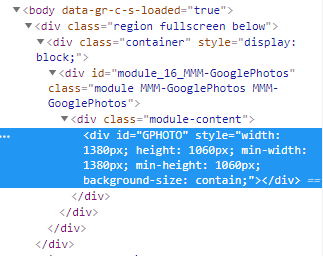
Inspector shows it loads the module but not an actual photo.Any help would be greatly appreciated.
-
@krouton
Move to some smaller folder than try again. 3000 would be so many photos, and ther could be more in your subdirectories. -
@krouton
By the way, sorry for out of topic, but…
RCREPO seems too many times working. Scanning should be executed at start of MM once. Why did the log say so many times?
Would you try again after removingMMM-Remote-Control-Repositoryfrom config.js?? -
@Sean , thanks a ton for this great module. My wife would have never been ok with a Smart display in our family room without having family pictures on it.
I have MMM-Google photos on full screen mode (monitor is in portrait mode). It works perfectly as expected - although the pictures come up as pixelated or not as sharp in lower resolution. All photos in my configured album are uploaded in full resolution. Is there any way to display it in high(est/er) resolution?My configuration is as below:-
{ module: "MMM-GooglePhotos", position: "fullscreen_below", config: { albumId: "XXXXX", // your album id from result of `auth_and_test.js` refreshInterval: 1000*60, scanInterval: 1000*60*10, // too many scans might cause API quota limit also. //note(2018-07-29). It is some weird. API documents said temporal image url would live for 1 hour, but it might be broken shorter. So, per 10 min scanning could prevent dead url. sort: "random", //'time', 'reverse', 'random' showWidth: "100%", // how large the photo will be shown as. (e.g;'100%' for fullscreen) showHeight: "100%", originalWidthPx: 1920, // original size of loaded image. (related with image quality) originalHeightPx: 1080, // Bigger size gives you better quality, but can give you network burden. mode: "hybrid", // "cover" or "contain" (https://www.w3schools.com/cssref/css3_pr_background-size.asp) //ADDED. "hybrid" : if you set as "hybrid" it will change "cover" and "contain" automatically by aspect ratio. } }, -
@yupwho - Hmm. If you uploaded at full resolution, they are probably higher than 1920x1080. Specifying those parameters may be causing some weird resizing artifacts.
As an experiment, trying taking out the
orginalWidthPixandoriginalHeightPxparameters and see what you get. -
@bhepler Thanks! Removing it seemed to worsen the quality. I think I am going to experiment with different values here - https://en.wikipedia.org/wiki/Display_resolution#Common_display_resolutions.
I have tried the 2560*1440 and it looks little bit better.Still looking if there is a more definite solution.
Thanks!
-
@yupwho
SetoriginalWidthPxandoriginalHeightPxto higher value.But dithering would be unescapable destiny. Because Max Screen Size of supported in RPI would be 1920*1080 and your pictures are larger than, so Dithering should be happened.
Usually Dithering - Scaling up/down, by index of 2 (e.g: X2, X4, X1/2, X1/4) would be better than other values.
So, dithering to 800X480 from 1600x960 could be better from 2000X1200.And I think the best values would be the same size to display.
Because, if dithering would be happened, it would be done twice - once when your Google Photo send picture to RPI by OriginalWidth/Height and once again when my module showing it by showWidth/Height.
So, The best case would be all the same sizes - your picture original, OriginalWidth/Height, showWidth/Height are same. In other case, somewhat quality down is unavoidable. My module has no correction/manipulation method because this is not photoshop. sorry. -
@sean Thanks for the details - agreed! I am going to experiment with various config values and picture types. Awesome work with the module - works out of the box as expected!
-
I have been messing around with this module for a couple of days now and am really impressed with the way it works and the aspect ratio switching. I have a question though about the way the module displays pictures with borders. Would there be a way to either: display the image at the top of the frame and leave all of the black space below the image, or display two landscape images on top of each other instead of bordering the images?
Thanks for any help with this.
-
@joeysface
Sorry for my poor English, I have a trouble to catch your points. If you can show me the example (simple image??) It will be a help. -
I actually figured out one of my questions yesterday. I use this in the top right corner with a portrait aspect ratio. when a landscape photo would come up it would put the black bars on the top and bottom (I use the hybrid mode). I wanted to put the photo at the top of the container and put all the black space below the image. I was able to edit the css file to get it to work for me.
-
Hee guys.
Any ideas why my magic mirror states that my config is corrupt after adding this module?
Raspberry 2 | Stretch | magic Mirror latest version
{
module: “MMM-GooglePhotos”,
position: “middle_center",
config: {
albumId: ["AN6D9_GC-eRw0Irq8BcuhBxYfwuHZPFlJpTKYbqRnR9xyHjFq3TjVVxzky9KqLEOxObDA4OFnB__”,"AN6D9_F2ZLhUpV8VrpCrp3MrQUh-D55YYop_hGeiMGtLMpMc_xNPI1IlGo5T7slIJRVfuyaS0jih”,“AN6D9_GByr6yyN-z5-VPgi_pxkG5KgBlWJZHwGzo3vHq_zwrxfYbudBygs0ePyzJmKRA-SQHl9Te”,“AN6D9_E6es9RyinVq9QoKxPU74pk-31H30p5sJW10o3YnzgDN33t6t-ZJRtb8PU2yPy4gKTpfBAM,AN6D9_GIGBaR1eBmI7ZUbneL8uq1dEfnVkcUlXKW0MnE-IZUSP7Kkg0mES07ah7rZtLxF6UHRSX3,AN6D9_Hr6iGqqA53-rOyZIESc-t9yFb4I_GF7ezQj1R-CSB2IVdzLRC_NpLgM3lMofKSM-TJjDkf”,“AN6D9_GIMMbpzErGJt5Z-bUB6HMDv5gKj44rZijAh_ynexuNxgJsyJ87jIBD4dp7aijzSaT8Dg7Z”,"AN6D9_EOTPePHltV88tdnuUi3nZOuNc3Luwg91K0wW4ikUrkDaLqGTYGyKbS1hmtA6bRSIp3d0bb”,“AN6D9_FiggE1yD2va8H3m7hLd_R2Ru_VfOYTxTZi6GNhlwbnw2hCVU9emnExm-9OqMps1RGH6xUU”], // your album id(s) from result ofauth_and_test.js
refreshInterval: 100060,
scanInterval: 100060*10, // too many scans might cause API quota limit also.
//note(2018-07-29). It is some weird. API documents said temporal image url would live for 1 hour, but it might be broken shorter. So, per 10 min scanning could prevent dead url.sort: "time", //'time', 'reverse', 'random' showWidth: "800px", // how large the photo will be shown as. (e.g;'100%' for fullscreen) showHeight: "600px", originalWidthPx: 800, // original size of loaded image. (related with image quality) originalHeightPx: 600, // Bigger size gives you better quality, but can give you network burden. mode: "hybrid", // "cover" or "contain" (https://www.w3schools.com/cssref/css3_pr_background-size.asp) //ADDED. "hybrid" : if you set as "hybrid" it will change "cover" and "contain" automatically by aspect ratio.}
},Appreciate your help! Thanks
-
@taxandria
I see that there is a comma missing at line 10 in between the || needs to be a comma.sort: "time", //'time', 'reverse', 'random'|,|I’m also not sure about the difference between ” and " (notice the slight angle) being a problem or not.
p.s. It’s pretty hard to read the code when only half of it is properly styled.
-
@Sean
Is there a way to use this as fullscreen and have all the other modules still readable by putting a dark mask behind them? -
@teitlebot set view position to “fullscreen_below” and modify css to add background to other modules.
-
@yupwho any luck with the dithering issue? I seem to be getting them on specific pictures although im not sure why just those.
-
Hi Thank you so much for creating this module I have set it up and been loving it!
The only issue I am having, however, is that when switching between images the module will fade to black for a second before going to the next photo.
Is it possible to remove this behavior and instead fade directly to the next image?
Thank you so much for the help!
-
@BryceTalbot
Possible by modifying source (showImage()of MMM-GooglePhotos) but not recommended. Because each picture size would be different, So the transition will make some annoying distortion on showing/hiding. -
@Sean
Any idea how I can get the monitor to rotate like this guy did except I want to use google photos? He created the code for arduino to rotate but the pi has to send a signal based on rotation of the photo.
https://hackaday.io/project/16291-flipframe
Hello! It looks like you're interested in this conversation, but you don't have an account yet.
Getting fed up of having to scroll through the same posts each visit? When you register for an account, you'll always come back to exactly where you were before, and choose to be notified of new replies (either via email, or push notification). You'll also be able to save bookmarks and upvote posts to show your appreciation to other community members.
With your input, this post could be even better 💗
Register Login