MagicMirror Forum
    • Recent
    • Tags
    • Unsolved
    • Solved
    • MagicMirror² Repository
    • Documentation
    • 3rd-Party-Modules
    • Donate
    • Discord
    • Register
    • Login
    A New Chapter for MagicMirror: The Community Takes the Lead
    Read the statement by Michael Teeuw here.

    Wrong font in newsfeed

    Scheduled Pinned Locked Moved Custom CSS
    10 Posts 6 Posters 3.8k Views 5 Watching
    Loading More Posts
    • Oldest to Newest
    • Newest to Oldest
    • Most Votes
    Reply
    • Reply as topic
    Log in to reply
    This topic has been deleted. Only users with topic management privileges can see it.
    • MarosM Offline
      Maros
      last edited by Maros

      Hi all,

      i’ve added some modules to my MM and i see that there is some problem with fonts as you can see some characters have different font. (most visible in newsfeed)

      i’ve edited custom.css and added this lines :
      body {
      @font-face {
      font-family: “Verdana”;
      font-style: normal;
      font-weight: 100;
      src:
      local(“Verdana”),
      url(“/fonts/Verdana.ttf”) format(“truetype”);
      },
      .newsfeed {
      font-family: Verdana;
      },
      }

      i’ve downloaded font Verdana.ttf and copied to MagicMirror/fonts folder
      but it’s not working font is still not ok
      Can you please help me how to solve this problem ?
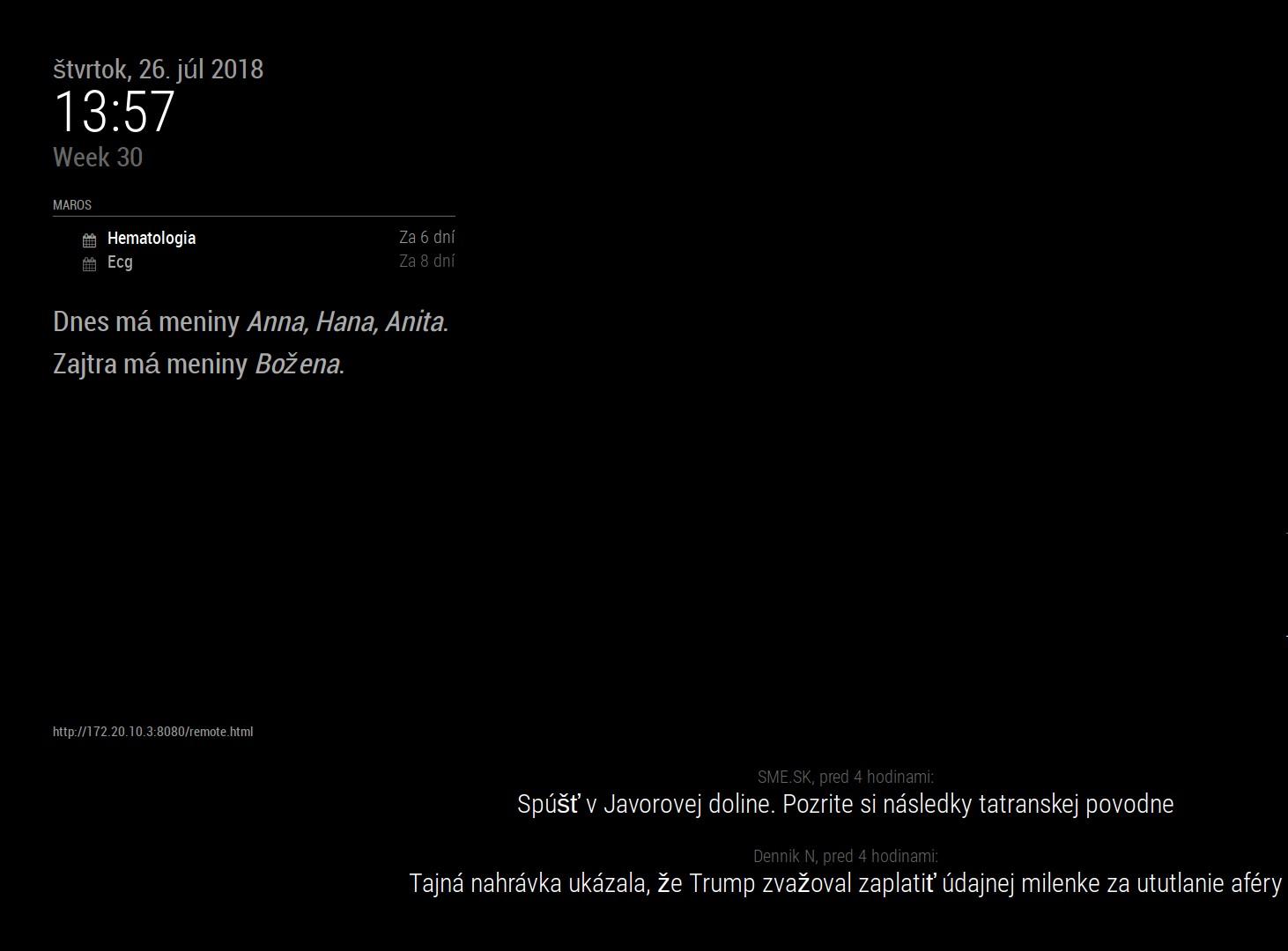
      0_1532607723631_screen_test.jpg

      1 Reply Last reply Reply Quote 0
      • MarosM Offline
        Maros
        last edited by

        i’ve tried also woff font Verdana.woff as mentioned here :
        https://forum.magicmirror.builders/topic/4824/i-need-help-to-change-the-fonts/3

        but it’s also not working at all :(

        1 Reply Last reply Reply Quote 0
        • MarosM Offline
          Maros
          last edited by

          Noone any idea?

          1 Reply Last reply Reply Quote 0
          • D Offline
            davidnesbitt7
            last edited by

            Open up your console in dev tools and see if you’re getting any errors

            Do. Or do not. There is no try

            brobergB 1 Reply Last reply Reply Quote 0
            • brobergB Offline
              broberg Project Sponsor @davidnesbitt7
              last edited by broberg

              Folder path is misdirected, try this

              body {
              @font-face {
              font-family: “Verdana”;
              font-style: normal;
              font-weight: 100;
              src:
              local(“Verdana”),
              url("../fonts/Verdana.ttf") format(“truetype”);
              },
              .newsfeed {
              font-family: Verdana;
              }, 
              }
              
              1 Reply Last reply Reply Quote 0
              • MarosM Offline
                Maros
                last edited by Maros

                @broberg said in Wrong font in newsfeed:

                @font-face {
                font-family: “Verdana”;
                font-style: normal;
                font-weight: 100;
                src:
                local(“Verdana”),
                url(“…/fonts/Verdana.ttf”) format(“truetype”);
                },
                .newsfeed {
                font-family: Verdana;
                },

                i’ve tried but still same

                @davidnesbitt7 i’ve checked error log on pm2 but there nothing mentioned about rss feed font error

                1 Reply Last reply Reply Quote 0
                • C Offline
                  cabott
                  last edited by cabott

                  @maros Did you fix this issue? I’ve encountered the same with Polish news…

                  edit:
                  solved by installing Roboto fonts into Raspbian (found somewhere here at the forum or in the Internet).

                  R 1 Reply Last reply Reply Quote 0
                  • R Offline
                    radokristof @cabott
                    last edited by

                    @cabott I have the same problems. Some characters are not showing properly only on the newsfeed module.
                    I have tried installing roboto fonts with apt, how did you installed it? (And which package).

                    C 1 Reply Last reply Reply Quote 0
                    • C Offline
                      cabott @radokristof
                      last edited by

                      @radokristof sorry for late answer, I completely missed this topic. For those who still had this issue:
                      I just installed the fonts with

                      sudo apt-get update
                      sudo apt-get install fonts-roboto
                      

                      then

                      fc-cache -fv
                      pm2 restart MagicMirror
                      

                      and voila… works for me.

                      1 Reply Last reply Reply Quote 1
                      • F Offline
                        Fifin404
                        last edited by

                        Work for me. Thank you

                        1 Reply Last reply Reply Quote 0

                        Hello! It looks like you're interested in this conversation, but you don't have an account yet.

                        Getting fed up of having to scroll through the same posts each visit? When you register for an account, you'll always come back to exactly where you were before, and choose to be notified of new replies (either via email, or push notification). You'll also be able to save bookmarks and upvote posts to show your appreciation to other community members.

                        With your input, this post could be even better 💗

                        Register Login

                        • 1 / 1
                        • First post
                          Last post
                        Enjoying MagicMirror? Please consider a donation!
                        MagicMirror created by Michael Teeuw.
                        Forum managed by Sam, technical setup by Karsten.
                        This forum is using NodeBB as its core | Contributors
                        Contact | Privacy Policy