MagicMirror Forum
    • Recent
    • Tags
    • Unsolved
    • Solved
    • MagicMirror² Repository
    • Documentation
    • 3rd-Party-Modules
    • Donate
    • Discord
    • Register
    • Login
    A New Chapter for MagicMirror: The Community Takes the Lead
    Read the statement by Michael Teeuw here.

    Head first developing MM module for extreme beginners

    Scheduled Pinned Locked Moved Development
    27 Posts 9 Posters 24.6k Views 12 Watching
    Loading More Posts
    • Oldest to Newest
    • Newest to Oldest
    • Most Votes
    Reply
    • Reply as topic
    Log in to reply
    This topic has been deleted. Only users with topic management privileges can see it.
    • cowboysdudeC Offline
      cowboysdude Module Developer @StuGrunt
      last edited by

      @StuGrunt said in Head first developing MM module for extreme beginners:

      It is because there is an error (at least I think so - I am new too) and no instructions on where to put the function.

      1. change the Module.register(“MMM-Timetable”) to Module.register(“MMM-Test”)

      2. The article does not tell you where to put the getDom function when it is first introduced. Replace the getDom: function() {}. with the code shown. In other words, don’t just add it to the file. This article would have benefited from a final section that gave the entire code.

      I think the original author at least expected us to be very familiar with Node.js (fair enough), but alas, I am not so it took a bit of work to figure it out. :-)

      Here it is, for the first part:

      Module.register(“MMM-Test”, {
      defaults: {},
      start: function () {},

      getDom: function() {
      var element = document.createElement(“div”)
      element.className = “myContent”
      element.innerHTML = “Hello, World!”
      return element
      },
      notificationReceived: function() {},
      socketNotificationReceived: function() {},
      })
      _

      Both of those functions go outside the getDom function pretty much anywhere you want to put them.

      The socketNotificationReceived function [example below, can be used in either node_helper OR your main.js file. The example below is in my node_helper] :

      socketNotificationReceived: function(notification, payload) {
      		if (notification === 'CONFIG') {
                  this.config = payload; 
              }
              if (notification === 'GET_CURRENT') {
                  this.getCurrent(payload);
              }
              if (notification === 'GET_FORECAST') {
                  if (this.forecast.timestamp === this.getDate() && this.forecast.data !== null) {
                      this.sendSocketNotification('FORECAST_RESULT', this.forecast.data); 
                      console.log("Using data we already have");
                  } else { 
                      this.getForecast();
      				console.log("Getting new data");
                  }
              }
      		
          }
      

      Here is the corresponding one in the main.js

      socketNotificationReceived: function(notification, payload) {
              if (notification === "CURRENT_RESULT") {
                  this.processCurrent(payload);
              }
              if (notification === "FORECAST_RESULT") {
                  this.processForecasts(payload);
              }
      		this.updateDom(this.config.initialLoadDelay);
          },
      

      You can use notificationReceived to receive info from other modules like this:

      Here are examples of that:

      notificationReceived: function (notification, payload){ 
              if (notification === 'CURRENT_RESULT') {
      			this.processCurrent(payload); 
              }
      	},
      
      this.sendNotification('CURRENT_RESULT', payload);
      

      This is how I send and receive my ‘payload’ from one module to another.
      The first example is getting my ‘CURRENT_RESULT’ [getting info for a Forecast module from the Current weather module] from the bottom example that is
      sending out ‘CURRENT_RESULT’…

      The bottom example will ‘broadcast’ and in reality ANY module can get the data it’s sending out.

      Hope this helps. It’s a really simple process.

      1 Reply Last reply Reply Quote 1
      • S Offline
        Schmaniel
        last edited by Schmaniel

        How can I test the getDom() html output?
        I don’t want to restart MM every time when I change something just to look if it worked.

        S 1 Reply Last reply Reply Quote 0
        • S Do not disturb
          sdetweil @Schmaniel
          last edited by

          @Schmaniel ctrl-r to reload the screen

          Sam

          How to add modules

          learning how to use browser developers window for css changes

          1 Reply Last reply Reply Quote 2
          • N Offline
            nrayever @sdetweil
            last edited by

            @sdetweil … ok.

            D 1 Reply Last reply Reply Quote 0
            • D Offline
              Dobi @nrayever
              last edited by Dobi

              Hey guys,

              I’m quite new in developing an own module. I was able to change exiting modules on my magic mirror but now I wanted to create my own module, but I’m not able to get socket communication between my “main” module an the “helper-function”

              I uploaded my module here:
              https://github.com/Dobherrmann/MMM_Testmodul.git
              my Module looks like this on my magic mirror:
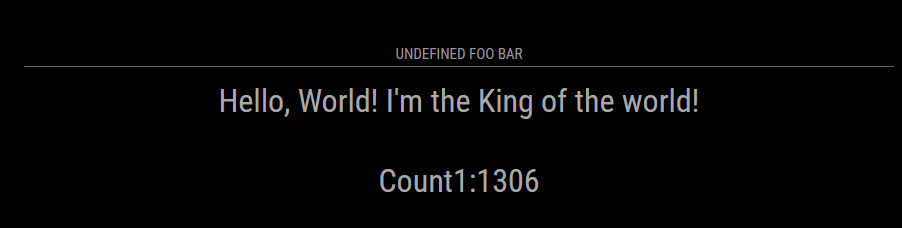
              8f60324c-9269-4d1c-b5ae-0e337b316361-grafik.png
              maybe someone can find my mistake(s).

              BR

              S 1 Reply Last reply Reply Quote 0
              • S Do not disturb
                sdetweil @Dobi
                last edited by sdetweil

                @dobi two things

                when the DomObject Created method is called, its POSSIBLE that the elements are not yet accessible… so your code fails as the document.getElementbyID returns null…

                second, do you have a position: set in the module def in config.js?

                third and MOST important

                the module NAME must match the folder name AND the filename and the register in the file…

                so, the filename is MMM-cookbook.js
                therefore ALL the things must be called MMM-cookbook

                git clone will name the folder the name of the github repo
                (unless u add an extra part to git clone repo_url output_folder_name)

                I fixed all those and the module displays the countdown/up each second

                Sam

                How to add modules

                learning how to use browser developers window for css changes

                D 1 Reply Last reply Reply Quote 0
                • D Offline
                  Dobi @sdetweil
                  last edited by

                  @sdetweil ahh thank you for these information I will give it a try.

                  1 Reply Last reply Reply Quote 0
                  • D Offline
                    Dobi
                    last edited by

                    @sdetweil I gave it a try but without differences :(
                    I made a new git repo : https://github.com/Dobherrmann/MMM-cookbook.git
                    Now there I should have the same name in the repo like my module.

                    my config. js looks like this (I gave it a position):

                     {
                          module: "MMM-cookbook",
                          position: "middle_center",
                          config: {
                            header: "My Cookbook",
                            foo: "I'm the King of the world!"
                          }
                        },
                    

                    I started to debug “my code” a little bit and I found this when I want to send a socket notification:

                    self.sendSocketNotification("DO_YOUR_JOB", this.count);
                    					console.log("Notfication", this.sendSocketNotification("DO_YOUR_JOB", this.count))
                    					this.sendSocketNotification("DO_YOUR_JOB", this.count)
                    					this.subElementUp.innerHTML = "Count UP:" + this.count
                    

                    On my console i get the feedback that “this.sendSocketNotification(“DO_YOUR_JOB”, this.count” is undefined. It looks like that this function is unkown.

                    S 1 Reply Last reply Reply Quote 0
                    • S Do not disturb
                      sdetweil @Dobi
                      last edited by sdetweil

                      @dobi u are inside a callback. change the ‘this’ to ‘self’ like the self.sendSocketNotification

                      ‘this’ is always tricky. depends on the context, and some of the programming idioms used

                      that’s why we typically see
                      var self = this;
                      at the beginning of functions that have callbacks or .then() used inside

                      Sam

                      How to add modules

                      learning how to use browser developers window for css changes

                      D 1 Reply Last reply Reply Quote 0
                      • D Offline
                        Dobi @sdetweil
                        last edited by

                        @sdetweil ok, but it dosen’t change something.

                        notificationReceived: function (notification, payload, sender) {
                        		self = this;
                        		switch (notification) {
                        			case "DOM_OBJECTS_CREATED":
                        				var timer = setInterval(() => {
                        					//this.updateDom()
                        					self.sendSocketNotification("DO_YOUR_JOB", this.count);
                        					console.log(`self.sendSocketNotification("DO_YOUR_JOB", this.count)`, self.sendSocketNotification("DO_YOUR_JOB", this.count))
                        					self.sendSocketNotification("DO_YOUR_JOB", this.count)
                        					this.subElementUp.innerHTML = "Count UP:" + this.count
                        					this.count++
                        				}, 1000)
                        				break
                        		}
                        	},
                        

                        Now i could post a picture of my console
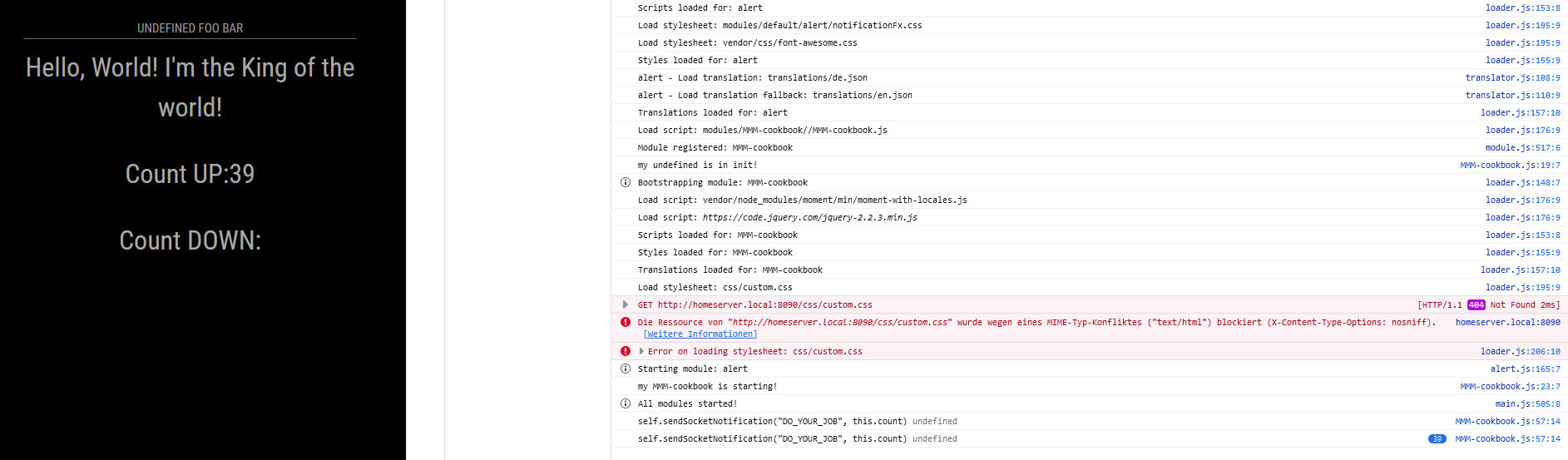
                        875c1b85-daa2-4374-b4d3-c833268e7387-grafik.png

                        S 2 Replies Last reply Reply Quote 0
                        • S Do not disturb
                          sdetweil @Dobi
                          last edited by sdetweil

                          @dobi show the source code page. u had to fix both counters

                          sources tab, modules, mmm-cookbook, mmm-cookbook.js

                          Sam

                          How to add modules

                          learning how to use browser developers window for css changes

                          1 Reply Last reply Reply Quote 0
                          • S Do not disturb
                            sdetweil @Dobi
                            last edited by sdetweil

                            @dobi

                            self.sendSocketNotification("DO_YOUR_JOB", this.count)
                            

                            but u didn’t change this.count to self.count
                            in all the places

                            Sam

                            How to add modules

                            learning how to use browser developers window for css changes

                            D 1 Reply Last reply Reply Quote 0
                            • D Offline
                              Dobi @sdetweil
                              last edited by

                              @sdetweil I replaced all this. … calls to self. … but I don’t get a change. Is there a way that I can check to check that I can check that the function is loaded correctly from the kernal?

                              S 1 Reply Last reply Reply Quote 0
                              • S Do not disturb
                                sdetweil @Dobi
                                last edited by sdetweil

                                @dobi view the source in the dev window

                                what u showed above is not changed

                                Sam

                                How to add modules

                                learning how to use browser developers window for css changes

                                D 1 Reply Last reply Reply Quote 0
                                • D Offline
                                  Dobi @sdetweil
                                  last edited by

                                  @sdetweil
                                  sorry I only updated it on github

                                  
                                  notificationReceived: function (notification, payload, sender) {
                                  		var self = this;
                                  		switch (notification) {
                                  			case "DOM_OBJECTS_CREATED":
                                  				var timer = setInterval(() => {
                                  					//this.updateDom()
                                  					self.sendSocketNotification("DO_YOUR_JOB", self.count);
                                  					console.log(`self.sendSocketNotification("DO_YOUR_JOB", this.count)`, self.sendSocketNotification("DO_YOUR_JOB", self.count))
                                  					self.sendSocketNotification("DO_YOUR_JOB", self.count)
                                  					self.subElementUp.innerHTML = "Count UP:" + self.count
                                  					self.count++
                                  				}, 1000)
                                  				break
                                  		}
                                  	},
                                  
                                  
                                  S 1 Reply Last reply Reply Quote 0
                                  • S Do not disturb
                                    sdetweil @Dobi
                                    last edited by

                                    @dobi and in the console.log too

                                    Sam

                                    How to add modules

                                    learning how to use browser developers window for css changes

                                    D 1 Reply Last reply Reply Quote 1
                                    • D Offline
                                      Dobi @sdetweil
                                      last edited by

                                      @sdetweil Hey sorry for my quite late response. But I wanted to tell you that I found my error it was quite stupid. I had to restart my raspi. After a restart the node_helper worked fine :)
                                      I wrote my first module.

                                      Thanks for your patient

                                      S cowboysdudeC 2 Replies Last reply Reply Quote 2
                                      • S Do not disturb
                                        sdetweil @Dobi
                                        last edited by

                                        @dobi glad you found it… so much fun!!

                                        Sam

                                        How to add modules

                                        learning how to use browser developers window for css changes

                                        1 Reply Last reply Reply Quote 1
                                        • cowboysdudeC Offline
                                          cowboysdude Module Developer @Dobi
                                          last edited by

                                          @dobi See you can do it! Great job and glad that it all worked out for you! :) This is what this project is about…learning.

                                          NOW you can make your mirror your own by showing information that you want and/or need to see…

                                          1 Reply Last reply Reply Quote 0
                                          • R Offline
                                            riich
                                            last edited by

                                            Anyone have an idea on how to display an image instead of a line. I downloaded a jpeg image of a dog and I would like to display that instead of

                                            1 Reply Last reply Reply Quote 0

                                            Hello! It looks like you're interested in this conversation, but you don't have an account yet.

                                            Getting fed up of having to scroll through the same posts each visit? When you register for an account, you'll always come back to exactly where you were before, and choose to be notified of new replies (either via email, or push notification). You'll also be able to save bookmarks and upvote posts to show your appreciation to other community members.

                                            With your input, this post could be even better 💗

                                            Register Login

                                            • 1
                                            • 2
                                            • 1 / 2
                                            • First post
                                              Last post
                                            Enjoying MagicMirror? Please consider a donation!
                                            MagicMirror created by Michael Teeuw.
                                            Forum managed by Sam, technical setup by Karsten.
                                            This forum is using NodeBB as its core | Contributors
                                            Contact | Privacy Policy