MagicMirror Forum
    • Recent
    • Tags
    • Unsolved
    • Solved
    • MagicMirror² Repository
    • Documentation
    • 3rd-Party-Modules
    • Donate
    • Discord
    • Register
    • Login
    A New Chapter for MagicMirror: The Community Takes the Lead
    Read the statement by Michael Teeuw here.

    how to pull new element added to an array?

    Scheduled Pinned Locked Moved Solved Troubleshooting
    57 Posts 4 Posters 25.5k Views 4 Watching
    Loading More Posts
    • Oldest to Newest
    • Newest to Oldest
    • Most Votes
    Reply
    • Reply as topic
    Log in to reply
    This topic has been deleted. Only users with topic management privileges can see it.
    • justjim1220J Offline
      justjim1220 Module Developer @sdetweil
      last edited by

      @sdetweil

       start: function () {
              Log.info("Starting module: " + this.name);
      
              // Set locale.
              moment.locale(config.language);
      
              this.newsItems = [];
              this.loaded = false;
              this.activeItem = 0;
              this.scrollPosition = 0;
      
              this.registerFeeds();
      
      		"use strict";
      
              this.isShowingDescription = this.config.showDescription;
          },
      

      "Life's Too Short To Dance With Ugly People"
      Jim Hallock - 1995

      S 1 Reply Last reply Reply Quote 0
      • justjim1220J Offline
        justjim1220 Module Developer @sdetweil
        last edited by

        @sdetweil

        this is the default MM newsfeed, I am trying to modify it to show different things.

        "Life's Too Short To Dance With Ugly People"
        Jim Hallock - 1995

        1 Reply Last reply Reply Quote 0
        • justjim1220J Offline
          justjim1220 Module Developer @sdetweil
          last edited by

          @sdetweil

          My last modification was this…

          https://forum.magicmirror.builders/assets/uploads/files/1539306174825-screenshot-140.png

          https://forum.magicmirror.builders/assets/uploads/files/1539306174825-screenshot-141.png

          https://forum.magicmirror.builders/assets/uploads/files/1539306174825-screenshot-142.png

          "Life's Too Short To Dance With Ugly People"
          Jim Hallock - 1995

          1 Reply Last reply Reply Quote 0
          • S Do not disturb
            sdetweil @justjim1220
            last edited by

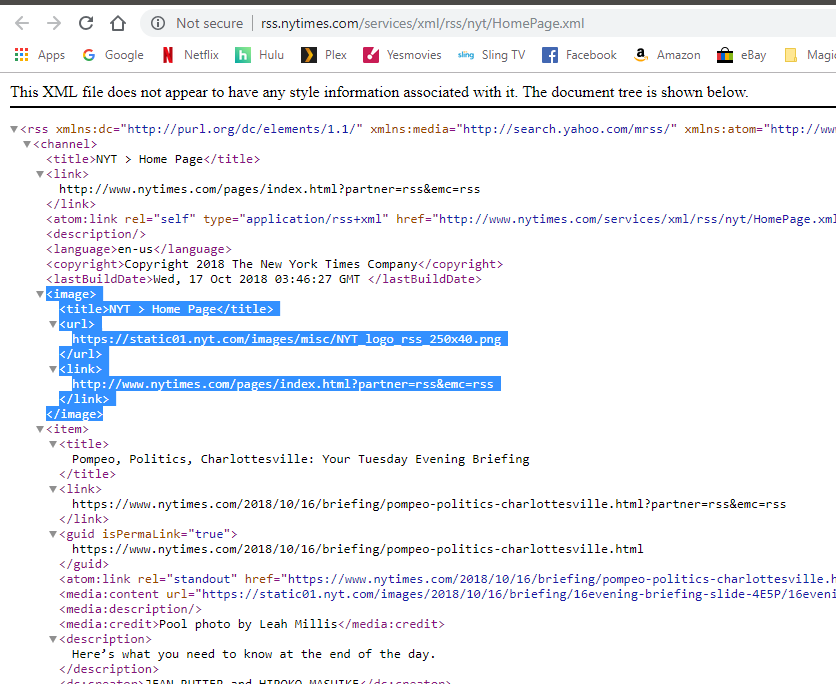
            @justjim1220 the problem is that the newsItems array is set from the rest api to pull the entries from the source. THAT data does NOT contain the icon you want to use.

            your feed DEFINITION does , but not the feed response data…

            so, can u tell from an item which ‘feeds’ entry caused this entry to be in the data? (ie, tell its source)… and can you search the feeds to locate the feed definition from any data in the item?

            once u can do that, then u can use the feed entry icon

            Sam

            How to add modules

            learning how to use browser developers window for css changes

            justjim1220J 2 Replies Last reply Reply Quote 0
            • justjim1220J Offline
              justjim1220 Module Developer @sdetweil
              last edited by

              @sdetweil

              Not quite sure I am following you correctly…
              Do you mean to pull the icon from the feeds source? the website?

              "Life's Too Short To Dance With Ugly People"
              Jim Hallock - 1995

              1 Reply Last reply Reply Quote 0
              • justjim1220J Offline
                justjim1220 Module Developer @sdetweil
                last edited by

                @sdetweil

                ok, so how would I be able to use the corresponding icons/images for the active feed showing if there isn’t any icon data in the rest API?

                "Life's Too Short To Dance With Ugly People"
                Jim Hallock - 1995

                S 1 Reply Last reply Reply Quote 0
                • S Do not disturb
                  sdetweil @justjim1220
                  last edited by

                  @justjim1220 you have to match up the feed definition (feeds array) with the element in the source response (newsItems array) somehow

                  the source does not send the icon back

                  Sam

                  How to add modules

                  learning how to use browser developers window for css changes

                  justjim1220J 2 Replies Last reply Reply Quote 0
                  • justjim1220J Offline
                    justjim1220 Module Developer @sdetweil
                    last edited by

                    @sdetweil

                    that’s because I don’t think the source has an icon to pull from it.

                    So, is there a way to put the icons in an image folder in the newsfeed directory and pull from there for each corresponding newsfeed?

                    "Life's Too Short To Dance With Ugly People"
                    Jim Hallock - 1995

                    1 Reply Last reply Reply Quote 0
                    • justjim1220J Offline
                      justjim1220 Module Developer @sdetweil
                      last edited by

                      @sdetweil

                      this is how I was able to modify the code to show a single icon and to get it to scroll across the screen

                      https://forum.magicmirror.builders/assets/uploads/files/1539381868184-screenshot-146.png

                      "Life's Too Short To Dance With Ugly People"
                      Jim Hallock - 1995

                      1 Reply Last reply Reply Quote 0
                      • S Do not disturb
                        sdetweil
                        last edited by

                        right… you hard coded it…

                        Sam

                        How to add modules

                        learning how to use browser developers window for css changes

                        justjim1220J 1 Reply Last reply Reply Quote 0
                        • justjim1220J Offline
                          justjim1220 Module Developer @sdetweil
                          last edited by

                          @sdetweil

                          So, is what I am wanting to do even possible?

                          "Life's Too Short To Dance With Ugly People"
                          Jim Hallock - 1995

                          S 1 Reply Last reply Reply Quote 0
                          • S Do not disturb
                            sdetweil @justjim1220
                            last edited by

                            @justjim1220 sure… just have to figure out how to find the feeds entry from the newsItem entry… you MAY/PROBABLY have to add something to the newsItem entries (every one) when they are placed in the newsItem array…

                            i can’t look at any of the rss code til thursday sometime…

                            Sam

                            How to add modules

                            learning how to use browser developers window for css changes

                            justjim1220J 1 Reply Last reply Reply Quote 0
                            • justjim1220J Offline
                              justjim1220 Module Developer @sdetweil
                              last edited by

                              @sdetweil

                              Is this what I am looking for?

                              0_1539748209164_Screenshot (383).png

                              "Life's Too Short To Dance With Ugly People"
                              Jim Hallock - 1995

                              ? 1 Reply Last reply Reply Quote 0
                              • S Do not disturb
                                sdetweil
                                last edited by

                                Note that that data is not part of the item. What code moves the xml to the Json object you are accessing?

                                Sam

                                How to add modules

                                learning how to use browser developers window for css changes

                                S 1 Reply Last reply Reply Quote 0
                                • S Do not disturb
                                  sdetweil @sdetweil
                                  last edited by sdetweil

                                  looking at the code on my phone, the fetcher.js needs another method to parse out the source icon.

                                  parser.on("image", function(image){})
                                  

                                  To set a variable with the icon url,
                                  That u can use in the

                                  parser.on("item", function(item)
                                  

                                  To add the icon url to each item to be able to use it during the display process

                                  Sam

                                  How to add modules

                                  learning how to use browser developers window for css changes

                                  1 Reply Last reply Reply Quote 0
                                  • ? Offline
                                    A Former User @justjim1220
                                    last edited by

                                    @justjim1220
                                    But not all RSS would have that channel.image. that is optional.

                                    justjim1220J 1 Reply Last reply Reply Quote 1
                                    • justjim1220J Offline
                                      justjim1220 Module Developer @Guest
                                      last edited by justjim1220

                                      @sdetweil @sean

                                      SO, I changed this part of the fetcher, but, after reading your posts, I am not sure if this is what you are talking about…

                                      parser.on("item", function(item) {
                                      
                                      			var title = item.title;
                                      			var image = item.image || item.logo || item.img || item.svg || "";
                                      			var description = item.description || item.summary || item.content || "";
                                      			var pubdate = item.pubdate || item.published || item.updated || item["dc:date"];
                                      			var url = item.url || item.link || "";
                                      
                                      			if (title && pubdate) {
                                      
                                      				var regex = /(<([^>]+)>)/ig;
                                      				description = description.toString().replace(regex, "");
                                      
                                      				items.push({
                                      					title: title,
                                      					image: image,
                                      					description: description,
                                      					pubdate: pubdate,
                                      					url: url,
                                      				});
                                      
                                      			} else if (logFeedWarnings) {
                                      				console.log("Can't parse feed item:");
                                      				console.log(item);
                                      				console.log("Title: " + title);
                                      				console.log("Image: " + image);
                                      				console.log("Description: " + description);
                                      				console.log("Pubdate: " + pubdate);
                                      			}
                                      		});
                                      

                                      It is looking like you are telling me I need to add a new section to the fetcher similar to this, but starting with

                                      parser.on("image", function(image){})
                                      			var title = image.title;
                                      			var image = image.image || image.logo || image.img || image.svg || "";
                                      			var url = image.url || image.link || "";
                                      

                                      and would I also need this part?

                                                              if (image&& url) {
                                      
                                      				var regex = /(<([^>]+)>)/ig;
                                      				description = description.toString().replace(regex, "");
                                      
                                      				images.push({
                                      					title: title,
                                      					image: image,
                                      					url: url,
                                      				});
                                      
                                      			} else if (logFeedWarnings) {
                                      				console.log("Can't parse feed item:");
                                      				console.log(item);
                                      				console.log("Title: " + title);
                                      				console.log("Image: " + image);
                                      				console.log("Description: " + description);
                                      				console.log("Pubdate: " + pubdate);
                                      			}
                                      		});
                                      

                                      And, would this be the way to add the image url in the config…

                                                              {
                                                                      imageUrl: "https://static01.nyt.com/images/misc/NYT_logo_rss_250x40.png",
                                                                      title: "New York Times",
                                      				url: "http://www.nytimes.com/services/xml/rss/nyt/HomePage.xml"
                                                              },
                                      			{
                                                                      imageUrl: "http://online.wsj.com/img/wsj_sm_logo.gif",
                                      				title: "Wall St. Journal",
                                      				url: "http://www.wsj.com/xml/rss/3_7085.xml"
                                      			},
                                      			{
                                                                      imageUrl: "http://www.gannett-cdn.com/sites/usatnetwork/images/RSS_Syndication_Logo-USATN.png",
                                      				title: "USA Today",
                                      				url: "http://rssfeeds.usatoday.com/UsatodaycomNation-TopStories"
                                      			},
                                      			{
                                                                      imageUrl: "https://news.bbcimg.co.uk/nol/shared/img/bbc_news_120x60.gif",
                                      				title: "BBC World News",
                                      				url: "http://feeds.bbci.co.uk/news/world/rss.xml#"
                                      			}
                                      

                                      Sorry, for all the questions, just really trying to learn all this…
                                      AND, thanks for all your help!!! :smiling_face_with_sunglasses:

                                      "Life's Too Short To Dance With Ugly People"
                                      Jim Hallock - 1995

                                      1 Reply Last reply Reply Quote 0
                                      • S Do not disturb
                                        sdetweil
                                        last edited by sdetweil

                                        ok, then to use the definition in the feed entry
                                        modify the node helper

                                        			fetcher = new Fetcher(url, reloadInterval, encoding, config.logFeedWarnings);
                                        
                                        			fetcher.onReceive(function(fetcher) {
                                                                        // add code here to run thru the array of feed response items and add the icon url to each entry..
                                                                        // the feed definition was passed in as parm to the containing method..   because this is a callback, you will probably have to bind the feed definition to this function
                                                                        for( var item in fetcher.items())
                                                                        {
                                                                             item.icon=this.feed_def.icon;
                                                                         }
                                        				self.broadcastFeeds();
                                        			}.bind({feed_def:feed}))
                                        

                                        Sam

                                        How to add modules

                                        learning how to use browser developers window for css changes

                                        justjim1220J 1 Reply Last reply Reply Quote 0
                                        • justjim1220J Offline
                                          justjim1220 Module Developer @sdetweil
                                          last edited by

                                          @sdetweil

                                          well, sort of lost me there, but also getting a headache.

                                          Gotta run some errands, I’ll look at it some more after a while.

                                          AGAIN, THANK YOU for all the help!!!

                                          "Life's Too Short To Dance With Ugly People"
                                          Jim Hallock - 1995

                                          1 Reply Last reply Reply Quote 0
                                          • S Do not disturb
                                            sdetweil
                                            last edited by sdetweil

                                            @justjim1220 said in how to pull new element added to an array?:

                                            var image = item.image || item.logo || item.img || item.svg || “”;

                                            that looks good, except as you note, these are optional in the response (item) data.

                                            do you want to use the configured url for the feed if not present?

                                            var image = item.image || item.logo || item.img || item.svg || xxxx.yyy.icon || "";
                                            

                                            the feed definition is passed into the fetcher function. except that routine could have ended seconds ago, when the parser.on(item) method is called (by the callback)…

                                            so, what should xxxx.yyy be? can’t use the parm feed directly, as the routine could have exited already…

                                            so, javascript gives you the ability to bind (connect) a variable with a routine when it is called asyncronously…

                                            when u bind the variable, it will be accessible in the context of the function, context = this,

                                            so, on the close brace of the function defined on the .on(), add the .bind() clause.

                                            inside the bind clause, you specify the name of the variable INSIDE the function, and connect it to the variable at the time the .on() definition is called… (ie ‘feed’)…

                                            so,

                                            }.bind({feed_var_in_function:feed})
                                            

                                            then when the function is called, you can get access to the variable using ‘this’…

                                            this.feed_var_in_function.icon, would be the icon defined for THIS feed

                                            therefore the stmt above would be

                                            var image = item.image || item.logo || item.img || item.svg || this.feed_var_in_function.icon || "";
                                            

                                            this says, use any of the optional images in the feed item, if present,
                                            else use the user defined feed icon,
                                            else nothing if not defined…

                                            Sam

                                            How to add modules

                                            learning how to use browser developers window for css changes

                                            justjim1220J 1 Reply Last reply Reply Quote 0

                                            Hello! It looks like you're interested in this conversation, but you don't have an account yet.

                                            Getting fed up of having to scroll through the same posts each visit? When you register for an account, you'll always come back to exactly where you were before, and choose to be notified of new replies (either via email, or push notification). You'll also be able to save bookmarks and upvote posts to show your appreciation to other community members.

                                            With your input, this post could be even better 💗

                                            Register Login


                                            • 1
                                            • 2
                                            • 3
                                            • 2 / 3
                                            • First post
                                              Last post
                                            Enjoying MagicMirror? Please consider a donation!
                                            MagicMirror created by Michael Teeuw.
                                            Forum managed by Sam, technical setup by Karsten.
                                            This forum is using NodeBB as its core | Contributors
                                            Contact | Privacy Policy