Read the statement by Michael Teeuw here.
Problem with the Module "email"
-
@sdetweil Sorry, but where do I have to execute the command.
Sorry, I’m really a beginner …
-
I hope this helps:
0|MagicMirror  | Email notifier error:  { Error: Please log in via your web browser: https://support.google.com/mail/accounts/answer/78754 (Failure)
0|MagicMirror  |     at Connection._resTagged (/home/pi/MagicMirror/modules/email/node_modules/imap/lib/Connection.js:1502:11)
0|MagicMirror  |     at Parser.<anonymous> (/home/pi/MagicMirror/modules/email/node_modules/imap/lib/Connection.js:194:10)
0|MagicMirror  |     at emitOne (events.js:116:13)
0|MagicMirror  |     at Parser.emit (events.js:211:7)
0|MagicMirror  |     at Parser._resTagged (/home/pi/MagicMirror/modules/email/node_modules/imap/lib/Parser.js:175:10)
0|MagicMirror  |     at Parser._parse (/home/pi/MagicMirror/modules/email/node_modules/imap/lib/Parser.js:139:16)
0|MagicMirror  |     at Parser._tryread (/home/pi/MagicMirror/modules/email/node_modules/imap/lib/Parser.js:82:15)
0|MagicMirror  |     at TLSSocket.Parser._cbReadable (/home/pi/MagicMirror/modules/email/node_modules/imap/lib/Parser.js:53:12)
0|MagicMirror  |     at emitNone (events.js:106:13)
0|MagicMirror  |     at TLSSocket.emit (events.js:208:7) type: 'no', textCode: 'ALERT', source: 'authentication' }
That does not stop and it always comes back to the mistake itself
-
@cyrus1337 I don’t know anything about this module, but I would guess that your email config is wrong.
The error means the module failed parsing the email data, because there was a connection or permissions error (tls implies ssl connection problem)
-
I have the config as described on the page https://github.com/ronny3050/email-mirror
{ module: 'email', position: 'top_left', header: 'Email', config: { accounts: [ { user: 'name@gmail.com', password: 'pw', host: 'imap.gmail.com', port: 993, tls: true, authTimeout: 10000, numberOfEmails: 5, } ], fade: true, maxCharacters: 30 } }, -
@cyrus1337 and password: ‘pw’ where pw is YOUR EMAIL password, right?
And name@gmail.com is YOUR Gmail username
-
@sdetweil said in Problem with the Module "email":
@cyrus1337 and password: ‘pw’ where pw is YOUR EMAIL password, right?
And name@gmail.com is YOUR Gmail usernameGenau, das ist das Passwort für den Emailaccount.
Bei user habe ich meine Emailadresse angegeben.
-
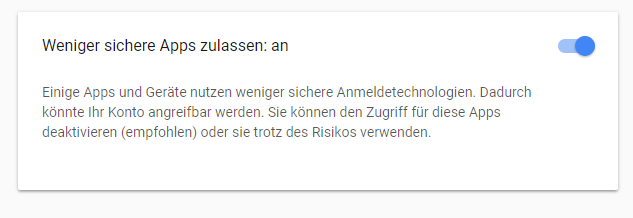
Did you set google security lower than the default. Something with allow third party apps?
-
@cirdan said in Problem with the Module "email":
Did you set google security lower than the default. Something with allow third party apps?
Yey, i have set
-
@cyrus1337 its an authentication problem. My best guess is an error in typing your userid or password. You can try it with username, without the @gmail.com part
-
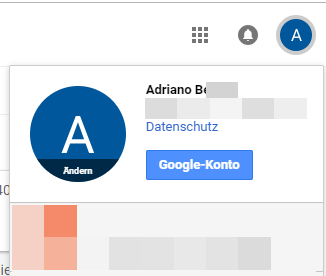
@cirdan Ok, you mean I should just enter the name: Adriano B …
-
@cyrus1337 what I mean is e.g. your email is namexxx@gmail.com that you use namexxx as an username in the config. I remember playing with that when getting to module to work
-
@cirdan I did that. My username in config is adriano.b .....@gmail.com or am I mistaken you?
{ module: 'email', position: 'top_left', header: 'Email', config: { accounts: [ { user: '...@gmail.com', password: '...', host: 'imap.gmail.com', port: 993, tls: true, authTimeout: 10000, numberOfEmails: 5, } ], fade: true, maxCharacters: 30 } }, -
usually when we show our config.js with personal stuff removed, we use … or xxx instead of the default ‘name’ and ‘pw’.
this lets others looking at your issue know you have changed the content
-
@sdetweil
ok, i changed it. Thanks for the information -
@cyrus1337 thank you…
-
But I have not come further. Is there something wrong with my config?
-
@cyrus1337 ok, I cut/pasted your config, changed to my userid and password…
failed… module imap not found…
had to run npm install from the modules/email folder…
restart mirror…
note: this only shows NEWLY arriving email… i don’t know how the mail drops off, as it hasn’t updated for me… 5 emails shown…
-
@sdetweil I did that you’ve got. Unfortunately without success
pi@raspberrypi2:~ $ cd MagicMirror pi@raspberrypi2:~/MagicMirror $ cd modules pi@raspberrypi2:~/MagicMirror/modules $ cd email pi@raspberrypi2:~/MagicMirror/modules/email $ npm install npm WARN email@0.0.1 No repository field. npm WARN email@0.0.1 No license field. audited 24 packages in 4.491s found 0 vulnerabilities pi@raspberrypi2:~/MagicMirror/modules/email $ sudo reboot login as: pi pi@192.168.1.102's password: Linux raspberrypi2 4.14.67-v7+ #1139 SMP Wed Aug 29 15:17:05 BST 2018 armv7l The programs included with the Debian GNU/Linux system are free software; the exact distribution terms for each program are described in the individual files in /usr/share/doc/*/copyright. Debian GNU/Linux comes with ABSOLUTELY NO WARRANTY, to the extent permitted by applicable law. Last login: Thu Nov 8 20:03:08 2018 from 192.168.1.134 pi@raspberrypi2:~ $ -
@cyrus1337 ok , open a command prompt so we can look at the error output…
then cd MagaicMirror and type
npm starti see stuff like this
> magicmirror@2.5.0 start /home/odroid/Magi > sh run-start.sh Starting MagicMirror: v2.5.0 Loading config ... Loading module helpers ... No helper found for module: alert. Initializing new module helper ... Module helper loaded: updatenotification No helper found for module: clock. Initializing new module helper ... Module helper loaded: calendar Initializing new module helper ... Module helper loaded: newsfeed handler helper in init Module helper loaded: MMM-SleepWake Initializing new module helper ... Module helper loaded: MMM-ImagesPhotos Initializing new module helper ... Module helper loaded: MMM-BMW-DS All module helpers loaded. Starting server on port 8086 ... You're using a full whitelist configuration Server started ... Connecting socket for: updatenotification Connecting socket for: calendar Starting node helper for: calendar Connecting socket for: newsfeed Starting module: newsfeed Connecting socket for: MMM-SleepWake handler helper in start Connecting socket for: MMM-ImagesPhotos Starting node helper for: MMM-ImagesPhotos Connecting socket for: MMM-BMW-DS Starting node_helper for: MMM-BMW-DS Sockets connected & modules started ... Launching application. -
@sdetweil Thanks for the help, I will post my log tonight

Hello! It looks like you're interested in this conversation, but you don't have an account yet.
Getting fed up of having to scroll through the same posts each visit? When you register for an account, you'll always come back to exactly where you were before, and choose to be notified of new replies (either via email, or push notification). You'll also be able to save bookmarks and upvote posts to show your appreciation to other community members.
With your input, this post could be even better 💗
Register Login