Read the statement by Michael Teeuw here.
MMM-GroveGestures
-
MMM-GroveGestures
MagicMirror Module - detecting 3D gesture with GroveGesture Sensor(PAJ7620u2)
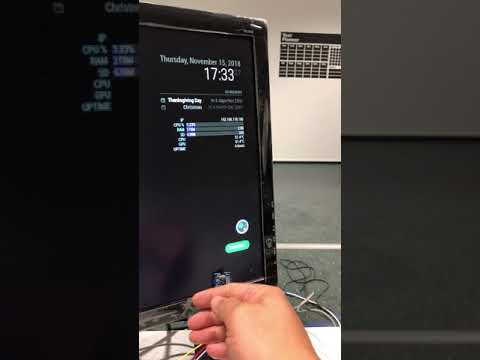
Video Clip
Hardware
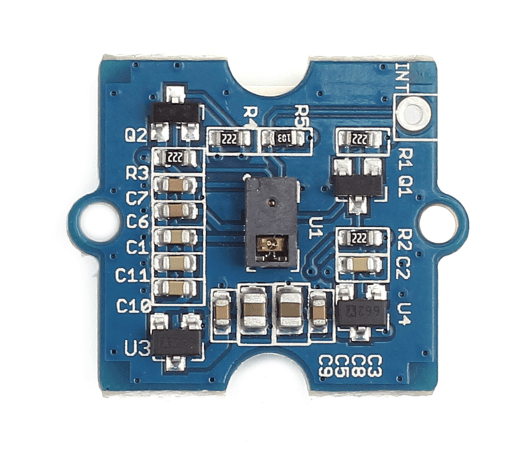
- Grove Gesture Sensor (PAJ7620u2)
- The sensor on Grove - Gesture is PAJ7620U2 that integrates gesture recognition function with general I2C interface into a single chip. It can recognize 9 basic gestures, and these gestures information can be simply accessed via the I2C bus.
- price: $10~20USD
- gestures : Up / Down / Left / Right / Forward / Backward / Clockwise / Count Clockwise / Wave
- detection range : 5 ~ 10cm / non-touch
- size : 20mm X 20mm
Unfortunately, due to it’s short range and theory of electro-magnetic field, this sensor will not be used beneath Spymirror. But under the thin wooden, plastic or normal glass, it will work.
It works as 3D gesture sensor similar withSkywriterorFlick!, but definitely small, flat, and non-HAT. It could fit for bezel-frame of MagicMirror. Soldering is not needed.Comparison
- vs. PIR sensor, ultrasonic sensor, CAM motion detection
- PROS: more gestures
- CONS: short range
- vs. Skywriter, Flick!
- PROS: small
- CONS: touch, tap gestures are not supported
- vs. CAM gesture recognition
- PROS: light, easy, low CPU
- CONS: short range, not so COOL
REQUIREMENT
- 1 x Grove Gesture Sensor (or PAJ7620u2 compatible)
- 1 x 4pin Female jumper cable
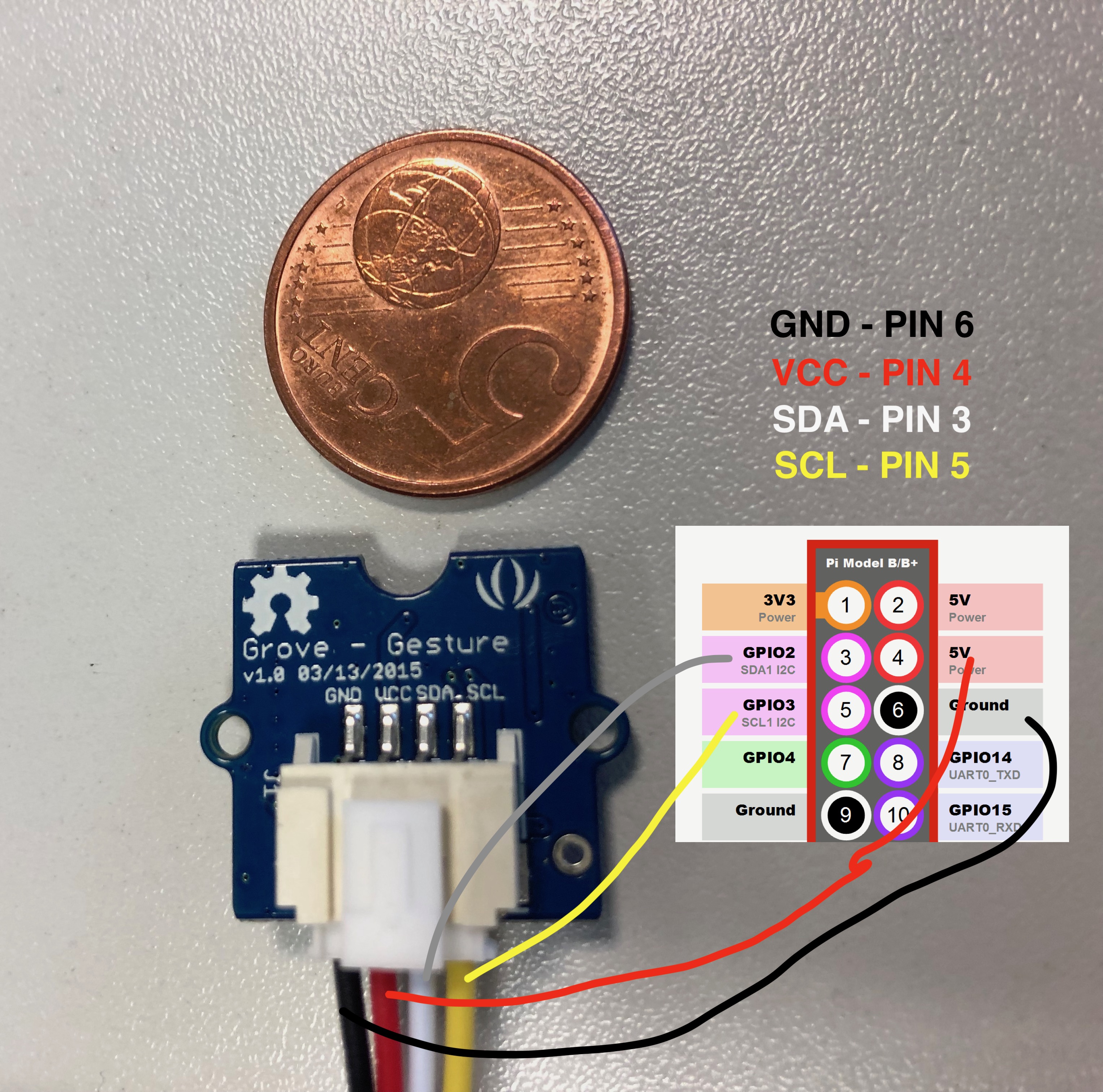
Pin Connect (I2C 1)
- 5V (GPIO PIN 4) : VCC
- GND (GPIO PIN 6) : GND
- SDA (GPIO PIN 3) : SDA
- SCL (GPIO PIN 5) : SCL
Install & Details
[card:eouia/MMM-GroveGestures]
- Grove Gesture Sensor (PAJ7620u2)
-
Hi @Sean ,
I was wondering if the module would be able to handle 2 identical PAJ7620u2 sensors?
Not talking about combining both (maybe an idea for later), but just giving the user the possibility to have 2 times more interactions with modules by putting one sensor on right side of the Mirror and the other on left side for example.
I’m currently building my mm project and I’ve to be honest, I would love that!!
Regards
-
@bolish
I answered on github.
Currently it couldn’t. Sorry. I’ve never imagined that situation. -
Thanks for the answer and the additional “sequence” tip. Let’s follow up on GitHub post if needed.
-
Hello World,
I love your module!
I use MMM-page-selector to switch between 2 pages. I wanted to use grove gesture to change pages, but I can not adapt the script.
I can see my gestures in the Magic Mirror when I pass my hand in front of the grove gesture; after, i do not know what to put in config.js
Can you help me?
For information, my english is bad, and I do not know anything about programming!Thank you
BenH
-
@Benjaminh86
Let’s assume You have page1and2.You can assign gesture
LEFTto1,RIGHTto2.
At that case, you can add this to your command set(default or any other you want)."LEFT": { notificationExec: { notification: "PAGE_SELECT", payload: "1", } }, "RIGHT": { notificationExec: { notification: "PAGE_SELECT", payload: "2", } },The problem is,
MMM-page-selectorhas no feature of “NEXT PAGE” or “PREVIOUS PAGE”. so when there be more than 2 pages, you should assign gestures per each page. -
@Sean as I said, I’m a beginner, and I do not understand everything in programming.
In addition, I have a synthaxe error on the line “exec: (module, gestures) => {”
it indicates a problem with the symbol =>.
Can you help me? -
@Benjaminh86
Show me your configuration. -
@Sean
here is my configuration for your module :
{
module: “MMM-GroveGestures”,
position: “top_right”,
pages: {‘all’: ‘top_right’},
config: {
autoStart: true, //When Mirror starts, recognition will start.
verbose:false, // If set astrue, useful messages will be logged.
recognitionTimeout: 1000, //Gesture sequence will be ended after this time from last recognized gesture.
cancelGesture: “WAVE”, //If set, You can cancel gesture sequence with this gesture.
visible: true, //Recognized gesture sequence will be displayed on positionidleTimer: 1000*60*30, // `0` for disable, After this time from last gesture, onIdle will be executed. onIdle: { // See command section moduleExec: { module: [], exec: (module, gestures) => { module.hide(1000, null, {lockstring:"GESTURE"}) } } }, onDetected: { notificationExec: { notification: "GESTURE_DETECTED", }, /* You can make Mirror to wake up the modules which were hidden by onIdle with any gestures. moduleExec: { module: [], exec: (module) => { module.show(1000, null, {lockstring:"GESTURE"}) } } */ }, gestureMapFromTo: { //When your sensor is installed with rotated direction, you can calibrate with this. "Up": "UP", "Down": "DOWN", "Left": "LEFT", "Right": "RIGHT", "Forward": "FORWARD", "Backward": "BACKWARD", "Clockwise": "CLOCKWISE", "anti-clockwise": "ANTICLOCKWISE", "wave": "WAVE" }, commandSet: { "LEFT": { notificationExec: { notification: "PAGE_SELECT", payload: "main", } }, "RIGHT": { notificationExec: { notification: "PAGE_SELECT", payload: "2", } }, }, },}
}, -
@Benjaminh86
Your configuration about commandSet has something wrong.commandSet: { "default" : { "LEFT": { notificationExec: { notification: "PAGE_SELECT", payload: "main", } }, "RIGHT": { notificationExec: { notification: "PAGE_SELECT", payload: "2", } }, }, }, -
@Benjaminh86
And Have you syntax error? How did you know? Have you usednpm check:config? That knows old-fashioned style javascript grammar. So it might not understand new trendy ES6 style grammar.
Try this to check your javascript syntax.
http://esprima.org/demo/validate.html -
@Sean
I used the command “npm run config: check”
-
@Sean I modified my JavaScript and corrected the errors.
On my Magic Mirror, I can see my left right scan, but the page does not change.
an idea… -
@Benjaminh86
Well, If notification would be emitted properly, remains are MMM-page-selector’s business.
You can check whether notification is broadcasted well withnpm start dev(before it, stop yourpm2) orCtrl+Shift+ion MM running. You can get some useful messages on dev-console -
Hello @Sean
i will watch npm start dev.
Thanks for your help.BenH
-
Hi @Benjaminh86
If it can help you, this is how I’m dealing with it :
- I uses MMM-GroveGestures / MMM-Pages / MMM-Pages indicator / MMM-Notificationtrigger
MMM-Pages allows PAGE_INCREMENT / PAGE_DECREMENT notification reception.
MMM-Pages is allow able to send you the active page number back is you ask for QUERY_PAGE_NUMBER.So basically, in MMM-GroveGesture , I wanted specific gestures depending on the active page :
-
I’ve created one command set per page (1/2/3/4/5)
-
I’ve put PAGE_INCREMENT / DECREMENT as a default gesture (left / right) on all commands sets (as those one are always the same)
-
I’ve put specific up / down / etc… gestures and related notification in different commands set depending on the page.
-
I’ve added a specific fire into MMM-NotificationTrigger so that each time “PAGE INCREMENT / DECREMENT” is triggered, it also fires “PAGE NUMBER IS” back (thanks to “PAGE_QUERY_NUMBER”)
This way, MMM-GrovesGestures always knows on which page I’m and is using the proper command set.
Hope this will help you.
-
Thank you so much @bolish !!
in principle, I understand how it works, but I’m really fond of programming.
without wanting to abuse, can you show me your scripts MMM-GroveGestures, MMM-Pages, MMM-NotificationTrigger… -
@Benjaminh86
I will be able to do it later tonight as not at home for now.
Honestly, I clearly don’t have any knowledge at all neither, I just started MM 2 months ago and never touched to a Raspberry or Javascript or even text edit before…
Just by reading around on MM forums + the incredible community support, I managed it by playing around myself with different modules.
I’m still not an expert, but it works and I’m proud of myself!If you want to understand how it works yourself for purposes of proudness, I would recommend you to :
- Install MMM-Pages (config in config.js is easy)
- Install MMM-RemoteControl (appart from changing the IP adress at the top of your config.js, there is nothing else to do. This will allow you to send notification from your smartphone browser as a matter of testing. And when you will be comfortable, you will see that this will allow you to configurate your own smartphone command app for the mirror, it’s pretty powerful and simple)
- Install MMM-NotificationTrigger (basically, it works like that : if Notification A is received, please send notification B
Start to play with NotificationTrigger and MMM-Pages to do something like this :
- On your smartphone browser (after ahving installed MMM-RemoteControl and configured it) : send some notification like this to MMM-Pages and see if the pages changes :
http://YOURIP:8080/remote?action=NOTIFICATION¬ification=PAGE_INCREMENT""http://YOURIP:8080/remote?action=NOTIFICATION¬ification=PAGE_DECREMENT"Try to configure MMM-NotificationTrigger so that when “PAGE_INCREMENT” is received, it will fire “PAGE_QUERY_NUMBER” (to MMM-Pages that will then respond with “PAGE_NUMBER_IS” + payload “X”, X being the page number).
Try to configure MMM-NotificaitonTrigger so that when “PAGE_NUMBER_IS” is received (with payload), and alert is shown on the mirror with the returned Page Number as a payload.
Once you will have done that, you will have understand how everything works (you will be able to delete the alert shown on the message which was just a test).
If you manage to do that, the MMM-GroveGestures part in the end will be a piece of cake (and don’t worry, the above is not difficult at all if you want to learn by yourself).
I will try to post you a working extract of my config.js this evening. If I forget, please remind me.
Regards
-
you seem to know how to do things better than me; there are some who understand faster than others, I must be part of the 2nd categories!
I already installed remote control that works well. I will try with all the information you give me as soon as I have time (I am not at home now).
it may seem a little easy for me to ask you your scripts, but it allows me to understand the operation and interactions, so I want to see them when you have time.
Thanks for your help :) -
Hi, I’m interrested in using this module (Great job by the way).
But in hardware I have number of choice :
https://fr.aliexpress.com/item/Fast-Free-Ship-Based-on-PAJ7620U2-Gesture-Recognition-Sensor-9-Gesture-Recognition-Grove-Gesture-Recognition-Sensor/32796887595.html
This one seam to be the same as yours at 22.33€But there other with the same "chipset’ :
https://fr.aliexpress.com/item/PAJ7620U2-Divers-Geste-Reconnaissance-Capteur-Module-Pour-Arduino-Int-gr-9-geste-IIC-interface-reconnaissance-intelligente/32963443120.html
At 3.52€ … The only “difference” I see is the number of pin : 5 instead of 4… there is a “INT” Pin… do you know if it’s compatible and what’s the use of this “INT” pin ?
Hello! It looks like you're interested in this conversation, but you don't have an account yet.
Getting fed up of having to scroll through the same posts each visit? When you register for an account, you'll always come back to exactly where you were before, and choose to be notified of new replies (either via email, or push notification). You'll also be able to save bookmarks and upvote posts to show your appreciation to other community members.
With your input, this post could be even better 💗
Register Login