Read the statement by Michael Teeuw here.
MMM-CalendarExt2 not showing icons in calendar
-
Hi,
I tried to insert icons into my calendar, but they are not been shown:
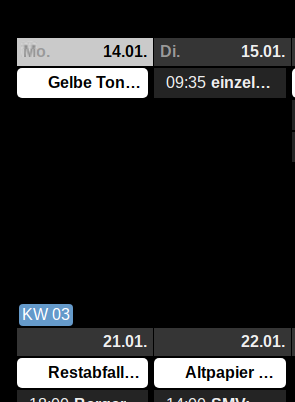
it seems the space for the icons have been added. Here is my config.{ module: "MMM-CalendarExt2", config: { views: [ { name: "weeks", mode: "week", position: "middle_center", type: "row", slotCount: 2, slotTitleFormat: "DD.MM.", slotAltTitleFormat: "DD.MM.", weeksFormat: "[KW] WW", calendars: ["Abfall"], }, ], scenes: [ { name: "DEFAULT", views: ["weeks"], }, ], calendars: [ { name: "Abfall", icon: "noto-soccer-ball", url: 'https://calendar.google.com/calendar/ical/.../basic.ics', auth: { user: '...', pass: '...', method: 'basic' }, },Any idea, why they are not showing up?
BR
sworrs -
@sworrs
Have you tried othe icons?
If all icons are not shown, you might have front-end error to disrupt loading iconify script. Check it with “npm start dev” or opening dev-console of MM screen. -
@sean
I tried different icons and they all do not show up. And you are right, I get an error in dev mode:iconify.min.js:13 Uncaught TypeError: n.MutationObserver is not a constructor at iconify.min.js:13 at Object.i.nextInitItem (iconify.min.js:13) at Object.i.nextInitItem (iconify.min.js:13) at Object.i.nextInitItem (iconify.min.js:13) at iconify.min.js:13 (anonymous) @ iconify.min.js:13 i.nextInitItem @ iconify.min.js:13 i.nextInitItem @ iconify.min.js:13 i.nextInitItem @ iconify.min.js:13 (anonymous) @ iconify.min.js:13 setTimeout (async) (anonymous) @ iconify.min.js:13 (anonymous) @ iconify.min.js:13 (anonymous) @ iconify.min.js:13What does this mean?
-
@sworrs
Can I get your ics URL to examine? my email address is eouia0819@gmail.com
I cannot represent your error on my cases So I need your ics URL. -
How does the module know where to find the icons?
-
@othomys
This module useiconifyto show icons.
You can find icons here : https://iconify.design/icon-sets/ -
@sean
I have many calendars inserted there, but now I will try to find the calendar causing the problem. At least I found out, that the icons sometimes are shown.
Thanks for the hint. I will try around with the calendars and as soon as I now the right calendar I will mail you.
Do you know any other problems with multiple calendars? Not all calendars are shown everytime I start the magic mirror and by now I have no idea whats the matter here. -
@sworrs
If you have many events and many calendars, adjust maxItems in configuration. -
@Sean
what does the maxItems mean? Does it load the next Items of the calendar? How many could be loaded, should the number be around the count of shown calendar items? -
@sworrs
‘maxItems’ means number of events to be read per calendar. Fot performance issue, it is berrer to be limited. Some calendar could have a tons of events and it could make memory drains. -
Hi,@Sean @sworrs
did you solve your icon issue?
Mine are not showing neither…Several calendars, all not showing the icons. Strange… -
@bolish
See the front-end log whether there is some error to prevent icon loading.And test my module with other modules disabled.
-
Hi @bolish,
I did not solve the icon completely, but I had no time trying anything, sorry. -
@sworrs no problem.
I will try the debugging method proposed by @Sean this week and keep both of you posted.
Hello! It looks like you're interested in this conversation, but you don't have an account yet.
Getting fed up of having to scroll through the same posts each visit? When you register for an account, you'll always come back to exactly where you were before, and choose to be notified of new replies (either via email, or push notification). You'll also be able to save bookmarks and upvote posts to show your appreciation to other community members.
With your input, this post could be even better 💗
Register Login