Read the statement by Michael Teeuw here.
MMM-DWD-WarnWeather - Wetterwarnungen
-
Hey,
nice work, great addition to my setup, thank you!
I currently have two problems.
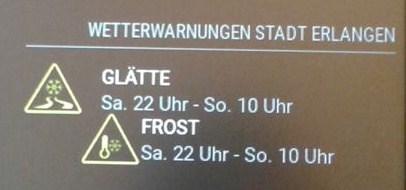
When there are two notifications, the second one is indented (can’t make a screenshot right now, sorry).
And on Firefox (I usually open the mm on my pc, too) the symbols are really, really large: .sprite_sturm has a size of 256x256px, this could be a little bit smaller… I guess Firefox handles the css different, on the mirror they have the right size.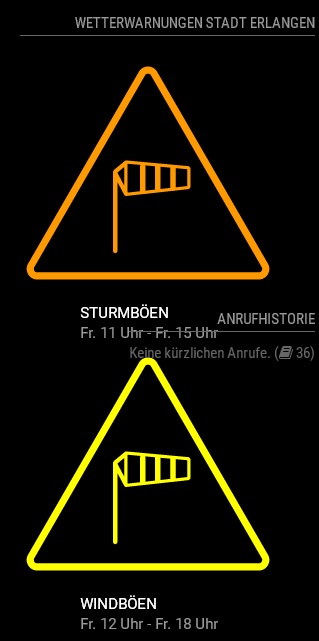
-
@Matthes0815 Thank you.
I will have a look over that, when I got some time. -
You’re welcome… take your time, it’s not really a problem.
Here now a photo of the indented warnings:
-
@LukeCodewalker
Great module, thanks a lot!Having the same issue on Firefox with the icon size as Matthes0815.
Also the warnings are shown twice.
I´ve setup the config to poll DWD warnings for my region (Landkreis), any idea why this happens?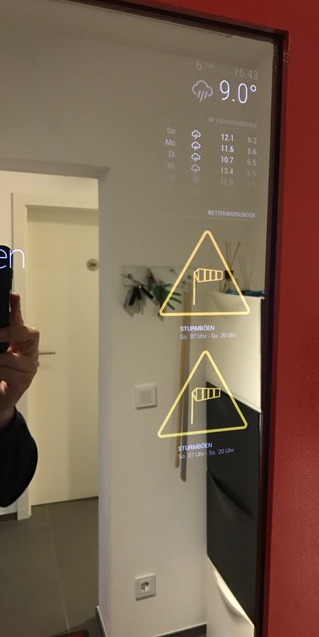
-
Ok. Firefox bug should be fixed now.
Maybe you see the warning twice because DWD is having it twice on their website?
For further issues please use the new Trubleshooting thread. Thank you. -
@Matthes0815 said in MMM-DWD-WarnWeather - Wetterwarnungen:
You’re welcome… take your time, it’s not really a problem.
Here now a photo of the indented warnings:
Are you using the latest version of this module? I could not reproduce this bug.
Are you
-
It was the latest version when I took the photo. Sadly the weather here is nice and friendly, no warnings at the moment…
Where are the autumn storms when you need them? -
@LukeCodewalker Many thanks for the Firefox fix, awesome.
Now everything is displayed correctly.Regarding the duplicate warnings, you were right, they were displayed twice on the DWD website.
One for the whole region and another one for altitudes above 600m.Great work :-)
-
Hi,
no data is displayed with me. It remains in the state “Warnungen werden geladen…” Region was “Kreis Lippe”
Any ideas or suggestions?
Mark
-
config:
{
module: ‘MMM-DWD-WarnWeather’,
position: ‘top_right’,
header: ‘Wetterwarnungen’,
config: {
region: ‘Kreis Lippe’,
changeColor: true,
interval: 10601000
}
}, -
@MarkAlisch After a restart of the raspi it worked.
-
@MarkAlisch said in MMM-DWD-WarnWeather - Wetterwarnungen:
@MarkAlisch After a restart of the raspi it worked.
This module - like other modules too - uses a node_helper and this requires a reboot of the magicmirror process (or the whole raspberry).
-
@ostfilinchen said in MMM-DWD-WarnWeather - Wetterwarnungen:
I have commented out line 56-60 in MMM-DWD-WarnWeather.js.
Hello,
witch code have you commented out?
please add the sample code.
Thanks
-
@lolobyte in the actual Version of the Module u didn’t need to coment out the lines
-
oh, then tell me please how is it actually possible to increase the text and format the date.
-
@lolobyte
for increasing the text size you have to edit MMM-DWD-Warnweather.css (description class).
to format the date you have to edit lines 84 and 85:var start = moment(this.warnings[i]['start']).format("dd. HH") + ' Uhr'; var end = moment(this.warnings[i]['end']).format("dd. HH") + ' Uhr'; -
Hi, thank you for your answer.
this is a part of my custom.css
.MMM-DWD-WarnWeather .description {
font-family: Roboto;
margin-left: 10px;
color: white; //white
padding-left: 50px;
padding-top: 3px;
color: #fff; //fff
width: auto;
font-size: 25px;
line-height: 30px;
text-align: left;
}i can make some changes, but not wit all commands.
for example.
if i use
color: red;
nothing changes
when i use
color: #f00; //fff
the color change.
if is try to use
    font-size: 10px;
    line-height: 10px;
nothing happens.
What’s wrong?
-
Can this be modified to work in the US?
-
@pugsly
Sure. You have to find an API that gives you the data and you have to modify the module that it works with this data. -
Hy
is there a way to show the warnings for regions in austria?
Hello! It looks like you're interested in this conversation, but you don't have an account yet.
Getting fed up of having to scroll through the same posts each visit? When you register for an account, you'll always come back to exactly where you were before, and choose to be notified of new replies (either via email, or push notification). You'll also be able to save bookmarks and upvote posts to show your appreciation to other community members.
With your input, this post could be even better 💗
Register Login