@dsmith76
If I remember correctly the calendar needs to be public and not solely shared with users.
A
Offline
A New Chapter for MagicMirror: The Community Takes the Lead
Read the statement by Michael Teeuw here.
Read the statement by Michael Teeuw here.
Posts
-
RE: Shared Google Calendar Access
-
RE: Mirror turning black after a while
I agree with others that the problem is most likely related to Electron and not module-specific but rather related to which module dependencies it has.
-
RE: Mirror turning black after a while
@retroflex
I will dig up another respberry pi and try it out. My test environment is a dietpi vm which runs on a pc so I wouldn’t expect the cpu load to be representative of the load on the pi. -
RE: Mirror turning black after a while
@binog @FredJ @cyberdie @schlachtkreuzer6
Looking through the unirest dependencies it looks like it relies on express which may or may not make it sus eptible to the issues with electron.
To resolve this I replaced unirest with node-fetch and pushed the new version of MMM-ResRobot to github.
To upgrade cd to your MagicMirror directory and run the following commands:
git pull
npm remove unirest
npm install
Please post results in this thread!
Hope this resolves the issue. -
RE: Mirror turning black after a while
@retroflex I can’t think of anythong off hand.
I am running an older version of MM myself so haven’t researched the electron issues.
Can anyone confirm that the issue started with the new MM version?As I am running my magic mirror on an original Pi 1 with 256MB RAM with no issues whatsoever I am a bit surprised that the module should cause this.
Edit: MMM-ResRobot has but one dependency and that is the unirest module.
Which version of ResRobot are you running? I did a rewrite to reduce the number of updates w while ago.
-
RE: Problem with MMM-ResRobot, it wont start(?)
@ayeball
Bra att det funkar.
Du ska bara behöva ändra i den config.js som ligger i MagicMirror-mappen, inte i de andra.För att ange flera rutter lägger du bara till en ny rad med:
{from:“”, to:“”},På din config ser det ut som att fu använger en gammal version. Gör en git pull för att uppdatera. En av ändringarna är just formatet för att ange flera rutter. Se README.md för dokumentation.
-
RE: Problem with MMM-ResRobot, it wont start(?)
@ayeball
Klipp in den relevanta delen av config.js så kan vi kolla på den.
Please post the appropriate part of config.js -
RE: Problem with MMM-ResRobot, it wont start(?)
@Gailby
Great to hear! (Jag dokumenterade på engelska så alla kunde förstå men då blir ju svenskar lite förvirrade! :-)
Maybe I should add the swedish name of the API key to the documentation as well. -
RE: Problem with MMM-ResRobot, it wont start(?)
@Gailby I copied your first config but used my API key and it worked with no issues at all.
Verify that you are using the correct API key.
The 400 status code is usually because you are using the wrong key. -
RE: MMM-ResRobot - Public transport information for Sweden
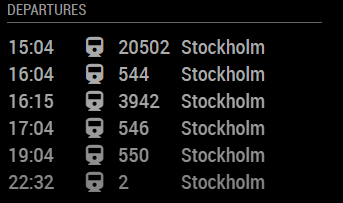
@nn1mda I copied your config above and fixed the comma. It does indeed show “fetching departures”/Inga avgångar which isn’t a big surprise as the API-key is masked. Using my API key it works as expected, see output below. You probably used an invalid API key, double check that it is correct.
-
RE: MMM-ResRobot - Public transport information for Sweden
@nn1mda Strange, I’m running the latest version and it works (as of 1 minute ago) without any issues.
Have you tried running magicmirror from the shell?node serveronly
That way errors and status messages will be printed directly to the terminal making it easier to troubleshoot. -
RE: MMM-ResRobot - Public transport information for Sweden
@nn1mda
You are missing a comma after the closing brace “]” in routes.
The format is:routes: [ {...}], -
RE: MMM-ResRobot - Public transport information for Sweden
@nn1mda
Sorry! There is a documentation error in the README.
The routes needs to enclosed by curly braces, like this:{ module: "MMM-ResRobot", position: "left", header: "Departures", config: { routes: [ {from: "740000003", to: "740000001"}, {from: "740000002", to: ""}, ] skipMinutes: 0, maximumEntries: 6, truncateAfter: 5, apiKey: "71a3996f-***" } }, -
RE: MMM-ResRobot - Public transport information for Sweden
I’ve just pushed an update to github that resolves the scheduling issues some users have been experiencing. Please update the module. NOTE! There has been a breaking change in version 1.3 in that the config parameters have changed. See the start of this topic or the README.
-
RE: Problem with MMM-ResRobot, it wont start(?)
@ajomannen sorry, the curly braces got lost in my copying. I have updated my previous post.
-
RE: Problem with MMM-ResRobot, it wont start(?)
@Eburkis et al
I’ve just pushed a long-overdue update to MMM-ResRobot to github.This new version has a completely reworked updating logic which should result in less “frozen” updates and also less API calls to Trafiklab/ResRobot over time.
Note that there is a breaking change to the configuration as I’ve changed the way routes are defined.
Previous configuration:from: "from1,from2,from3", to: "to1,,to3"New configuration:
routes: [
  {from: "from1", to: "to1"},
  {from: "from2", to: ""},
  {from: "from3", to: "to3"},
]
Sorry for not pushing the update sooner but my mirror project has been delayed due to other things. Will try to update more frequently in the future. Please drop me a note if you encounter issues!
-
RE: MMM-ResRobot - Public transport information for Sweden
@nn1mda
I haven’t been active in the Magic Mirror community for some time but I just checked and for me it works without issues. Did you get your API key? -
RE: MMM-ResRobot - Public transport information for Sweden
@Eburkis
I haven’t been active for a while due to other things than magic mirrors.
Let me take a look and see if I can find out what’s wrong. -
RE: MMM-SL - Public transport information for Stockholm (Sweden)
@jonaswadsten
MMM-ResRobot funkar med SL och andra, inklusive Västtrafik.
Den sorterar avgångar på tid. -
RE: 3 tries 3 fails Raspberry b+
@infamoustiggr
Try installing wtf-8 module by running the commandnpm install wtf-8from the MagicMirror directory.