A
Offline
A New Chapter for MagicMirror: The Community Takes the Lead
Read the statement by Michael Teeuw here.
Read the statement by Michael Teeuw here.
Posts
-
RE: header line color
-
header line color
Hello everyone. I want to change the color of the header’s line in my MM modules but I do not know what to change in my custom css. If someone can help me it woud be appriciated. Here is a picture of a module and the line I want to change the color:
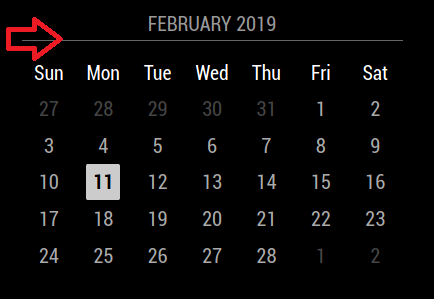
Thank you in advance. -
RE: MMM-WiFiPassword
@sdetweil I manage to change its position from top_center to botom_right but same result again
-
RE: MMM-WiFiPassword
@sdetweil it has debug:true support. Here is the original js cinfig file
Module.register("MMM-WiFiPassword", {
  defaults: {
	  qrSize: 125,
	  colorDark: "#000",
	  colorLight: "#fff",
	  authType: "WPA", // WEP, WPA, NONE
	  network: "REQUIRED", // Your Network ID
	  password: "REQUIRED", // Your Network Password
	  header: "Local WiFi Details", // Default heading
	  hiddenId: false, // Whether your Network ID is hidden
	  layoutVertical: true, // Whether to display in vertical (true), or horizontal (false) mode.
	  showNetwork: true, // Display network name
	  showPassword: true, // Display password
	  showAuthType: true, // Dispay authentication type
	  debug: false
  },
I know it reads my network and password right because if i copy paste them after scan to a notebook the text is correct. I even tried to change the scan application but same result. When I choose to connect to the scaned network nothing happens.
-
RE: MMM-WiFiPassword
@sdetweil In fact I just did and 2 minutes now I have black screen
-
RE: MMM-WiFiPassword
@sdetweil I don’t think it work. I set debug to true and after restart I did not find any debug log and beside that my network name and my password was shown below the module. I don’t know. Maybe I will try uninstall it and reinstall it and see how it goes. Thank you for your answer though.
-
MMM-WiFiPassword
Hello everyone. I hope you are all well. I have a problem with the MMM-WiFiPassword module. I installed it but it does not seem to work. When I am scanning the QR code nothing happens. I have also change my password so is does not have any special cahracters as the author recomends but still nothing. I hope someone can help me with this. Here is my config:
 {
      module: 'MMM-WiFiPassword',
      position: "top_center",
        config: {
          //See 'Configuration options' for more information.
          header: "WiFi",
          network: "VODAFONE_7402",
          password: "***********",
          showNetwork: true, // Display network name
          showPassword: false, // Display password
          showAuthType: false,
        }
    },
Also after playing around with my custom.css for exact positioning I noticed a very big delay on the MM start up. It takes more than 1 minute with black screen and more than 2 minutes to load all modules. I know that probably it has nothing to do with my custom.css but it happened after I changed some things to figure out the desired position of the module. If anyone has any idea what is causing this delay please share it. Thank you in advance.
-
RE: Stop the screensaver!
This is a screenshot of what happened after about half an hour after restarting magic mirror.

-
RE: Stop the screensaver!
@bhepler
I will try this as well but 3 days now the problem does not appear. I haven’t touch anything on my MM and I don’t see the black screen. I will try asudo apt-get update && sudo apt-get upgradealthough. It is always usefull. Thank you. -
RE: Stop the screensaver!
@sdetweil
I don’t think that this is the problem but I want to test it just in case. -
RE: Stop the screensaver!
@sdetweil
In my case when the screen goes to sleep everything is hidden, modules, dev console etc. I see only black screen. Is there any possibility that pi “forgets” the setting to disable the screensaver? I will try to go and change this setting and after put it back again to see if anyhting changes. -
RE: Stop the screensaver!
This is getting too weird. Yesterday I had the MM running in dev mode and after I saw the screensaver I moved the mouse and everything came back as normal and no errors in the console. I don’t know why this happens not all the time and with different characteristics everytime.
-
RE: Stop the screensaver!
Update.
Last 3-4 days my MM was running just fine without screensaver appears. Last night it happened again so I restart MM in dev mode to see if I find an error after the the screensaver’s black screen. When I moved the mouse (after some time the screensaver had appeared) the screen was white and in dev console I had a message saying websocket disconnected or something like that. Usually when I moved the mouse after the screensaver and without the dev tools enabled the black screen dissapears and I get my MM screen back. This time was different. I’ll try to upload a screenshot when I get home. -
RE: Adjust the brightness of the MagicMirror
@CyruS1337
That’s weird because it doesn’t happen to me. Try conatct the author of the module. He may give you more help. -
RE: Adjust the brightness of the MagicMirror
@CyruS1337
Do you save your settings? If you don’t they won’t appear after a reboot. In my MM everytime I restart it or the pi after MM reloads I get my last settings from remote control. -
RE: Stop the screensaver!
@sdetweil
Mine too. If MM is shut down my screen is always on. This also happen if modules with movement are shown in the MM like MMM-ImageSlideShow which have pictures rotating. My screen goes black only when I have modules like clock,calendar,forunecookie,rfacs etc shown. I don’t know if a specific module cause this. For example I now have my MM on for 5 days without black screen and the modules shown are clock, calendar, stats, compliments, news, pictures and weather. If I hide pictures module or replace it with rfacts for example in about half an hour I will get the screensaver black screen. -
RE: MMM-SmartWebDisplay : display web contents (including YouTube) on your MM
@AgP42
I already have installed MMM-RemoteControl in my MM. If I remove it and reinstall it from your repository will it install the new feture as well to control SWD? -
RE: Adjust the brightness of the MagicMirror
@CyruS1337
I don’t know if there is another way but I made it by instlling MMM-RemoteControl where you can control our MM from your mobile or pc via web browser. With this module you can show/hide modules and abjust the brightness and save it too. I hope this will help you.