@coolie1101 do you have an error entry in the home assistant log?
B
Offline
A New Chapter for MagicMirror: The Community Takes the Lead
Read the statement by Michael Teeuw here.
Read the statement by Michael Teeuw here.
Posts
-
RE: Which modules with Home Assistant currently work?
-
RE: Which modules with Home Assistant currently work?
@coolie1101 do you make changes in „node_helper.js“ from MMM-HASS?
-
RE: Which modules with Home Assistant currently work?
Only for information, in case someone has the same problem.
The module works for me now, with the above configurationI found the following articles: https://github.com/aserramonner/MMM-HASS/pull/13/commits/bd816304ba146ad84bce5cada65cb3416194aca7
I made these changes: In File „node_helper.js“ von MMM-HASS
row 130 changed in:
post_options.headers = { 'Authorization' : 'Bearer ' + config.token };row 176 changed in:
get_options.headers = { 'Authorization' : 'Bearer ' + config.token }; -
RE: Which modules with Home Assistant currently work?
i want to use the modul MMM-HASS
but i get the error in HA “Login attempt or request with invalid authentication from”
i use Home Assistant 0.116.2here is my MM-Config from the Modul:
{
           module: "MMM-HASS",
           position: "top_left",
           config: {
                   host: "xxx.xxx.xxx.xxx",
                   port: "8123",
                   apipassword: "xxxxxx",
                   hassiotoken: true,
                   token: "xxxxxxxxxxxxxxxxxxxxxxxxxxxxxxxxxxxxxxxxxxxxxxx",
                   https: false,
                   devices: [
                   { deviceLabel: "Temp Test",
                           deviceReadings: [
                           { sensor: "sensor.temp1", icon: "wi wi-thermometer", suffix: "°"},
                           { sensor: "sensor.temp1 _2", icon: "wi wi-humidity", suffix: "%"},
                           ]
                   },
                   ]
             }
In MM:
Temp Test undefined°undefined%
Log from MM:
[2021-01-09 10:36:47.251] [LOG] { undefined: undefined, label: Temp Test }
[2021-01-09 10:37:47.408] [LOG] Request URL: http://xxx.xxx.xxx.xxx:8123/api/states/sensor. temp1?api_password= xxxxxx
[2021-01-09 10:37:47.408] [LOG] Request URL: http://xxx.xxx.xxx.xxx:8123/api/states/sensor. temp1_2?api_password= xxxxxx
[2021-01-09 10:37:47.524] [LOG] { undefined: undefined, label: Temp Test }What I have to config in HA? Would be really grateful for tips
-
RE: 2screen in wall no mirror project
Looks really great, respect.
Can you take more picture? And/or describe more?
How did you mount the monitors? Did you use two raspberry for that? Where’s the equipment? behind the monitors?Thank you very much
-
RE: MMM-mvgmunich
@Leon-tech i think it is an known issue of the default config from the modul, take a look at this post:
https://forum.magicmirror.builders/topic/11785/no-result-from-mvgmunich-modul?_=1591345034267 -
RE: no result from mvgmunich modul
I found the solution, it’s not a bug, it’s a new feature :-)
It is undocumented feature, some missing parts in configuration.
Now you able to filter some line unfortunately the filter is by default active. switch off the filter now it works.lineFiltering: { "active": false, "filterType": "whitelist", "lineNumbers": ["U1, U3, X50"] },With this config it should be worked :
{ module: 'mvgmunich', position: 'top_right', header: 'MVG', config: { haltestelle: 'Vaterstetten', maxEntries: 4, updateInterval: 60000, showIcons: true, transportTypesToShow: { "ubahn": false, "sbahn": true, "bus": false, "regional_bus": false, "tram": false }, lineFiltering: { "active": false, "filterType": "whitelist", "lineNumbers": ["U1, U3, X50"] }, ignoreStations: [], timeToWalk: 0, showWalkingTime: false, showTrainDepartureTime: true, trainDepartureTimeFormat: "relative", walkingTimeFormat: "relative", showInterruptions: true, showInterruptionsDetails: true, countInterruptionsAsItemShown: true, } }, -
RE: no result from mvgmunich modul
i install MM on an Windows PC to debug,
i start magic in node servonly
start browser + debug console
here is the result off debug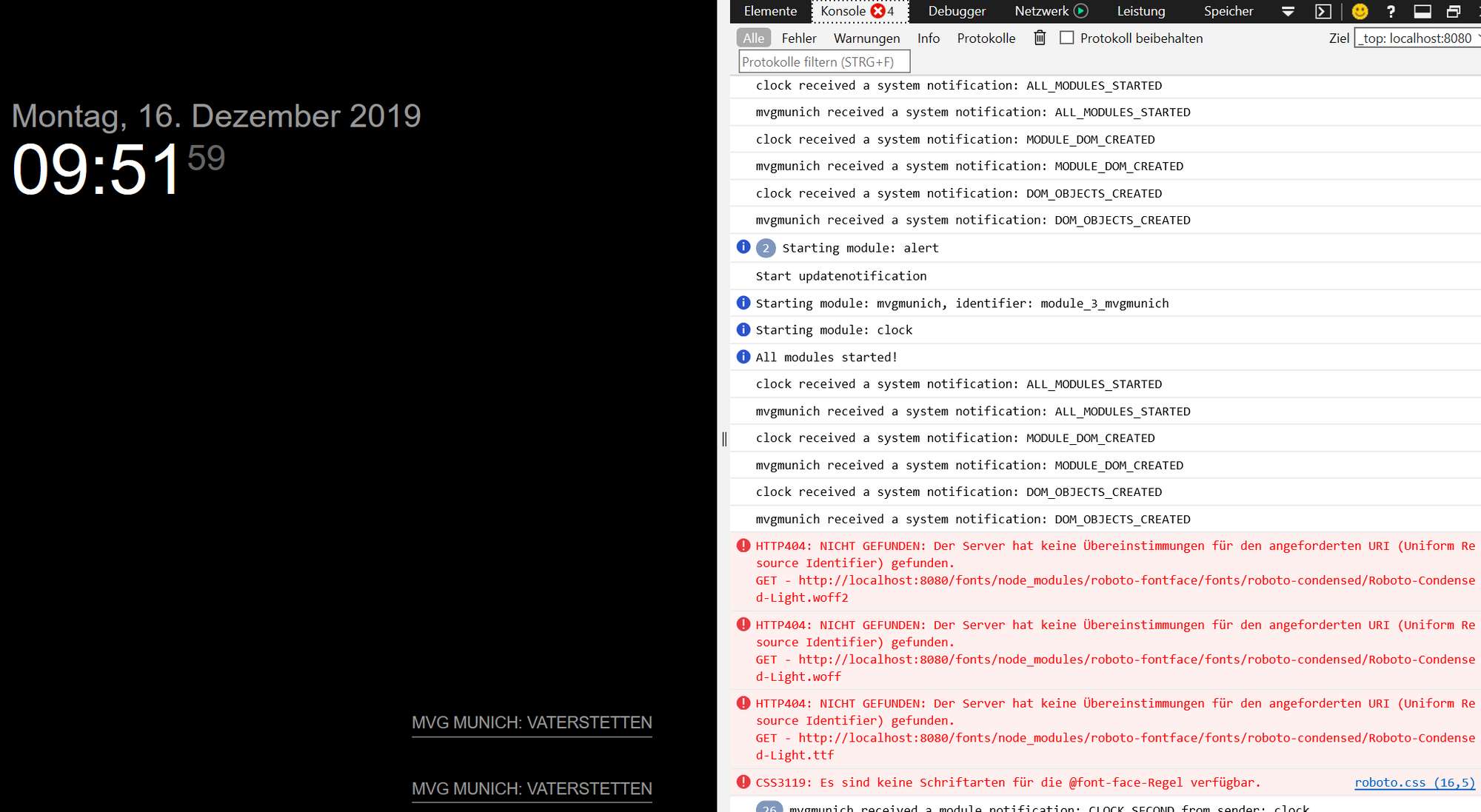
-
no result from mvgmunich modul
Thanks for the module, it is one of the most used modules in our family.
After the last update, the module no longer displays a result.
Here is my config:{ module: 'mvgmunich', position: 'bottom_right', header: 'MVG', config: { haltestelle: 'Vaterstetten', maxEntries: 4, // 10 items on screen updateInterval: 60000, // 60 s showIcons: false, // Show transport type icon transportTypesToShow: { "ubahn": false, // show ubahn route "sbahn": true, // show sbahn route "bus": false, // show bus route "regional_bus": false, // show regional bus route "tram": false // show tram route }, ignoreStations: [], // destination not to be shown timeToWalk: 0, // 10 min walking time to station. Default is 0 showWalkingTime: false, // if the walking time should be included and the starting time is displayed showTrainDepartureTime: true, // show tran departure time trainDepartureTimeFormat: "relative", // format of the train departure time walkingTimeFormat: "relative", // format of the walking time } }, -
RE: Bedside Touchscreen
Looks very good.
I have a similar building but my usage is different (on my desk with a DHT22 sensor)
Your case looks great! Where did you get that? I have the case printed by a friend but unfortunately it does not look that good -
RE: Starting MagicMirror with Windows
you can try this maybe this works for you but debends on your system/ environment
set internet explorer default page to “http://localhost:8080”
use windows key + r (run command)
type “shell:startup” (open a windows explorer)
create here a file with filetype *.bat (e.g. StartMagicMirror.bat)
type:@echo off START /max iexplore.exe cd C:\Users\MyUser\MagicMirror\ node serveronlysave an close and doubble click on the file, Internet Explorer should open and magic mirror should start.
Now you can restart an test -
RE: Public Transportation Module Munich, Germany
Hello,
I use the mvgmunich modul from https://github.com/mrVragec/MMM-mvgmunich.
It works perfect. Do you use the same modul?
Maybe it is a problem from config?
Can you post your modul config ….this config works:
{ module: 'mvgmunich', position: 'top_right', header: 'MVG', config: { haltestelle: 'Vaterstetten', maxEntries: 4, // 10 items on screen updateInterval: 60000, // 60 s showIcons: true, showUbahn: true, //show ubahn route showBus: false, // show bus route showTram: false, // show tram route showSbahn: true // show sbahn route } }, -
RE: MMM-SystemStats (cpu temp/load, fre ram ...)
@bhepler it is a new release with the bugfix from MMM-SystemStats available
-
RE: MMM-SystemStats (cpu temp/load, fre ram ...)
i have a solution,
it is only a comma missing in “MMM-SystemStats.js” in line 20baseURLSyslog: 'http://127.0.0.1:8080/syslog', -
RE: Considering taking donations to support the MagicMirror project. Interested in your thoughts!
Hello, my paypal e-mail is unfortunately another as well.
Please i want my badge :-)Thanks you all for the great project
-
RE: MMM-Lunartic
thank you for the module, it is fantastic.
a little mistake in “de.json”
not
"Wanning Gibbous Moon": abnehmender Mond"better:
"Waning Gibbous Moon": abnehmender Mond" -
RE: Search for 3d printed case for raspberry
I found this one, I it not optimal but for me it works.
https://www.thingiverse.com/thing:2794643I set you drill hole for raspberry and use space.
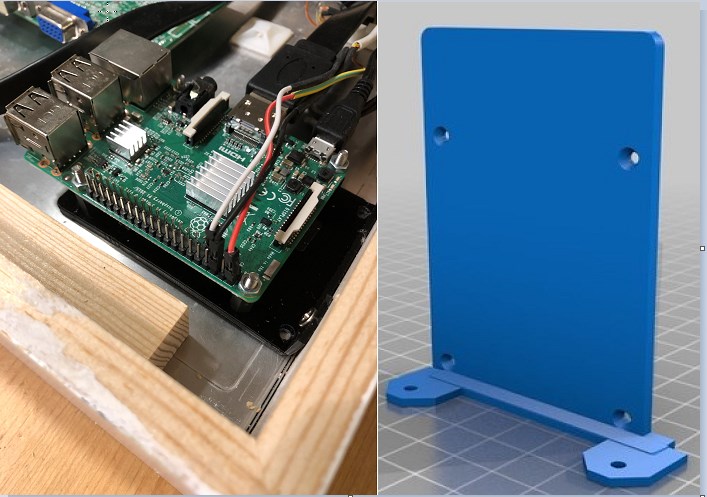
Thank you for your help and inspiration
-
Search for 3d printed case for raspberry
I think I have seen here in the forum a picture from 3d printed case/rack for the raspberry pi.
The case was mounted behind a monitor in the corner of a wood caseMaybe someone can send me the file for printing
-
RE: Calendar times in 24 hour format?
i have the same problem, maybe I have time on the weekend for more test.
For me it is really ugly -
RE: MMM-Soccer - Standings, Schedules and Top Scorers
ok it is crazy.
on my test/development mirror with windows 10 don’t work. No result withfocus_on: {'GERMANY': 'FC Bayern München'},but on my main mirror on the raspberry it works perfect.
so no further investigation.
thank you for your help / time