MagicMirror Forum
    • Recent
    • Tags
    • Unsolved
    • Solved
    • MagicMirror² Repository
    • Documentation
    • 3rd-Party-Modules
    • Donate
    • Discord
    • Register
    • Login
    1. Home
    2. bicolorbore586
    3. Posts
    A New Chapter for MagicMirror: The Community Takes the Lead
    Read the statement by Michael Teeuw here.
    B
    Offline
    • Profile
    • Following 1
    • Followers 0
    • Topics 8
    • Posts 51
    • Groups 0

    Posts

    Recent Best Controversial
    • MMM-Calendarext3 eventTransformer

      So, I’ve copied the code, but wondering how to add more than 1 event title / colour combination, eg John = Blue for the example below, but how would I get John=Blue, Steve=Green, Sandra=Orange, I’ve tried copying and having a separate line for each, but that results in none of the events having colours.

      eventTransformer: (ev) => {
      if (ev.title.search(‘John’) > -1) ev.color = ‘blue’
      return ev
      }
      posted in Troubleshooting
      B
      bicolorbore586
    • RE: Font-awesome

      @sdetweil got ya!

      I hadn’t created the column in the right place.

      Thanks for your patience and guidance.

      posted in Troubleshooting
      B
      bicolorbore586
    • RE: Font-awesome

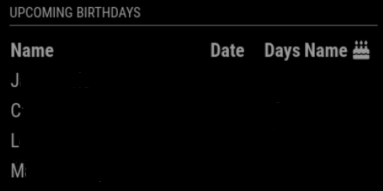
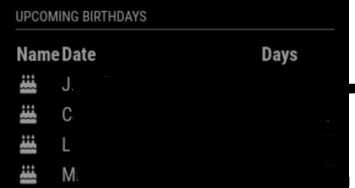
      @sdetweil so, I now have the icon in each row, but it fills the name column and shifts the name to the date, date to days and pops the days on the end… (sorry absolute noob at this, trying to move things around, but can’t for the live of me see how to change it).
      014861f7-aacd-4bfa-8961-5bf028681d21-image.png

      {% for p in people.slice(0,limit) %}
      	<tr>
      
      {% if p.days == 0 %} {% else %} {% endif %} {% endfor %}
      Name Date Days
      {{p.name}} {{p.date}}Today{{p.days}}
      posted in Troubleshooting
      B
      bicolorbore586
    • RE: Font-awesome

      @sdetweil Yeah the config.js is all set up.
      I would like it a inn the screen shot you posted where you have
      Cake Icon Steve 25 Nov 50
      Cake Icon Marco 30 Dec 85

      Similar to the calendar, but the birthday cake instead of calendar icon.

      posted in Troubleshooting
      B
      bicolorbore586
    • RE: Font-awesome

      @sdetweil Copied and pasted the code and I get the below 29368d2e-22bc-4a73-9588-cf7df46f6846-image.png

      Questions…
      Do I need to add each persons name to where it says {{p.name}}
      Does it matter where in the .njk code I put the text?

      posted in Troubleshooting
      B
      bicolorbore586
    • RE: Font-awesome

      @sdetweil I copied and pasted the icon logo from font-awesome cheat sheet.

      The module is https://github.com/marcomerens/anniversarymodule

      posted in Troubleshooting
      B
      bicolorbore586
    • RE: Font-awesome

      @sdetweil
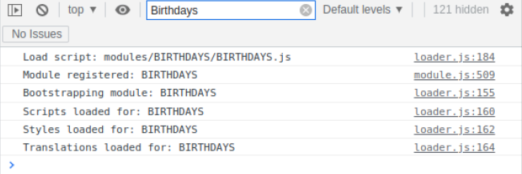
      Hi Sam, thanks for taking the time to reply, having looked at the developer window I have the below… doesn’t appear to show any issues.
      195e114a-6ade-484b-b035-7daee37e9227-image.png

      posted in Troubleshooting
      B
      bicolorbore586
    • Font-awesome

      Hi all,

      Looking at modifying the MMM-BIRTHDAYS to display a birthday cake icon.

      I’ve added symbol: ‘birthday-cake’, to the config.js file along with
      getStyles: function () {
      return [“font-awesome.css”];
      },

      but this doesn’t appear to work. I’ve tried comparing to calendar.js etc but to no avail.

      Any help / guidance (in simpletons language), would be greatly appreciated.

      posted in Troubleshooting
      B
      bicolorbore586
    • RE: Magic Mirror Default Weather Module

      @sdetweil all sorted now, I took the config out and put it back in fresh as I couldn’t work out where the typo/formatting error was. All tickety-boo now. Thanks for your help!

      posted in Troubleshooting
      B
      bicolorbore586
    • RE: Magic Mirror Default Weather Module

      @sdetweil Hi Sam, I’m probably not following this correctly, but I appear to be in a worse position than before in the fact that none of my modules now load.

      posted in Troubleshooting
      B
      bicolorbore586
    • 1 / 1