MagicMirror Forum
    • Recent
    • Tags
    • Unsolved
    • Solved
    • MagicMirror² Repository
    • Documentation
    • 3rd-Party-Modules
    • Donate
    • Discord
    • Register
    • Login
    1. Home
    2. brandao.rafael
    A New Chapter for MagicMirror: The Community Takes the Lead
    Read the statement by Michael Teeuw here.
    B
    Offline
    • Profile
    • Following 0
    • Followers 0
    • Topics 2
    • Posts 3
    • Groups 0

    brandao.rafael

    @brandao.rafael

    1
    Reputation
    1
    Profile views
    3
    Posts
    0
    Followers
    0
    Following
    Joined
    Last Online

    brandao.rafael Unfollow Follow

    Best posts made by brandao.rafael

    • MMM-Nest-Camera-WebRTC

      Hey everyone! I’ve been working on a module to display a live Google Nest camera feed on MagicMirror² using WebRTC, and wanted to share it with the community.


      MMM-Nest-Camera-WebRTC
      https://github.com/brandaorafael/MMM-Nest-Camera-WebRTC
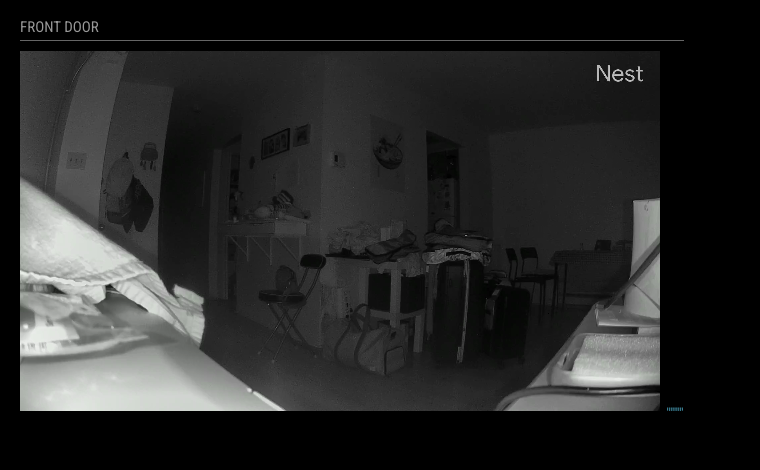
      MMM-Nest-Camera-WebRTC preview


      What it does:

      • Streams live video from a Google Nest camera directly on your mirror via WebRTC
      • Automatically refreshes OAuth tokens — no manual intervention needed after initial setup
      • Keeps the stream alive beyond Nest’s 5-minute session limit via periodic extension
      • Includes an audio frequency visualizer — a bar equalizer that reacts to the camera’s audio track (without playing any sound through the mirror)
      • Auto-reconnects on connection failure with configurable delay
      • Integrates with USER_PRESENCE (e.g. MMM-PIR-Sensor) to suspend/resume the stream when you leave/return
      • Supports hiddenOnStartup to defer the WebRTC connection until the module is shown

      Requirements:

      • A Google Cloud project with the Smart Device Management API enabled
      • A Device Access Console project (~$5 one-time fee to Google)
      • OAuth 2.0 credentials (Client ID + Secret)

      The README has step-by-step instructions for getting all credentials and completing the initial OAuth setup with the included exchange-nest-code.js CLI tool.


      This is a fork originally based on work by @shbatm — I rewrote the streaming and token logic, added the audio visualizer, and hardened the reconnection/session extension flow. Feedback and issues welcome!
      posted in Utilities
      B
      brandao.rafael

    Latest posts made by brandao.rafael

    • RE: MMM-StreamerStatus

      Formated configuration:

        {
          module: "MMM-StreamerStatus",
          position: "top_right",
          header: "Live Now",
          config: {
            twitchClientId: "your_client_id",
            twitchClientSecret: "your_client_secret",
            kickClientId: "your_client_id",
            kickClientSecret: "your_client_secret",
            youtubeApiKey: "your_api_key",
            displayStyle: "list",  // or "card"
            showOffline: false,
            streamers: [
              { name: "your_streamer", platform: "twitch" },
              { name: "your_streamer", platform: "kick" },
              { name: "Channel Name",  platform: "youtube", channelId: "UCxxxxxxx" },
            ],
          },
        },
      
      posted in Entertainment
      B
      brandao.rafael
    • MMM-Nest-Camera-WebRTC

      Hey everyone! I’ve been working on a module to display a live Google Nest camera feed on MagicMirror² using WebRTC, and wanted to share it with the community.


      MMM-Nest-Camera-WebRTC
      https://github.com/brandaorafael/MMM-Nest-Camera-WebRTC

      MMM-Nest-Camera-WebRTC preview


      What it does:

      • Streams live video from a Google Nest camera directly on your mirror via WebRTC
      • Automatically refreshes OAuth tokens — no manual intervention needed after initial setup
      • Keeps the stream alive beyond Nest’s 5-minute session limit via periodic extension
      • Includes an audio frequency visualizer — a bar equalizer that reacts to the camera’s audio track (without playing any sound through the mirror)
      • Auto-reconnects on connection failure with configurable delay
      • Integrates with USER_PRESENCE (e.g. MMM-PIR-Sensor) to suspend/resume the stream when you leave/return
      • Supports hiddenOnStartup to defer the WebRTC connection until the module is shown

      Requirements:

      • A Google Cloud project with the Smart Device Management API enabled
      • A Device Access Console project (~$5 one-time fee to Google)
      • OAuth 2.0 credentials (Client ID + Secret)

      The README has step-by-step instructions for getting all credentials and completing the initial OAuth setup with the included exchange-nest-code.js CLI tool.


      This is a fork originally based on work by @shbatm — I rewrote the streaming and token logic, added the audio visualizer, and hardened the reconnection/session extension flow. Feedback and issues welcome!

      posted in Utilities
      B
      brandao.rafael
    • MMM-StreamerStatus

      [Module] MMM-StreamerStatus — See who’s live on Twitch, Kick & YouTube

      Hey everyone! I’d like to share a new module I built: MMM-StreamerStatus.

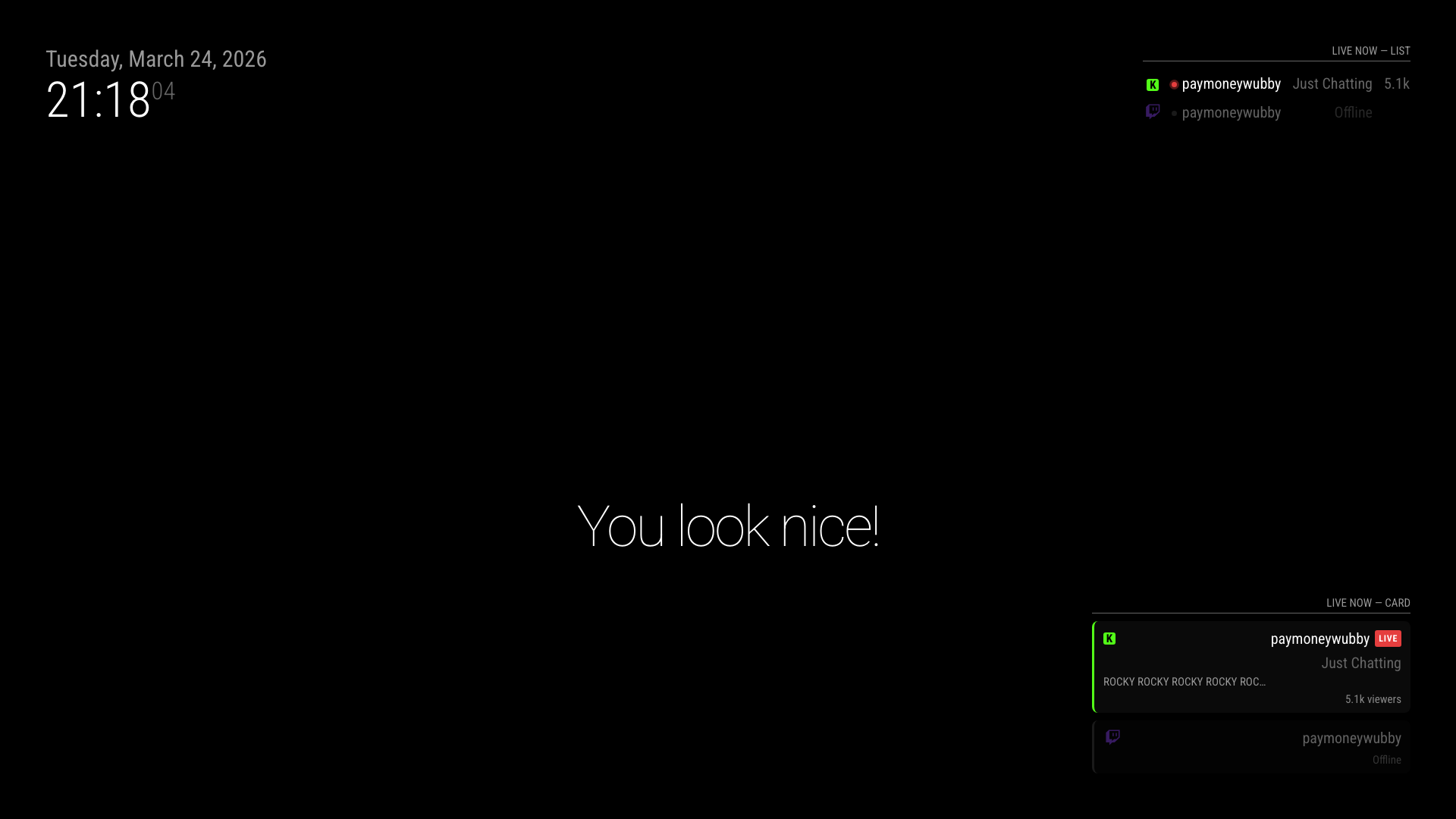
      It monitors a list of streamers across Twitch, Kick, and YouTube and shows you who’s currently live — with their game/category and
      viewer count — right on your mirror.


      Features

      • Supports Twitch, Kick, and YouTube
      • Two display styles: compact list or card grid (your choice)
      • Shows platform icon, live indicator, current game/category, and viewer count
      • Offline streamers can be shown dimmed or hidden entirely
      • Smart polling: Twitch + Kick every 2 min, YouTube on a separate interval to stay within the free API quota
      • OAuth token caching with automatic refresh for all platforms

      Screenshot

      Screenshot 2026-03-24 at 21.18.04.png


      Installation

      cd ~/MagicMirror/modules
      git clone https://github.com/brandaorafael/MMM-StreamerStatus

      No npm install needed.


      Configuration

      {
      module: “MMM-StreamerStatus”,
      position: “top_right”,
      header: “Live Now”,
      config: {
      twitchClientId: “your_client_id”,
      twitchClientSecret: “your_client_secret”,
      kickClientId: “your_client_id”,
      kickClientSecret: “your_client_secret”,
      youtubeApiKey: “your_api_key”,
      displayStyle: “list”, // or “card”
      showOffline: false,
      streamers: [
      { name: “your_streamer”, platform: “twitch” },
      { name: “your_streamer”, platform: “kick” },
      { name: “Channel Name”, platform: “youtube”, channelId: “UCxxxxxxx” },
      ],
      },
      },

      Full setup guide (including how to get API credentials for each platform) is in the README:
      https://github.com/brandaorafael/MMM-StreamerStatus

      Feedback and contributions welcome!

      posted in Entertainment
      B
      brandao.rafael