embarrassing… -_____-
Thank you mate ^^
I was sure, that this option doesn’t exist 'cause i didn’t see it ^^
 C
Offline
C
Offline
embarrassing… -_____-
Thank you mate ^^
I was sure, that this option doesn’t exist 'cause i didn’t see it ^^
Hi guys,
in my profile i can only see my posts i did.
Is or would it be possible to add a function, where i can see my created topics?
Because i find it laborious to search my topics ^^
thx
Don’t know if it helps and i am trying to keep it short…
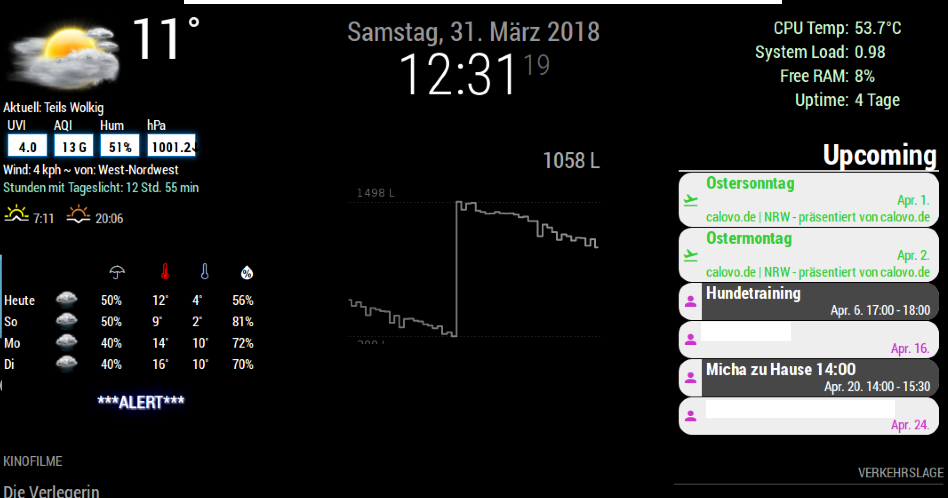
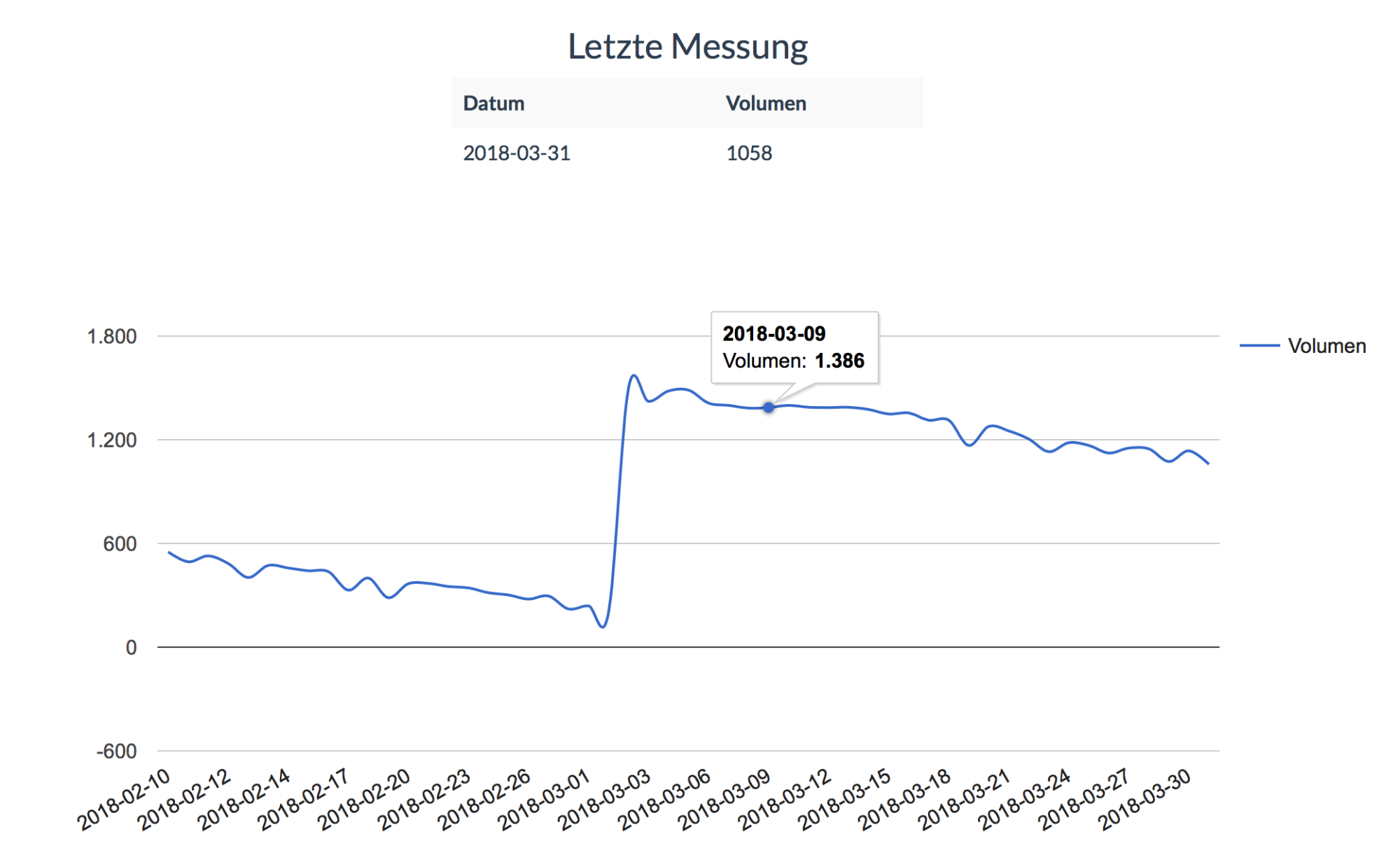
I build an Oiltank measurement system with another raspberry pi.
The results will be written to a mysql database and to a JSON file, which will be uploaded to my NAS.
On the NAS i run the database and a web server.
To Display the results on a webpage i used this php script: https://github.com/cruunnerr/OilTank-Graph-WebPage
To display the results on my MM i got some very much help from our user @doubleT
He wrote this module for me: https://github.com/cruunnerr/MMM-Oiltank
The module grabs the data from a JSON file and shows it on the MM.
Maybe this could help :/
MagicMirror:
Web Page:
i would think the other way…
let the cronjob execute a script which checks if there are mobile phones online.
the script should do it like this:
1. is there a phone nearby?

2.
      yes --> turn on the monitor

      no --> don't do anything
need to google for this kind of script, but shouldn’t be too difficult.
Hey mate,
here u can see my result: https://forum.magicmirror.builders/topic/6048/my-first-mirror-until-now/2
i used this tutorial: https://dordnung.de/raspberrypi-ledstrip/
its not a module for MM. But you can use Pigpio with an external script.
Just use the PIR or a button to turn on and off the lights.
in my case the PIR starts a script where it turns on the monitor and turn on the mosfets slowly.
For the PIR i used this:
#!/usr/bin/env python

import sys
import time
import RPi.GPIO as io
import subprocess
import pigpio

io.setmode(io.BCM)
SHUTOFF_DELAY = 119 # seconds
PIR_PIN = 25       # 22 on the board
LED_PIN = 16

def main():
    io.setup(PIR_PIN, io.IN)
    io.setup(LED_PIN, io.OUT)
    turned_off = False
    last_motion_time = time.time()

    while True:
        if io.input(PIR_PIN):
            last_motion_time = time.time()
            io.output(LED_PIN, io.LOW)
            print ".",
            sys.stdout.flush()
            if turned_off:
                turned_off = False
                turn_on()
        else:
            if not turned_off and time.time() > (last_motion_time +
                                                 SHUTOFF_DELAY):
                turned_off = True
                turn_off()
            if not turned_off and time.time() > (last_motion_time + 1):
                io.output(LED_PIN, io.HIGH)
        time.sleep(.1)

def turn_on():
        subprocess.call("sh /home/pi/lights_on.sh", shell=True)

def turn_off():
        subprocess.call("sh /home/pi/lights_off.sh", shell=True)

if __name__ == '__main__':
    try:
        main()
    except KeyboardInterrupt:
        io.cleanup()
And the script (lights_on and lights_off) which will be executed by detection looks like this:
lights_on:
sudo tvservice -p

sleep 0.02

pigs p 17 1
pigs p 22 1
pigs p 24 1

sleep 0.06s

pigs p 17 2
pigs p 22 2
pigs p 24 2

sleep 0.06s

pigs p 17 3
pigs p 22 3
pigs p 24 3

sleep 0.06s

pigs p 17 4
pigs p 22 4
pigs p 24 4

sleep 0.06s

pigs p 17 5
pigs p 22 5
pigs p 24 5

sleep 0.06s

pigs p 17 6
pigs p 22 6
pigs p 24 5

sleep 0.06s

pigs p 17 7
pigs p 22 7
pigs p 24 6

sleep 0.06s

pigs p 17 8
pigs p 22 8
pigs p 24 7

sleep 0.06s

pigs p 17 9
pigs p 22 9
pigs p 24 8

sleep 0.06s

pigs p 17 10
pigs p 22 10
pigs p 24 9

sleep 0.06s

pigs p 17 11
pigs p 22 11
pigs p 24 10

sleep 0.06s

pigs p 17 12
pigs p 22 12
pigs p 24 11
lights_off:
pigs p 17 12
pigs p 22 12
pigs p 24 11

sleep 0.06s

pigs p 17 11
pigs p 22 11
pigs p 24 10

sleep 0.06s

pigs p 17 10
pigs p 22 10
pigs p 24 9

sleep 0.06s

pigs p 17 9
pigs p 22 9
pigs p 24 8

sleep 0.06s

pigs p 17 8
pigs p 22 8
pigs p 24 7

sleep 0.06s

pigs p 17 7
pigs p 22 7
pigs p 24 6

sleep 0.06s

pigs p 17 6
pigs p 22 6
pigs p 24 5

sleep 0.06s

pigs p 17 5
pigs p 22 5
pigs p 24 5

sleep 0.06s

pigs p 17 4
pigs p 22 4
pigs p 24 4

sleep 0.06s

pigs p 17 4
pigs p 22 4
pigs p 24 4

sleep 0.06s

sudo tvservice -o
pigs p 17 3
pigs p 22 3
pigs p 24 3

sleep 0.06s

pigs p 17 2
pigs p 22 2
pigs p 24 2

sleep 0.06s

pigs p 17 1
pigs p 22 1
pigs p 24 1

sleep 0.06s

pigs p 17 0
pigs p 22 0
pigs p 24 0
Because u used the automatic installer and pressed “yes” when it asked you for starting MagicMirror automatically ;)
try
pm2 stop mm
pm2 delete mm
pm2 save
@pinsdorf said in Not sure what doing wrong :( adding modules:
{
module: ‘uptimerobot’,
position: ‘top_right’,
config: {
useColors: true
api_key:‘u505342-b40737465f0eada9bb8a’,
},
Missing comma behind the “true”.
Must look like this:
{
		module: 'uptimerobot',
		position: 'top_right',
        		config: {
		useColors: true,
		api_key:'u505342-b40737465f0eada9bb8a'
	},
Just a copy/paste failure from Mykle ;)
hmm… I will check this tomorrow and will give a result
Installed a fresh Raspbian Stretch Desktop and just created the relayPIR.py which runs perfectly. can start and stop whenever i want the script and even autostart on reboot works great.
Hmm… so we used several options and nothing seems to work… You should delete all things we made and start again.
Maybe just try to create the relay script on point 5.2
Do u have a link to your relay? Do u hear it clicking?
This is in some way a problem of Wunderlist. :/
So nothing u can do as far as i know. I searched long for a solution until i finally disabled the module. :(
Maybe u try this: https://forum.magicmirror.builders/topic/566/mmm-todoist-your-todoist-tasks-on-your-mirror
i didn’t try it yet
@AxLed said in [MMM-Buttons] Connect multiple buttons to send configurable notifications:
as i need some WAF (Woman acceptance faktor) for my mirror.
We could open a petition XD
@AxLed said in [MMM-Buttons] Connect multiple buttons to send configurable notifications:
i also have a problem with MMM-Buttons, that Buttonpress is only sometimes recognized if i press twice or triple.
Maybe play around with the min and max Presstime.
connected between 1: GND an BCM26; 2: GND and BMC20
I tested the buttons with a python script an they are recognized
Wondering that this works with the module… when u press the Button the gpio would be set to low which is equal to 0.
- Do Buttons on GND work or do i have to put them on +3,3V with a resistor instead?
- how do i use
activeLowin MMM-Buttons Configuration? … activeLow: true ?
Afaik this isn’t possible through the module. Maybe u find a solution in the web, fo how changing the input state detection.
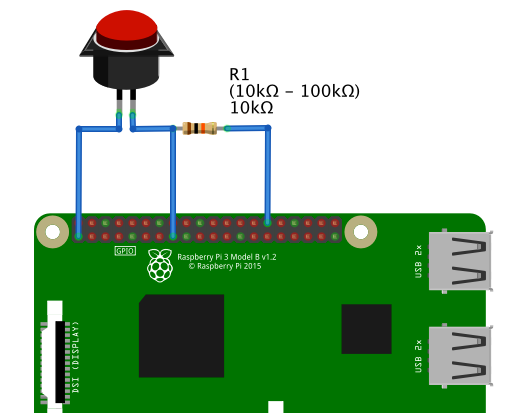
And yes, u should use resistors for giving the GPIO a defined state when not pressing. When u don’t want to connect them physically (but i recommend) u could use the internal resistors (check below on this site http://wiringpi.com/the-gpio-utility/)
So normal way (or the way i used) is to connect the button like this:
@RoboDoc said in TypeError: Cannot read property ‘hash’ of null:
at /home/pi/MagicMirror/modules/default/updatenotification/node_helper.js:68:31
line 68 in the node_helper of the update notification seems to check all modules on GitHub for updates, if i understand that correctly…
So there are two options:
Your mirror lost it’s wifi/internet connection. Maybe u could check on your router if the device had logged off from the wifi.
Or check the strength of the connection. Maybe take a look at the wifi_rebooter, as the wifi on the RPi 3 is not the best. So i installed an automatically wifi_rebooter here. U could try that as well: http://alexba.in/blog/2015/01/14/automatically-reconnecting-wifi-on-a-raspberrypi/
in my case my Pi pings my router address every 3 minutes and when it cannot reach it, it reboots it’s wifi itself.
Some of the 3rd party modules has errors. But i don’t think so. To check it u could just run the default modules for a while
So you use the camera module i posted?
unfortunately i don’t use this module, so i am maybe the wrong person to ask…
But i took a look at the webcam.js of the module and in line 46/47 the width and hight is defined.
Maybe u should play around with that…
https://github.com/alexyak/camera/blob/master/webcam.js
nano MagicMirror/modules/camera/webcam.js
also check the camera.js at line 62/63…
nano MagicMirror/modules/camera/camera.js
I don’t know if it would be necessary to set the resolution of the cam within raspbian… ?
To start the cam with a button u can even use the MMM-Buttons module. This should work, if i understand the camera-module correct ^^
{
		    module: 'MMM-Buttons',
		    config: {
			maxShortPressTime: 1000,
		        buttons: [
		            {
		                pin: 15,
		                name: "camera",
		                shortPress: {
		                    notification: "SHOW_CAMERA",
                                         }
		             },
                                longPress: {
                                notification: "HIDE_CAMERA",
                                         },
		             },
		         ]
		     }
		},
WooooooW,
that is exactly how i want to do it in my bathroom. Looks very smart…
love it!
did u try what i posted?
U said, u tried part 2 of the tutorial. So u should have a “monitor_on.sh” and a “monitor_off.sh”
Try to change the content to the following:
sudo vcgencmd display_power 1 for monitor_on.sh
sudo vcgencmd display_power 0 for monitor_off.sh
or
sudo tvservice -p && sudo chvt 9 && sudo chvt 7 for monitor_on.sh
sudo tvservice -o for monitor_off.sh
If these don’t work at all u should go for the relay.
U could use every relay u want, but u should search for a 3 - 5V relay because otherwise u need to install a transistor.
https://www.ebay.com/sch/i.html?_from=R40&_trksid=p2380057.m570.l1313.TR0.TRC0.H0.Xraspberry+pi+relay.TRS0&_nkw=raspberry+pi+relay&_sacat=0
surely, but i don’t know what camera u mean^^
A security camera somewhere at your house or the RPi camera?
For security u could check this: https://github.com/shbatm/MMM-RTSPStream
for RPi cam u could check this: https://forum.magicmirror.builders/topic/603/camera-module