@sdetweil
Great! I’m glad I helped you while you were helping me. :)
D
Offline
A New Chapter for MagicMirror: The Community Takes the Lead
Read the statement by Michael Teeuw here.
Read the statement by Michael Teeuw here.
Posts
-
RE: Scaling issues with MM 2.35 using NPM Run Start:x11
-
RE: Scaling issues with MM 2.35 using NPM Run Start:x11
@sdetweil
I used your script to upgrade. It was the custom css. custom.css was moved but I had other custom files and folders in /css. I moved all the contents of /css to /config and everything seems to be back to what I had before. Great catch! Thank you so much! -
Scaling issues with MM 2.35 using NPM Run Start:x11
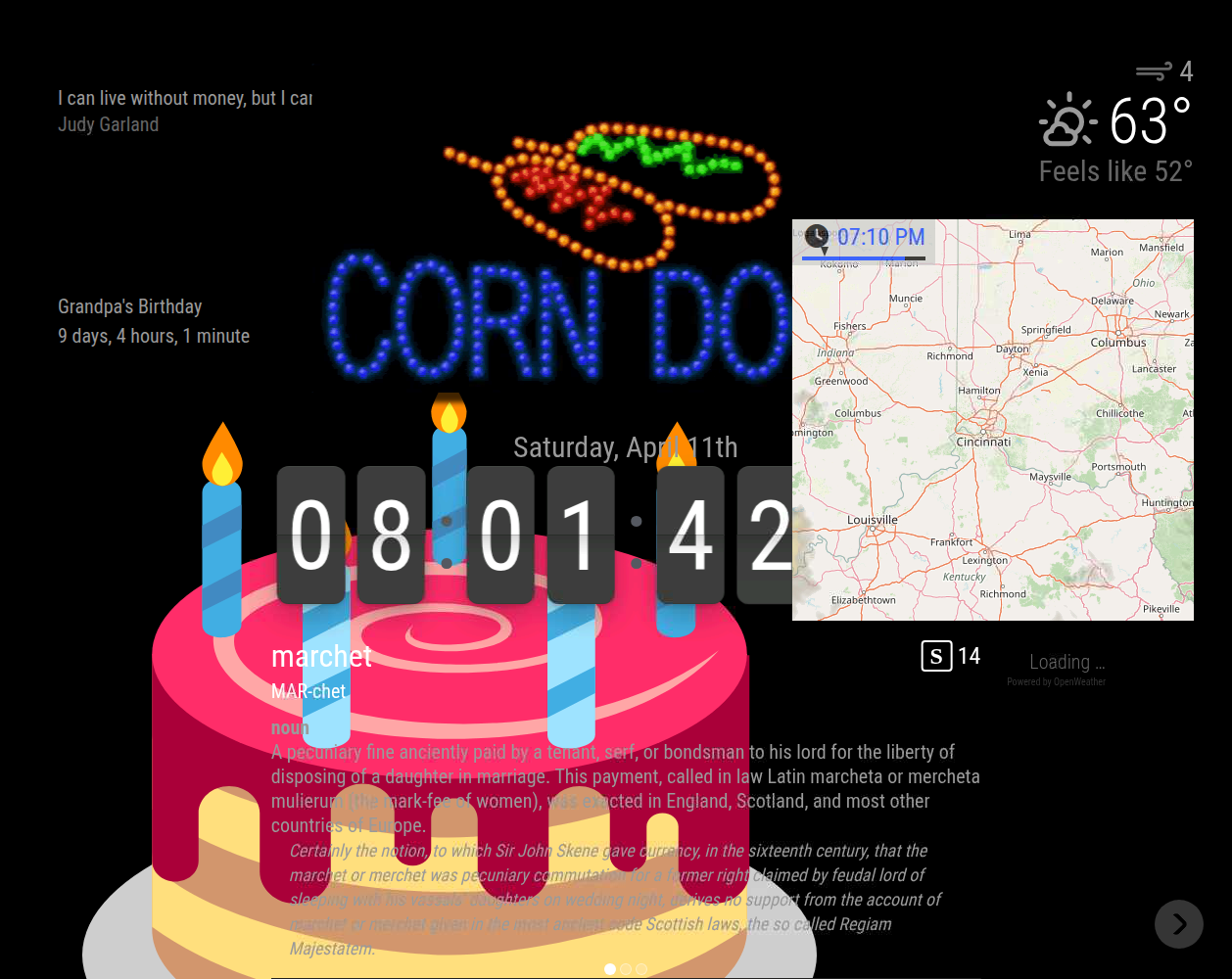
I am having to use NPM Run Start:x11 to get MM 2.35 to run. NPM start was working in 2.34. Now I am having scaling and text issues and would greatly appreciate some help with troubleshooting this. Here is some info about my machine:
[2026-04-11 21:12:18.020] [INFO] [systeminformation]System Information
- SYSTEM: manufacturer: libre-computer; model: aml-s905x-cc-v2; virtual: false; MM: v2.35.0
- OS: platform: linux; distro: Debian GNU/Linux; release: 12; arch: arm64; kernel: 6.1.92-15907-gf36fd2695db3
- VERSIONS: electron: 41.1.0; used node: 22.21.1; installed node: 22.21.1; npm: 10.9.4; pm2: 6.0.14
- ENV: XDG_SESSION_TYPE: x11; MM_CONFIG_FILE: undefined
WAYLAND_DISPLAY: undefined; DISPLAY: :0; ELECTRON_ENABLE_GPU: undefined - RAM: total: 1944.19 MB; free: 969.87 MB; used: 974.32 MB
I posted pictures comparing 2.34 and 2.35. Please let me know if I can provide additional info that would be helpful. Thanks!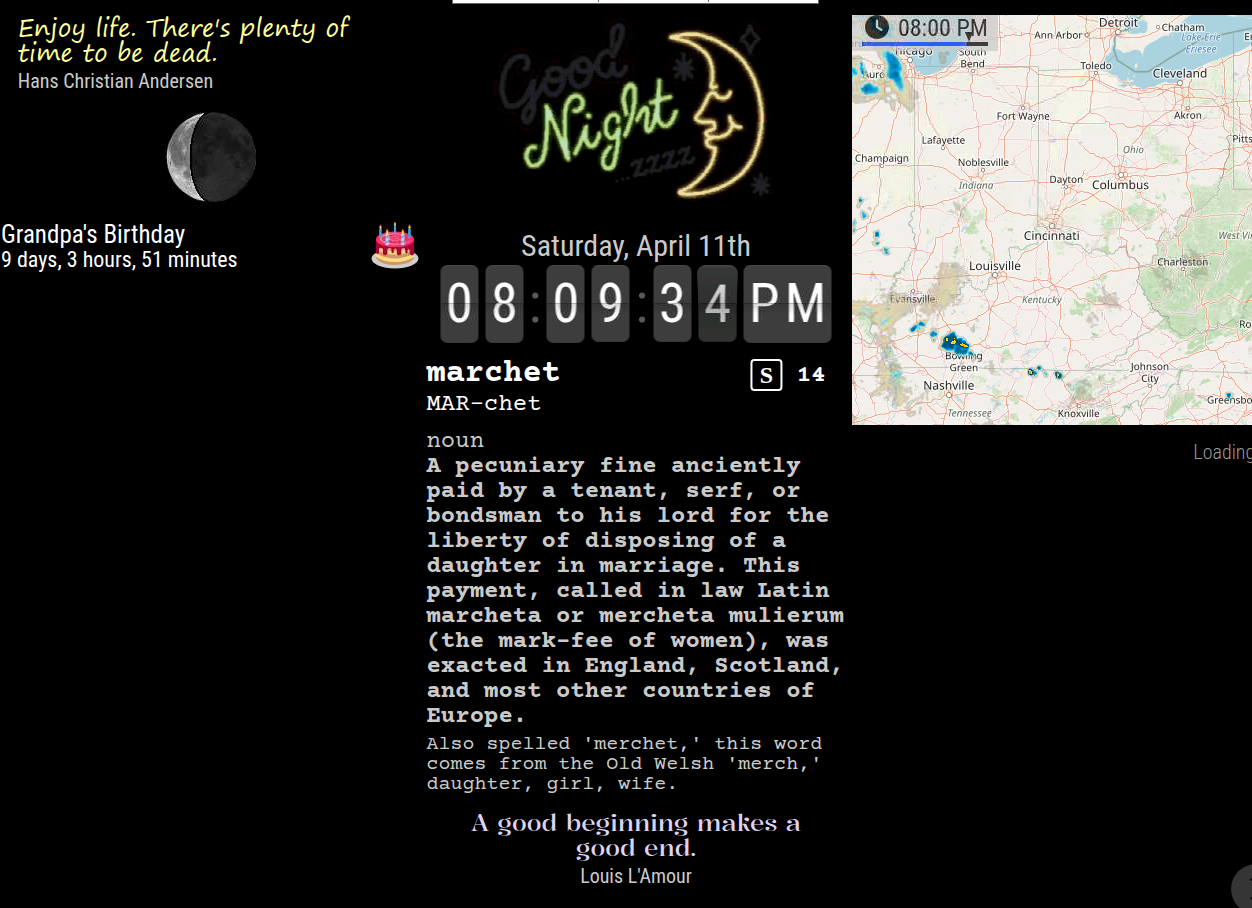
-
RE: Help with Crontab starting pm2 mm.sh
@sdetweil Like so
PATH=/usr/local/bin:/usr/bin:/bin 00 7 * * * pm2 start mm &>/dev/null -
RE: Help with Crontab starting pm2 mm.sh
Now I have
PATH=/usr/local/bin:/usr/bin:/bin 00 7 * * * pm2 start mm >/dev/null 2>&1 -
RE: Help with Crontab starting pm2 mm.sh
@sdetweil That was the solution. Thank you!
29 14 * * * /usr/local/bin/pm2 start mm.sh >/dev/null >2&1 -
Help with Crontab starting pm2 mm.sh
I am using Rasp Pi Bookworm on a Libre Sweet Potato.
In my user Crontab:
29 14 * * * pm2 start mm.sh >/dev/null >2&1sweetpotatopi:~ $ sudo systemctl status cron ● cron.service - Regular background program processing daemon Loaded: loaded (/lib/systemd/system/cron.service; enabled; preset: enabled) Active: active (running) since Mon 2025-02-03 14:27:37 EST; 1min 55s ago Docs: man:cron(8) Main PID: 2402 (cron) Tasks: 1 (limit: 1986) Memory: 368.0K CPU: 165ms CGroup: /system.slice/cron.service └─2402 /usr/sbin/cron -f Feb 03 14:27:37 sweetpotatopi systemd[1]: Started cron.service - Regular background program processing daemon. Feb 03 14:27:37 sweetpotatopi cron[2402]: (CRON) INFO (pidfile fd = 3) Feb 03 14:27:37 sweetpotatopi cron[2402]: (CRON) INFO (Skipping @reboot jobs -- not system startup) Feb 03 14:29:01 sweetpotatopi CRON[2409]: pam_unix(cron:session): session opened for user user(uid=1000) by (uid=0) Feb 03 14:29:01 sweetpotatopi CRON[2410]: (user) CMD (pm2 start mm.sh >/dev/null >2&1) Feb 03 14:29:01 sweetpotatopi CRON[2409]: pam_unix(cron:session): session closed for user userBut, the mirror is not starting.
~ $ pm2 show mm
 Describing process with id 0 - name mm
┌───────────────────┬────────────────────────────────────┐
│ status            │ stopped                            │
│ name              │ mm                                 │
│ namespace         │ default                            │
│ version           │ N/A                                │
│ restarts          │ 0                                  │
│ uptime            │ 0                                  │
│ script path       │ /home/user/mm.sh                  │
│ script args       │ N/A                                │
│ error log path    │ /home/user/.pm2/logs/mm-error.log │
│ out log path      │ /home/user/.pm2/logs/mm-out.log   │
│ pid path          │ /home/user/.pm2/pids/mm-0.pid     │
│ interpreter       │ bash                               │
│ interpreter args  │ N/A                                │
│ script id         │ 0                                  │
│ exec cwd          │ /home/user                        │
│ exec mode         │ fork_mode                          │
│ node.js version   │ N/A                                │
│ node env          │ N/A                                │
│ watch & reload    │ ✘                                  │
│ unstable restarts │ 0                                  │
│ created at        │ 2025-01-30T12:31:59.717Z           │
└───────────────────┴────────────────────────────────────┘
 Divergent env variables from local env
┌────────────────┬──────────────────────────────────┐
│ _LXSESSION_PID │ 1234                             │
│ SSH_AUTH_SOCK  │ /tmp/ssh-rK5CMznThwsE/agent.1234 │
│ SSH_AGENT_PID  │ 1326                             │
└────────────────┴──────────────────────────────────┘
What do I have wrong? Thank you for taking a look at this.
-
RE: Failed to get fd for plane and Failed to export buffer to dma_buf errors
Thank you! I will try to not lose too much sleep over it. :)
-
Failed to get fd for plane and Failed to export buffer to dma_buf errors
I am trying to get Magic Mirror set up on my new machine with Bookworm installed and am getting numerous errors. MM seems to be running okay with the few modules I have so far. I would appreciate some help correcting these errors if they are a problem. Thanks!
> magicmirror@2.30.0 start:x11 > DISPLAY="${DISPLAY:=:0}" ./node_modules/.bin/electron js/electron.js [2025-01-18 21:47:08.866] [LOG] Starting MagicMirror: v2.30.0 [2025-01-18 21:47:08.930] [LOG] Loading config ... [2025-01-18 21:47:08.935] [LOG] config template file not exists, no envsubst [2025-01-18 21:47:10.116] [INFO] Checking config file /home/mmuser/MagicMirror/config/config.js ... [2025-01-18 21:47:10.390] [INFO] Your configuration file doesn't contain syntax errors :) [2025-01-18 21:47:10.392] [INFO] Checking modules structure configuration ... [2025-01-18 21:47:10.680] [INFO] Your modules structure configuration doesn't contain errors :) [2025-01-18 21:47:10.686] [LOG] Loading module helpers ... [2025-01-18 21:47:14.006] [LOG] Launching application. [24016:0118/214715.118683:ERROR:gbm_wrapper.cc(74)] Failed to get fd for plane.: No such file or directory (2) [24016:0118/214715.120260:ERROR:gbm_wrapper.cc(257)] Failed to export buffer to dma_buf: No such file or directory (2) [24016:0118/214715.121045:ERROR:gbm_wrapper.cc(74)] Failed to get fd for plane.: No such file or directory (2) [24016:0118/214715.121691:ERROR:gbm_wrapper.cc(257)] Failed to export buffer to dma_buf: No such file or directory (2) [24016:0118/214715.122798:ERROR:gbm_wrapper.cc(74)] Failed to get fd for plane.: No such file or directory (2) [24016:0118/214715.123836:ERROR:gbm_wrapper.cc(257)] Failed to export buffer to dma_buf: No such file or directory (2) [24016:0118/214715.124929:ERROR:gbm_wrapper.cc(74)] Failed to get fd for plane.: No such file or directory (2) [24016:0118/214715.126185:ERROR:gbm_wrapper.cc(257)] Failed to export buffer to dma_buf: No such file or directory (2) [24016:0118/214715.127230:ERROR:gbm_wrapper.cc(74)] Failed to get fd for plane.: No such file or directory (2) [24016:0118/214715.128281:ERROR:gbm_wrapper.cc(257)] Failed to export buffer to dma_buf: No such file or directory (2) [24016:0118/214715.129560:ERROR:gbm_wrapper.cc(74)] Failed to get fd for plane.: No such file or directory (2) [24016:0118/214715.137125:ERROR:gbm_wrapper.cc(257)] Failed to export buffer to dma_buf: No such file or directory (2) [24016:0118/214715.138330:ERROR:gbm_wrapper.cc(74)] Failed to get fd for plane.: No such file or directory (2) [24016:0118/214715.139359:ERROR:gbm_wrapper.cc(257)] Failed to export buffer to dma_buf: No such file or directory (2) [24016:0118/214715.144838:ERROR:gbm_wrapper.cc(74)] Failed to get fd for plane.: No such file or directory (2) [24016:0118/214715.147648:ERROR:gbm_wrapper.cc(257)] Failed to export buffer to dma_buf: No such file or directory (2) [24016:0118/214715.148735:ERROR:gbm_wrapper.cc(74)] Failed to get fd for plane.: No such file or directory (2) [24016:0118/214715.149965:ERROR:gbm_wrapper.cc(257)] Failed to export buffer to dma_buf: No such file or directory (2) [24016:0118/214715.151057:ERROR:gbm_wrapper.cc(74)] Failed to get fd for plane.: No such file or directory (2) [24016:0118/214715.152118:ERROR:gbm_wrapper.cc(257)] Failed to export buffer to dma_buf: No such file or directory (2) [24016:0118/214715.153159:ERROR:gbm_wrapper.cc(74)] Failed to get fd for plane.: No such file or directory (2) [24016:0118/214715.154235:ERROR:gbm_wrapper.cc(257)] Failed to export buffer to dma_buf: No such file or directory (2) [24016:0118/214715.155276:ERROR:gbm_wrapper.cc(74)] Failed to get fd for plane.: No such file or directory (2) [24016:0118/214715.156286:ERROR:gbm_wrapper.cc(257)] Failed to export buffer to dma_buf: No such file or directory (2) [24016:0118/214715.157239:ERROR:gbm_wrapper.cc(74)] Failed to get fd for plane.: No such file or directory (2) [24016:0118/214715.163090:ERROR:gbm_wrapper.cc(257)] Failed to export buffer to dma_buf: No such file or directory (2) [24016:0118/214715.164534:ERROR:gbm_wrapper.cc(74)] Failed to get fd for plane.: No such file or directory (2) [24016:0118/214715.166261:ERROR:gbm_wrapper.cc(257)] Failed to export buffer to dma_buf: No such file or directory (2) [2025-01-18 21:47:16.078] [INFO] System information: ### SYSTEM: manufacturer: libre-computer; model: aml-s905x-cc-v2; virtual: false ### OS: platform: linux; distro: Debian GNU/Linux; release: 12; arch: arm64; kernel: 6.1.64-11810-g69b1ffe8ef6c ### VERSIONS: electron: 32.2.8; used node: 20.18.1; installed node: 20.18.1; npm: 10.8.2; pm2: 5.4.3 ### OTHER: timeZone: America/New_York; ELECTRON_ENABLE_GPU: undefined -
RE: Do modules stop requesting API data when monitor is off or module is hidden?
@sdetweil
Thank you! So, probably the thing to do is set up PM2 and use MMM-AlexaControl to auto start and stop it? If I have MM on a RPi and then two browser windows displaying MM, does that increase the number of API calls to 3 or is it still just one? I’m thinking about this transition to OneCall 3.0 and how to be the most efficient with the calls. -
Do modules stop requesting API data when monitor is off or module is hidden?
I am using MMM-AlexaControl and have a routine set to turn off the monitor overnight. Does this stop MagicMirror in general? Do the modules like weather modules stop requesting data? Do modules stop requesting data when hidden with modules like MMM-ModuleScheduler?
-
RE: How can elements in the default weather module be moved
@sdetweil
I have made some progress. I commented out everything in vendor\node_modules\weathericons\css\weather-icons.css. and changed .weather . larger to flex and have more control of the icon..weather .large { line-height: 1; display: flex; } .weather .weathericon { font-size: unset !important; line-height: unset !important; transform: unset !important; outline: 1px solid blue; width: 2em !important; height: 2em !important; position:relative; top: -18px; left: -15px; } .weather .light.bright { outline: 1px solid green; position:absolute; top: 2px; left: 147px; } .weather .normal.medium.feelslike { outline: 1px solid purple; position:absolute; top: 3px; left: 242px; }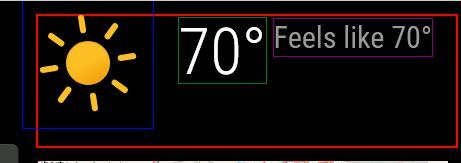
The icons in this set have a lot of background “dead space” so it is skewed up and left to get it to the corner. The height of the module space is being controlled by the height of the icon. How can I decrease the height of the module space by the amount I moved the icon up plus a little extra for the dead space?
-
RE: How can elements in the default weather module be moved
@sdetweil
I’ve made some headway with the temperatures but the icon is not behaving. I think part of the problem is that it is being treated as a font or the original icon that is a font is hanging around causing a problem. It there a way with the CSS to clear all the settings and remove the font setting for the icon container? -
RE: MMM-Gas
@MarcLandis
That is unfortunate. I looked around a bit to see if there is another option but did not find anything free. (: -
RE: How can elements in the default weather module be moved
@sdetweil
In tinkering around, I am able to move it in custom.css with the following and possibly avoid addressing every individual icon..weather .weathericon { display: inline-block; transform: translate(-31px, -32px) !important; outline: 1px solid blue; }The problem with what I have above is that it will only make it look okay on one screen resolution. How do I move it to the top left of the module space so that it is relative (stays in the top left regardless of screen resolution).
-
RE: How can elements in the default weather module be moved
@sdetweil
Thank you for helping me.<div id="module_3_weather" class="module weather" style="transition: opacity 1.5s ease 0s; position: static; opacity: 1;"> <header class="module-header" style="display: none;"></header> <div class="module-content"> <div> <div class="normal medium"> </div> <div class="large"> <span class="light wi weathericon wi-day-sunny"> ::before </span> <span class="light bright">81°</span> <span class="normal medium feelslike"> <span class="dimmed"> Feels like 81° </span> </span> </div> <!-- Uncomment the line below to see the contents of the `current` object. --> <!-- <div style="word-wrap:break-word" class="xsmall dimmed">{"date":"2024-10-06T16:11:01.142Z","windSpeed":5.81,"windFromDirection":237,"sunrise":"2024-10-06T11:39:13.000Z","sunset":"2024-10-06T23:11:13.000Z","temperature":26.76,"minTemperature":null,"maxTemperature":null,"weatherType":"day-sunny","humidity":0.45,"precipitationAmount":null,"precipitationUnits":null,"precipitationProbability":null,"feelsLikeTemp":null}</div> --> </div></div></div> -
RE: MMM-Gas
@JohnGalt
Have you made any progress figuring this out? I am having the same problem. The module loads but doesn’t show that it is getting any data. -
How can elements in the default weather module be moved
I am trying t get things lined up but I don’t know enough to get this looking good and would really appreciate some help. In the default Weather module I have made some changes to hide the wind info and move the Feels Like temp into the same area as the icon and temperature. I changed the icons to a set of svg images in a custom css. In the custom css I added the following to change the size of the weather icon size:
.weather .weathericon {
	width: 2.75em !important;
	height: 2.75em !important;}
Currently I have:
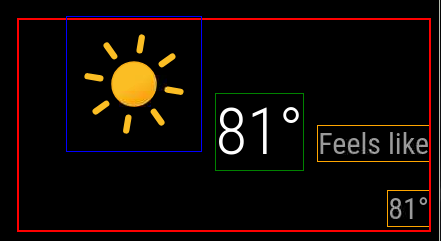
And would like to get to:

Following is my current.njk
{% macro humidity() %} {% if current.humidity %} <span class="humidity"><span>{{ current.humidity | decimalSymbol }}</span><sup> <i class="wi wi-humidity humidity-icon"></i></sup></span> {% endif %} {% endmacro %} {% if current %} {% if not config.onlyTemp %} <div class="normal medium"> {# Start of config setting I added #} {% if config.showWindInfo %} <span class="wi wi-strong-wind dimmed"></span> <span> {{ current.windSpeed | unit("wind") | round }} {% if config.showWindDirection %} <sup> {% if config.showWindDirectionAsArrow %} <i class="fas fa-long-arrow-alt-down" style="transform:rotate({{ current.windFromDirection }}deg)"></i> {% else %} {{ current.cardinalWindDirection() | translate }} {% endif %} </sup> {% endif %} </span> {% endif %} {# End of config setting I added #} {% if config.showHumidity === "wind" %} {{ humidity() }} {% endif %} {% if config.showSun %} <span class="wi dimmed wi-{{ current.nextSunAction() }}"></span> <span> {% if current.nextSunAction() === "sunset" %} {{ current.sunset | formatTime }} {% else %} {{ current.sunrise | formatTime }} {% endif %} </span> {% endif %} {% if config.showUVIndex %} <td class="align-right bright uv-index"> <div class="wi dimmed wi-hot"></div> {{ current.uv_index }} </td> {% endif %} </div> {% endif %} <div class="large"> {% if config.showIndoorTemperature and indoor.temperature or config.showIndoorHumidity and indoor.humidity %} <span class="medium fas fa-home"></span> <span style="display: inline-block"> {% if config.showIndoorTemperature and indoor.temperature %} <sup class="small" style="position: relative; display: block; text-align: left;"> <span> {{ indoor.temperature | roundValue | unit("temperature") | decimalSymbol }} </span> </sup> {% endif %} {% if config.showIndoorHumidity and indoor.humidity %} <sub class="small" style="position: relative; display: block; text-align: left;"> <span> {{ indoor.humidity | roundValue | unit("humidity") | decimalSymbol }} </span> </sub> {% endif %} </span> {% endif %} <span class="light wi weathericon wi-{{ current.weatherType }}"></span> <span class="light bright">{{ current.temperature | roundValue | unit("temperature") | decimalSymbol }}</span> {# Start of changes I made #} {% if (config.showFeelsLike) and not config.onlyTemp %} <span class="normal medium feelslike"> <span class="dimmed"> {{ "FEELS" | translate({DEGREE: current.feelsLike() | roundValue | unit("temperature") | decimalSymbol }) }} </span> </span> {% endif %} {# End of changes I made #} {% if config.showHumidity === "temp" %} <span class="medium bright">{{ humidity() }}</span> {% endif %} </div> {# {% if (config.showFeelsLike or config.showPrecipitationAmount or config.showPrecipitationProbability) and not config.onlyTemp %} #} {% if (config.showPrecipitationAmount or config.showPrecipitationProbability) and not config.onlyTemp %} <div class="normal medium feelslike"> {% if config.showFeelsLike %} <span class="dimmed"> {% if config.showHumidity === "feelslike" %} {{ humidity() }} {% endif %} {#{{ "FEELS" | translate({DEGREE: current.feelsLike() | roundValue | unit("temperature") | decimalSymbol }) }}#} </span> <br /> {% endif %} {% if config.showPrecipitationAmount and current.precipitationAmount %} <span class="dimmed"> <span class="precipitationLeadText">{{ "PRECIP_AMOUNT" | translate }}</span> {{ current.precipitationAmount | unit("precip", current.precipitationUnits) }} </span> <br /> {% endif %} {% if config.showPrecipitationProbability and current.precipitationProbability %} <span class="dimmed"> <span class="precipitationLeadText">{{ "PRECIP_POP" | translate }}</span> {{ current.precipitationProbability }}% </span> {% endif %} </div> {% endif %} {% if config.showHumidity === "below" %} <span class="medium dimmed">{{ humidity() }}</span> {% endif %} {% else %} <div class="dimmed light small">{{ "LOADING" | translate }}</div> {% endif %} <!-- Uncomment the line below to see the contents of the `current` object. --> <!-- <div style="word-wrap:break-word" class="xsmall dimmed">{{current | dump}}</div> -->Thank you for taking a look at this.
-
RE: MMM-Gas
admin@raspberrypi:~/Desktop/MagicMirror $ npm run start

> magicmirror@2.28.0 start
> DISPLAY="${DISPLAY:=:0}" ./node_modules/.bin/electron js/electron.js

[2024-09-28 14:20:56.806] [LOG]   Starting MagicMirror: v2.28.0
[2024-09-28 14:20:56.892] [LOG]   Loading config ...
[2024-09-28 14:20:56.899] [LOG]   config template file not exists, no envsubst
[2024-09-28 14:20:56.909] [LOG]   Loading module helpers ...
[2024-09-28 14:20:59.198] [LOG]   Initializing new module helper ...
[2024-09-28 14:20:59.201] [LOG]   Module helper loaded: MMM-Gas
[2024-09-28 14:20:59.202] [LOG]   All module helpers loaded.
[2024-09-28 14:20:59.224] [LOG]   Starting server on port 8080 ...
[2024-09-28 14:21:00.473] [LOG]   Server started ...
[2024-09-28 14:21:00.479] [LOG]   Connecting socket for: MMM-Gas
[2024-09-28 14:21:00.482] [LOG]   Starting module: MMM-Gas
[2024-09-28 14:21:00.485] [LOG]   Sockets connected & modules started ...
[2024-09-28 14:21:02.543] [LOG]   Launching application.
[2024-09-28 14:21:07.261] [INFO]  System information:
### SYSTEM:   manufacturer: Raspberry Pi Foundation; model: Raspberry Pi 2 Model B Rev 1.2; raspberry: [object Object]; virtual: false
### OS:       platform: linux; distro: Raspbian GNU/Linux; release: 11; arch: arm; kernel: 6.1.21-v7+
### VERSIONS: electron: 31.1.0; used node: 20.14.0; installed node: 20.11.0; npm: 10.2.4; pm2: 5.4.1
### OTHER:    timeZone: America/New_York; ELECTRON_ENABLE_GPU: undefined
It doesn’t look like it is fetching the gas prices. ??
-
RE: MMM-Gas
I recently noticed that the MMM-Gas module is not showing/working. All of my other modules are working. I removed all the modules except MMM-Gas from config.js and disabled the default modules and am just getting a black screen. There is no Loading or Undefined message. I deleted the module and reinstalled but got the same results. MM is installed on a Raspberry Pi. Please let me know what further info I can provide or steps to take to troubleshoot further. Thank you!