@BKeyport
That works great! Thank you!
D
Offline
A New Chapter for MagicMirror: The Community Takes the Lead
Read the statement by Michael Teeuw here.
Read the statement by Michael Teeuw here.
-
RE: Module is changing width of position
-
RE: MMM-AlexaControl not changing MMM-Carousel pages anymore
@sdetweil Thank you for taking a look at this. I was getting odd info from MMM-Notifications so I changed all the OnOff 's to false in the notification section and it started working.
-
RE: Delay loading of one instance of a module and not another
@sdetweil Seems to be working great! Thank you very much for taking the time to make this a multi-instance module! Also great that you eliminated the need for npm install node-fetch@2. Even though I don’t know very much about java script, I understand it much better than these horoscopes :grinning_squinting_face:
-
RE: Scaling issues with MM 2.35 using NPM Run Start:x11
@sdetweil
Great! I’m glad I helped you while you were helping me. :)
-
RE: Scaling issues with MM 2.35 using NPM Run Start:x11
@sdetweil
Great! I’m glad I helped you while you were helping me. :) -
RE: Scaling issues with MM 2.35 using NPM Run Start:x11
@sdetweil
I used your script to upgrade. It was the custom css. custom.css was moved but I had other custom files and folders in /css. I moved all the contents of /css to /config and everything seems to be back to what I had before. Great catch! Thank you so much! -
Scaling issues with MM 2.35 using NPM Run Start:x11
I am having to use NPM Run Start:x11 to get MM 2.35 to run. NPM start was working in 2.34. Now I am having scaling and text issues and would greatly appreciate some help with troubleshooting this. Here is some info about my machine:
[2026-04-11 21:12:18.020] [INFO] [systeminformation]System Information
- SYSTEM: manufacturer: libre-computer; model: aml-s905x-cc-v2; virtual: false; MM: v2.35.0
- OS: platform: linux; distro: Debian GNU/Linux; release: 12; arch: arm64; kernel: 6.1.92-15907-gf36fd2695db3
- VERSIONS: electron: 41.1.0; used node: 22.21.1; installed node: 22.21.1; npm: 10.9.4; pm2: 6.0.14
- ENV: XDG_SESSION_TYPE: x11; MM_CONFIG_FILE: undefined
WAYLAND_DISPLAY: undefined; DISPLAY: :0; ELECTRON_ENABLE_GPU: undefined - RAM: total: 1944.19 MB; free: 969.87 MB; used: 974.32 MB
I posted pictures comparing 2.34 and 2.35. Please let me know if I can provide additional info that would be helpful. Thanks!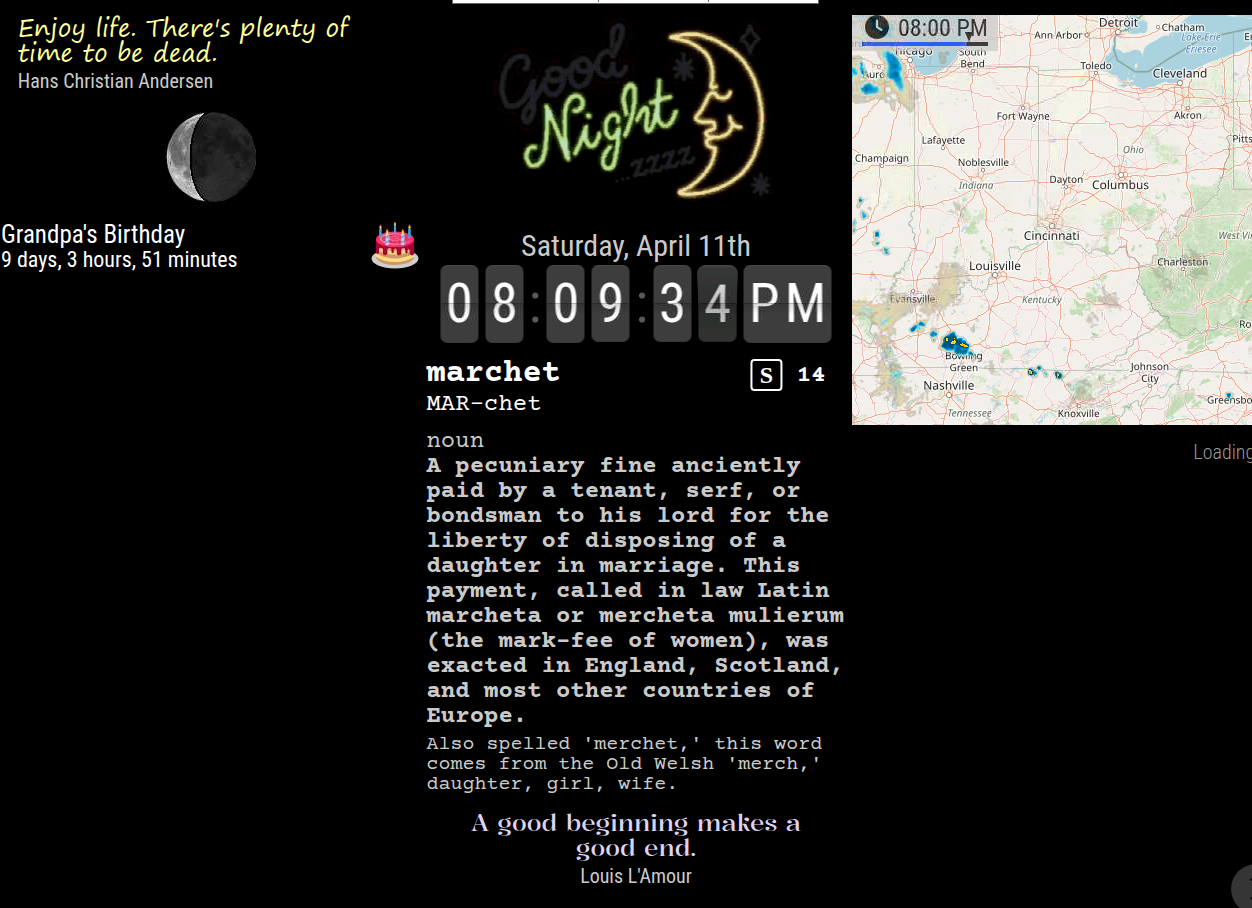
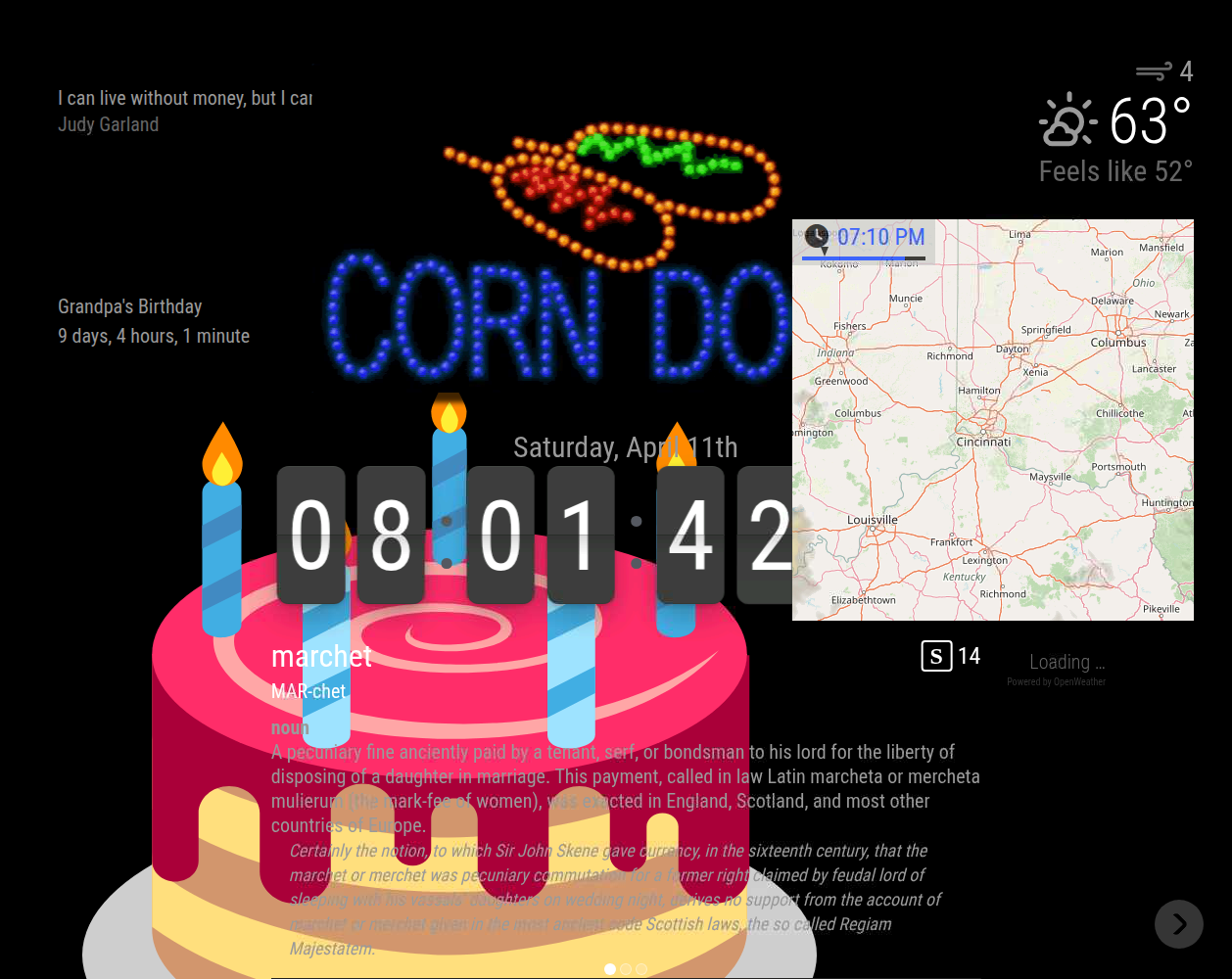
-
RE: Help with Crontab starting pm2 mm.sh
@sdetweil Like so
PATH=/usr/local/bin:/usr/bin:/bin 00 7 * * * pm2 start mm &>/dev/null -
RE: Help with Crontab starting pm2 mm.sh
Now I have
PATH=/usr/local/bin:/usr/bin:/bin 00 7 * * * pm2 start mm >/dev/null 2>&1 -
RE: Help with Crontab starting pm2 mm.sh
@sdetweil That was the solution. Thank you!
29 14 * * * /usr/local/bin/pm2 start mm.sh >/dev/null >2&1 -
Help with Crontab starting pm2 mm.sh
I am using Rasp Pi Bookworm on a Libre Sweet Potato.
In my user Crontab:
29 14 * * * pm2 start mm.sh >/dev/null >2&1sweetpotatopi:~ $ sudo systemctl status cron ● cron.service - Regular background program processing daemon Loaded: loaded (/lib/systemd/system/cron.service; enabled; preset: enabled) Active: active (running) since Mon 2025-02-03 14:27:37 EST; 1min 55s ago Docs: man:cron(8) Main PID: 2402 (cron) Tasks: 1 (limit: 1986) Memory: 368.0K CPU: 165ms CGroup: /system.slice/cron.service └─2402 /usr/sbin/cron -f Feb 03 14:27:37 sweetpotatopi systemd[1]: Started cron.service - Regular background program processing daemon. Feb 03 14:27:37 sweetpotatopi cron[2402]: (CRON) INFO (pidfile fd = 3) Feb 03 14:27:37 sweetpotatopi cron[2402]: (CRON) INFO (Skipping @reboot jobs -- not system startup) Feb 03 14:29:01 sweetpotatopi CRON[2409]: pam_unix(cron:session): session opened for user user(uid=1000) by (uid=0) Feb 03 14:29:01 sweetpotatopi CRON[2410]: (user) CMD (pm2 start mm.sh >/dev/null >2&1) Feb 03 14:29:01 sweetpotatopi CRON[2409]: pam_unix(cron:session): session closed for user userBut, the mirror is not starting.
~ $ pm2 show mm
 Describing process with id 0 - name mm
┌───────────────────┬────────────────────────────────────┐
│ status            │ stopped                            │
│ name              │ mm                                 │
│ namespace         │ default                            │
│ version           │ N/A                                │
│ restarts          │ 0                                  │
│ uptime            │ 0                                  │
│ script path       │ /home/user/mm.sh                  │
│ script args       │ N/A                                │
│ error log path    │ /home/user/.pm2/logs/mm-error.log │
│ out log path      │ /home/user/.pm2/logs/mm-out.log   │
│ pid path          │ /home/user/.pm2/pids/mm-0.pid     │
│ interpreter       │ bash                               │
│ interpreter args  │ N/A                                │
│ script id         │ 0                                  │
│ exec cwd          │ /home/user                        │
│ exec mode         │ fork_mode                          │
│ node.js version   │ N/A                                │
│ node env          │ N/A                                │
│ watch & reload    │ ✘                                  │
│ unstable restarts │ 0                                  │
│ created at        │ 2025-01-30T12:31:59.717Z           │
└───────────────────┴────────────────────────────────────┘
 Divergent env variables from local env
┌────────────────┬──────────────────────────────────┐
│ _LXSESSION_PID │ 1234                             │
│ SSH_AUTH_SOCK  │ /tmp/ssh-rK5CMznThwsE/agent.1234 │
│ SSH_AGENT_PID  │ 1326                             │
└────────────────┴──────────────────────────────────┘
What do I have wrong? Thank you for taking a look at this.
-
RE: Failed to get fd for plane and Failed to export buffer to dma_buf errors
Thank you! I will try to not lose too much sleep over it. :)
-
Failed to get fd for plane and Failed to export buffer to dma_buf errors
I am trying to get Magic Mirror set up on my new machine with Bookworm installed and am getting numerous errors. MM seems to be running okay with the few modules I have so far. I would appreciate some help correcting these errors if they are a problem. Thanks!
> magicmirror@2.30.0 start:x11 > DISPLAY="${DISPLAY:=:0}" ./node_modules/.bin/electron js/electron.js [2025-01-18 21:47:08.866] [LOG] Starting MagicMirror: v2.30.0 [2025-01-18 21:47:08.930] [LOG] Loading config ... [2025-01-18 21:47:08.935] [LOG] config template file not exists, no envsubst [2025-01-18 21:47:10.116] [INFO] Checking config file /home/mmuser/MagicMirror/config/config.js ... [2025-01-18 21:47:10.390] [INFO] Your configuration file doesn't contain syntax errors :) [2025-01-18 21:47:10.392] [INFO] Checking modules structure configuration ... [2025-01-18 21:47:10.680] [INFO] Your modules structure configuration doesn't contain errors :) [2025-01-18 21:47:10.686] [LOG] Loading module helpers ... [2025-01-18 21:47:14.006] [LOG] Launching application. [24016:0118/214715.118683:ERROR:gbm_wrapper.cc(74)] Failed to get fd for plane.: No such file or directory (2) [24016:0118/214715.120260:ERROR:gbm_wrapper.cc(257)] Failed to export buffer to dma_buf: No such file or directory (2) [24016:0118/214715.121045:ERROR:gbm_wrapper.cc(74)] Failed to get fd for plane.: No such file or directory (2) [24016:0118/214715.121691:ERROR:gbm_wrapper.cc(257)] Failed to export buffer to dma_buf: No such file or directory (2) [24016:0118/214715.122798:ERROR:gbm_wrapper.cc(74)] Failed to get fd for plane.: No such file or directory (2) [24016:0118/214715.123836:ERROR:gbm_wrapper.cc(257)] Failed to export buffer to dma_buf: No such file or directory (2) [24016:0118/214715.124929:ERROR:gbm_wrapper.cc(74)] Failed to get fd for plane.: No such file or directory (2) [24016:0118/214715.126185:ERROR:gbm_wrapper.cc(257)] Failed to export buffer to dma_buf: No such file or directory (2) [24016:0118/214715.127230:ERROR:gbm_wrapper.cc(74)] Failed to get fd for plane.: No such file or directory (2) [24016:0118/214715.128281:ERROR:gbm_wrapper.cc(257)] Failed to export buffer to dma_buf: No such file or directory (2) [24016:0118/214715.129560:ERROR:gbm_wrapper.cc(74)] Failed to get fd for plane.: No such file or directory (2) [24016:0118/214715.137125:ERROR:gbm_wrapper.cc(257)] Failed to export buffer to dma_buf: No such file or directory (2) [24016:0118/214715.138330:ERROR:gbm_wrapper.cc(74)] Failed to get fd for plane.: No such file or directory (2) [24016:0118/214715.139359:ERROR:gbm_wrapper.cc(257)] Failed to export buffer to dma_buf: No such file or directory (2) [24016:0118/214715.144838:ERROR:gbm_wrapper.cc(74)] Failed to get fd for plane.: No such file or directory (2) [24016:0118/214715.147648:ERROR:gbm_wrapper.cc(257)] Failed to export buffer to dma_buf: No such file or directory (2) [24016:0118/214715.148735:ERROR:gbm_wrapper.cc(74)] Failed to get fd for plane.: No such file or directory (2) [24016:0118/214715.149965:ERROR:gbm_wrapper.cc(257)] Failed to export buffer to dma_buf: No such file or directory (2) [24016:0118/214715.151057:ERROR:gbm_wrapper.cc(74)] Failed to get fd for plane.: No such file or directory (2) [24016:0118/214715.152118:ERROR:gbm_wrapper.cc(257)] Failed to export buffer to dma_buf: No such file or directory (2) [24016:0118/214715.153159:ERROR:gbm_wrapper.cc(74)] Failed to get fd for plane.: No such file or directory (2) [24016:0118/214715.154235:ERROR:gbm_wrapper.cc(257)] Failed to export buffer to dma_buf: No such file or directory (2) [24016:0118/214715.155276:ERROR:gbm_wrapper.cc(74)] Failed to get fd for plane.: No such file or directory (2) [24016:0118/214715.156286:ERROR:gbm_wrapper.cc(257)] Failed to export buffer to dma_buf: No such file or directory (2) [24016:0118/214715.157239:ERROR:gbm_wrapper.cc(74)] Failed to get fd for plane.: No such file or directory (2) [24016:0118/214715.163090:ERROR:gbm_wrapper.cc(257)] Failed to export buffer to dma_buf: No such file or directory (2) [24016:0118/214715.164534:ERROR:gbm_wrapper.cc(74)] Failed to get fd for plane.: No such file or directory (2) [24016:0118/214715.166261:ERROR:gbm_wrapper.cc(257)] Failed to export buffer to dma_buf: No such file or directory (2) [2025-01-18 21:47:16.078] [INFO] System information: ### SYSTEM: manufacturer: libre-computer; model: aml-s905x-cc-v2; virtual: false ### OS: platform: linux; distro: Debian GNU/Linux; release: 12; arch: arm64; kernel: 6.1.64-11810-g69b1ffe8ef6c ### VERSIONS: electron: 32.2.8; used node: 20.18.1; installed node: 20.18.1; npm: 10.8.2; pm2: 5.4.3 ### OTHER: timeZone: America/New_York; ELECTRON_ENABLE_GPU: undefined -
RE: Do modules stop requesting API data when monitor is off or module is hidden?
@sdetweil
Thank you! So, probably the thing to do is set up PM2 and use MMM-AlexaControl to auto start and stop it? If I have MM on a RPi and then two browser windows displaying MM, does that increase the number of API calls to 3 or is it still just one? I’m thinking about this transition to OneCall 3.0 and how to be the most efficient with the calls.