@MMRIZE
Thanks! eventSorter fixed it in Firefox and it corrected the order in Pale Moon. Personally, I’m not too concerned about the date thing in Pale Moon. I just thought I would try MM there and see what it looked like.
A New Chapter for MagicMirror: The Community Takes the Lead
Read the statement by Michael Teeuw here.
Read the statement by Michael Teeuw here.
D
Offline
Posts
-
RE: MMM-CalendarExt3
-
RE: Javascript equivalent of @import in css
@sdetweil said in Javascript equivalent of @import in css:
but many are unclear or undocumented…
there are lots of old, unmaintained modulesAnd yayhoos like me making modules. :beaming_face_with_smiling_eyes:
If I start using MM-Config again and find some oddities, I will post separately so it’s not “hiding” under this topic. -
RE: Javascript equivalent of @import in css
@sdetweil said in Javascript equivalent of @import in css:
the ‘issue’ in that the code loads config.js into the webpage as part of a
Did you have more to discuss?
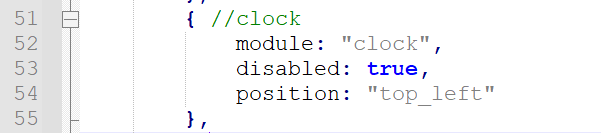
I read through the link you posted and the possible solution there and did not see a clear solution that I could follow and tweak. I’m just a tinkerer. I tried your MMM-Config early on but was getting some unwanted results and went away from it. I might work with it again and how it goes. I also thought I could use the expand/collapse feature Notepad++ and put the name of the module after “{”. Notepad++ also has a bookmark feature (that’s the blue dot next to the line 51 indicator) and I think there is a plug-in to extend the bookmark capabilities.
 .
.Ultimately, I’m trying to have the config.js be a little cleaner and make it easier work through so I am not scrolling through all the lines of code looking for the module section I need. Which, in turn, will help prevent spikes in my blood pressure :face_with_steam_from_nose: . Thank you for looking at this and explaining what the code is doing.
-
RE: MMM-CalendarExt3Agenda
@BKeyport
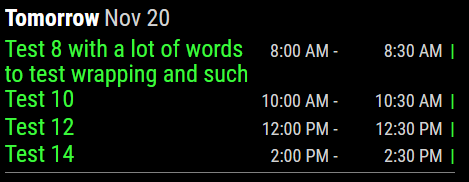
Maybe someone with CSS Wizard skills can help us out. I am far from a wizard with any of this stuff, I just come up with impossible ideas.Do you know what css your are looking for specifically? I might have changed something in the module’s css and forgot to move it over to mine. “Is it the Test 8 with a lot of words to test wrapping and such” that you are interested in?
-
RE: Javascript equivalent of @import in css
@sdetweil
How does config.js “override” the settings in the config of the module? That’s basically what I would like to do except it wouldn’t really override config.js since I wouldn’t have anything specific for the module there. The config.js would just pick up the settings from the specific custom config file I make for each module. -
Javascript equivalent of @import in css
I put my custom css for modules in their own file and then import in custom.css to make it a little easier to work with. Is there a way to accomplish this with the config.js also? I use this “template” in custom.css: @import “./MyCss/customModulename.css”
-
RE: MMM-CalendarExt3
@MMRIZE
Occurs in week and month modes. I am using Windows 10 and Firefox. I just tested it in Edge to see and it is in the correct order. I also looked at it Pale Moon browser (Firefox like fork) and it shows the date and reversed chrono order, but no time.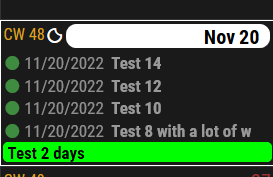
-
RE: MMM-CalendarExt3Agenda
@BKeyport
I think I need to use something other than width: ##px so that it adjusts based on how much space the time takes. Is there a way to make startTime " - " endTime into a string or something and then align that to the right?.CX3A { font-size: 16px; min-width: 300px; max-width: 400px; text-align: left; color: lightgray; --saturdayColor : white; --sundayColor: white; --todayColor: gold; } /* +++ Colored dot before event +++ */ .CX3A .event .headline .symbol { color: var(--calendarColor); font-size: 75%; vertical-align: text-bottom; } .CX3A .event .headline .symbol.noSymbol::after { content: '|'; font-weight: bold; } /* ++++ Divider Lines +++ */ .CX3A .agenda .cell { padding-top: 2px; border-top: 1px solid gray; margin-top: 2px; } .CX3A .cellHeaderMain { display: flex; gap: 3px; text-transform: capitalize; } /* +++ Show/Hide event description or location +++ */ /*.CX3A .agenda .event .description, */ .CX3A .agenda .event .location { display: none; } /* +++ Change order of info displayed +++ */ /* to test text-wrapping */ /*.CX3A { width: 300px; }/**/ *.CX3A .cellBody .fullday .event { width: 100%; } /* +++ Event title +++ */ .CX3A .event .title { color: var(--calendarColor); order: 1; width: 120px; /* Adjust for your region width. Here I am using fixed value to make things simple */ flex-grow: 1; } .CX3A .event .time.startTime { order: 2; width: 52px; text-align: right; } .CX3A .event .startTime::after { content: ' -'; } .CX3A .event .time.endTime { order: 2; width: 65px; text-align: right; } .CX3A .event .symbol { order: 3; } .CX3A .event .headline { justify-content: space-between; } -
RE: MMM-OpenWeatherForecast - Replacement for MMM-DarkSkyForecast
@j-e-f-f
I can, but I think I figured it out last night without changing anything in MM or the module. I initially signed up for the free account on OpenWeatherMap. Last night I signed up for the One Call by Call https://openweathermap.org/api and MMM-OpenWeatherForecast starting working. Before signing up, I tested my API in a browser at https://api.openweathermap.org/data/2.5/onecall?lat=someLatitude&lon=someLongitude&appid=secretAPI
and at https://api.openweathermap.org/data/3.0/onecall?lat=someLatitude&lon=someLongitude&appid=secretAPI
and both reported 401 error. After signing up, the module began working in MM. This does require a credit card and subscribers get 1000 free calls per day. Subscribers can set the maximum number of calls in their dashboard to prevent going over and getting charged. This doesn’t seem like it would be too much of a problem if users set the module’s config appropriately.I’m guessing that the module is trying to get data that is no longer free and some API’s are grandfathered ?? Or I misunderstood what type of account I needed from the start.
Where is the API address in the module’s code?
Let me know if I can provide further information.