
MagicMirror Forum
    • Recent
    • Tags
    • Unsolved
    • Solved
    • MagicMirror² Repository
    • Documentation
    • 3rd-Party-Modules
    • Donate
    • Discord
    • Register
    • Login
    1. Home
    2. emlowe
    3. Posts
    A New Chapter for MagicMirror: The Community Takes the Lead
    Read the statement by Michael Teeuw here.
    Offline
    • Profile
    • Following 0
    • Followers 0
    • Topics 3
    • Posts 62
    • Groups 1

    Posts

    Recent Best Controversial
    • RE: MMM-CalendarExt3 only one calendar not updating

      Was out for a week - some more details:

      Here are relevant log entries:

      0|MagicMirror | [2025-01-27 10:54:33.580] [LOG] Launching application.
      0|MagicMirror | [2025-01-27 10:54:50.855] [LOG] Create new calendarfetcher for url: - Interval: 300000
      0|MagicMirror | [2025-01-27 10:55:44.585] [INFO] Calendar-Fetcher: Broadcasting 23 events from
      …
      0|MagicMirror | [2025-01-27 11:01:33.443] [INFO] Calendar-Fetcher: Broadcasting 23 events from

      So that was about a minute to broadcast the first time, and then it follows the refresh interval reasonably closes.

      I have the Ext3 module waitFetch set to 5 minutes (5 * 60 *1000) - well after the first broadcast. When the Ext3 module draws after 5 minutes, there is nothing in it, and it is empty with no events whatsoever. It’s like it has no data at all.

      I have the Ext3 module refreshInterval set to 7 minutes (7 * 60 * 1000) - after the 7 minutes the module will refresh and it remains empty despite the calendar having done two broadcasts. The Ext3 module will remain empty for hours.

      However, if I manually refresh the browser using the remotecontrol module - the Ext3 module takes 5 minutes to appear (based on waitFetch but will have all the data)
      posted in Troubleshooting
      emloweE
      emlowe
    • RE: MMM-CalendarExt3 only one calendar not updating

      Yea, it’s a mystery to me as well - I just know doing the manual refresh works very reliably.

      I’ve had this problem on a stock pi3 b and a pi3 a+ - initially, I thought it was related to the low memory issues on the pi3 a+ - but as I update to use this new module from older ones I’ve seen it again on a stock 4gb pi3

      posted in Troubleshooting
      emloweE
      emlowe
    • RE: MMM-CalendarExt3 only one calendar not updating

      I have this same problem with Ext3Agenda - manual refresh always works.

      Sometimes waiting works - I’ve waited for 4 hours and suddenly have items appear. Waiting for refreshInterval doesn’t work - I can see the module/refresh with no data even though the calendar has broadcasted the items.

      My current workaround is to wait for a few minutes and then use MMM-RemoteControl to connect and refresh the browser using that module, which in my experience works 100% of the time

      posted in Troubleshooting
      emloweE
      emlowe
    • RE: MMM-CalendarExt3

      CX3? I’m still using OG CX …

      I couldn’t get CX2 to do what I was doing with CX so I never upgraded at all - it still runs, but it does have trouble parsing some kinds of calendar items.

      I use OG CX to do

      1. A single Day scrolling view for my 7" “Desktop MM” - not much screen space on the 7" screen so can only show a single day on one half in a scrolling loop

      2. A 3-day view for the Kitchen Family Screen - an entire week makes things too small so you cannot see easily - a 3 day view fits nicely though and can use a nice large font

      I’ll agree that CX2 was crazy complicated to configure though - and I gave up trying to get it look like I wanted.

      posted in Utilities
      emloweE
      emlowe
    • RE: Google Home Hub

      I use a 7" touchscreen Pi as a “desk assistant” running MagicMirror. I keep a scrolling calendar for the day on one half, and I rotate the other half through a bunch of panels using mmm-carousel.

      You can simulate a lot of what this Google device does, however, it’s likely to be quite hard to get the touchscreen working in a similar way. Swiping, tapping, etc, bringing up a keyboard - these are all things Android does very seamlessly and easily. MagicMirror just doesn’t have the support for those, unfortunately.

      I spent some time trying to get some gestures to work - I wanted a “double-tap” to turn on and off the screen - but wasn’t really able to make much progress because the basic support for it in electron just wasn’t there

      But good luck on this project, I think this is a worthwhile goal and I’ll be following your progress

      posted in General Discussion
      emloweE
      emlowe
    • RE: MMM-EarthWinds

      Love it!
      Installed it on the family info board, and the kids think its great.

      posted in Education
      emloweE
      emlowe
    • RE: Magic alarm clock

      For those using the official 7" display you can use MMM-Screendimmer

      Or write directly to /sys/class/backlight/rpi_backlight/brightness

      posted in Show your Mirror
      emloweE
      emlowe
    • RE: Can't view MM on LG TV WebOS browser - others fine

      I don’t have any ideas for you, except to say that I never even thought about trying this - I’m going to try it on my Samsung tv!

      I would reduce the config down to the default, and then eliminate modules to see if anything works.

      posted in Troubleshooting
      emloweE
      emlowe
    • RE: Double power supply, different output, for RPI and screen controller

      I’m terrible with the soldering iron but here is what I did

      0_1523386207043_2018-04-10 11.41.00.jpg

      posted in Hardware
      emloweE
      emlowe
    • RE: Double power supply, different output, for RPI and screen controller

      I used a 12v 5a power supply with the same board - you don’t have to stick with 3a, that’s a minimum recommendation for the controller. So getting a 5a power supply should cover easily the controller and the rpi.

      -Earle

      posted in Hardware
      emloweE
      emlowe
    • RE: Double power supply, different output, for RPI and screen controller

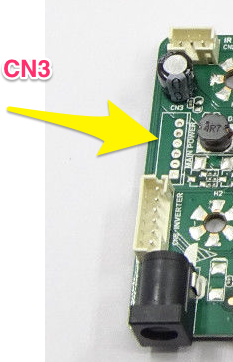
      In the spec sheet you posted, see where it says CN3 on page 4 &5. This is an optional connector that may (or may not) be on the board.

      Pins 3 & 4 are 5v and 5 & 6 are GND.

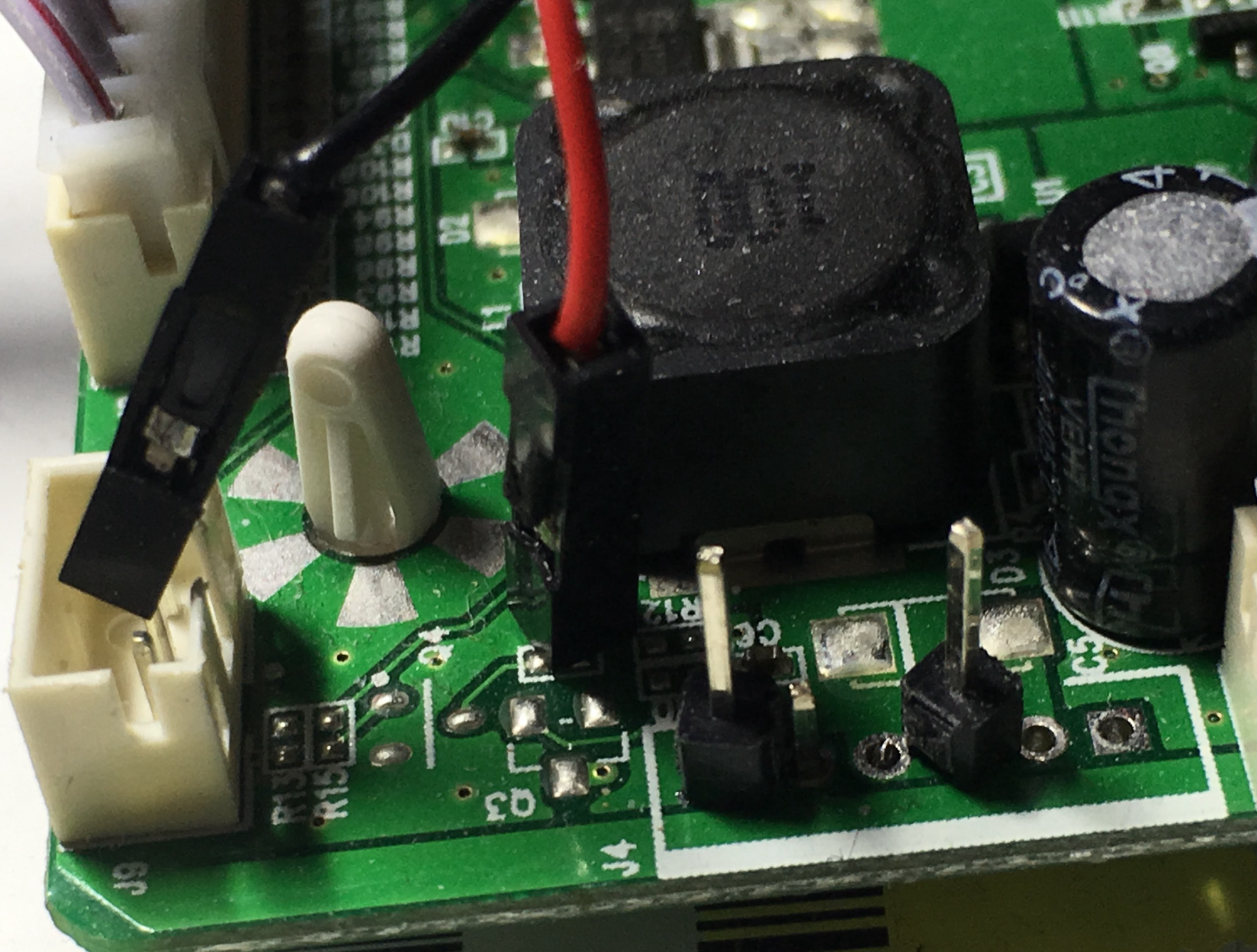
      Note, however, unless you want to do some simple PCB soldering this isn’t the way to go. What I did was attach some header pins to the board, cut one end off a USB cable and attached it to the pins, then plugged it in the normal way into the RPi.

      0_1523372272947_PCB.jpg

      posted in Hardware
      emloweE
      emlowe
    • RE: SolarEdge Module

      I wrote one for pulling data from the Enphase Envoy-C (directly, but only ones with old firmware). There is also one for pulling from Enphase Enlighten API (couldn’t get an API key for reasons to date I can’t figure out)

      I also believe there is one for PVOutput.

      You may also find an openHAB plugin exists for your system, and then you can use MMM-Openhab.

      My MMM-EnphaseEnvoy module could easily be modified to fetch data from other sources if you want very simple display - it is limited to current power, generated today, this week, and lifetime.

      -Earle

      posted in Requests
      emloweE
      emlowe
    • RE: Double power supply, different output, for RPI and screen controller

      More specifically:

      (http://www.panelook.com/upload/201511/MNT686762A_12516-Specification_A2_(1)_201511187301.pdf)

      Supplies 5v on the CN3 pins (probably headless on the board, but 5v is there)

      This guy says it’s good up to 1.5 amps (https://www.raspberrypi.org/forums/viewtopic.php?t=67312)

      I’ve confirmed that this is there and can indeed power the rpi - however, you if you need to power USB devices from the pi, it may not be enough.

      -Earle

      posted in Hardware
      emloweE
      emlowe
    • RE: Double power supply, different output, for RPI and screen controller

      Depending on which controller board you actually end up with (sometimes ebay gives out different ones) - the controller itself may have a 5v output already on it that you can use.

      posted in Hardware
      emloweE
      emlowe
    • RE: Clean operating system?

      Someone suggested this about a year ago, but I don’t think anyone has tried.

      But BENJA in theory might work: https://benja.io/

      posted in General Discussion
      emloweE
      emlowe
    • RE: MMM-ISS

      I have an inexpensive Astromaster LT80 AZ - but the cheap tripod mount really is difficult to. Been wanting to upgrade, but haven’t managed to yet.

      posted in Education
      emloweE
      emlowe
    • RE: Small 'Picture frame' MagicMirror (first attempt)

      I like what you did with the power, nice and clean. FYI, a number of the LCD driver boards have 5v outputs and I’ve successfully powered an rpi3 from the output from the board itself.

      (http://www.panelook.com/upload/201511/MNT686762A_12516-Specification_A2_(1)_201511187301.pdf)

      Supplies 5v on the CN3 pins (probably headless on the board, but 5v is there)

      This guy says it’s good up to 1.5 amps (https://www.raspberrypi.org/forums/viewtopic.php?t=67312)

      I wired it to a USB cable rather than directly to the GPIO

      -Earle

      posted in Show your Mirror
      emloweE
      emlowe
    • RE: [Remote-Control] Shutdown, Configure and Update your MagicMirror

      This module is great - a couple items related to support for the ‘official 7" pi touchscreen’
      I can probably code this up and submit a PR if you want - the on/off is easy to do because that is already in the helper. Brightness would need to get moved to the helper away from the CSS tricks.

      It is interesting that controlling the brightness of a monitor itself over HDMI is surprisingly non-existent, but the 7" touchscreen h/w rev: 1.1 does indeed support direct brightness manipulation:

      You can control the brightness of the backlight itself by:

      echo X > /sys/class/backlight/rpi_backlight/brightness
      

      where X is a value between 0 and 255

      And you can turn off the backlight with

      echo 0 > /sys/class/backlight/rpi_backlight/bl_power
      

      and turn it back on with:

      echo 1 > /sys/class/backlight/rpi_backlight/bl_power
      

      Earle

      posted in System
      emloweE
      emlowe
    • RE: My 42" multitouch Philips MagicMirror Display

      Hello-Lucy is unlikely to work well on an rpi though, correct? At least this is my understanding…

      posted in Show your Mirror
      emloweE
      emlowe
    • RE: MMM-newsfeedtouch - News so hot you wanna touch it

      Just to followup on my CSS, the following should center the content pretty well on most setups - I can’t figure out why I have to manually set the height though, but if I don’t the border doesn’t draw around all the text.

      This creates something like a “pop-up” in the middle of your screen for the content, which works pretty well for me.

      .infoCenter {  
        position: fixed;
        left: 50%;
        top: 50%;
        transform: translate(-50%,-50%); // This centers the box
        width: 80vw; // set the width to about 80% of the screen
        height: 20vw; // set the height to about 20% of the screen
      }
      
      
      posted in Utilities
      emloweE
      emlowe
    • 1
    • 2
    • 3
    • 4
    • 2 / 4