@janner6 those are the files you downloaded from the last step
J
Offline
A New Chapter for MagicMirror: The Community Takes the Lead
Read the statement by Michael Teeuw here.
Read the statement by Michael Teeuw here.
Posts
-
RE: MMM-MirrorMirrorOnTheWall - Alexa voice control to hide/show modules and display text/images
-
RE: Mirror mirror on the wall alexa skill
@KMH0 screenshots are added! let me know if the guide still doesn’t make sense
-
RE: MMM-MirrorMirrorOnTheWall - Alexa voice control to hide/show modules and display text/images
@d3r yeah! awesome! you just need to tell my module to close my module
-
RE: Mirror mirror on the wall alexa skill
@KMH0 create a new folder inside the src folder, call it certs, then place the files you downloaded and the generated root-CA.crt in it. I just started to create a guide with screenshots, but it will take me some time, in the meanwhile, you can just ask me
-
RE: MMM-MirrorMirrorOnTheWall - Alexa voice control to hide/show modules and display text/images
I just made another Alexa skill and Magic Mirror module for simple note taking, you can find them here: https://forum.magicmirror.builders/topic/1824/mmm-notetaker-a-module-that-displays-your-notes-stored-by-the-alexa-skill-note-taker
-
MMM-NoteTaker: A module that displays your notes stored by the Alexa skill Note Taker
Description:
A module that displays your notes stored by the Alexa skill Note Taker. The Alexa skill takes your notes and stores them in DynamoDB, reads them back and deletes them under your command.
To use this mirror module, you have to setup your own Alexa skill, DynamoDB and AWS access key. Instructions are in the repos.
Downloads:
[card:joanaz/MMM-NoteTaker]
[card:joanaz/AS-NoteTaker]
-
RE: MMM-MirrorMirrorOnTheWall - Alexa voice control to hide/show modules and display text/images
@lucallmon lol, what do you mean there’s no guide? my guides have a total of 250 lines. anyways, I tried to help you guys setup and figuring out your errors, but clearly my module is out of your league. so come back when you have more dev skills.
-
RE: MMM-MirrorMirrorOnTheWall - Alexa voice control to hide/show modules and display text/images
@artifactdev that’s what AWS IoT device gateway is for. Just setup the skill and the mirror module as instructed
-
RE: MMM-MirrorMirrorOnTheWall - Alexa voice control to hide/show modules and display text/images
@zman3 you copied your certs folder to the mirror module folder? check your terminal to see any error messages
-
RE: MMM-MirrorMirrorOnTheWall - Alexa voice control to hide/show modules and display text/images
@Gunwoody @lucallmon sorry, you do have to have a little of programming experience and experience of using AWS services to setup this module. I do have a step by step guide in the companion Alexa skill repo, but it would still be hard for people without any software experience.
-
RE: MMM-MirrorMirrorOnTheWall - Alexa voice control to hide/show modules and display text/images
@zman3 no, that’s not the point, he uses the config library, we don’t. They mentioned some good points, such as “OSX makes node_modules readable only by the user so AWS cannot read it”, so you need to check the permission of your node_modules folder. And also make sure the node_modules inside the zip file is not empty.
-
RE: MMM-MirrorMirrorOnTheWall - Alexa voice control to hide/show modules and display text/images
@savage_gr1nd you can setup AlexaPi to run automatically after reboot
-
RE: MMM-MirrorMirrorOnTheWall - Alexa voice control to hide/show modules and display text/images
@savage_gr1nd yeah, but it requires a physical pushbutton. I’m using AlexaPi with my own wake word, so I can activate Alexa by saying “Mirror mirror”.
-
RE: MMM-MirrorMirrorOnTheWall - Alexa voice control to hide/show modules and display text/images
@Journeytojah that’s weird, like @savage_gr1nd said, the problem is usually on how you zip the files and folders inside src folder. It has nothing to do with RPi, or your zip file name, mine is the default ‘Archive.zip’. Assume you didn’t change the handler setting in Lambda, which should be ‘index.handler’. So you have to recreate the problem for me, show me how you do it step by step.
-
RE: MMM-MirrorMirrorOnTheWall - Alexa voice control to hide/show modules and display text/images
@savage_gr1nd that’s awesome!!! I’ll try to add a timeout on the module, it’s just that videos have different lengths, but I’m sure it can be done. To change font, you can add some css in MMM-MirrorMirrorOnTheWall.css.
-
RE: MMM-MirrorMirrorOnTheWall - Alexa voice control to hide/show modules and display text/images
@savage_gr1nd ok, so there are few places you can check.
- the skill should console log the api response, so check it in Lambda. see whether ‘items[0].id.videoId’ is still the right way to get the video ID
- use AWS IoT to check whether that video ID is published to channel “MagicMirror:new-video”
- check your mirror module, see whether it received that video ID.
-
RE: MMM-MirrorMirrorOnTheWall - Alexa voice control to hide/show modules and display text/images
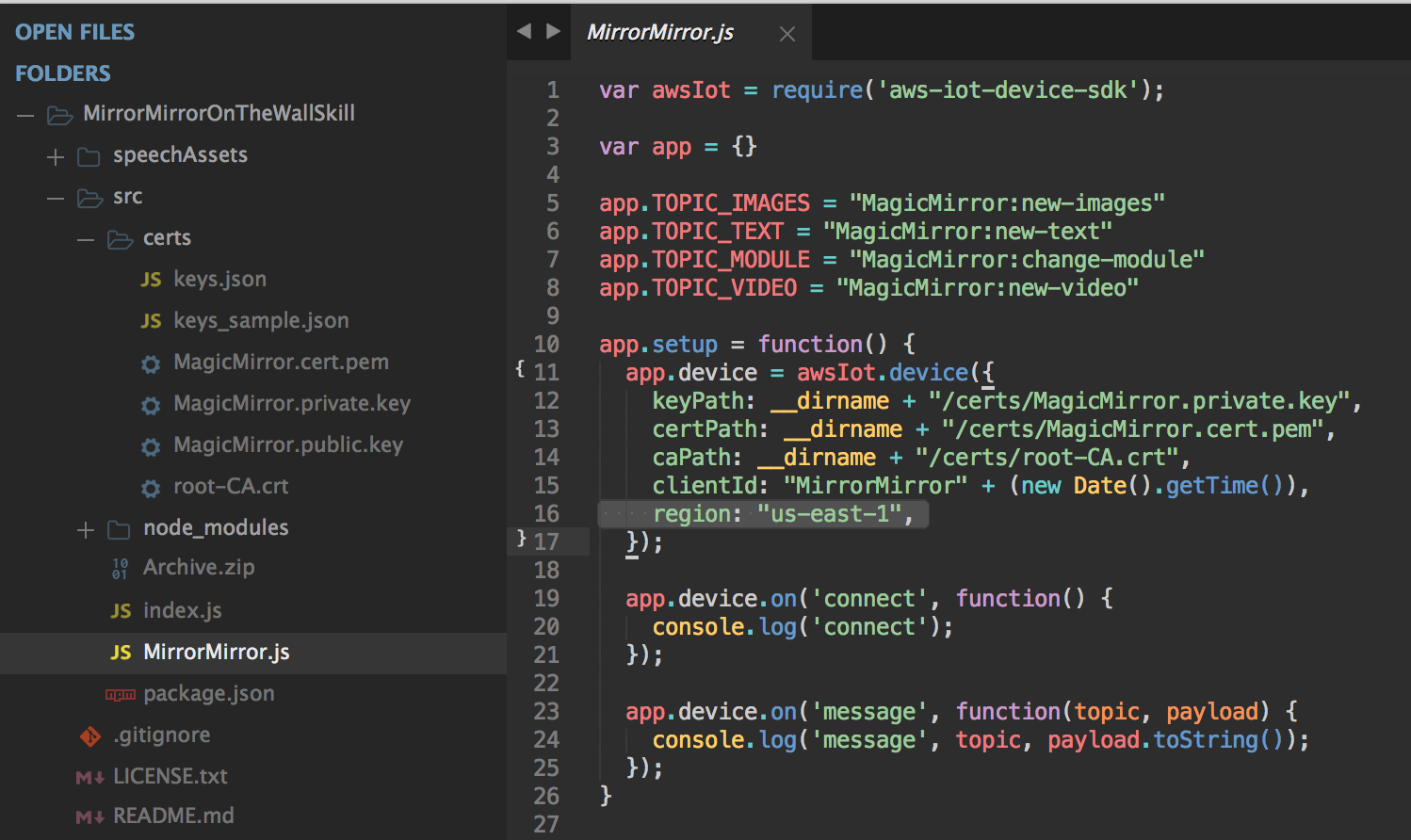
@Journeytojah ok, remember to change the region setting in MirrorMirror.js in both folders. (line 16 below)
-
RE: MMM-MirrorMirrorOnTheWall - Alexa voice control to hide/show modules and display text/images
@Journeytojah I think the region is why some people couldn’t get it to work. Right now, Lambda only works with US East regions. So better use US East for every AWS services needed here.
-
RE: MMM-MirrorMirrorOnTheWall - Alexa voice control to hide/show modules and display text/images
Just out of curiosity, which cities are you guys in? I’m in New York.