Would it work for you guys if I implement a config parameter for the Remote Control, similar to the ones I use for my Buttons module (notification specification), and you can create custom Buttons with this specification for the remote control?
A New Chapter for MagicMirror: The Community Takes the Lead
Read the statement by Michael Teeuw here.
Read the statement by Michael Teeuw here.
J
Offline
Posts
-
RE: Module: iFrame! Starting Video automatically!
-
RE: MMM-PIR-Sensor is turning off the screen when it detects user?
@Mar If it is doing the reverse of what you want, swap the comparison of
value == 1andvalue == 0of this section in thenode_helper.js. -
RE: Controlling Embedded Youtube Video on MM
@zichao92 First of all you are editing the
remote.jsfile, aren’t you? This is not on the actual mirror website, so you can not directly send notifications from there. This is thejsfile for theraspberrypi:8080/remote.htmlwebsite.You could however send the notification through a generic notification request.
Also
thisin the part I think you are editing, refers to the dictionary, not the theRemoteobject, since it is outside of the class definition. You could move it inside to fix this, or changethistoRemote. -
RE: [MMM-PIR-Sensor] Install failing
-
RE: [Remote-Control] Versions not visible
@schlachtkreuzer6 How did you install the module? It sounds like you may have downloaded a zipped version? Or did you use the installer or
git clone https://github.com/Jopyth/MMM-Remote-Control.git? Edit: Also please do @yawns suggestion, if the folder does not exist, something went wrong with cloning/initializing the git repository. -
RE: [Remote-Control] Shutdown, Configure and Update your MagicMirror
@AAPS If you want to allow all devices on your network, change the 24 to a 120 for IPv6:
::ffff:192.168.1.1/120Also, new version with bugfixes is out, see below. Has anyone tried the installer yet? I made it mostly for fun, but I am still look for serious feedback. :)
[1.1.2] - 2017-02-01
Note: Since version 1.1.0 this module uses (new) dependencies, check the Updating section in the README.md.
Added
- Swedish translation
Changed
- Installation process updated in README.md
- Automatic installer/updater includes hint to restart Magic Mirror²
Fixed
- Issues with not applying shown and hidden status correctly to modules
- Issues where lockstrings were missing
- Modules sometimes did not show correctly in the UI as hidden or shown:
- This is due to a bug in Magic Mirror²
- PR #659 to fix this was made in the project, will be released in the next version
-
RE: Send message to the Mirror
[Advertisement for my own module incoming]: We (ab)use the Trello module for this kind of note. My girlfriend and I use one dedicated list for MagicMirror notes, and if we put cards on it they show on the mirror. Downside is you need a Trello account, upside is, it is easy to edit from phone, PC, …
With some custom CSS styling it would look like a sticky note. :)
-
RE: [MMM-PIR-Sensor] Install failing
@Mar said in [MMM-PIR-Sensor] Install failing:
I’ve tried following the instruction above of removing and reinstalling but I keep getting the below errors. I’m not even sure what they are unfortunately, wondering if anyone is able to help.
pi@raspberrypi:~/MagicMirror/modules/MMM-PIR-Sensor $ npm install
npm WARN engine electron-rebuild@1.5.7: wanted: {"node":">=6.0.0"} (current: {"node":"4.2.1","npm":"2.14.7"})
This is an old node version. Please update your
nodeandnpm. (If you need help check the answers to this SO question.) -
RE: [Remote-Control] Shutdown, Configure and Update your MagicMirror
@Patex Do you want to do this with the
config.jsor with thesettings.json(visibility of modules and brightness)? I had this idea once for the settings of visible modules and brightness, but did not implement it. Basically what other modules do with profiles defined in the config. I am not sure how much sense it makes to have multipleconfig.js. One (large)config.js(which includes all configured modules) and multiple “profiles” which only show a selection of these might be the way to go? -
RE: [Remote-Control] Shutdown, Configure and Update your MagicMirror
-
RE: [Remote-Control] Shutdown, Configure and Update your MagicMirror
@fox Interesting. What changes did you make? I will try to give you a short
gitcrash course for your case: You can get an overview viagit status(should show changed files) andgit diff(showing the changes themselves). If you do not care about these changes you should be able to usegit reset --hard origin/masteror if you do care about them usegit stash, then dogit pull, and thengit stash popto apply the changes again. -
RE: !Update available for MMM-WunderGround module.
@Renfield If you would like to disable all update notifications you can do as @cowboysdude has written (remove the
updatenotificationmodule).Alternatively (edit: if you only want to disable update notifications for the
WunderGroundmodule):
Go to~/MagicMirror/module/MMM-WunderGroundand remove the git remote with the commandgit remote remove origin. If at any point you want to enable updates, orgit pullcommand again, you can add the remote back withgit remote add origin https://github.com/RedNax67/MMM-WunderGround.git.Source for the module: https://github.com/MichMich/MagicMirror/tree/master/modules/default/updatenotification
-
RE: [Calendar] Local .ics file stoped working
I am going to quote my previous post:
Maybe you can post an anonymous copy of your ics file?
Without more information this is going to be difficult to resolve.
Edit: Somehow the dates in the parsing are being ported back to a date before 1970, probably because a year is not passed or interpreted correctly. Additionally it might be useful to know when you last updated (when it was still working) and at what point in time it stopped working, this would limit the changes we have to look at a little bit.
-
RE: Request template to create new MM module
@dz I suggest you start with copying the helloworld module. For example, if you are in the MagicMirror
modulesfolder you copy thedefault/helloworldfolder tomyawesomemodule(out of the default folder).Then, in that folder you rename
helloworld.jstomyawesomemodule.jsand change the name in line 10 in the new file also tomyawesomemodule. You will also need to do these renaming steps, to change your module to a different name, so it is best if you pick a great name for what you want to do before you publish the module.Now add your new module to the config:
{
    module: "myawesomemodule",
    position: "upper_third",
    classes: "large thin",
    config: {
        text: "My awesome module says: 'Hello World MagicMirror2'!"
    }
},
I hope this gets you started. Will see if I can add some more info on the
node_helper.jsstuff, but you may be able to figure this out yourself, by looking at other modules. -
RE: [MMM-PIR-Sensor] Install failing
@Makradon Sensor PIN 22 for the PIR-Sensor module is this one:
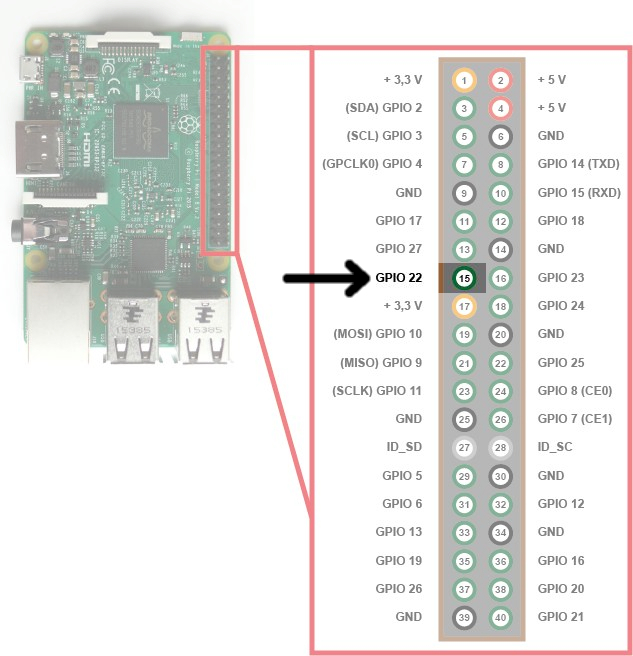
Edit: Maybe I was confused by the diagram of the DHT22 module. It looked to me like the GPIO and WiringPi numbers are different.
-
RE: not able to profileswitch/schedule LocalTransport module
-
RE: [MMM-PIR-Sensor] Install failing
@Makradon Nope, definitely not the same numbering.
-
RE: [MMM-Buttons] An unhandled error occurred inside electron-rebuild
@FlorianRD
You need to be on Magic Mirror versions2.1.0or higher (i.e.developbranch).Edit: What MagicMirror version are you on?
2.1.0? When you navigate from theMMM-Buttonsfolder to../../node_modulesyou should end up in a folder with anelectronfolder. If there is only aelectron-prebuiltfolder, it should be possible to fix the issues by upgrading MagicMirror to2.1.0. -
RE: [Remote-Control] Shutdown, Configure and Update your MagicMirror
@ChrisLaurie Correct. The value is
3500ms by default (code). This can be changed in theconfigof thealertmodule.@in_a_days Yes, that is a false error, I will probably implement it, so an error after trying to restart is just ignored.
-
RE: How HOT Does it Get?
What do you need? Module or command:
/opt/vc/bin/vcgencmd measure_temp?