MagicMirror Forum
    • Recent
    • Tags
    • Unsolved
    • Solved
    • MagicMirror² Repository
    • Documentation
    • 3rd-Party-Modules
    • Donate
    • Discord
    • Register
    • Login
    1. Home
    2. Jopyth
    3. Posts
    A New Chapter for MagicMirror: The Community Takes the Lead
    Read the statement by Michael Teeuw here.
    J
    Offline
    • Profile
    • Following 2
    • Followers 6
    • Topics 8
    • Posts 279
    • Groups 3

    Posts

    Recent Best Controversial
    • RE: skywriter - python to javascript

      @kclemen Please use three backticks (```) for markdown if you paste your code, instead of one (`). Otherwise it will not recognize it as multi line code.

      The problem are your regular print statements (e.g. print "Gesture is west to east"), these are also read by node, and they are not in the JSON format. You can comment these out, or maybe write them to a log file instead, if you want them to debug.

      posted in Development
      J
      Jopyth
    • RE: Looking for beta testers for MMM-Remote-Control

      @done Kind of, yes. I think I have not fixed all mentioned errors, but hopefully the major ones. Also @Mr-Meeseeks added some new functionality (sending alerts).

      Feel free to git pull the current status and test again. :) It should no longer mess up config.js files as much, but it still could be. It is using config.js.backupX so make manual backup somewhere else.

      posted in Development
      J
      Jopyth
    • RE: skywriter - python to javascript

      @kclemen Well, you can try googling for node.js (which is programmed in javascript) and python, and the answer will be quite different.

      If you want to program this module, you will need (at least) 3 components (I will demonstrate how it works in the facial recognition example):

      • the module in the browser:
        this will listen for events send from node_helper.js, for example see this function. In the example, it broadcasts this event to all modules (here), and then catches that notification again (here) to show all modules with a certain class

      • the node_helper.js:
        this is what will be calling your python code in the backend, for example in this line the python module is started, and then listens for events here

      • your python code:
        not much here you need, most of the code would look like your example, except the communication to node from this line

      Hope this helps to get you started.

      posted in Development
      J
      Jopyth
    • RE: skywriter - python to javascript

      @kclemen If you want an example of how to put together python and a module, you can have a look at this. It uses a python backend for face recognition. I think you could use a similar approach to “listen” for flicks.

      posted in Development
      J
      Jopyth
    • RE: MM Face AI like Face

      @wjdw87 Its a different repository that provides most of the AI functionality. Please check the description of the video, on how to set it up.

      posted in Troubleshooting
      J
      Jopyth
    • RE: Something I'm working on ...

      @roramirez Installer system is a great idea, however this is something that @strawberry-3-141 will implement as a mobile app, from what I hear plus I am building something like this into my remote control (a website - currently on the develop branch). So maybe have a look at it, before you start something completely new. Although, if there is a good reason for building this again or in a different way, count me in.

      posted in Announcements
      J
      Jopyth
    • RE: Third Party modules does not work

      @indigomejor Please check the installation notes of the modules again, and see if there are any steps you might have overlooked. Also you can have a look at the output of the server (i.e. pm2 logs mm if you are using the pm2 method), and check for errors there, and post them here (remove confidential information first!).

      posted in Troubleshooting
      J
      Jopyth
    • MMM-Advent - Advent Candle

      Description:

      This module for the MagicMirror shows a candle, which burns turn towards a specified date (e.g. as an advent candle).

      Screenshot:
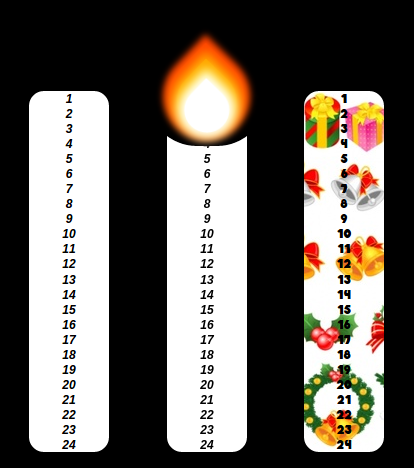
      Three example candles

      Download:

      [card:Jopyth/MMM-Advent]


      [1.0.2] - 2016-12-04

      Changed

      • Configuration options:
        • start and end can be an array of timestamps now
        • if they are, multiple candles are created side by side, one for each element in both arrays (length of both arrays should match)
        • Example for four red candles, lightning up at each advent sunday (disable animation with enableAnimation: false, if the flicker does not look nice):
          {
              module: "MMM-Advent",
              position: "bottom_center",
              config: {
                  marks: 0,
                  candleColor: "#EE1111",
                  start: ["2016-11-27 14:00:00", "2016-12-04 14:00:00", "2016-12-11 14:00:00", "2016-12-18 14:00:00"],
                  end: ["2016-12-24 22:00:00", "2016-12-24 22:00:00", "2016-12-24 22:00:00", "2016-12-24 22:00:00"]
              }
          },
      

      [1.0.1] - 2016-11-22

      Added

      • Configuration options:
        • enableAnimation - set to false to disable flame animation, default is true
        • fontCSS - link to a custom font stylesheet, default is https://fonts.googleapis.com/css?family=Dosis
        • fontColor - the color of the marks on the candle, default is #000000 (black)
        • candleColor - the color of the candle, default is #FFFFFF (white)
        • font - the font used (probably depends on the fontCSS option, default is 'Dosis', sans-serif

      Changed

      • Value are applied through a css stylesheet
      • Default font is a bold version of Dosis
      • Default candle height is 425

      Fixed

      • If flame is shown before the start time, it does no longer hover way above the candle

      Removed

      • Loading of pumpkin font

      [1.0.0] - 2016-11-20

      Initial release of the Advent module.

      posted in Fun & Games advent candle module
      J
      Jopyth
    • RE: Hide a module while still having it work

      @DevilRev You can also do that, just add the line

      this.hide(0);
      

      to the module start up section. However you will need to stash (or commit) these changes later on when you want to update the module.

      posted in Troubleshooting
      J
      Jopyth
    • RE: Alerts not showing?

      @clumsy_ninja Yup documentation is wrong there, the default is false. Edit: made a PR to correct this.

      posted in Troubleshooting
      J
      Jopyth
    • RE: MMM-ModuleScheduler, how to hide it ?

      @Clogs Remove the position: bottom_left (or wherever it is) entry from the config section for your MMM-ModuleScheduler? Alternatively if you already have the Remote Control installed, you can save hide the module, and then save the config. The module will then be hidden directly after startup.

      Full disclosure: I am the main author of the MMM-Remote-Control.

      posted in Troubleshooting
      J
      Jopyth
    • RE: Alerts not showing?

      @clumsy_ninja Have look at the documentation: You need to set welcome_message in the config (a string).

      posted in Troubleshooting
      J
      Jopyth
    • RE: Problems mit config.js

      @Hakupapa The autostart should happen automatically. Once you start the mirror with pm2 restart and it is running, and then do pm2 save, pm2 should save the current status (which is, your mirror application is running), and try to restore it after a reboot, or even after the program crashes.

      If it really does not do this, maybe try updating as described here?

      posted in Troubleshooting
      J
      Jopyth
    • RE: Hide a module while still having it work

      @DevilRev Well if that does not work you could use my Remote Control, hide the module in question, and save the hidden status. The module will then be hidden directly after each startup.

      Also it allows you to easily display the module again when needed, so it is quite controllable. ;)

      posted in Troubleshooting
      J
      Jopyth
    • RE: Hide a module while still having it work

      @DevilRev Remove the position: bottom_left (or whatever position you have) from the config? This works with some modules, which do not try to interact with their own DOM (since it does not exist).

      posted in Troubleshooting
      J
      Jopyth
    • RE: Activate and deactivate modules from other module

      @DevilRev I think this is currently not possible within the core application. I also wanted this for my remote control, however I concluded that for now it is sufficient, to add the module to the config, and restart the application in this case.

      However this might be worth being added to the core.

      posted in Development
      J
      Jopyth
    • RE: Turn On/Off Screen - LCD Screen

      @BillyCallahan Based on what @Dom1n1c said: My screen does not show the brand when it wakes up from standby, sometimes you might be able to find an option in the internal menu of the screen.

      As for triggering the tvservice commands, there are modules that do it automatically based on a PIR-Sensor or via a webcam. They switch on the screen when someone is moving in front of the mirror, and switch it off after a fixed time (e.g. 60 seconds).

      posted in Hardware
      J
      Jopyth
    • RE: Videostream of "Tagesschau in 100 Sekunden"?

      @lolobyte Two modules already exist: https://github.com/ptrbld/MMM-Podcast and https://github.com/PtrBld/MMM-Button

      You could give these a try.

      posted in Requests
      J
      Jopyth
    • RE: [Remote-Control] Shutdown, Configure and Update your MagicMirror

      @lolobyte This is not related to the Remote Control, is it? Please make a a post in the troubleshooting section possibly with the configurations of your netatmo and Fuel modules, maybe something is wrong in your config.js.

      posted in System
      J
      Jopyth
    • RE: [Remote-Control] Shutdown, Configure and Update your MagicMirror

      @lolobyte It should work with any browser. Did you replace the 192.168.xxx.xxx with the IP of your raspberry pi? If you set a position for the module, you should also be able to see the URL on your mirror, for example the following should show the URL to the remote inf the bottom left:

      {
          module: 'MMM-Remote-Control',
          position: 'bottom_left'
      },
      
      posted in System
      J
      Jopyth
    • 1
    • 2
    • 6
    • 7
    • 8
    • 9
    • 10
    • 13
    • 14
    • 8 / 14