@BKeyport Oh sheesh. After my change it’s now showing the entire mini calendar with all the events on it. It wasn’t like that before so it’s definitely sending things it wasn’t. I have the PastDays thing set to 1, in the base calendar but EXT3 calendar is showing events for all of March so that flag doesn’t seem to work right or something.
K
Offline
A New Chapter for MagicMirror: The Community Takes the Lead
Read the statement by Michael Teeuw here.
Read the statement by Michael Teeuw here.
Posts
-
RE: MMM-CalendarExt3Agenda - Two questions
-
RE: MMM-CalendarExt3Agenda - Two questions
I think I fixed it and I Just found a typo in the official documentation:
On this page:
https://docs.magicmirror.builders/modules/calendar.html#configuration-optionsThe first instance of broadcastPastEvents is wrong.

It should say pastDaysCount, not maximumNumberofDays,

Anyway, I set broadcastPastEvents to True and PastDaysCount to 1. It seems to be showing now. I’ll know more tomorrow afternoon.
-
RE: MMM-CalendarExt3Agenda - Two questions
@BKeyport I know it says its broadcasting 400+ events so I’m assuming it’s sending old stuff.
-
RE: MMM-CalendarExt3Agenda - Two questions
@BKeyport said in MMM-CalendarExt3Agenda - Two questions:
@Kelemvor do you have
broadcastPastEvents: true,set in the default calendar app?Not if that goes in the normal Config area. Does that make ALL events from the entire calendar get passed over to Ext3? Is that going to overload anything since it’s decades of events? :)
-
RE: MMM-CalendarExt3Agenda - Two questions
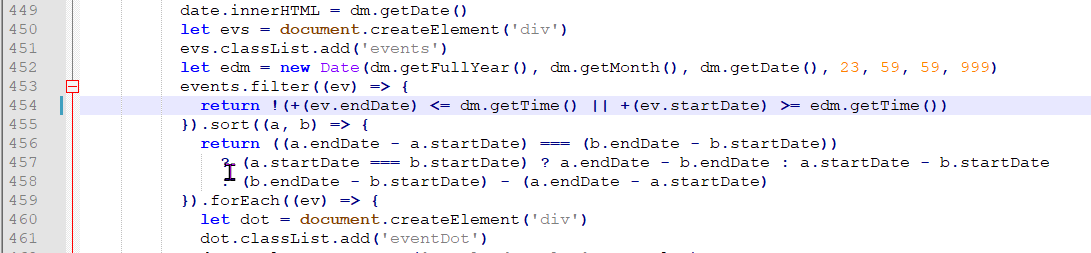
Maybe something in this section if I’m deciphering things correctly…
-
RE: MMM-CalendarExt3Agenda - Two questions
@BKeyport said in MMM-CalendarExt3Agenda - Two questions:
As for the #1 question, look at these config items:
startDayIndex
endDayIndex
Those are already set correctly. There’s something hard coded somewhere that removes events that are in the past from showing, even if they’re from Today. If those settings were wrong I wouldn’t see anything from today.
-
RE: MMM-CalendarExt3Agenda - Two questions
There’s already this in the CSS that makes the passed events Gray:
.CX3A .event.passed {
filter: brightness(0.6) grayscale(0.33);
}But, there must be something else that removes them completely when it updates so they don’t show at all.
-
RE: MMM-CalendarExt3Agenda - Two questions
@sdetweil Thanks. I’ll take a look tomorrow when my brain is fresh. ;)
-
MMM-CalendarExt3Agenda - Two questions
Hi,
I have two questions about this Module.-
Is it possible to show the current day’s activities all day, even after they’ve passed, and just turn them Gray when they’re done? I happened to check my MM today before it had refreshed and saw some older items from this morning showing in gray because they were already done. I thought that was actually a neat feature so I’m wondering if I can have it stay that way until Midnight and then that day’s events fall off and the next day’s activities stay on the screen until the next midnight. Is that possible?
-
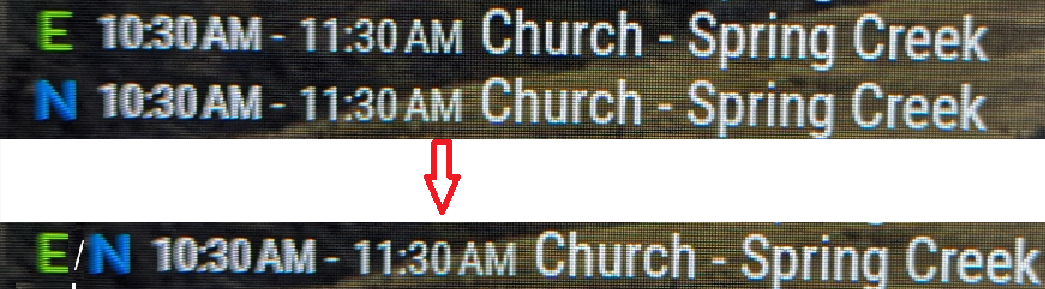
I like the skipDuplicated flag, but my kids get confused because they don’t see all of their events on the screen. It just picks one of them and uses that calendar icon and the other one gets hidden. If I turn it off, then many things are shown 2 or 3 times. I’m wondering if there’s any way to have an in-between option. Is there any way to have duplicated events only show up once, but have their table layout modified to show all the calendar icons shown at the beginning so you can tell who the event is duplicated for.
So instead of showing:
A 10AM EventName
B 10AM EventNameCould it show:
A / B 10AM EventNameThis would reduce the clutter of having two events, but still show you that the event is for more than one person.
Something like this:
And if my wife and kids all have the same event, then it’d need to have all three calendar letters in there.
Thanks.
-
-
RE: MMM-CalendarExt3Agenda
Well, swapping the order seems like it might have helped. I restarted MM a few times and it seems like they are all showing up now. I’ll keep an eye on it. :)
Thanks -
RE: MMM-CalendarExt3Agenda
@sdetweil I do have the Clipping thing on. Right now, the problem calendar is the second one in the config area of the main calendar module. I’ll swap it with the first one and see what happens.
-
RE: MMM-CalendarExt3Agenda
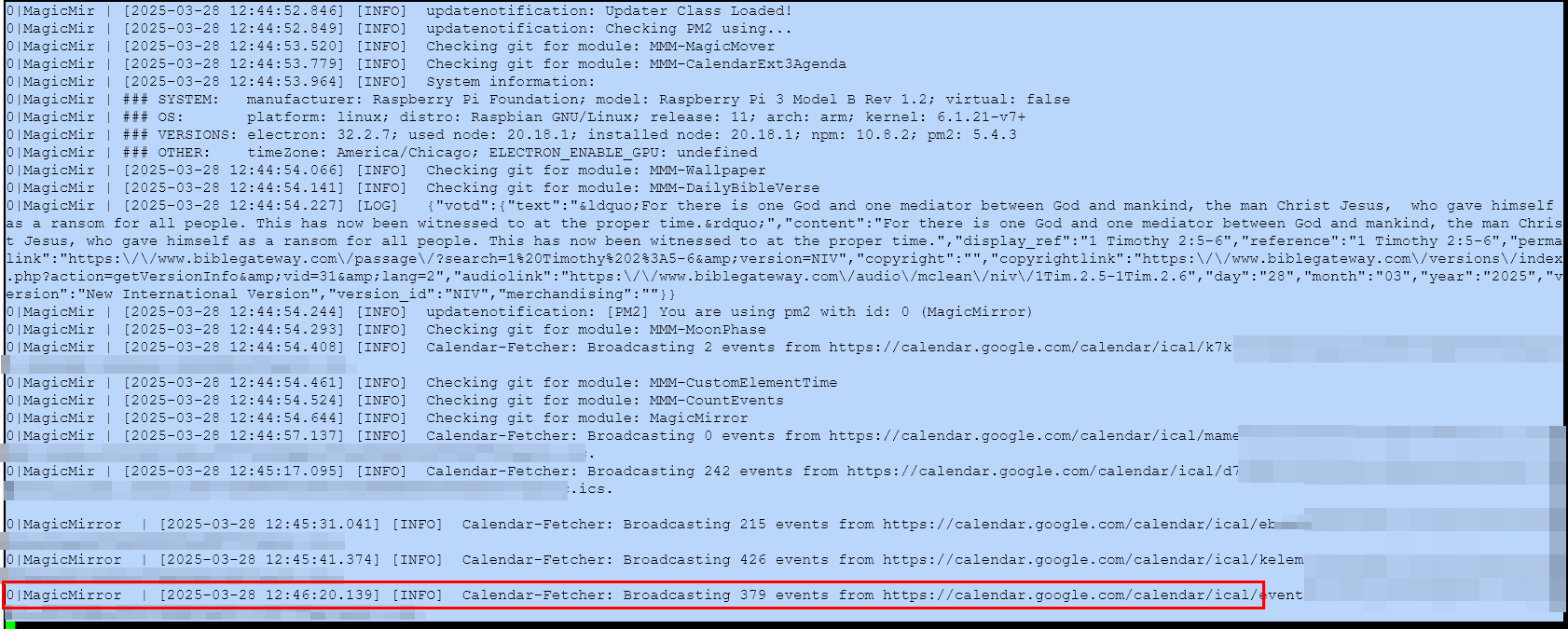
I’m currently fighting with a problem that I have one calendar that doesn’t always show up. I don’t know if it’s a timing thing or what. I put in waitFetch: 120000 to see if that would give it more time to load, but it doesn’t always help. Sometimes all the calendars show up. Sometimes one is missing, and it’s always the same one.
It shows the Calender-Fetcher as Broadcasting events from the calendar, but they just don’t show up on the screen. Anyone have any ideas what the problem might be?
-
How can I limit the width of a module that's crossing over from left to right?
Hi,
I was looking for something to fill some space on my screen and happened upon the MMM Dad Jokes module. I installed it fine and put it in Top Left under the clock. The problem is the text doesn’t wrap so the module is crossing over into the right half of the screen and overlapping with my calendar module that’s over there. How can I stop this from happening?I just want it to be the same size as the default Clock module with the same spacing. Is there a way to do that easily? I’m sure it can be done with some CSS, but I’m no good with CSS so any help would be great. ;)
Thanks.
-
How can I make the EXT Agenda module section go further down the screen instead of fading out?
HI,
I’m using the EXT Agenda module and want it to go all the way to the bottom of my screen. It current fades out after just a couple days. I tried setting maximumEntries to a larger number, but that had no effect.If you look at the last line of the mini-calendar you can see there are lots of events that extend a week out into the future, I just want the agenda list to show more of them until the list goes off the screen. Or to let me specify how many to show once I figure out how many will fit on the screen.
Is this possible? I haven’t found a setting to extend the module and make it longer

Thanks.
-
RE: One of my Calendars isn't showing up in the default module.
Does it go here?

If so, it didn’t seem to help.
-
RE: One of my Calendars isn't showing up in the default module.
I did now:
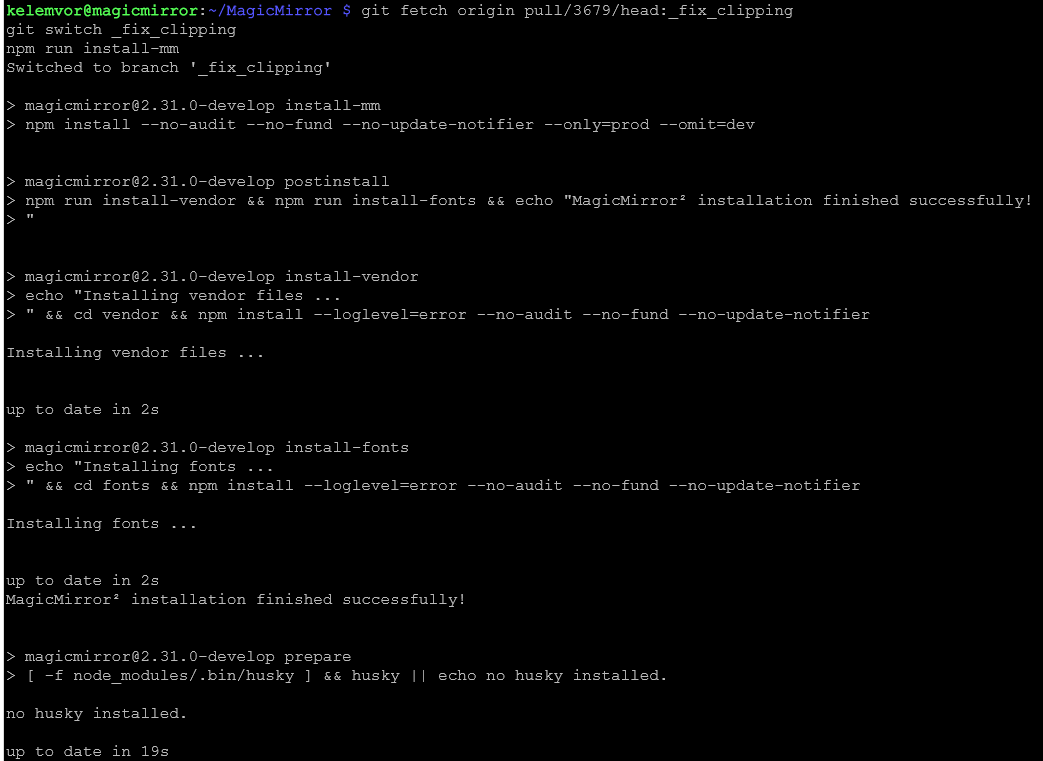
But it didn’t seem to have any effect.
I replaced the calendar URL with one to a different calendar and it loaded right up just fine. No idea what might be different about this one calendar from the rest.
-
RE: One of my Calendars isn't showing up in the default module.
I removed all the other modules and everything so this is all that’s left:
	modules: [
		{
			module: "alert",
		},
		{
			module: "updatenotification",
			position: "top_bar"
		},
		{
			module: "clock",
			position: "top_left"
		},
		{
			module: "calendar",
			header: "My Calendars",
			position: "top_left",
			config: {

				calendars: [
					{
						name: "c",
						fetchInterval: 60 * 60 * 1000,
						symbol: "c",
						url: "https://calendar.google.com/calendar/ical/xxxxxxxxxxxxxxxxxxxxxxxxxx/basic.ics",
						color: "#ffbef8"
					}
				]


			}
		}
	]
And this is what it shows on my screen when it starts:
[2025-03-25 21:35:09.663] [LOG]   Connecting socket for: calendar
[2025-03-25 21:35:09.672] [LOG]   Starting node helper for: calendar
[2025-03-25 21:35:09.680] [LOG]   Sockets connected & modules started ...
[2025-03-25 21:35:10.403] [LOG]   Launching application.
[2025-03-25 21:35:13.894] [INFO]  System information:
### SYSTEM:   manufacturer: ; model: ; virtual: false
### OS:       platform: linux; distro: Debian GNU/Linux; release: 12; arch: arm64; kernel: 6.6.74+rpt-rpi-v8
### VERSIONS: electron: 32.2.7; used node: 23.10.0; installed node: 23.10.0; npm: 10.9.2; pm2: 5.4.3
### OTHER:    timeZone: America/Chicago; ELECTRON_ENABLE_GPU: undefined
[2025-03-25 21:35:15.948] [LOG]   Create new calendarfetcher for url: https://calendar.google.com/calendar/ical/xxxxxxxxxxxxxxxxxxxxxxxxxxx/basic.ics - Interval: 3600000
[2025-03-25 21:35:16.077] [INFO]  updatenotification: Updater Class Loaded!
[2025-03-25 21:35:16.079] [INFO]  updatenotification: Checking PM2 using...
[2025-03-25 21:35:16.083] [INFO]  updatenotification: [PM2] You are not using pm2
[2025-03-25 21:35:16.086] [INFO]  Checking git for module: MagicMirror
[2025-03-25 21:36:02.139] [INFO]  Calendar-Fetcher: Broadcasting 378 events from https://calendar.google.com/calendar/ical/xxxxxxxxxxxxxxxxxxxxx/basic.ics.
But all that’s on the monitor is Loading …
-
One of my Calendars isn't showing up in the default module.
Hi,
I had to redo my MM from scratch and I’m having a problem. I have 6 calendars that I put in the config file. However, one of my calendars isn’t showing up in the default Calendar module even though it says it fetched events in the log. I commented out all but two calendars as a test but it’s still not showing the problem calendar at all. When I comment out all but the one that’s not working, I just get nothing at all.
The log says:
[2025-03-25 21:10:45.940] [INFO] Calendar-Fetcher: Broadcasting 378 events from https://calendar.google.com/calendar/ical/xxxxxxxxxx/basic.ics.If I go to the url manually, I can download the basic.ics file. When I open it up I can see that there are tons of events in there, including ones that are tomorrow.
Is there any way to figure out why they aren’t showing up on the screen?
Thanks.
-
MMM-GooglePhotos - Just says Loading...
Hi,
I followed all the instructions to install the Google Photos module. I got the json files and I think I did everything correctly. When I reboot my MM, I just get the word “Loading…” on the screen, but nothing else happens.
When I run MM via npm, I see this in the text:
[09.03.2024 16:15.43.513] [INFO]  Checking git for module: MMM-GooglePhotos
[09.03.2024 16:15.43.585] [ERROR] unable to load cache [Error: ENOENT: no such file or directory, open '/home/kelemvor/MagicMirror/modules/MMM-GooglePhotos/cache/photoListCache.json'] {
  errno: -2,
  code: 'ENOENT',
  syscall: 'open',
  path: '/home/kelemvor/MagicMirror/modules/MMM-GooglePhotos/cache/photoListCache.json'
}
[09.03.2024 16:15.43.585] [INFO]  Initialization complete!
[09.03.2024 16:15.43.586] [INFO]  Start first scanning.
[09.03.2024 16:15.43.588] [INFO]  Start Album scanning
[09.03.2024 16:15.43.590] [INFO]  Getting album list
Then a bit further down I see this:
[09.03.2024 16:16.12.348] [ERROR] Trace: [GPHOTOS:CORE] request fail with URL sharedAlbums
    at GPhotos.logTrace (/home/kelemvor/MagicMirror/modules/MMM-GooglePhotos/GPhotos.js:128:13)
    at GPhotos.request (/home/kelemvor/MagicMirror/modules/MMM-GooglePhotos/GPhotos.js:169:12)
    at process.processTicksAndRejections (node:internal/process/task_queues:95:5)
    at async getAlbum (/home/kelemvor/MagicMirror/modules/MMM-GooglePhotos/GPhotos.js:207:24)
    at async GPhotos.getAlbums (/home/kelemvor/MagicMirror/modules/MMM-GooglePhotos/GPhotos.js:179:18)
    at async Class.getAlbums (/home/kelemvor/MagicMirror/modules/MMM-GooglePhotos/node_helper.js:200:15)
    at async Class.getAlbumList (/home/kelemvor/MagicMirror/modules/MMM-GooglePhotos/node_helper.js:246:18)
    at async Class.scanJob (/home/kelemvor/MagicMirror/modules/MMM-GooglePhotos/node_helper.js:227:5)
[09.03.2024 16:16.12.350] [ERROR] Trace: [GPHOTOS:CORE] params {"pageSize":50,"pageToken":""}
    at GPhotos.logTrace (/home/kelemvor/MagicMirror/modules/MMM-GooglePhotos/GPhotos.js:128:13)
    at GPhotos.request (/home/kelemvor/MagicMirror/modules/MMM-GooglePhotos/GPhotos.js:170:12)
    at process.processTicksAndRejections (node:internal/process/task_queues:95:5)
    at async getAlbum (/home/kelemvor/MagicMirror/modules/MMM-GooglePhotos/GPhotos.js:207:24)
    at async GPhotos.getAlbums (/home/kelemvor/MagicMirror/modules/MMM-GooglePhotos/GPhotos.js:179:18)
    at async Class.getAlbums (/home/kelemvor/MagicMirror/modules/MMM-GooglePhotos/node_helper.js:200:15)
    at async Class.getAlbumList (/home/kelemvor/MagicMirror/modules/MMM-GooglePhotos/node_helper.js:246:18)
    at async Class.scanJob (/home/kelemvor/MagicMirror/modules/MMM-GooglePhotos/node_helper.js:227:5)
[09.03.2024 16:16.12.352] [ERROR] Trace: [GPHOTOS:CORE] data null
    at GPhotos.logTrace (/home/kelemvor/MagicMirror/modules/MMM-GooglePhotos/GPhotos.js:128:13)
    at GPhotos.request (/home/kelemvor/MagicMirror/modules/MMM-GooglePhotos/GPhotos.js:171:12)
    at process.processTicksAndRejections (node:internal/process/task_queues:95:5)
    at async getAlbum (/home/kelemvor/MagicMirror/modules/MMM-GooglePhotos/GPhotos.js:207:24)
    at async GPhotos.getAlbums (/home/kelemvor/MagicMirror/modules/MMM-GooglePhotos/GPhotos.js:179:18)
    at async Class.getAlbums (/home/kelemvor/MagicMirror/modules/MMM-GooglePhotos/node_helper.js:200:15)
    at async Class.getAlbumList (/home/kelemvor/MagicMirror/modules/MMM-GooglePhotos/node_helper.js:246:18)
    at async Class.scanJob (/home/kelemvor/MagicMirror/modules/MMM-GooglePhotos/node_helper.js:227:5)
[09.03.2024 16:16.12.361] [ERROR] Converting circular structure to JSON
    --> starting at object with constructor 'TLSSocket'
    |     property '_httpMessage' -> object with constructor 'ClientRequest'
    --- property 'socket' closes the circle
stack:
TypeError: Converting circular structure to JSON
    --> starting at object with constructor 'TLSSocket'
    |     property '_httpMessage' -> object with constructor 'ClientRequest'
    --- property 'socket' closes the circle
    at JSON.stringify (<anonymous>)
    at error_to_string (/home/kelemvor/MagicMirror/modules/MMM-GooglePhotos/error_to_string.js:13:38)
    at GPhotos.request (/home/kelemvor/MagicMirror/modules/MMM-GooglePhotos/GPhotos.js:172:21)
    at process.processTicksAndRejections (node:internal/process/task_queues:95:5)
    at async getAlbum (/home/kelemvor/MagicMirror/modules/MMM-GooglePhotos/GPhotos.js:207:24)
    at async GPhotos.getAlbums (/home/kelemvor/MagicMirror/modules/MMM-GooglePhotos/GPhotos.js:179:18)
    at async Class.getAlbums (/home/kelemvor/MagicMirror/modules/MMM-GooglePhotos/node_helper.js:200:15)
    at async Class.getAlbumList (/home/kelemvor/MagicMirror/modules/MMM-GooglePhotos/node_helper.js:246:18)
    at async Class.scanJob (/home/kelemvor/MagicMirror/modules/MMM-GooglePhotos/node_helper.js:227:5)
[09.03.2024 16:16.12.369] [ERROR] (node:26481) UnhandledPromiseRejectionWarning: TypeError: Converting circular structure to JSON
    --> starting at object with constructor 'TLSSocket'
    |     property '_httpMessage' -> object with constructor 'ClientRequest'
    --- property 'socket' closes the circle
    at JSON.stringify (<anonymous>)
    at error_to_string (/home/kelemvor/MagicMirror/modules/MMM-GooglePhotos/error_to_string.js:13:38)
    at GPhotos.request (/home/kelemvor/MagicMirror/modules/MMM-GooglePhotos/GPhotos.js:172:21)
    at process.processTicksAndRejections (node:internal/process/task_queues:95:5)
    at async getAlbum (/home/kelemvor/MagicMirror/modules/MMM-GooglePhotos/GPhotos.js:207:24)
    at async GPhotos.getAlbums (/home/kelemvor/MagicMirror/modules/MMM-GooglePhotos/GPhotos.js:179:18)
    at async Class.getAlbums (/home/kelemvor/MagicMirror/modules/MMM-GooglePhotos/node_helper.js:200:15)
    at async Class.getAlbumList (/home/kelemvor/MagicMirror/modules/MMM-GooglePhotos/node_helper.js:246:18)
    at async Class.scanJob (/home/kelemvor/MagicMirror/modules/MMM-GooglePhotos/node_helper.js:227:5)
(Use `electron --trace-warnings ...` to show where the warning was created)
[09.03.2024 16:16.12.373] [ERROR] (node:26481) UnhandledPromiseRejectionWarning: Unhandled promise rejection. This error originated either by throwing inside of an async function without a catch block, or by rejecting a promise which was not handled with .catch(). To terminate the node process on unhandled promise rejection, use the CLI flag `--unhandled-rejections=strict` (see https://nodejs.org/api/cli.html#cli_unhandled_rejections_mode). (rejection id: 17)
Anyone know where I can start looking to figure out what all this means?
Thanks.
-
MMM-GooglePhotos - How do I get the Token?
Hi,
I’m reading this page and have a question: https://github.com/hermanho/MMM-GooglePhotos/blob/master/INSTALL.md
The first step under token.json says: Clone this repo in your local pc and execute npm install
My local PC is a laptop running Windows 10. I’m not a Linux person so I’m not sure how to clone it to my laptop. Can anyone tell me what I need to do to go through that step?
Thanks!