Hrm, yeah that’s short. Though honestly, I would wrap it behind the panel and tape it there. However, it also depends on where the rPi actually sits in relation to where this cable is.
A New Chapter for MagicMirror: The Community Takes the Lead
Read the statement by Michael Teeuw here.
Read the statement by Michael Teeuw here.
 Offline
Posts
-
RE: EoF's Touch Screen Magic Mirror (Testing Phase)
-
RE: EoF's Touch Screen Magic Mirror (Testing Phase)
So a bit of advice: when you have an enclosure (which I hope is sooner rather than later), affix the ribbon cable to something permanent. Even if you want to put hot snot on it (hot glue), just something to immobilize it so it can’t accidentally get snagged on something and get ripped, or that you accidentally pull on it …
-
RE: EoF's Touch Screen Magic Mirror (Testing Phase)
Basically the pulled a MacGyver then … :)
-
RE: EoF's Touch Screen Magic Mirror (Testing Phase)
You’re better off replacing the ribbon cable, if you can find a replacement. You’ll likely have to desolder it on the other end, then resolder the new one on.
Or, alternatively, take the ribbon cable off and solder your own wires and connector on.
-
RE: I'm back!
Oh no, he’s back. Quick lock up your mirrors, change your passwords. Lock the doors!
-
RE: Monthly Calendar View
@MichMich, it is, by default, B/W. Users can set a custom CSS to change the colors, like I did as a test.
-
RE: eGalax Touch Screen Panel Worked Out of the Box on Pi 3
Likely because it’s using standard USB drivers.
-
RE: News Feed for the entire screen
At the moment, the module only does one at a time. If you’d like it to do more, you’ll have to write your own module. We welcome pull requests on modified versions of the defaults.
-
RE: Monthly Calendar View
So as it turns out, it’s extremely easy to let the calendar Do Its Own Thing as far as figuring out what day to start the week on, Sunday or Monday. It litereally done by the system’s LOCALE, which you control by setting a language option in the main
'config.js'. Below is a screen shot of the English ('en') versus Spanish ('es') setting: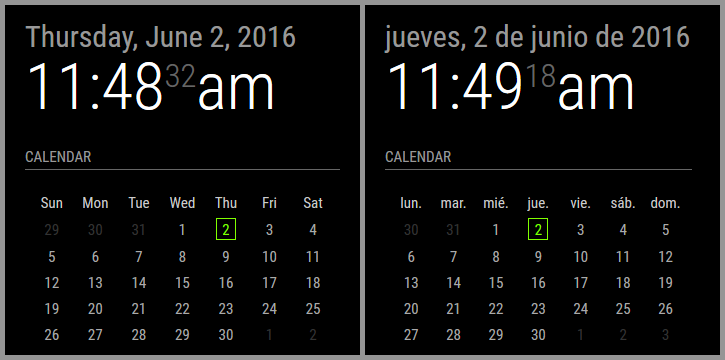
Notice how the Spanish one starts on Monday (lunes) whereas the English one starts on Sunday. I am not manually calculating this to draw the calendar. Moment.js takes care of this automatically.
Here’s the drawback: if your LOCALE defines the start of the week as Sunday, but you want to VISUALLY set the calendar to Monday (or vice verse), that would require me to actually manually calculate the entire calendar and draw it out. It’s a pain in the rear to be honest.
-
RE: Monthly Calendar View
That’s the custom CSS being implemented. By default it doesn’t have any color nor border. The user can edit their CSS and personalize it that way. Essentially the code reads:
	// Module defaults
	defaults: {
		...
		displayMonthyear: true,
		cssStyle: "default" /* Current options are 'default', 'block', 'custom' */
	},

	// Required styles
	getStyles: function() {
		switch(this.config.cssStyle) {
			case "block":
				return ["styleDefault.css", "styleBlock.css"];
				break;
			case "custom":
				return ["styleDefault.css", "styleCustom.css"];
				break;
			default:
				return ["styleDefault.css"];
		}
	},