MagicMirror Forum
    • Recent
    • Tags
    • Unsolved
    • Solved
    • MagicMirror² Repository
    • Documentation
    • 3rd-Party-Modules
    • Donate
    • Discord
    • Register
    • Login
    1. Home
    2. Klinge
    3. Posts
    A New Chapter for MagicMirror: The Community Takes the Lead
    Read the statement by Michael Teeuw here.
    K
    Offline
    • Profile
    • Following 0
    • Followers 0
    • Topics 37
    • Posts 112
    • Groups 0

    Posts

    Recent Best Controversial
    • Black screen after update - reason layer 8!

      Hello,
      since today my MM got a black screen.
      When I start with " npm start dev" I got the following error

      [2021-04-02 14:27:32.741] [LOG]    Initializing new module helper ...
      [2021-04-02 14:27:32.745] [LOG]    Module helper loaded: MMM-DarkSkyForecast
      [2021-04-02 14:27:33.532] [ERROR]  WARNING! Could not load config file. Starting with default configuration. Error found: Error: Cannot find module 'digest-fetch'
      Require stack:
      - /home/pi/MagicMirror/modules/default/calendar/calendarfetcher.js
      - /home/pi/MagicMirror/modules/default/calendar/node_helper.js
      - /home/pi/MagicMirror/js/app.js
      - /home/pi/MagicMirror/js/electron.js
      - /home/pi/MagicMirror/node_modules/electron/dist/resources/default_app.asar/main.js
      -
      [2021-04-02 14:27:33.535] [LOG]    Loading module helpers ...
      

      In the update notes I can see the following

      Replaced deprecated request package with node-fetch and digest-fetch.
      Refactored calendar fetcher.

      “npm rebuild” in the calendar module doesn´t help.

      It would be wonderful if someone could help me.

      Thank you in advance.
      Lars

      posted in Troubleshooting
      K
      Klinge
    • RE: http connection denied despite open whiteList

      @fribse That´s it! I thought there must be something simple. I changed it to 0.0.0.0 and it works.

      Thanks to both of you for your help.

      posted in Troubleshooting
      K
      Klinge
    • http connection denied despite open whiteList

      Hi,

      I tried to connect to my MM via Firefox on Port 8080. By it doesn´t works. I got the error “connection refused”.
      When I tried to connect via telnet I get the error “connection error”.
      But my whiteList is completely open.

      My config is

      var config = {
              address: "localhost",   // Address to listen on, can be:
                                                              // - "localhost", "127.0.0.1", "::1" to listen on loopback interface
                                                              // - another specific IPv4/6 to listen on a specific interface
                                                              // - "0.0.0.0", "::" to listen on any interface
                                                              // Default, when address config is left out or empty, is "localhost"
              electronOptions: {
              webPreferences: {
              webviewTag: true
                      }
              },
              port: 8080,
              basePath: "/",  // The URL path where MagicMirror is hosted. If you are using a Reverse proxy
                                              // you must set the sub path here. basePath must end with a /
              ipWhitelist: [],        //**** Set [] to allow all IP addresses
                                                                                                                              // or add a specific IPv4 of 192.168.1.5 :
                                                                                                                              // ["127.0.0.1", "::ffff:127.0.0.1", "::1", "::ffff:192.168.1.5"],
                                                                                                                              // or IPv4 range of 192.168.3.0 --> 192.168.3.15 use CIDR format :
                                                                                                                              // ["127.0.0.1", "::ffff:127.0.0.1", "::1", "::ffff:192.168.3.0/28"],
      
              useHttps: false,                // Support HTTPS or not, default "false" will use HTTP
              httpsPrivateKey: "",    // HTTPS private key path, only require when useHttps is true
              httpsCertificate: "",   // HTTPS Certificate path, only require when useHttps is true
      
              language: "de",
              logLevel: ["INFO", "LOG", "WARN", "ERROR"],
              timeFormat: 24,


      So I allow all IPs.

      My second MM has the same whiteList. And I can connect.

      It would be fine, when you have some good ideas for me to help.

      Thank you in advance.
      Lars

      posted in Troubleshooting
      K
      Klinge
    • RE: Black screen after 2.13 update - tentatively resolved

      @sdetweil
      I run npm install in the …\MagicMirror Folder

      Ok, in future I will use your script

      posted in Troubleshooting
      K
      Klinge
    • RE: Black screen after 2.13 update - tentatively resolved

      @sdetweil you are right. After an npm install it works. But I don´t understand it. Because, I run an update script with git pull && npm install in the MagicMirror Folder.

      Whtatever, after the npm install it works. Is it running now because the electron was rebuilt?

      Thank you for your help.

      posted in Troubleshooting
      K
      Klinge
    • RE: Black screen after 2.13 update - tentatively resolved

      @sdetweil said in Black screen after 2.13 update - tentatively resolved:

      pm2 logs --lines=???

      When I run the pm2 logs, I got the following logs

      0|mm     | [2020-10-02 14:32:00.841] [LOG]    Module helper loaded: updatenotification
      0|mm     | [2020-10-02 14:32:00.843] [LOG]    No helper found for module: clock.
      0|mm     | [2020-10-02 14:32:01.602] [LOG]
      0|mm     | Initializing new module helper ...
      0|mm     | [2020-10-02 14:32:01.604] [LOG]    Module helper loaded: MMM-DarkSkyForecast
      0|mm     | [2020-10-02 14:32:01.620] [ERROR]
      0|mm     | WARNING! Could not load config file. Starting with default configuration. Error found: Error: Cannot find module 'node-ical'
      0|mm     | Require stack:
      0|mm     | - /home/pi/MagicMirror/modules/default/calendar/calendarfetcher.js
      0|mm     | - /home/pi/MagicMirror/modules/default/calendar/node_helper.js
      0|mm     | - /home/pi/MagicMirror/js/app.js
      0|mm     | - /home/pi/MagicMirror/js/electron.js
      0|mm     | - /home/pi/MagicMirror/node_modules/electron/dist/resources/default_app.asar/main.js
      0|mm     | -
      0|mm     | [2020-10-02 14:32:01.621] [LOG]    Loading module helpers ...
      0|mm     | [2020-10-02 14:32:01.623] [LOG]    No helper found for module: alert.
      0|mm     | [2020-10-02 14:32:01.627] [LOG]    Initializing new module helper ...
      0|mm     | [2020-10-02 14:32:01.629] [LOG]    Module helper loaded: updatenotification
      0|mm     | [2020-10-02 14:32:01.633] [LOG]    No helper found for module: clock.
      0|mm     | [2020-10-02 14:32:01.637] [LOG]    Initializing new module helper ...
      0|mm     | [2020-10-02 14:32:01.640] [LOG]    Module helper loaded: MMM-DarkSkyForecast
      0|mm     | [2020-10-02 14:32:01.649] [ERROR]
      0|mm     | App threw an error during load
      0|mm     | [2020-10-02 14:32:01.651] [ERROR]  Error: Cannot find module 'node-ical'
      0|mm     | Require stack:
      0|mm     | - /home/pi/MagicMirror/modules/default/calendar/calendarfetcher.js
      0|mm     | - /home/pi/MagicMirror/modules/default/calendar/node_helper.js
      0|mm     | - /home/pi/MagicMirror/js/app.js
      0|mm     | - /home/pi/MagicMirror/js/electron.js
      0|mm     | - /home/pi/MagicMirror/node_modules/electron/dist/resources/default_app.asar/main.js
      0|mm     | -
      0|mm     |     at Module._resolveFilename (internal/modules/cjs/loader.js:627:15)
      0|mm     |     at Function.Module._resolveFilename (/home/pi/MagicMirror/node_modules/electron/dist/resources/electron.asar/common/reset-search-paths.js:41:16)
      0|mm     |     at Function.Module._resolveFilename (/home/pi/MagicMirror/node_modules/module-alias/index.js:49:29)
      0|mm     |     at Function.Module._load (internal/modules/cjs/loader.js:531:27)
      0|mm     |     at Module.require (internal/modules/cjs/loader.js:685:19)
      0|mm     |     at require (internal/modules/cjs/helpers.js:16:16)
      0|mm     |     at Object.<anonymous> (/home/pi/MagicMirror/modules/default/calendar/calendarfetcher.js:8:14)
      0|mm     |     at Module._compile (internal/modules/cjs/loader.js:786:30)
      0|mm     |     at Object.Module._extensions..js (internal/modules/cjs/loader.js:798:10)
      0|mm     |     at Module.load (internal/modules/cjs/loader.js:645:32)
      0|mm     | [2020-10-02 14:32:01.654] [ERROR]  Whoops! There was an uncaught exception...
      0|mm     | [2020-10-02 14:32:01.655] [ERROR]
      0|mm     | Error: Cannot find module 'node-ical'
      0|mm     | Require stack:
      0|mm     | - /home/pi/MagicMirror/modules/default/calendar/calendarfetcher.js
      0|mm     | - /home/pi/MagicMirror/modules/default/calendar/node_helper.js
      0|mm     | - /home/pi/MagicMirror/js/app.js
      0|mm     | - /home/pi/MagicMirror/js/electron.js
      0|mm     | - /home/pi/MagicMirror/node_modules/electron/dist/resources/default_app.asar/main.js
      0|mm     | -
      0|mm     |     at Module._resolveFilename (internal/modules/cjs/loader.js:627:15)
      0|mm     |     at Function.Module._resolveFilename (/home/pi/MagicMirror/node_modules/electron/dist/resources/electron.asar/common/reset-search-paths.js:41:16)
      0|mm     |     at Function.Module._resolveFilename (/home/pi/MagicMirror/node_modules/module-alias/index.js:49:29)
      0|mm     |     at Function.Module._load (internal/modules/cjs/loader.js:531:27)
      0|mm     |     at Module.require (internal/modules/cjs/loader.js:685:19)
      0|mm     |     at require (internal/modules/cjs/helpers.js:16:16)
      0|mm     |     at Object.<anonymous> (/home/pi/MagicMirror/modules/default/calendar/calendarfetcher.js:8:14)
      0|mm     |     at Module._compile (internal/modules/cjs/loader.js:786:30)
      0|mm     |     at Object.Module._extensions..js (internal/modules/cjs/loader.js:798:10)
      0|mm     |     at Module.load (internal/modules/cjs/loader.js:645:32) {
      0|mm     |   code: 'MODULE_NOT_FOUND',
      0|mm     |   requireStack: [
      0|mm     |     '/home/pi/MagicMirror/modules/default/calendar/calendarfetcher.js',
      0|mm     |     '/home/pi/MagicMirror/modules/default/calendar/node_helper.js',
      0|mm     |     '/home/pi/MagicMirror/js/app.js',
      0|mm     |     '/home/pi/MagicMirror/js/electron.js',
      0|mm     |     '/home/pi/MagicMirror/node_modules/electron/dist/resources/default_app.asar/main.js',
      0|mm     |     undefined
      0|mm     |   ]
      0|mm     | }
      0|mm     | [2020-10-02 14:32:01.682] [ERROR]  MagicMirror will not quit, but it might be a good idea to check why this happened. Maybe no internet connection?
      0|mm     | [2020-10-02 14:32:01.683] [ERROR]  If you think this really is an issue, please open an issue on GitHub: https://github.com/MichMich/MagicMirror/issues
      0|mm     | [2020-10-02 14:32:01.845] [LOG]
      0|mm     | Launching application.
      
      
      posted in Troubleshooting
      K
      Klinge
    • RE: Black screen after 2.13 update - tentatively resolved

      Found one more module too. In my case a black screen appears through the standard calendar module.

      my config is

                      {
                              module: "calendar",
                              header: "Termine",
                              position: "top_left",
                              config: {
                                      timeFormat: 'absolute',
                                      maximumEntries: 10,
                                      dateFormat: 'ddd DD MMM HH:mm',
                                      fullDayEventDateFormat: 'ddd DD MMM',
                                      showEnd: false,
                                      urgency: 0,
                                      getRelative: 0,
                                      calendars: [
                                              {
                                                      symbol: "calendar-check",
                                                      url: "https://calendar.google.com/calendar/ical/XXXXXXXXXXXXX/basic.ics"
                                              },
                                              {
                                                      url: "https://calendar.google.com/calendar/ical/XXXXXXXXXXX/basic.ics"
                                              }
                                      ]
                              }
                      },


      How can I create an issue for that?

      Or is there a problem in my config?

      posted in Troubleshooting
      K
      Klinge
    • RE: Problem with notifications in MMM-GoogleAssistant and MMM-Assistant2Display

      Thank you for your help. It works :-)

      posted in Troubleshooting
      K
      Klinge
    • Modifying my MM Display

      Hello,
      I have another question about my new MM.
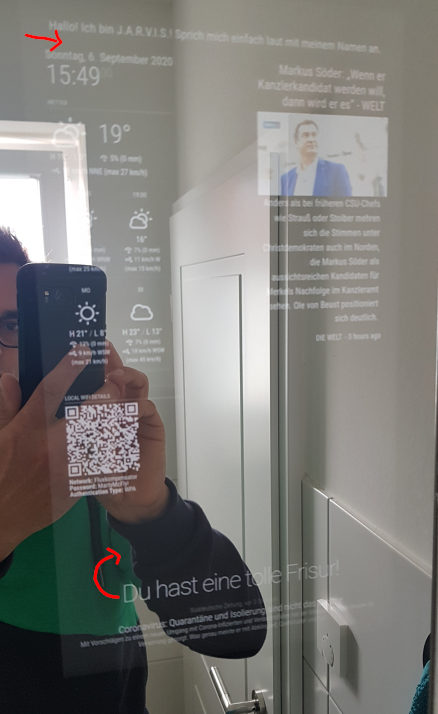
      On the screenshot you can see my MM. However, I would like to have the display modified.
      Between the first line and the next modules I would like to have two or three more empty lines. But I do not know how to get that. The top line I just just wrote in the header text.
      And then I would like to have more space between the compliment and the newsfeed module.
      It would be great if you could help me there.
      Thanks a lot.
      Many greetings
      Lars2020-09-06 15_57_41-Clipboard.png

      posted in Troubleshooting
      K
      Klinge
    • Problem with notifications in MMM-GoogleAssistant and MMM-Assistant2Display

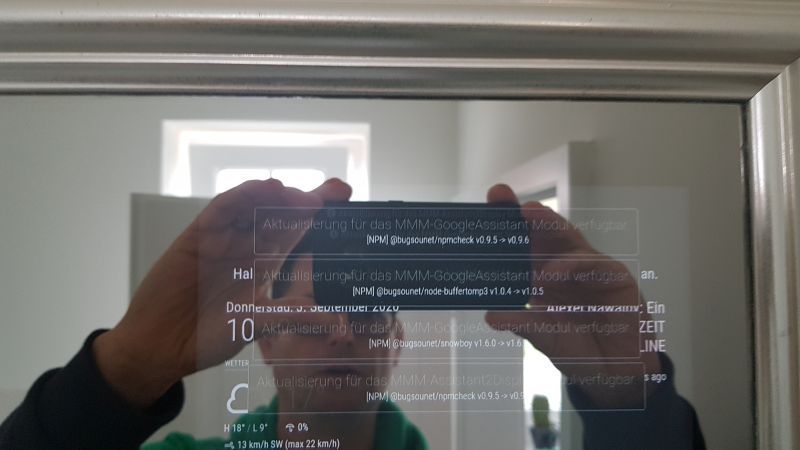
      Hi, at the moment I have problems with my MM. More precisely with the modules MMM-GoogleAssistant and MMM-Assistant2Display.
      There are four notifications of the modules about new versions of various software. The notifications come from the modules or from the developer bugsounet. You can see the messages in the picture.
      If I have understood it correctly, the function was “recently” built in.
      My problem is that I don’t know how to get the messages away. Or how I have to update them. Of course I have done a “git pull” and “npm install”. But the messages are still there.
      Unfortunately my research in the forum did not help me.
      Please excuse me if my question is too profane. But I would be really grateful. 20200903_103956.jpg.
      Thank you in advance.

      posted in Troubleshooting
      K
      Klinge
    • RE: MMM-Assistant2Display doesn´t show any photos

      Hi,
      thank you for your response.

      Then I obviously got it wrong. I searched for the links module, but unfortunately I couldn’t find it or anything like this.

      Please, can you give me a tip, which module you mean exactly.

      Thanks in advance.

      posted in Troubleshooting
      K
      Klinge
    • MMM-Assistant2Display doesn´t show any photos

      Hello,
      I installed the modules MMM-GoogleAssistant and MMM-Assistant2Display.

      But I have a problem with displaying photos.

      When I sayed, “JARVIS, show me a video from the soccer game Brazil vs Germany”, a Youtube-Video will be shown.

      But when I sayed, “JARVIS, show me a photo from a tree”, only a google-Link will be shown.

      Here you can see my config file

      var config = {
              address: "localhost", // Address to listen on, can be:
                                    // - "localhost", "127.0.0.1", "::1" to listen on loopback interface
                                    // - another specific IPv4/6 to listen on a specific interface
                                    // - "0.0.0.0", "::" to listen on any interface
                                    // Default, when address config is left out or empty, is "localhost"
                electronOptions: {
                       webPreferences: {
                            webviewTag: true
                          }
                        },
              port: 8080,
      .
      .
      .
       {
                       module: "MMM-GoogleAssistant",
                        position: "fullscreen_above",
                        config: {
                          debug: true,
                          assistantConfig: {
                            lang: "de-DE",
                            projectId: "", // Required to use gaction.
                            modelId: "", // (OPTIONAL for gaction)
                            instanceId: "", // (OPTIONAL for gaction)
                            latitude: XX.XXXXX,
                            longitude: X.XXXXXXX,
                          },
                          responseConfig: {
                            useScreenOutput: true,
                            screenOutputCSS: "screen_output.css",
                            screenOutputTimer: 5000,
                            activateDelay: 250,
                            useAudioOutput: true,
                            useChime: true,
                            newChime: false
                          },
                          micConfig: { // put there configuration generated by auto-installer
                            recorder: "arecord",
                            device: "plughw:1",
                          },
                          customActionConfig: {
                            autoMakeAction: false,
                            autoUpdateAction: false, // in RPI, gaction CLI might have some trouble.(current version should be 2.2.4, but for linux-arm, Google haven't updated) so leave this as false in RPI. I don't know it is solved or not.
                            actionLocale: "en-US", // At this moment, multi-languages are not supported, sorry. Someday I'll work.
                          },
                          snowboy: {
                            audioGain: 2.0,
                            Frontend: true,
                            Model: "jarvis",
                            Sensitivity: null
                          },
                          A2DServer: {
                            useA2D: true,
                            stopCommand: "stop"
                          },
                          recipes: [ "with-MMM-TelegramBot.js" ]
                        }
                      },
      .
      .
      .
                      {
                      module: "MMM-Assistant2Display",
                        position: "fullscreen_above",
                        config: {
                          debug:true,
                        },
                      photos: {
                            usePhotos: true,
                            displayDelay: 10 * 1000
                              },
                  spotify: {
                            useSpotify: true,
                            connectTo: null,
                            playDelay: 3000,
                            minVolume: 10,
                            maxVolume: 100
                                  }
                      },


      I enabled the debugging. But I don´t know, where I can find the logs.

      Unfortunately I didn´t found something in this forum.

      It would be great if someone could help me.

      Thanks in advance.
      Klinge
      posted in Troubleshooting
      K
      Klinge
    • PIR sensor does not switch on monitor

      Hello,
      I have configured and connected the PIR sensor exactly as described in this explanation from Hardwarepoint (https://hardwarepoint.net/2017/06/diy-smart-mirror/4/). The sensor also worked until a few weeks ago. Since a few weeks the monitor does not switch off.

      Today I could finally take care of the problem and went through the installation steps again. Everything looks like it should be. It worked before. After a reboot, the SmartMirror also starts. And now after about 60 seconds the monitor switched off! But now, the monitor does not switch on when I move in front of it! It stays black. In a browser (Port 8080) I can see the MM. This means that the software is running, but the monitor does not turn on.

      The status displays the following

      pi@raspberrypi:~ $ sudo systemctl status pir.service
      ● pir.service - Display timeout PIR daemon
      Loaded: loaded (/etc/systemd/system/pir.service; enabled; vendor preset: enab
      Active: active (running) since Wed 2020-03-18 09:01:51 CET; 2h 39min ago
      Main PID: 1782 (python)
      Tasks: 2 (limit: 2200)
      Memory: 2.2M
      CGroup: /system.slice/pir.service
      └─1782 python /usr/local/sbin/pir

      Mar 18 09:01:51 raspberrypi systemd[1]: Started Display timeout PIR daemon.
      Mar 18 09:01:52 raspberrypi pir[1782]: display_power=1
      Mar 18 09:02:51 raspberrypi pir [1782]: display_power=0

      It would be really great if someone could help me.

      Thanks in advance.
      Klinge
      posted in Troubleshooting
      K
      Klinge
    • RE: pm2 do not work after v2.8.0 Update

      @sdetweil Yes, you are right

      on my sytem it was

      sudo env PATH=$PATH:/usr/bin /usr/lib/node_modules/pm2/bin/pm2 startup systemd -u pi --hp /home/pi


      @bhepler Yes, you are right too.

      My path above was relative, not absolute. But of course, it was wrong. I entered the absolute path. So I have improved it above :-)

      posted in Troubleshooting
      K
      Klinge
    • RE: pm2 do not work after v2.8.0 Update

      Thank you for your advice.

      What exactly did I do?

      I installed npm again with

      sudo npm install -g pm2 
      

      Then I entered

      pm2 startup
      pm2 start /home/pi/MagicMirror/installers/mm.sh 
      

      Der MM startete. And then

      sudo pm2 flush
      pm2 flush
      pm2 save
      sudo pm2 save
      

      And when I restart the PI, MM start automatically.

      I do not know exactly what helped. But it works.

      Thank you again :-)

      posted in Troubleshooting
      K
      Klinge
    • RE: pm2 do not work after v2.8.0 Update

      Thank you for your help.

      But unfortunately it doesn´t work.

      I cleared the logfiles and started the MM as you described. The MM also started. And so I saved the state. But after I restarted the Pi, the MM did not start automatically anymore.

      PM2 status was empty

      pi@raspberrypi:~ $ pm2 status
      [PM2] Spawning PM2 daemon with pm2_home=/home/pi/.pm2
      [PM2] PM2 Successfully daemonized
      ┌──────┬────┬──────┬────────┬───┬─────┬────────┐
      │ Name │ id │ mode │ status │ ↺ │ cpu │ memory │
      └──────┴────┴──────┴────────┴───┴─────┴────────┘
       Use `pm2 show <id|name>` to get more details about an app
      
      
      posted in Troubleshooting
      K
      Klinge
    • pm2 do not work after v2.8.0 Update

      Hello,

      I installed a new MM and I got a problem with automatic start with pm2.
      I take a freshly installed Raspbian Buster and installed the MM on it. The option of automatic start over pm2 I confirmed with “y”. After the installation, the MM also started automatically.
      But when I restart the Pi now, the MM does not start automatically anymore. When I enter “pm2 status”, no application will appear. Of course, I try to start the MM via “pm2 start MagicMirror”. But it also fails. Although pm2 shows the application MagicMirror with the status “online”, but the MM does not start. “pm2 logs MagicMirror” gives the following problem

      /home/pi/.pm2/logs/MagicMirror-error.log last 15 lines:
      0|MagicMir | { Error: ENOENT: no such file or directory, open 'package.json'
      0|MagicMir | at Object.openSync (fs.js:443:3)
      0|MagicMir | at Object.readFileSync (fs.js:343:35)
      0|MagicMir | at Object.<anonymous> (/home/pi/MagicMirror/js/app.js:15:32)
      0|MagicMir | at Module._compile (internal/modules/cjs/loader.js:776:30)
      0|MagicMir | at Object.Module._extensions..js (internal/modules/cjs/loader.js:787:10)
      0|MagicMir | at Module.load (internal/modules/cjs/loader.js:653:32)
      0|MagicMir | at tryModuleLoad (internal/modules/cjs/loader.js:593:12)
      0|MagicMir | at Function.Module._load (internal/modules/cjs/loader.js:585:3)
      0|MagicMir | at Module.require (internal/modules/cjs/loader.js:690:17)
      0|MagicMir | at Module.Hook._require.Module.require (/usr/lib/node_modules/pm2/node_modules/require-in-the-middle/index.js:70:37)
      0|MagicMir | errno: -2,
      0|MagicMir | syscall: 'open',
      0|MagicMir | code: 'ENOENT',
      0|MagicMir | path: 'package.json' }
      

      The MM suddenly has a problem with the package.json file.

      From the directory … \ MagicMirror I can start the MM manually via “npm start”. But of course I need the automatic start.

      It would be really great if anyone could help me.
      Thanks in advance

      posted in Troubleshooting
      K
      Klinge
    • Black Desktop after installing PIR-Sensor

      Hello,

      unfortunately I have a problem with my PIR-Sensor.
      I followed the instructions of MagicMirrorCentral (https://www.magicmirrorcentral.com/pir-sensor-raspberry-pi-magic-mirror/).
      Now the PIR sensor also works. But after I installed that and restarted the Raspi, my desktop is black. But only the desktop. The application, MagicMirror, is displayed. When I minimize MM with Ctrl + M, I only see a black desktop. The mouse pointer is displayed and can be moved. But I can not click on anything.

      Of course I already tried the option with “vcgencmd display_power 1”. Unfortunately with the same result.
      I would really appreciate, if you could help me.

      Thank you in advance.
      Lars

      posted in Troubleshooting
      K
      Klinge
    • RE: Black Screen Of Death After Couple of Hours

      Hello,

      I have the same problem with the black screen and google maps.

      Have you already found a solution?

      Thank you.
      Lars

      posted in Troubleshooting
      K
      Klinge
    • RE: Whole font should be displayed brightly

      Hello,

      thank you for your help.

      The changes works.

      Lars

      posted in Troubleshooting
      K
      Klinge
    • 1
    • 2
    • 3
    • 4
    • 5
    • 6
    • 4 / 6