@Mykle1, @cowboysdude
I agree too !
by the way i’ve been helped quite a lot of times, wanted to upvote in some way, but didn’t know how to…just posted - thank you- .:rolling_eyes:
Just didn’t recognize that quote buttom !..
So be sure, I’ll quote the next times and till than-Thanks a lot- :slight_smile:
you guys doing such a good job for us, who like this projekt, but are just not experienced in these things
kurt
K
Offline
A New Chapter for MagicMirror: The Community Takes the Lead
Read the statement by Michael Teeuw here.
Read the statement by Michael Teeuw here.
Posts
-
RE: UpVote posts....show some love.
-
RE: Two way mirror order for Europe - Orders closed!
@Gitsack
@cpramhofer
Hi and Servas
I put my order today into the list.
Would be fine if we could manage it to order the mirrors together and get them delivered to Vienna (Linz).
or @cpramhofer , as I read in an other post, you are going toorganize a personal transport from Germany to Vienna:astonished:
What do you think ? -
RE: [Remote-Control] Shutdown, Configure and Update your MagicMirror
@yawns
By now the PM2 does its work! Great!
When I put the pi away from electricity and then start the pi again, PM2 starts the mirror :slight_smile:
But when I make some changes inEdit modulesorEinstellungen, save them, the changes are not shown, also after restarting the mirror but I getError!also after restarting the mirror.
So by now some features work :slight_smile: some still need some time or a little push…
Thank you -
RE: [Remote-Control] Shutdown, Configure and Update your MagicMirror
@yawns
my first step was to make this start script following the instructions.
themm.shwith the scriptcd ~/MagicMirror DISPLAY=:0 npm startis now in my/home/pifolder.
When I try to start the mm bynpm startI get this (the mirror is not appearing):{ Error: listen EADDRINUSE :::8080 at Object.exports._errnoException (util.js:1026:11) at exports._exceptionWithHostPort (util.js:1049:20) at Server._listen2 (net.js:1253:14) at listen (net.js:1289:10) at net.js:1399:9 at _combinedTickCallback (internal/process/next_tick.js:77:11) at process._tickCallback (internal/process/next_tick.js:98:9) at Module.runMain (module.js:592:11) at run (bootstrap_node.js:402:7) at startup (bootstrap_node.js:157:9) code: 'EADDRINUSE', errno: 'EADDRINUSE', syscall: 'listen', address: '::', port: 8080 }Thank you
-
RE: [Remote-Control] Shutdown, Configure and Update your MagicMirror
@yawns
this is what I get,
do you think it is a good idea to start the install routine once again from the beginning?pi@raspberrypi:~ $
in my modules folder there is no PM2 folder. Should there be one?
Thanks a lot for help
kurtpi@raspberrypi:~ $ npm start npm ERR! Linux 4.4.50-v7+ npm ERR! argv "/usr/bin/nodejs" "/usr/bin/npm" "start" npm ERR! node v6.10.0 npm ERR! npm v3.10.10 npm ERR! path /home/pi/package.json npm ERR! code ENOENT npm ERR! errno -2 npm ERR! syscall open npm ERR! enoent ENOENT: no such file or directory, open '/home/pi/package.json' npm ERR! enoent ENOENT: no such file or directory, open '/home/pi/package.json' npm ERR! enoent This is most likely not a problem with npm itself npm ERR! enoent and is related to npm not being able to find a file. npm ERR! enoent npm ERR! Please include the following file with any support request: npm ERR! /home/pi/npm-debug.log pi@raspberrypi:~ $ pm2 start mm [PM2] Spawning PM2 daemon with pm2_home=/home/pi/.pm2 [PM2] PM2 Successfully daemonized [PM2][ERROR] script not found : /home/pi/mm script not found : /home/pi/mm ┌──────┬──────┬────────┬───┬─────┬────────┐ │ Name │ mode │ status │ ↺ │ cpu │ memory │ └──────┴──────┴────────┴───┴─────┴────────┘ Use `pm2 show ` to get more details about an app -
RE: [Remote-Control] Shutdown, Configure and Update your MagicMirror
@strawberry-3.141
yes I did it following the steps in that wiki -
RE: [Remote-Control] Shutdown, Configure and Update your MagicMirror
@strawberry-3.141
Thank you, this is what I get…pi@raspberrypi:~/MagicMirror $ pm2 start mm [PM2][ERROR] script not found : /home/pi/MagicMirror/mm script not found : /home/pi/MagicMirror/mm ┌──────────┬────┬──────┬─────┬────────┬─────────┬────────┬─────┬─────┬──────────┐ │ App name │ id │ mode │ pid │ status │ restart │ uptime │ cpu │ mem │ watching │ └──────────┴────┴──────┴─────┴────────┴─────────┴────────┴─────┴─────┴──────────┘ Use `pm2 show ` to get more details about an app pi@raspberrypi:~/MagicMirror $ pm2 show error: missing required argument `id' pi@raspberrypi:~/MagicMirror $ -
RE: [Remote-Control] Shutdown, Configure and Update your MagicMirror
@strawberry-3-141
PM2 restart won’t work.
Could you have a look, please.
Thanks a lot[PM2] PM2 Successfully daemonized Use --update-env to update environment variables ┌──────────┬────┬──────┬─────┬────────┬─────────┬────────┬─────┬─────┬──────────┐ │ App name │ id │ mode │ pid │ status │ restart │ uptime │ cpu │ mem │ watching │ └──────────┴────┴──────┴─────┴────────┴─────────┴────────┴─────┴─────┴──────────┘ Use `pm2 show ` to get more details about an app [PM2][ERROR] Process mm not found { Error: Command failed: pm2 restart mm [PM2][ERROR] Process mm not found at ChildProcess.exithandler (child_process.js:218:12) at emitTwo (events.js:106:13) at ChildProcess.emit (events.js:191:7) at maybeClose (internal/child_process.js:877:16) at Socket. (internal/child_process.js:334:11) at emitOne (events.js:96:13) at Socket.emit (events.js:188:7) at Pipe._handle.close [as _onclose] (net.js:493:12) killed: false, code: 1, signal: null, cmd: 'pm2 restart mm' } pi@raspberrypi:~/MagicMirror $ -
RE: [Remote-Control] Shutdown, Configure and Update your MagicMirror
@strawberry-3.141
thank you, the icons are here again :slight_smile:
I’ll try to install pm2 so I can use the New start and Switch off feature. -
RE: [Remote-Control] Shutdown, Configure and Update your MagicMirror
@strawberry-3.141
how can we update the path?
cause I’ve got the same effect with lost icons, even after agit pullandnpm installin the MMM-Remote-Control modul.
Thanke you -
RE: Looking for Austrian Testers
@strawberry-3.141
Hi
Installed yesterday this modul and it’s working fine, first showing the stations with the lowest prices and after a while the ones which are nearest to the koordinates you gave in under lat: and lng:
Cool thing for us :flag_at: and Thanks a lot strawberry for your help again, as I am not a champ in installing modules :rolling_eyes:
Greetings from Vienna
kurt{ module: "MMM-Fuel", position: "top_right", config: { lat: 48.218403, lng: 16.331819, types: ["diesel", "e5"], // spritpreisrechner.at supports the types "diesel", "e5" and "gas" provider: "spritpreisrechner", }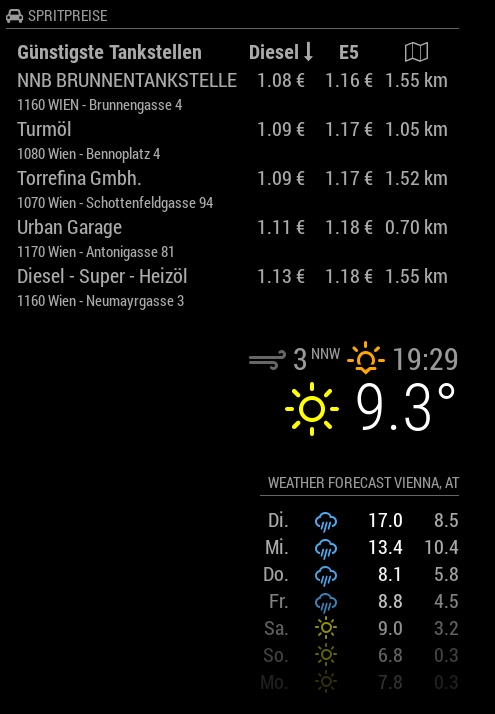
-
RE: Wunderlist - your todos on the mirror
@paviro
thanks a lot for your work, the module is working fine, strawberry helped me to make it run.
Great job
cheers
Kurt -
RE: [Remote-Control] Shutdown, Configure and Update your MagicMirror
@Jopyth
strawberry helped me a lot! to install your modul and it works fine, just starting to play around with it. to install moduls in the future without taking care about missing kommas or [ or { or making mistakes by copying scripts, is a imendous help for people like me, who is absolut new to this javascriptpythonworld.
So thanks a lot and cheers
by now everything is running fine
Kurt -
RE: mmm-wu-moon-phases - Moonphases from Weather Underground
@yawns
to completely answer your questions… sorry got a phone call…
The whole mirror is working, the module isn’t gone, I do not see any error messages,
Thank you
-
RE: mmm-wu-moon-phases - Moonphases from Weather Underground
@yawns
I just see:Aktuelle Mondphase wird geladen...is loading -
RE: mmm-wu-moon-phases - Moonphases from Weather Underground
@Raffaello
Hallo Raffaello
this is my config.js
Thank you/* Magic Mirror Config Sample * * By Michael Teeuw http://michaelteeuw.nl * MIT Licensed. */ var config = { port: 8080, ipWhitelist: ["::fff:0.0.0.0/1", "::fff:128.0.0.0/2", "::fff:192.0.0.0/3", "::fff:224.0.0.0/4", "127.0.0.1", "::ffff:127.0.0.1", "::1"], language: 'de', timeFormat: 24, units: 'metric', modules: [ { module: 'internet-monitor', position: 'top_center', header: '', config:{ type: '', maxTime: 20000, updateInterval: 0, verbose: false, displayStrength: true, displaySpeed: false, strengthIconSize: 80, maxGaugeScale: 100, } }, { module: 'mmm-wu-moonphase', header: 'Aktuelle Mondphase', // optionally you can add a header to this block position: 'bottom_right', // this can be any of the regions. config: { // See 'Configuration options' for more information. apikey: ' xxxxxx ', country: 'Austria', city: 'Vienna', apiLang: 'DL', } }, { module: 'mmm-systemtemperature', position: 'top_center', // This can be any of the regions. classes: 'small dimmed', // Add your own styling. Optional. config: { // See 'Configuration options' for more information. } }, { module: "MMM-WienerLinien", position: "bottom_left", config: { api_key: "xxxxxxx", stations: ["141"], } }, { module: 'alert', }, { module: "updatenotification", position: "top_bar" }, { module: 'clock', position: 'top_left' }, { module: 'compliments', position: 'lower_third' }, { module: 'currentweather', position: 'top_right', config: { location: 'Vienna', locationID: '2761369', //ID from http://www.openweathermap.org appid: 'xxxxxxxx' } }, { module: 'weatherforecast', position: 'top_right', header: 'Weather Forecast', config: { location: 'Vienna', locationID: '2761369', //ID from http://www.openweathermap.org appid: 'xxxxxxx' } }, { module: 'newsfeed', position: 'bottom_bar', config: { feeds: [ { title: "Der Standard", url: "http://derStandard.at/?page=rss&ressort=Seite1" } ], showSourceTitle: true, showPublishDate: true } }, ] }; /*************** DO NOT EDIT THE LINE BELOW ***************/ if (typeof module !== 'undefined') {module.exports = config;} -
RE: mmm-wu-moon-phases - Moonphases from Weather Underground
@Raffaello
Hallo Raffaello
The day has come…your moonphase doesn’t load anymore, and I don’t no why, because I havn’t changed a thing.
I updated the rpi some days ago, but the fault was also bevor the update.
I hope you can help, cause by now I miss the moon already.
And by the way Gratulation to the Swiss Tennis Finale. Love to watch both of them !
Liebe Grüße aus WienStarting MagicMirror: v2.1.0 Loading config ... Loading module helpers ... Initializing new module helper ... No helper found for module: mmm-wu-moonphase. Initializing new module helper ... Initializing new module helper ... No helper found for module: alert. Initializing new module helper ... No helper found for module: clock. No helper found for module: compliments. No helper found for module: currentweather. No helper found for module: weatherforecast. Initializing new module helper ... All module helpers loaded. Starting server op port 8080 ... Server started ... Connecting socket for: internet-monitor internet-monitor helper started ... Connecting socket for: mmm-systemtemperature Starting node helper: mmm-systemtemperature Connecting socket for: MMM-WienerLinien Starting module: MMM-WienerLinien Connecting socket for: updatenotification Connecting socket for: newsfeed Starting module: newsfeed Sockets connected & modules started ... (node:6133) DeprecationWarning: sys is deprecated. Use util instead. Launching application. starting internet monitor node helper Create new news fetcher for url: http://derStandard.at/?page=rss&ressort=Seite1 - Interval: 300000 -
RE: mmm-wu-moon-phases - Moonphases from Weather Underground
@Raffaello
Hi
Thank you and Dankeschön for the offer to help me in my native language.
Der Tag wird kommen :)
Oisdan bisdan
Kurt -
RE: mmm-wu-moon-phases - Moonphases from Weather Underground
@schlachtkreuzer6
Danke ! I can see the New Moon, at least some shades of him or her :)
Thanks a lot ! works fine, only when I tell himmiddle_ rightthe screen stays black. But withtop_righteverythings works out fine.
kurt