MagicMirror Forum
    • Recent
    • Tags
    • Unsolved
    • Solved
    • MagicMirror² Repository
    • Documentation
    • 3rd-Party-Modules
    • Donate
    • Discord
    • Register
    • Login
    1. Home
    2. lolobyte
    3. Posts
    A New Chapter for MagicMirror: The Community Takes the Lead
    Read the statement by Michael Teeuw here.
    Offline
    • Profile
    • Following 0
    • Followers 0
    • Topics 14
    • Posts 292
    • Groups 0

    Posts

    Recent Best Controversial
    • RE: MagicMirror v2.1.0 Update error

      Hello,

          ipWhitelist: ["127.0.0.1", "::ffff:127.0.0.1", "::1"],
      

      I can’t insert my ip from my laptop.
      I want to access MagicMirror from laptop with Remote Control, but it’s not possible now with this update.

      Where i have to insert my ip address in the white-list?

      posted in Troubleshooting
      lolobyteL
      lolobyte
    • RE: MagicMirror v2.1.0 Update error

      @yawns
      Thank u.
      Now i have this error!

      npm WARN grunt-yamllint@0.2.0 requires a peer of grunt@~0.4.0 but none was installed.

      posted in Troubleshooting
      lolobyteL
      lolobyte
    • MagicMirror v2.1.0 Update error

      How can i fix that?

      pi@raspi3-MM2:~/MagicMirror $ sudo git pull
      Aktualisiere b8167f8…8010e62
      error: Your local changes to the following files would be overwritten by merge:
      css/main.css
      modules/default/clock/clock.js
      modules/default/compliments/compliments.js
      modules/default/currentweather/currentweather.css
      modules/default/currentweather/currentweather.js
      package.json
      Please, commit your changes or stash them before you can merge.
      Aborting

      posted in Troubleshooting
      lolobyteL
      lolobyte
    • RE: MMM-Admin-Interface

      @ItayXD

      i do that step, but it doesn’t work.

      i mean the npm install in the Admin folder.

      Only after i install the missing files manually.

      posted in System
      lolobyteL
      lolobyte
    • RE: MMM-Admin-Interface

      @ItayXD

      No, sorry.
      I’m only a small and unknown user.

      posted in System
      lolobyteL
      lolobyte
    • RE: MMM-Admin-Interface

      @wrumble

      Hi, same problem like on my system.

      log in with ssh to yur raspberry pi.

      cd ~/MagicMirror/

      npm install body-parser

      If you have an grunt error, then just install

      npm install grunt@(your version) --save-dev

      in my case it was ~0.4.0
      npm install grunt@~0.4.0 --save-dev

      make a

      sudo reboot

      after that and see if your MacicMirror works again without un commented

      { “module”: “MMM-Admin-Interface” },

      Be aware!

      the developer made a little mistake. He wrote…

      Usage

      Go to :8181/MMM-Admin-Interface/
      Edit away!

      You must use the port 8080

      Go to :8080/MMM-Admin-Interface/
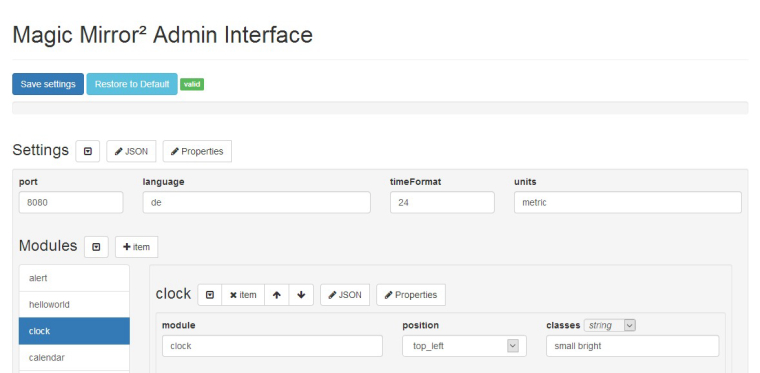
      posted in System
      lolobyteL
      lolobyte
    • RE: MMM-Admin-Interface

      Hey, that’s great.I like it.

      No need to start a ssh session.0_1483136812850_Admin_Interface.jpg

      posted in System
      lolobyteL
      lolobyte
    • RE: MMM-Globe

      @binderth

      yes, i know. That’s the south pole. ;-))

      Pull request, good idea.

      The Images are better then nothing.
      I searched for a better view for Europe with full disk, but nothing found.

      Maybe other sources from other user here?

      posted in Utilities
      lolobyteL
      lolobyte
    • RE: MMM-Globe

      @binderth

      Hi,
      i replacded the original links in the MMM-Globe.js for the image with this:

          start: function () {
                  self = this;
                  this.url = '';
                  this.imageUrls = {
                          'natColor': 'http://oiswww.eumetsat.org/IPPS/html/latestImages/EUMETSAT_MSG_RGBNatColour_LowResolution.jpg',
                          'geoColor': 'http://oiswww.eumetsat.org/IPPS/html/latestImages/EUMETSAT_MSG_IR108Color_LowResolution.jpg',
                          'airMass': 'http://oiswww.eumetsat.org/IPPS/html/latestImages/EUMETSAT_MSG_RGBAirmass_LowResolution.jpg',
                          'fullBand': 'http://oiswww.eumetsat.org/IPPS/html/latestImages/EUMETSAT_MSG_MPE_LowResolution.png'
                  }
                  this.hiResImageUrls = {
                          'natColor': 'http://oiswww.eumetsat.org/IPPS/html/latestImages/EUMETSAT_MSG_RGBNatColour_LowResolution.jpg',
                          'geoColor': 'http://oiswww.eumetsat.org/IPPS/html/latestImages/EUMETSAT_MSG_IR108Color_LowResolution.jpg',
                          'airMass': 'http://oiswww.eumetsat.org/IPPS/html/latestImages/EUMETSAT_MSG_RGBAirmass_LowResolution.jpg',
                          'fullBand': 'http://oiswww.eumetsat.org/IPPS/html/latestImages/EUMETSAT_MSG_MPE_LowResolution.png'
                  }
      

      good luck

      posted in Utilities
      lolobyteL
      lolobyte
    • RE: Module: iFrame! Starting Video automatically!

      @roramirez

      Hello Ramirez.

      The video is starting but only once.
      Then, when i restart the magicmirror.

      I realized the link http://media.tagesschau.de/video/100s/2016/1228/TV-100s-1841.podm.h264.mp4, is no option.
      The video is not really the actual newest information of the day. I must use one of the other links.

      My plan was to became a possibility to start every time when i activate the iframe module with the first tapping on “iFrame” with the hep of the module “Remote-Control”.

      posted in Troubleshooting
      lolobyteL
      lolobyte
    • Module: iFrame! Starting Video automatically!

      Hello,
      i wish to start with iframe the network video of Tagesschea in 100 sekunden.
      I tried several links with no success.
      The best result was with this link
      http://www.tagesschau.de/multimedia/video/video-244855~player_branded-true.html

      but the video didn’t start.

      Any proposal for a auto play option?

      Here is my config:

      {
      module: ‘iFrame’,
      position: ‘bottom_bar’, // This can be any of the regions.
      config: {
      url: “http://www.tagesschau.de/multimedia/video/video-244855~player_branded-true.html&autoplay=true”,
      // url: “https://www.tagesschau.de/100sekunden/&autoplay=1”,
      // url: “http://www.tagesschau.de/export/video-podcast/webxl/tagesschau-in-100-sekunden/&autoplay=1”,
      // url: “~/MagicMirror/modules/MMM-Podcast/video.mp4&autoplay=1”,
      // url: “http://media.tagesschau.de/video/100s/2016/1228/TV-100s-1841.podm.h264.mp4&autoplay=1”,
      width: “100px”, // Optional. Default: 100%
      height: “100px”, //Optional. Default: 100px
      }
      },

      posted in Troubleshooting
      lolobyteL
      lolobyte
    • RE: Default Module: Weather Forecast

      @yawns

      Thank you, actually no developer branch installed.

      posted in Troubleshooting
      lolobyteL
      lolobyte
    • RE: Stop the screensaver!

      Hi all,

      after doing this

      Disable the screensaver:
      Go to LXDE-autostart config:

      sudo nano /etc/xdg/lxsession/LXDE/autostart

      add the following lines:

      @xset s noblank
      @xset s off
      @xset -dpms

      Save and close, using the commands CTRL-O and CTRL-X.

      Go to lightdm.conf:

      sudo nano /etc/lightdm/lightdm.conf

      add the following lines in section [SeatDefaults]:

      xserver-command=X -s 0 -dpms

      The fucking screensaver is starting again.

      Then i do following:

      sudo apt-get install xscreensaver
      sudo apt-get remove xscreensaver

      An i never see a starting screensaver gain.

      Good luck!

      posted in General Discussion
      lolobyteL
      lolobyte
    • Default Module: Weather Forecast

      Why weather forecast won’t show

      showRainAmount?

      This is my config:

                  {
                          module: 'weatherforecast',
                          position: 'top_right',
                          header: 'Wettervorhersage',
                          classes: 'small bright', // Add your own styling. Optional.
                          config: {
                                  location: 'location',
                                  locationID: '121212121',  //ID from http://www.openweathermap.org
                                  appid: 'xxxxxxxxxxxxxxxxxxxxx',
                                  maxNumberOfDays: 10,
                                  animationSpeed: 2000,
                                  fade: true,
                                  fadePoint: 0.25,
                                  appendLocationNameToHeader: true,
                                  showRainAmount: true,
                          }
                  },
      

      Any ideas?


      Edited By Moderator: App Id removed from the code snippet. Please try not to post your API tokens and secrets in a public forum. :bow:

      posted in Troubleshooting
      lolobyteL
      lolobyte
    • RE: Calendar modification

      @CCoates

      iphone calendar is not a big problem.

      U must go to iCloud Calendar and make the calendar of your choice usable for public access.
      After that copy the link of your public calendar and insert this link into the config.js in your calendar module.

      restart your magicmirror

      posted in Tutorials
      lolobyteL
      lolobyte
    • RE: Looking for Mirror creaters experience

      @PindaPower

      Nice work. Witch HDMI to VGA adapter have you installed and witch resolution does it support?

      Its a lenovo laptop?

      I have the x220 lenovo. Great thing. Works also with Hackintosh.

      posted in General Discussion
      lolobyteL
      lolobyte
    • RE: Memory effect with MM2

      @strawberry-3.141

      Great, i’ll try it!

      posted in Hardware
      lolobyteL
      lolobyte
    • RE: How do you switch on / off, wake up yours?

      @schlachtkreuzer6

      yea, all ways on.
      If the cam recognize some motion in the front, the monitor is starting.

      After a chosen delay time the monitor is switched off.

      posted in Hardware
      lolobyteL
      lolobyte
    • RE: Developing USGS Earthquake Map (2MB Gif Warning)

      @croxis

      your link “Here is my current code…” https://github.com/croxis/MMM-earthquakes

      and the Module is named “Module planetrise” with this Code:

      {
      module: ‘planetrise’,
      position: ‘top_right’, // This can be any of the regions.
      header: ‘PLanet Rise’,
      config: { // Place the latitude and longitude of your mirror
      latitude: 45.5,
      longitude: -122.38,
      // A dictiory of the bodies and unicode character for the symbol
      // This is the default and does not need to be listed.
      // A full list of bodies can be seen on line 1359 in astronomy.js
      // Note: Trying to find the rise time of Earth will crash the Module
      bodies: {‘Sun’: ‘☉’,
      ‘Moon’: ‘☽’,
      ‘Mercury’: ‘☿’,
      ‘Venus’: ‘♀’,
      ‘Mars’: ‘♂’,
      ‘Jupiter’: ‘♃’,
      ‘Saturn’: ‘♄’,
      }
      }

      This Module is the confic.js entry for “Module planetrise”

      at https://github.com/croxis/planetrise

      The i ask again, where can i find your earthquake Module?

      posted in Development
      lolobyteL
      lolobyte
    • RE: Developing USGS Earthquake Map (2MB Gif Warning)

      @croxis

      and where is a running raspi mmm-module?

      posted in Development
      lolobyteL
      lolobyte
    • 1
    • 2
    • 9
    • 10
    • 11
    • 12
    • 13
    • 14
    • 15
    • 11 / 15