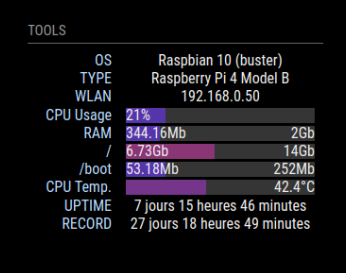
Love it!
Many thanks to Kristjan.
L
Offline
A New Chapter for MagicMirror: The Community Takes the Lead
Read the statement by Michael Teeuw here.
Read the statement by Michael Teeuw here.
Posts
-
RE: 3rd-Party-Modules project now part of MagicMirrorOrg
-
RE: Logitech Media Server (Squeezebox) - Multiroom Wlan Speaker System
@barnosch I don’t have touch, but I can control lms/Squeezelite via my smartphone. I didn’t know that PiCorePlayers was a system, not just some application. So now I am using SqueezeLite on my MM and that works great. My MM is connected to an usb audio system. It now can play music from my lms and MM is displaying the title. Quite cool :)
This tutorial helped me getting SqueezeLite running on my MM (latest Bookworm 64bit).
Those were my steps for 64bit:
Create a squeezelite “work” directory and download squeezelite
cd
mkdir squeezelite
cd squeezelite
wget -O squeezelite.tar.gz https://sourceforge.net/projects/lmsclients/files/squeezelite/linux/squeezelite-2.0.0.1524-aarch64.tar.gz/download
# for newest version see: https://sourceforge.net/projects/lmsclients/files/squeezelite/linux
tar -zxvf squeezelite.tar.gz
rm squeezelite.tar.gz
mv squeezelite squeezelite-aarch64
Move it to the usr directory, and make it executable:
sudo mv squeezelite-aarch64 /usr/bin
sudo chmod a+x /usr/bin/squeezelite-aarch64
With my USB audio device the following commands works (there is more info in the tutorial on how to find the correct device)
sudo /usr/bin/squeezelite-aarch64 -n Pi4-MagicMirror -o front:CARD=MicroII,DEV=0I don’t use it as a service yet (the steps in the tutorial didn’t work for me). So right now I have to manually start it after reboot.
-
RE: Logitech Media Server (Squeezebox) - Multiroom Wlan Speaker System
-
RE: new compositor on wayland
@lxne said in new compositor on wayland:
I switched to labwc on my pi4 (an existing MM installation) and now always when the screen turns on, after it turned off (MMM-Pir), the task bar is visible and MM is only maximized but not in full screen mode anymore.
With another monitor I do not have this issue. When I switch back to my normal monitor the problem persists. It is somehow hardware dependent.
-
RE: new compositor on wayland
@sdetweil hi, have you changed the full screen behavior anyhow?
I switched to labwc on my pi4 (an existing MM installation) and now always when the screen turns on, after it turned off (MMM-Pir), the task bar is visible and MM is only maximized but not in full screen mode anymore.I updated everything, but that didn’t help.
Any ideas why this is happening?Best wishes,
Alex -
RE: Top 5 unseen modules
Two modules…
My MagicMirror is running on an OLED display, so I am using MMM-MagicMover and MMM-BurnIn to prevent screen damage.and a complete suite…
MMM-GoogleAssistant and its components (Pages, Volume, Screen, Pir, Keyboard, TelegramBot, …) – priceless. -
RE: MMM-Deezer
@tpam03 Hi Pete, this still doesn’t work, right?
Is it even possible to play ‘loved songs’ from such an external player?
I thought that I have read it’s not somewhere. -
RE: Best monitor or TV
@benscammell
I really do like this mobile oled monitor for my MM. INNOCN 15.6" OLED Portable Monitor Full HD 1080P.
https://www.amazon.com/dp/B09L12DGW5To counteract a possible burn in effect I use two modules: MMM-MagicMover and MMM-BurnIn.
-
RE: MMM-bergfex not working
@FatTony123 Thanks for your reply.
Just three locations I am visiting more or less regularly:
‘Wildkogel-Arena / Neukirchen / Bramberg’,
‘Lech Zürs / Arlberg’,
‘Hochkössen / Unterberg’
Now the names are all with slashes. Last year there were some minuses.Thank you for the link.
Best wishes
-
RE: MMM-bergfex not working
@FatTony123 Hi, your fork is gone from git. Has anybody a working bergfex module? Mine isn’t showing any values anymore.
Log says: [12.12.2022 16:52.17.247] [LOG] 230 snow reports from bergfex.at retrieved.
Last season it worked.
Anybody any idea?Oh boy. They changed the names of a view locations.
After updating my list it works again. -
RE: MMM-OpenWeatherForecast - Replacement for MMM-DarkSkyForecast
Hello there,
We wanted to let you know about a change coming to Dark Sky. Beginning on March 31st, 2023 the Dark Sky API will no longer be available. To prepare, we encourage you to learn more about WeatherKit, a new Apple API available on iOS, iPadOS, macOS, tvOS, and web that provides access to the new Apple Weather forecast data.
You can learn more here.
As always, we appreciate your support, and will continue to update you with any future changes.Thanks, The Dark Sky Team
-
RE: My Bathroom Mirror
Pretty cool.
I am working on a similar bath mirror project and will definitely test some of the modules you are using.
Maybe for some inspiration here are the modules I am currently using besides clock, calendar and newsfeed:
MMM-pages
MMM-UpdateNotification
MMM-TelegramBot
MMM-Volume
MMM-Tools
MMM-Detector
MMM-GoogleAssistant
MMM-DWD-WarnWeather
MMM-MplayerRadio
MMM-DarkSkyForecast
MMM-DWD-Pollen
MMM-bergfex
MMM-GroveGestures -
RE: MMM-WOTD
Hi, I have updated my MagicMirror to 2.15.0 and then installed MMM-WOTD but I do not get any output. My MM runs with quite a view modules but MMM-WOTD won’t show up.
According to my telegram-bot these modules are installed (MMM-WOTD is not among those):
alert
MMM-pages
MMM-UpdateNotification
MMM-TelegramBot
MMM-Volume
MMM-Tools
MMM-GoogleAssistant
MMM-Assistant2Display
clock
MMM-DWD-WarnWeather
calendar
MMM-MplayerRadio
MMM-MusicOnDemand
MMM-Weather
MMM-DarkSkyForecast
newsfeed
MMM-NewsFeed
MMM-GroveGesturesIn the log I can only find one line regarding MMM-WOTD and it says: [02.04.2021 21:28.53.261] [LOG] No helper found for module: MMM-WOTD.
Any idea what might be the problem?
Best wishes.
-
RE: Bathroom Magic Mirror Cabinet "Alibert" - MagicAlibert
Awesome work!
Are the mirrors just glued onto the doors?
And did you use the chrome spy for both sides?Best wishes,
Alex (Lower Bavaria) -
RE: Hardware Compatibility Question: Using the Grove Adjustable PIR Sensor & ReSpeaker Pi HAT in the Same Build?
My MM hardware:
Raspberry Pi 3b+
Respeaker 2-Mics Hat
Grove PIR Motion Sensor (connected to Respeaker GP12 SENSOR_PIN=12)
Grove Gesture Sensor (PAJ7620u2) connected to Respeaker I2C-InputWorks for me.