MagicMirror Forum
    • Recent
    • Tags
    • Unsolved
    • Solved
    • MagicMirror² Repository
    • Documentation
    • 3rd-Party-Modules
    • Donate
    • Discord
    • Register
    • Login
    1. Home
    2. MadScientist
    3. Posts
    A New Chapter for MagicMirror: The Community Takes the Lead
    Read the statement by Michael Teeuw here.
    M
    Offline
    • Profile
    • Following 0
    • Followers 3
    • Topics 6
    • Posts 207
    • Groups 0

    Posts

    Recent Best Controversial
    • RE: Cheapest Magic Mirror

      For the LCD you can ask at your local recycling center if they have a bunch of old monitors they’d be willing to donate to the school. Otherwise try places like Craigslist or so. You should find old 17" LCD screens for around 5 bucks. If they are not working, but the LCD panel looks ok, you can buy very cheap universal LCD controller boards like this.
      The board runs on 5V so you also need a power supply. Try to find cheap 12V power supplies. Those to drive LEDs are generally very inexpensive. 25W should be enough per MagicMirror, but it greatly depends on the number and size of the CCFLs of the LCD. Use a 12V-to5V DC-DC buck converter. I have this one and I can also use it to power my RaspPi.
      You’ll also need either an inverter or LED driver for the backlight. I am not linking a product here because it depends on the number of CCFL’s/LED strips but they should generally be less than 2 bucks a piece.

      You’ll also need a HDMI to VGA adapter and if you don’t have a VGA cable, something like this.

      That’s my input from the LCD side of the project. Let me know if you need help or have any questions. I only posted AliExpress links but you can check any other places of course. Check out eBay, Banggood.com, Gearbest and so on. Make sure you do some searching to always get the best price! Especially if it has to be as cheap as possible.

      Edit: fixed mainly typos.
      posted in Hardware
      M
      MadScientist
    • RE: {HowTo} turn on/off your monitor (Time based, PIR/Button, App)

      I wouldn’t know how to program it but you could try playing around with a photo resistor like this or this. But I think that will only work if you have constant light conditions. Maybe an IR light barrier with a reflector on the other side would work better.

      No idea if what you want is possible but that would be an awesome project.

      posted in Tutorials
      M
      MadScientist
    • RE: Cooling Raspberry

      @mykle1 Pretty much the same as yours. Before was around 62-65°C and now I am around 41-42°C under pretty much the same conditions. And for the noise: You can barely hear the fan if you put your ear right next to it. I am pretty pleased with the result, especially for the price.

      posted in Troubleshooting
      M
      MadScientist
    • RE: Magic Mirror Blanks Several Hours

      @sdetweil
      That didn’t help in my case, hence the work-around with the cronjob. But it’s true that everybody should first try to disable the update module in their config.

      posted in Troubleshooting
      M
      MadScientist
    • RE: Cooling Raspberry

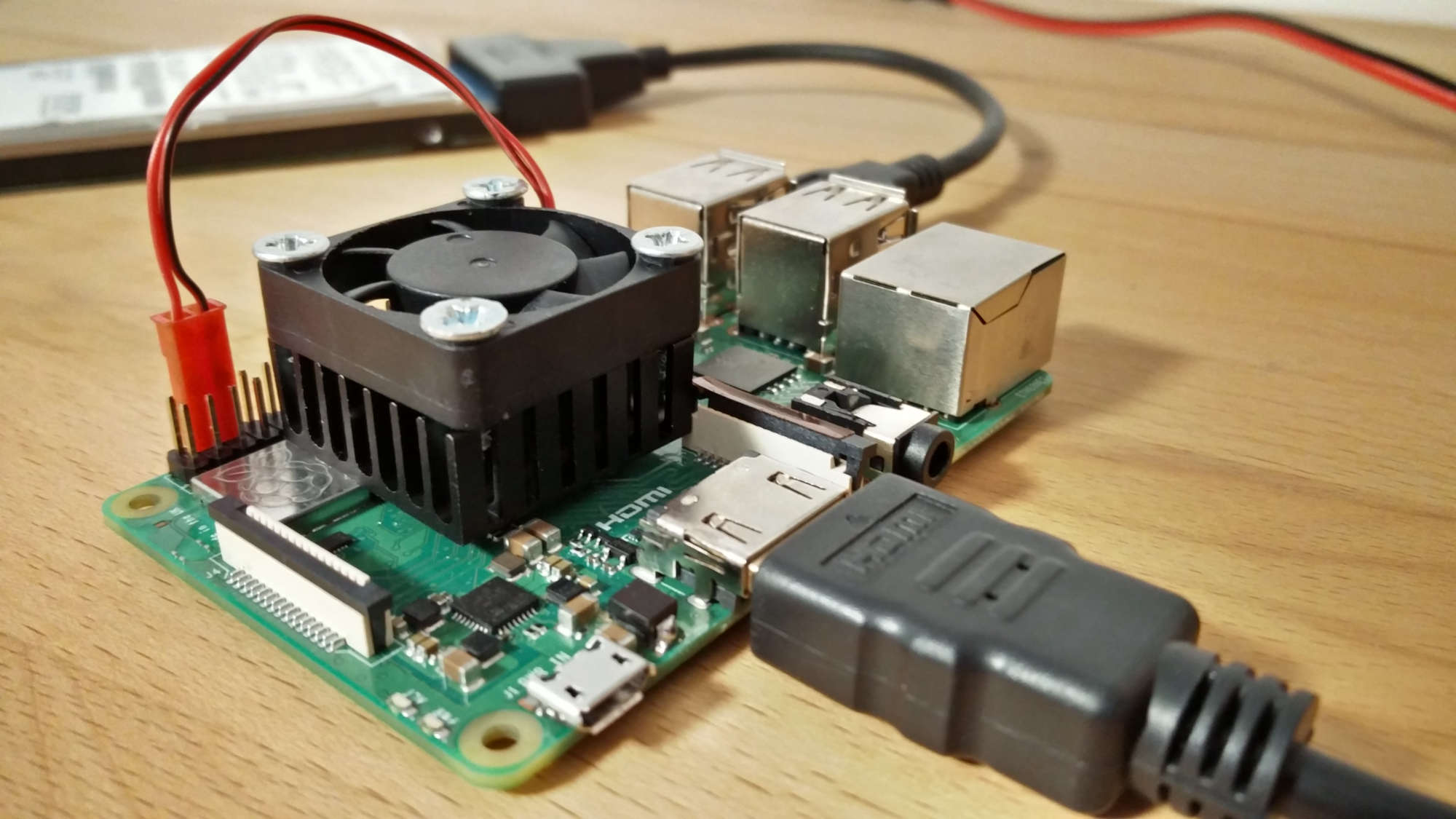
      I finally received my heat sinks and had the time to play with my second Pi (3b+, not my mirror-Pi, which is just a 3b).

      The heat sink is fixed to the CPU via heat conducting double-sided adhesive. It’s a small surface but it holds well. The 30mm 12V fan is connected to the 5V and GND of the Pi. That’s enough to get it running and it’s totally silent. The airflow is enough to keep everything cool.

      To fix the fan to the heat sink I just used some wood screws. Didn’t have any nicer looking ones…

      Costs:

      • list itemFan 1.17€ from Aliexpress
      • list itemHeat sink: 1.16€ (for 5 pieces) from Aliexpress, You can also buy just once but I will use the others for other projects.
      • list itemHeat conducting adhesive: 1.08€ for 48 pieces (25x25mm). You can buy less but I also use it for other projects…

      0_1538493521110_IMG_20181002_170652.jpg

      posted in Troubleshooting
      M
      MadScientist
    • RE: Magic Mirror Blanks Several Hours

      I have the same problem. A Ctrl-R helped getting the modules back but I didn’t like doing it at least once a day. Therefore I created a cronjob that reloads the MagicMirror everyday at 6am. Haven’t seen a black screen since then.

      Not a fix but a work-around.

      posted in Troubleshooting
      M
      MadScientist
    • RE: My Custom Smart Mirror.

      One if the cleanest setups I have seen so far. Well done!

      posted in Show your Mirror
      M
      MadScientist
    • RE: Problems using MMM-WunderGround24hours

      Make sure your location ID still exists. I had to change mine a couple of times since January this year.

      posted in Troubleshooting
      M
      MadScientist
    • RE: UK Mirror photobooth issues

      Maybe contact the guy from here (Goldjunge_Chriz). In his post it says the max size is 120x80cm to ship to the UK. Maybe you can ask him if he can make an exception.
      It’s not cheap (way too expensive for my taste) but the results look spectacular. Additional to that it is thin and therefore light.

      Maybe he’s able to ship to the UK if you pay extra. Should be still below 500€ altogether.

      posted in Hardware
      M
      MadScientist
    • RE: Rpi 3B+, can't install

      That’s why I run mine from a cheap SSD (Kingston A400, 120GB iirc). Much faster and no risk of corrupting it. I paid 27€ for my SSD. At this price I think it is worth considering buying one.

      posted in Troubleshooting
      M
      MadScientist
    • RE: Rpi 3B+, can't install

      Not sure this will help but you could try npm install -g electron within your MagicMirror directory.

      If that doesn’t work, try npm install electron@2.0.0 inside your MM directory.

      posted in Troubleshooting
      M
      MadScientist
    • RE: My Custom Mirror

      That’s a very nice build. For the camera you should check out the PS3 camera. It also comes with microphones is dirt cheap. I bought one for 4€ (incl. shipping) on ebay. Don’t have it yet, though. I can imagine that it will look much neater on your mirror and the microphones (afaik 4 of them) are supposed to be of good quality.

      posted in Show your Mirror
      M
      MadScientist
    • RE: Auto restart MagicMirror after x hours ?

      My cronjob looks like this: 0 6 * * * pm2 reload mmand it is working just fine. Maybe try the reload instead of the restart command?
      Also, I run crontab -ewithout sudo.

      posted in Troubleshooting
      M
      MadScientist
    • RE: Rpi 3B+, can't install

      Try git clone https://github.com/MichMich/MagicMirrorthen cd MagicMirrorfollowed by npm install.
      Looks to me you tried to start the MagicMirror before installing it.

      posted in Troubleshooting
      M
      MadScientist
    • RE: Web viewer / http request

      I think he wants to display the constantly changing time table of his school?

      Have you looked here to see if there’s a module you could use? Otherwise I’d try the MMM-iFrame module.

      posted in Tutorials
      M
      MadScientist
    • RE: Cooling Raspberry

      What are those costs for the case and the Pi power hat? My fan and heat sink will be together less than $2 and it’s absolutely silent as well with the same result. Drawback is that it takes time to receive the parts from China.

      I will post pics once I have everything but it still can take weeks to get the heat sinks.

      posted in Troubleshooting
      M
      MadScientist
    • RE: Cooling Raspberry

      Currently I am using a 40mm/12V fan which is just in front of the heat sink. The fan runs at 5V from the same source that powers the Pi. I ordered a 30x7mm 12V fan and 28x28x11mm heat sinks from Aliexpress for very little money. If hight is not an issue you can also get 15mm or even 20mm high heat sinks for better heat dissipation.
      The fan already arrived and is impossible to hear at 5V. It’s currently running on my 2nd Pi with a “hand made” heat sink from an old graphic card. In both cases the temperatures dropped at ~12°C.

      Maybe that’s an interesting solution for you.

      posted in Troubleshooting
      M
      MadScientist
    • RE: Strip Down Guide for BenQ 28" VA Monitor GC2870H

      Are you sure the touch sensor works behind the mirror? It’s pretty expensive and it would be a pity if it doesn’t. Touch-anything generally doesn’t work behind the mirror because of the metallic coating.

      What mirror are you using and where did you get it from? I am still looking for a better alternative for mine. Not very happy with the transmission of only 8%.

      posted in Hardware
      M
      MadScientist
    • RE: Strip Down Guide for BenQ 28" VA Monitor GC2870H

      I use it in portrait mode.

      posted in Hardware
      M
      MadScientist
    • RE: Strip Down Guide for BenQ 28" VA Monitor GC2870H

      @yep_dd Same here for passive heat sink and usage. I just placed an old 40mm/12V fan in front of the Pi which runs at 5V. It’s hard to hear in an absolute silent environment. I’ve noticed crashes during the hot period in summer, that’s why I use a fan now and it generall runs smoother. I think at some points the Pi got hot enough to throttle.

      posted in Hardware
      M
      MadScientist
    • 1 / 1