Read the statement by Michael Teeuw here.
MM and UBUNTU. Made for each other.
-
MM and UBUNTU. Made for each other.
This is not a tutorial. It’s more of a testimonial to the wonderful
working relationship between MagicMirror and UBUNTU.Why?
I don’t know how many people are using MM with UBUNTU, but I am.
- I’m not using Pi’s anymore.
- MM is very happy on ubuntu and runs like a champ.
- A cheap laptop running ubuntu outperforms any Pi.
- MMM-voice with Hello-Lucy runs amazingly well.
The old laptops I’m using this on.
- MacBook(2005?) = Vanity mirror / Alarm Clock with Hello-Lucy
- Compaq Presario CQ57 = Alarm Clock / Hello-Lucy
- Dell Inspiron E1505 = Vanity mirror / Alarm Clock with Hello-Lucy
- HP G60 Notebook = Alarm Clock / Hello-Lucy
- ASUS Eee PC Seashell = Alarm Clock / Hello-Lucy
All of these are 10+ years old. I’ve had no trouble finding them on eBay
and Craigslist for less than the price of a Pi3.Avoid Lenovo ThinkPads T410 & T61
For whatever reason, ubuntu does not like these two machines. So, I didn’t
bother with them. I use one now as a server machine under Windows 7.There’s no going back
Seriously, once you’ve experienced MagicMirror with UBUNTU you won’t go
back to Raspbian, and once you’ve done the same on a cheap old laptop,
you won’t go back to the Pi.- The difference is astounding.
- No video issues
- No RAM issues (You can upgrade)
- No system load issues
- No heat issues
- Most laptops have built-in WiFi
- Most laptops have an integrated microphone
For what it’s worth
My recommendations:
Because I have ubuntu on so many different machines, with relatively
different specs, I settled on UBUNTU 16.04 LTS for all of them. I did this
because it runs beautifully on every machine, even my i7 dev machine. The
installations are virtually identical, making it exceptionally easy to move
from one machine to another, for any reason.So, if you’re interested. Go to the ubuntu website and pick up your free
version. Installation is fairly easy. They have a wonderful “how-to” guide
that will help you with the installation.Install node. I do it this way for version 6
curl -sL https://deb.nodesource.com/setup_6.x | sudo -E bash -Install MagicMirror
Thoughts you will have
- Mykle was so right
Peace!
-
And what are your solutions for GPIO related stuff like temperatur sensor or PIR-Sensor (infrared or radar).
Do you always use the laptop screen or how does this look? -
@Mykle1 was so right…LOL
-
Habe you compared the Laptops Power consumption with the raspberries? ;)
For sure it runs way better, but if you use just normal stuff, it is absolute not necessary imho.
Most of us use the mirror on the wall, without tons of cables (execpt Power) viewable. With a Laptop you have to be more tricky.
But nice to know that it runs easily With Ubuntu :D
-
@kruemel said in MM and UBUNTU. Made for each other.:
And what are your solutions for GPIO related stuff like temperatur sensor or PIR-Sensor (infrared or radar).
Do you always use the laptop screen or how does this look?I don’t need a GPIO solution for temperature sensors. My thermostat already tells me that information. PIR sensor for motion? Not necessary. A simple usb webcam will do the trick. You can use the laptop display or you can use an external monitor when the laptop board supports that. I haven’t seen one that doesn’t.
-
@barnosch said in MM and UBUNTU. Made for each other.:
Habe you compared the Laptops Power consumption with the raspberries? ;)
For sure it runs way better, but if you use just normal stuff, it is absolute not necessary imho.
Most of us use the mirror on the wall, without tons of cables (execpt Power) viewable. With a Laptop you have to be more tricky.You’re not just running a raspberry. You’re also powering a display. I have not compared but I am sure there is a nominal difference. If there is a difference, the performance boost outweighs the cost difference.
Normal stuff? There are single modules that the Pi struggles with. I don’t accept stuttering transitions, RAM inadequacies, system overload and heat issues just to use a Pi.
I don’t know how you speak for “most of us”, but ok. Disassemble the laptop. Fits behind mirror as easily as a Pi. Only the power cord showing. How is this different from a Pi mirror? It’s not.
-
Raspberry pi is fine to mount a prototype, but with MM and Kalliope shows freezing moments …
On the laptop: everything is easy and the answer is immediate.
My next MM with Kalliope (voice) will be in a mini PC. More expensive, yes, but it compensates the normal fluency that these app requires -
@Mykle1 How do you did the wake up with a webcam?
Let’s say a notebook has always an integrated webcam on top of the display. How do you wake the screen up like a PIR-Sensor does? -
How do you wake the screen up like a PIR-Sensor does?
I use voice commands with Hello-Lucy to put my displays to sleep and to wake them up. I use this on my Pi mirror. https://github.com/alexyak/motiondetector
-
@Mykle1 Using old laptops makes sense to me too. But i do have one question; how do you manage heat and fan noise? I’m concerned that an old laptop gets hotter than a Pi behind a mirror and if its using a HDD and has a fan it must either get noisy or hot (if you disconnect the fan)
-
I have not found heat to be an issue at all. In fact, by removing the motherboard from the case, the temps are actually lower, even when placed behind a mirror. As long as the construction of the mirror is well ventilated, I don’t think that would ever be an issue.
I do not remove the fan. I’ve found that in a normal environment, (people, tv, ambient noises, etc…) the fan noise isn’t even noticeable. Only when the house, or room, is completely silent is the fan audible. For me, this is not an issue when a mobo mirror outperforms any Pi mirror, hands down.
Note: There are silent fans these days but I have never used them with a mirror. I’ve never felt the need to but that is certainly an option for anyone.
-
@mykle1 said in MM and UBUNTU. Made for each other.:
I have not found heat to be an issue at all. In fact, by removing the motherboard from the case, the temps are actually lower, even when placed behind a mirror. As long as the construction of the mirror is well ventilated, I don’t think that would ever be an issue.
I do not remove the fan. I’ve found that in a normal environment, (people, tv, ambient noises, etc…) the fan noise isn’t even noticeable. Only when the house, or room, is completely silent is the fan audible. For me, this is not an issue when a mobo mirror outperforms any Pi mirror, hands down.
Note: There are silent fans these days but I have never used them with a mirror. I’ve never felt the need to but that is certainly an option for anyone.
Nice to know! Got a old laptop I’m gonna try it with then! Using MMM-pages and MMM-voice, so a more powerful CPU would be preferred.
-
@mdhenriksen said in MM and UBUNTU. Made for each other.:
Using MMM-pages and MMM-voice, so a more powerful CPU would be preferred.
That is largely the reason I moved away from the Pi. (I still have my first Pi mirror). I’ve been using MMM-voice and Hello-Lucy for about a year now and I could not be more pleased with the results and the performance.
-
I did learn the hard way that a miniPC running an Intel Atom processor and integrated graphics is not suitable for Ubuntu and therefore the MagicMirror. The IGP does not have drivers in Ubuntu 14, 16, nor 18 and uses most of its power to render the desktop.
I might put the server version on it and turn it into a gateway or something.
-
@bhepler said in MM and UBUNTU. Made for each other.:
Intel Atom processor and integrated graphics is not suitable for Ubuntu and therefore the MagicMirror.
The only two laptops that I’ve had trouble with are both ThinkPads. I struggled with them and eventually gave up.
However, I did have success with a little piece of $h1t with specs similar to what you mentioned.
https://www.youtube.com/watch?v=QZ8t3UoKYu0
Total cost = $11
Specs:
ASUS Eee PC
Intel Atom CPU N570 @ 1.66GHz x 4
2GB of RAM
Intel Pineview M Graphics
Display 8.5" width by 5.25" height
250GB HD
Integrated microphone
Built-in WiFi
VGA port (for external monitor)$11 on craigslist
64-bit Ubuntu 14.04 LTS
MagicMirror v2.1.3Modules:
MMM-Advice
AlarmClock
calendar
clock
compliments
Cocktails
EARTH
EasyBack
Events
FMI (Find My iPhone)
ImageSlideshow
Lunartic
newsfeed
NOAA3
PC-Stats
voice w/ Hello-Lucy
WunderGround -
@mykle1 - Sigh. I suppose I can try again. Did you have to do any fiddling to get the OS to use a graphics driver?
-
@bhepler said in MM and UBUNTU. Made for each other.:
Sigh. I suppose I can try again. Did you have to do any fiddling to get the OS to use a graphics driver?
No sir. I did a standard install of ubuntu 16.04LTS (I only use this version. I tried 18.xx and had trouble) During the setup of the installation there is a click box for “use third party drivers” or something to that effect. I always click (enable) that option. I don’t know if it’s worth mentioning but I always use a wired internet connection during installation. It’s just faster that way as it updates everything.
Let me know how you make out. :thumbsup:
-
Recommendation Update
Actually, this is more of a recommendation confirmation. While you can use ubuntu 18.xx and MM together, I don’t recommend it. I just did a clean install of ubuntu 18.04. Newest stable node and npm. MM v2.6.0. Yes, it runs MM but I don’t see any benefit to using ubuntu 18.xx over 16.04 LTS. I don’t like the changes to the UI in 18.xx and I really don’t like dealing with all the vulnerabilities.
Ubuntu 16.04 LTS has a more intuitive UI (IMHO) and there are NO vulnreablilities to deal with. NONE!
So, for the time being, I’m staying with Ubuntu 16.04 LTS. It’s trouble free and MM loves it, too.
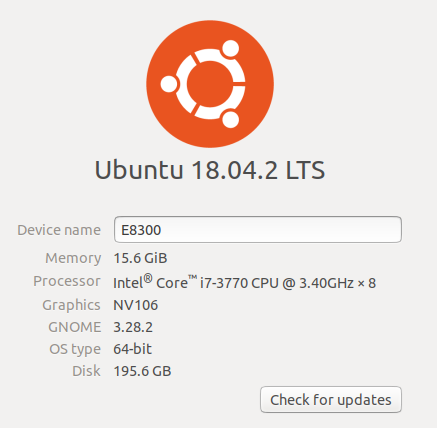
I did a test install of Ubuntu 18.04 on a machine I found in someone’s trash. That’s when the vulnerabilities reminded me of why I don’t like 18.xx. Look at the specs. One man’s trash is another man’s treasure.
-
not gonna lie, i actually have a i5 mini pc laying around and have been fiddling with the pis for weeks now trying to get everything dialed in and your post got me a little pumped to be able to use this pc i got.
i got ubuntu installed no problem…
i know NOTHING about it so i couldnt even get past how to install the wireless adapter lol…
so im scrapping this and going back to install raspbian on the pc and will try it at that point.
-
@Mykle1 Nice Find! :)




Hello! It looks like you're interested in this conversation, but you don't have an account yet.
Getting fed up of having to scroll through the same posts each visit? When you register for an account, you'll always come back to exactly where you were before, and choose to be notified of new replies (either via email, or push notification). You'll also be able to save bookmarks and upvote posts to show your appreciation to other community members.
With your input, this post could be even better 💗
Register Login