My stream showing upside down. any idea ?
 M
Offline
M
Offline
A New Chapter for MagicMirror: The Community Takes the Lead
Read the statement by Michael Teeuw here.
Read the statement by Michael Teeuw here.
Posts
-
RE: [octomirror-module] Monitor & Control an OctoPrint 3D Printer Server
-
How to Start/Stop motioneye
Hello,
How to Start/Stop motioneye from command line.Thank you.
-
RE: Two way mirror in United Kingdom
I get the mirror from Walsh Glazing Half Moon Ln
-
RE: Two way mirror in United Kingdom
Hi
I think my glass light transmission will be around 50/50 or 60/50- My Clock Setup
-
RE: Glass or foil??
I don’t think foil will be way to go. Glass only for nice finish of mirror.
I came cross mirror supplier which offers standard thickness two way mirror 6mm, and also 4mm
I have smaller Version of Magic Mirror with 6mm glass. Which look very nice
But I never come cross 4mm. -
Two way mirror in United Kingdom
Guys I have a question I came cross mirror supplier which offers
Standard thickness two way mirror 6mm, and also 4mm
I have smaller Version of Magic Mirror with 6mm glass.
But I never come cross 4mm. -
RE: pm2 logs mm error
after removing modules, and reboot
0|mm | (node:1893) DeprecationWarning: sys is deprecated. Use util instead.
0|mm | Launching application.
0|mm | ERROR! Could not find main module js file.
0|mm | Notification: GET_COMIC Payload: [object Object]
0|mm | GET_WUNDERGROUND -
pm2 logs mm error
Hi all,
I have an issue with the MM-PIR Sensor. I get alltime this error in pm2 log
I have the original from @paviro or the modification,
and I installed Pir-Sensor @cowboysdude0|mm | > magicmirror@2.1.2 start /home/pi/MagicMirror
0|mm | > sh run-start.sh
0|mm | Starting MagicMirror: v2.1.2
0|mm | Loading config …
0|mm | Loading module helpers …
0|mm | Initializing new module helper …
0|mm | Module helper loaded: MMM-Remote-Control
0|mm | Initializing new module helper …
0|mm | Module helper loaded: DailyXKCD
0|mm | No helper found for module: alert.
0|mm | Initializing new module helper …
0|mm | Module helper loaded: updatenotification
0|mm | No helper found for module: clock.
0|mm | No helper found for module: calendar_monthly.
0|mm | No helper found for module: currentweather.
0|mm | Initializing new module helper …
0|mm | Module helper loaded: MMM-WunderGround
0|mm | No helper found for module: weatherforecast.
0|mm | Initializing new module helper …
0|mm | Module helper loaded: MMM-SystemStats
0|mm | Initializing new module helper …
0|mm | Module helper loaded: MMM-AlexaPi
0|mm | No helper found for module: MMM-AlarmClock.
0|mm | No helper found for module: helloworld.
0|mm | Initializing new module helper …
0|mm | Module helper loaded: newsfeed
0|mm | No helper found for module: MMM-SimpleLogo.
0|mm | No helper found for module: MMM-Globe.
0|mm | Initializing new module helper …
0|mm | Module helper loaded: MMM-Traffic
0|mm | No helper found for module: MMM-iFrameReload.
0|mm | Initializing new module helper …
0|mm | Module helper loaded: MMM-IMDBComingSoon
0|mm | Initializing new module helper …
0|mm | Module helper loaded: MMM-PIR-Sensor
0|mm | All module helpers loaded.
0|mm | Starting server on port 8080 …
0|mm | Server started …
0|mm | Connecting socket for: MMM-Remote-Control
0|mm | Starting node helper for: MMM-Remote-Control
0|mm | Connecting socket for: DailyXKCD
0|mm | Starting node helper: DailyXKCD
0|mm | Connecting socket for: updatenotification
0|mm | Connecting socket for: MMM-WunderGround
0|mm | MMM-WunderGround helper started …
0|mm | Connecting socket for: MMM-SystemStats
0|mm | Connecting socket for: MMM-AlexaPi
0|mm | Starting node helper for: MMM-AlexaPi
0|mm | Connecting socket for: newsfeed
0|mm | Starting module: newsfeed
0|mm | Connecting socket for: MMM-Traffic
0|mm | MMM-Traffic helper started …
0|mm | Connecting socket for: MMM-IMDBComingSoon
0|mm | Starting module helper: MMM-IMDBComingSoon
0|mm | Connecting socket for: MMM-PIR-Sensor
0|mm | Sockets connected & modules started …
0|mm | (node:2320) DeprecationWarning: sys is deprecated. Use util instead.
0|mm | Launching application.
0|mm | ERROR! Could not find main module js file.
0|mm | Notification: GET_COMIC Payload: [object Object]
0|mm | GET_WUNDERGROUND
0|mm | Create new news fetcher for url: https://www.nasa.gov/rss/dyn/solar_system.rss - Interval: 300000
0|mm | Create new news fetcher for url: http://feeds.reuters.com/reuters/scienceNews - Interval: 300000
0|mm | Create new news fetcher for url: http://www.nytimes.com/services/xml/rss/nyt/HomePage.xml - Interval: 300000
0|mm | Create new news fetcher for url: http://feeds.bbci.co.uk/news/rss.xml?edition=uk - Interval: 300000Can anybody help me?
Regards Michael
-
RE: MMM-AlexaPi
@bminer1 said in MMM-AlexaPi:
/etc/opt/AlexaPi
This should work
pi@Clock: cd /etc/opt/AlexaPi
pi@Clock:/etc/opt/AlexaPi ls
config.yaml
pi@Clock:/etc/opt/AlexaPi
nano config.yaml -
RE: MMM-AlexaPi
@borrigan
yes mate, mic. icon show up after installing one of add ons -
RE: Alexapi - Any UK Users on here?
Hi
I did restore my sd card from backup. and start instoling modules. backup only have default modules on it and alexa. Mic icon did not show up until I installed MMM-IMDBComingSoon. Pretty sure last time when I reinstall completely my mm-clock, I have installed something else, different module. I’m not sure which one. Anyway mic show up after i add this module.
Each time installing new module I reboot device.
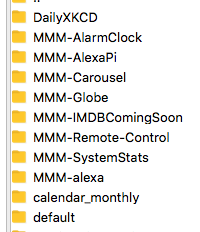
I’m not too sure how helpful this can be for you, also it’s no make any changes the any thing except instilling modules and Adding the module to my config/config.js until mic icon show up.modules: [ { module: 'MMM-Remote-Control', // uncomment the following line to show the URL of the remote control on the mirror // position: 'bottom_right', // you can hide this module afterwards from the remote control itself //ipWhitelist: ["127.0.0.1", "::ffff:127.0.0.1", "::1", "......ip....address..."], ipWhitelist: ["127.0.0.1", "::ffff:127.0.0.1", "::1", "....ip......address...."], }, { module: 'alert', }, { module: "updatenotification", position: "top_bar" }, { module: 'calendar_monthly', position: 'top_left', config: { } }, { module: 'currentweather', position: 'top_right', config: { location: 'London,GB', locationID: '......................', //ID from http://www.openweathermap.org appid: '.........................' } }, { module: 'clock', position: 'top_center', config: { displayType: 'analog', clockBold: 'true', analogSize: '240px', analogFace: 'face-008', secondsColor: '#bf1a1a', } }, { module: 'weatherforecast', position: 'top_right', header: 'Weather Forecast', config: { location: 'London,GB', locationID: '............', //ID from http://www.openweathermap.org appid: ......................................', onlyTemp: true } }, { module: 'MMM-SystemStats', position: 'bottom_right', // This can be any of the regions. classes: 'small dimmed', // Add your own styling. Optional. config: { updateInterval: 10000, animationSpeed: 0, //header: 'System Stats', // This is optional } }, { module: 'MMM-AlexaPi', position: 'lower_third', config: { alexaTimeout: '15000', alexaHBTimeout: '10000', // The config property is optional. // If no config is set, defualt values are used // See 'Configuration options' for more information. } }, { module: 'MMM-Globe', position: 'bottom_left', config: { style: 'geoColor', // natColor, geoColor, airMass, fullBand, europeDiscNat, europeDiscSnow, centralAmericaDiscNat imageSize: 175, updateInterval: 10*60*1000 } }, { module: 'MMM-IMDBComingSoon', position: 'bottom_left', header: "Upcoming Films", config: { apikey: "......................................................", reloadInterval: 8 * 60 * 60 * 1000, //8 hours dataSwapInterval: 60 * 1000, //1 min animationSpeed: 1.5 * 1000 //1.5 secs } }, ] }; /*************** DO NOT EDIT THE LINE BELOW ***************/ if (typeof module !== 'undefined') {module.exports = config;} -
RE: Alexapi - Any UK Users on here?
@johnnyboy
I in Herne Hill SE24.
yeah no problem mate, I will check which one Bring up mic. icon on to my mm-clock. and let you know. I did run in to same problem. MMM-AlexaPi did not bring mic. icon as expected. -
RE: Admin - Pin a 'Usefull Terminal Commands' post?
@johnnyboy Thanks for this one ;-)
-
RE: Alexa on mm-clock
@Durnumosis Hi mate, sorry for late respond, been away, clock its default module mm.
my clock in config
{
module: ‘clock’,
position: ‘top_center’,
config: {
displayType: ‘analog’,
clockBold: ‘true’,
analogSize: ‘230px’,
analogFace: ‘face-008’,
secondsColor: ‘#bf1a1a’,
}
},thanks
-
RE: Show SMS text message on Mirror
Still no notification receive
how i can fix the issue? -
RE: Show SMS text message on Mirror
yea, thats was problem. I notice after post question
-
phone-notification-mirror no notification
first I have sing up at phushbullet.com
Also installed phushbullet app on iPhone
Then I have installed like the Readme file says.
But no notification will displayed. how i can fix the issue.
my config:modules: [ { module: 'phone_notification', position: 'bottom_right', header: 'Phone Notifications', config:{ accessToken: 'MY_ACCESS_TOKEN', numberOfNotifications: 5, displayNotificationIcon: true, displayMessage: true, displayCount: false, alert: false, fade: true, maxCharacters: 50 } },