@sdetweil Thanks Sam! I ended up copying the SD card to a new one.
M
Offline
A New Chapter for MagicMirror: The Community Takes the Lead
Read the statement by Michael Teeuw here.
Read the statement by Michael Teeuw here.
Posts
-
RE: Problem with rebooting PI
-
Speaker sound after copying SD card
Hi,
Can someone help troubleshoot my sound settings on my RPI4 with Raspbian OS? I use the MMM-Sounds module to trigger sounds at different events, but since copying the SD card to a new one, it seems to have lost the ability to play wav files. Cannot remember how I used to set it up!When i do Aplay sound.wav nothing happens it plays the wav with no sound.
When I do aplay -l:
card 2: Device [USB2.0 Device], device 0: USB Audio [USB Audio]
  Subdevices: 1/1
  Subdevice #0: subdevice #0
When I do:
speaker-test -c2 -twav -l7 -D plughw:2,0
the speaker outputs front left…front right…front left…etc. so I know it is working.
Thanks a lot for the help!
-
RE: Problem with rebooting PI
@sdetweil The problem for me is, that when it automatically reboots at 6:00 (which has worked fine for years), MM all of a sudden does not start up anymore. So each morning I wake up to a mirror with the Raspbian OS desktop open and the RPI seems to be unresponsive. I cannot SSH or MSTSC to it. When I cut off power to the MM and reboot it that way, it comes up fine (usually).
-
RE: Problem with rebooting PI
@sdetweil Yes, it could have something to do with that. I need to look into how to view that. Thank you.
-
Problem with rebooting PI
Hi,
I setup my mirror years ago and used a feature like crontab to have it reboot once pr day.Now, I would like to remove the autyomatic reboot, but I cannot find what triggers it.
Nothing under crontab -e and nothing in /etc/rc.local.
last -x produces this for one day:
Kragh    pts/0        192.168.1.20     Wed Feb 11 17:41   still logged in
Kragh    tty1                          Wed Feb 11 06:01    gone - no logout
runlevel (to lvl 5)   6.6.51+rpt-rpi-v Wed Feb 11 06:01   still running
Kragh                                  Wed Feb 11 06:01    gone - no logout
reboot   system boot  6.6.51+rpt-rpi-v Wed Feb 11 06:00   still running
shutdown system down  6.6.51+rpt-rpi-v Wed Feb 11 06:00 - 06:00  (-00:00)
Help is much appreciated…
Br,
Kragh -
RE: Receive a HTTP request and subsequently wake up display and display alert/notification
@MMRIZE said in Receive a HTTP request and subsequently wake up display and display alert/notification:
@MilkShake said in Receive a HTTP request and subsequently wake up display and display alert/notification:
I cannot get
http://192.168.1.100:8090/webhook?action=notification=SOMEONE_AT_THE_DOORto work. It returns a 200:OK but nothing is displayed.http://MMIP:8090/webhook?notification=SOMEONE_AT_THE_DOORread carefully.
You are absolutely correct. Thanks for pointing it out.
-
RE: Receive a HTTP request and subsequently wake up display and display alert/notification
@MMRIZE said in Receive a HTTP request and subsequently wake up display and display alert/notification:
@MilkShake said in Receive a HTTP request and subsequently wake up display and display alert/notification:
It works when I include the notification in the URL like this:
http://MMIP:8090/remote?action=NOTIFICATION¬ification=SOMEONE_AT_THE_DOOR
Simply, you can use this.
http://MMIP:8090/webhook?notification=SOMEONE_AT_THE_DOORThat is the
GETmethod.for the shellscript, your trial seems right, but you should take care for the path and the permission.
I think this would be right. (It depends on your environment)exec: "bash /home/Kragh/monitor_on.sh", // OR exec: ". /home/Kragh/monitor_on.sh",Well, I got it working, sort off.
I cannot get http://192.168.1.100:8090/webhook?action=notification=SOMEONE_AT_THE_DOOR to work. It returns a 200:OK but nothing is displayed.
I have to use http://MMIP:8090/remote?action=NOTIFICATION¬ification=SOMEONE_AT_THE_DOOR for it to work.
-
RE: Receive a HTTP request and subsequently wake up display and display alert/notification
Oh well, succeded in turning the display on as well:
{
        module: "MMM-NotificationTrigger",
        config: {
                useWebhook: true,
                triggers: [
                        {
                                trigger: "SOMEONE_AT_THE_DOOR",
                                fires: [
                                        {
                                                fire: "SHOW_ALERT",
                                                exec: "vcgencmd display_power 1",
                                                payload: {
                                                        title: "PORTEN",
                                                        message: "Der er nogen ved porten!",
                                                        timer: "20000",
                                                }
                                        }
                                ]
                        }

                ]
        }
},
Last thing to do is to also play the doorbell. I need to configure the speaker on the rasp4 first.
-
RE: Receive a HTTP request and subsequently wake up display and display alert/notification
Also, do you know the syntax for executing a shell script in MMM-NotificationTrigger?
I though it would be like this:
{
        module: "MMM-NotificationTrigger",
        config: {
                useWebhook: true,
                triggers: [
                        {
                                trigger: "SOMEONE_AT_THE_DOOR",
                                fires: [
                                        {
                                                fire: "SHOW_ALERT",
                                                exec: "home/Kragh/monitor_on.sh",
                                                payload: {
                                                        title: "PORTEN",
                                                        message: "Der er nogen ved porten!",
                                                        timer: "10000",
                                                }
                                        }
                                ]
                        }
                ]
        }
}
monitor_on.sh is set as executionable.
-
RE: Receive a HTTP request and subsequently wake up display and display alert/notification
@MMRIZE All I have is this:
https://www.doorbird.com/downloads/manual_d10x_en_de.pdf
It works when I include the notification in the URL like this:
http://MMIP:8090/remote?action=NOTIFICATION¬ification=SOMEONE_AT_THE_DOOR
That is sweet. Now I need to exec a shell script also.
-
RE: Receive a HTTP request and subsequently wake up display and display alert/notification
@MMRIZE said in Receive a HTTP request and subsequently wake up display and display alert/notification:
First, What request method and body is emitted from the gate?
It should be something like;- endpoint :
http://MYMM:8090/webhook - requestMethod :
"POST" - requestHeader:
"Content-type: application/json" - requestBody : (
{
  notification: "SOMEONE_AT_THE_DOOR"
}
If you select “GET” as requestMethod, you may need to deliver the notification as parameter instead of requestBody JSON
Then you can configure like this.
{
	module: "MMM-NotificationTrigger",
	config: {
		useWebhook: true,
		triggers: [
			{
				trigger: "SOMEONE_AT_THE_DOOR",
				fires: [
					{
						fire: "SHOW_ALERT",
						payload: {
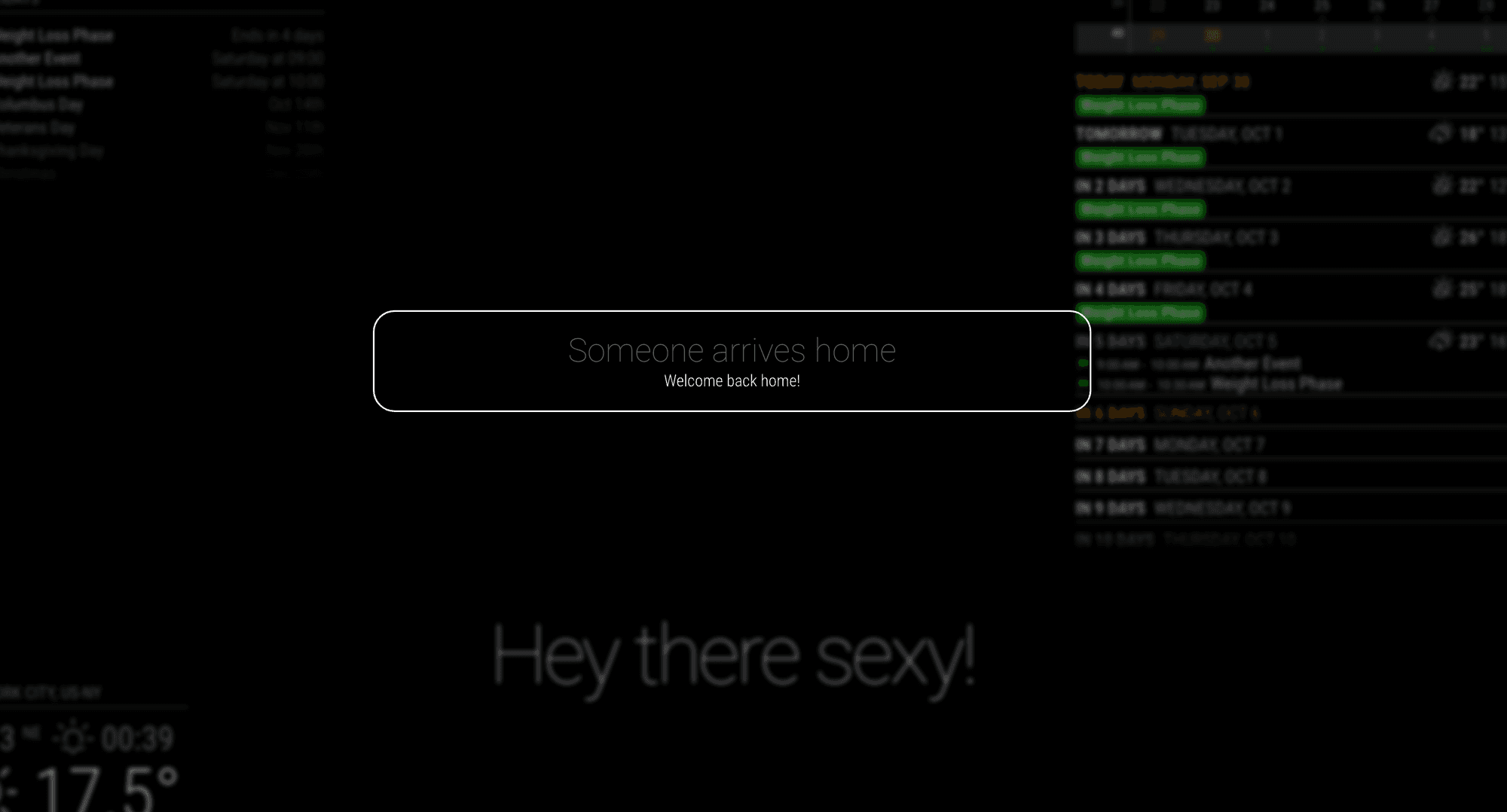
							title: "Someone arrives home",
							message: "Welcome back home!",
							timer: "10000",
						}
					}
				]
			}
		]
	}
},
Thanks man! I will try that out. I think the doorbird appliance is using application/json POST requests, even though that is hard to find in the documentation.
- endpoint :
-
RE: Receive a HTTP request and subsequently wake up display and display alert/notification
@MMRIZE said in Receive a HTTP request and subsequently wake up display and display alert/notification:
@MilkShake
What is the request body from the gate? “SHOW_ALERT”? I think it would be better to emit other dedicated custom notification other than “SHOW_ALERT”.It is just a webhook that is meant to get cached by MMM-NotificationTrigger module, that in turn should be able to send notifications to the Alert module.
-
MMM-NotificationTrígger
@MMRIZE said in Receive a HTTP request and subsequently wake up display and display alert/notification:
@MilkShake
What is the request body from the gate? “SHOW_ALERT”? I think it would be better to emit other dedicated custom notification other than “SHOW_ALERT”.@sdetweil said in Receive a HTTP request and subsequently wake up display and display alert/notification:
@MMRIZE he is trying to get the alert module popup
Yes. Well, I would actually like to execute a shell script that turns on the screen and display an Alert/Notification. I had this working on a previous version of MM, but now I cannot seem to figure it out.
-
Receive a HTTP request and subsequently wake up display and display alert/notification
Hi,
I have been trying to display a notification on my MM upon the receival of a HTTP request that comes from my gate. When womeone pushes the button at the gate, the gate is able to do a HTTP request.It is setup to request: http://MYMM:8090/webhook
When that is fired I receive a 200:OK.
In my config I have:
{
      module: "MMM-NotificationTrigger",
      config: {
        useWebhook:true,
        triggers:[
          {
            trigger: "SHOW_ALERT",
            fires: [
              {
                fire:"SHOW_ALERT",
                payload:{
                        "title": "PORTEN",
                        "message": "Der er nogen ved porten",
                        "timer":5000
                        },
              },
            ],
          },
        ]
      }
 },
Can anyone point me in the right direction?
Much appreciated :)
Br,
Lars -
RE: Rasp4 running MagicMirror stops responding after some time
Yeah, mine is not constant with that. Some times it can work 3 days and sometimes it is hours. I am looking into logs now.
-
RE: Rasp4 running MagicMirror stops responding after some time
@sdetweil said in Rasp4 running MagicMirror stops responding after some time:
@MilkShake could be
I would start by looking in the /var/logs folder where the system logs are written
there are multiple
so you would need to look at the latest dates,
usually when u boot the previous is saved and a new is startedThansk man. I will dig around and see what I can find. It is annoying to say the least.
-
Rasp4 running MagicMirror stops responding after some time
Hi All,
I have a magic mirror that I built 3 years ago, running on a Rapsberry 4. It uses a small motionsensor on the left of the mirror to activate. After booting the rasp it usually works for 2-3 days after which it stops responding to SSH, motion detection and RDP. I can still ping it.Would anyone know how to go about troubleshooting this? Could it be memory build up?
Best regards
Lars Kragh-Hvidberg -
RE: Syntax of MMM-NotificationTrigger
@MilkShake Got it to work using:
{ module: "MMM-NotificationTrigger", config: { useWebhook:true, triggers:[ { trigger: "PLAY_SOUND", fires: [ { fire: "USER_PRESENCE", payload: function(payload) { return false } } ] }, { trigger: "OPEN_GATE", fires: [ { fire: "OPENING_THE_GATE", exec: "sudo python /home/pi/open_gate.py" } ] }, ] } }, -
RE: [Guide] Control MM via Google Home
@MilkShake
Got it to work using:{ module: "MMM-NotificationTrigger", config: { useWebhook:true, triggers:[ { trigger: "PLAY_SOUND", fires: [ { fire: "USER_PRESENCE", payload: function(payload) { return false } } ] }, { trigger: "OPEN_GATE", fires: [ { fire: "OPENING_THE_GATE", exec: "sudo python /home/pi/open_gate.py" } ] }, ] } }, -
RE: [Guide] Control MM via Google Home
Hi, Thanks for the guide. I got it working as IFTTT actually sends a webrequest to my mirror. I am having trouble with the syntax of NotificationTrigger. I already use that module to turn on my Mirror if my gate button is pushed and display an alert.
I would like to execute a script when the trigger OPEN_GATE is received. Here is my current config:
{
module: "MMM-NotificationTrigger",
      config: {
          triggers:[
          {
            trigger: "PLAY_SOUND",
            fires: [
              {
                fire:"USER_PRESENCE",
                payload: function(payload) {
                  return false

                }
              },

              {
                fire:"SHOW_ALERT",
                payload: function(payload) {
                  return {
                    type: "notification",
                    title: "Porten",
                    message: "Der er nogen ved porten!"
                    }
                },
              }
            ],
          },

        ]
      }
},
Can anyone help with the syntax to add a trigger for “OPEN_GATE” notification that fires a script?