I just recieved my order of another 6 window sensors yesterday :) But I really think they will shut this down soon, guess they (gearbest) are not paying any taxes at all…
Working on the new version, this is what I have in mind:
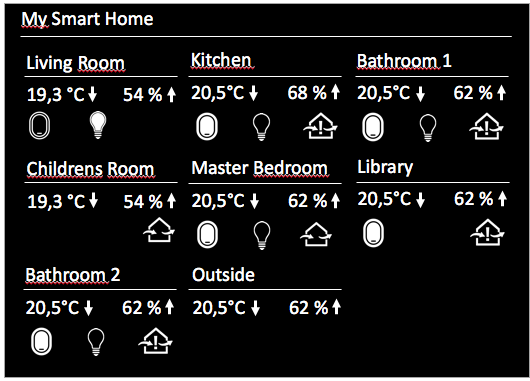
I just recieved my order of another 6 window sensors yesterday :) But I really think they will shut this down soon, guess they (gearbest) are not paying any taxes at all…
Working on the new version, this is what I have in mind:
Good to hear! :)
Suggestions welcome, I have just added ventilation recommendation(see latest update), will also add window sensors - but still unsure how to visualize all that information. Suggestions welcome!
Ok, now another try :) Forgot to add utility class which was already present from other modules on my instance. Please update from GIT.
Try the latest update (git pull), I just checked for null items - even i that should not happen.
Hmm not sure about miio details, I just know that you can sync the tokens via
miio --discover --sync
Else I would try manually setting to the correct (new) token.
For the MM: try to uncomment line 51 in node_helper.js, this logs all found devices. You could also add some more logs here to see where the program fails.
Ok at least some progress. So first to enable your manual token just update the configuration:
config: {
	 interval: 30,
	 gatewayIP: '192.168.13.1',
	 gatewayToken: '6eea5ac1eb475bfedbfff98aab7c2bc7',
	 devices : [{
	     id: '158d00015736a8',
	     name: 'MyRoom1'
	 }]
}
You only need the IDs from your sensors, not the gateway.
About the Mi Home App and your lost token, I would try once this works to reconfigure your gateway with the Mi Home app, and then try to fetch the auto-token again (in your first sample it seems to provide auto-token).
When I run the discover tool I get the following:
Device ID: 56804143
Model info: Unknown
Address: 192.168.0.9 (xiaomi-gateway.fritz.box)
Token: cfbdb315c0825ccc971918e36923febe via auto-token
Support: Unknown

Device ID: 158d0001635bb3
Model info: lumi.sensor_ht (sensor)
Address: Owned by 56804143
Token: Automatic via parent device
Support: At least basic
So I just read through the documentation of miio and found this:
https://github.com/aholstenson/miio/blob/master/docs/management.md#getting-the-token-of-a-device
or:
https://github.com/aholstenson/miio/blob/master/docs/management.md#setting-the-token-of-a-device
My device seems to provide the token “via auto-token”, in your case it seems it does not. Maybe try either of the above.
IDs are same with me, maybe my documentation is wrong here.
Hey Albert,
I think I have solved your issue: not all gateways seem to allow auto-discovery without authentification via a security token. I have added an additional configuration parameter now where you can provide your token:
https://github.com/mirko3000/MMM-xiaomi
Update the module and follow the description at the bottom:
https://github.com/mirko3000/MMM-xiaomi#authentification
Hope that works.
Best regards.
Well the IDs show up in your magic mirror - the problem is to identify which ID belongs to which sensor. I guessed them by checking the temperature, still I agree that this is not very convenient so far. Looking out for a better solution…
Also it only supports xiaomi temperature sensors, so if you don’t have any registered on your gateway it will not show anything (Keeping in “Connecting to gateway…” mode).
Sorry, forgot about the link:
https://github.com/mirko3000/MMM-xiaomi
@barnosch, @cxlwill: Did you check the logs? Anything showing up there?
Hi guys,
just made a small module to display temperature and humidity from your Xiaomi smarthome sensors. Pretty basic so far, but hugely helpful to me to monitor heating and ventilation (humidity!).
Sensors look like this and cost around 8 €:

Here a sample from the module:
[card:mirko3000/MMM-xiaomi]
Hi there,
I am trying to include my Synology NAS calender with the default calendar module of the magic mirror. But it does not work and I can’t figure out why. When debugging I only see that the payload of my calender contains no events - which is not the case.
Can anyone help me out how to debug where in the application the parsing of the ics happens? In calendar.js (socketNotificationReceived) I only see the empty payload.
Regards,
mirko