@sdetweil the thing is before I set it up for a cloud connection for me to access it remotely, I could access it via MMM-Remote-Control as it was in my home. When I established the cloud connection with VNC, remote quit working. Get the get error
A New Chapter for MagicMirror: The Community Takes the Lead
Read the statement by Michael Teeuw here.
Read the statement by Michael Teeuw here.
M
Offline
Posts
-
RE: Would this cause a conflict with MMM-RemoteControl
-
RE: Would this cause a conflict with MMM-RemoteControl
I can access it via cloud service now that it’s on their wifi but they can’t get remote to get past the get error.
-
RE: Magic Mirror Mark IV
@bhepler said in Magic Mirror Mark IV:
Huh. Well, now the images uploaded properly. Yay!
This one has the remote access code on it and I’ve already modified the compliments file to fit their house. They love it and they are the only people in their town to have one!
Remote access code?
-
RE: mmm Dad Jokes
Try a reboot. I believe that it’s needed for this module
-
RE: Finally built my mirror
@Mykle1 Thanks for all of your help. I gave the one I made as a gift away Saturday and everyone at the party freaked out. That kid will be the coolest kid in the dorm.
-
Finally built my mirror
Thanks to all who answered all of my questions.
I am not a builder, don’t have a bunch of tools so trying to build a frame was going to be a challenge. In all of my research I found a medicine cabinet build at
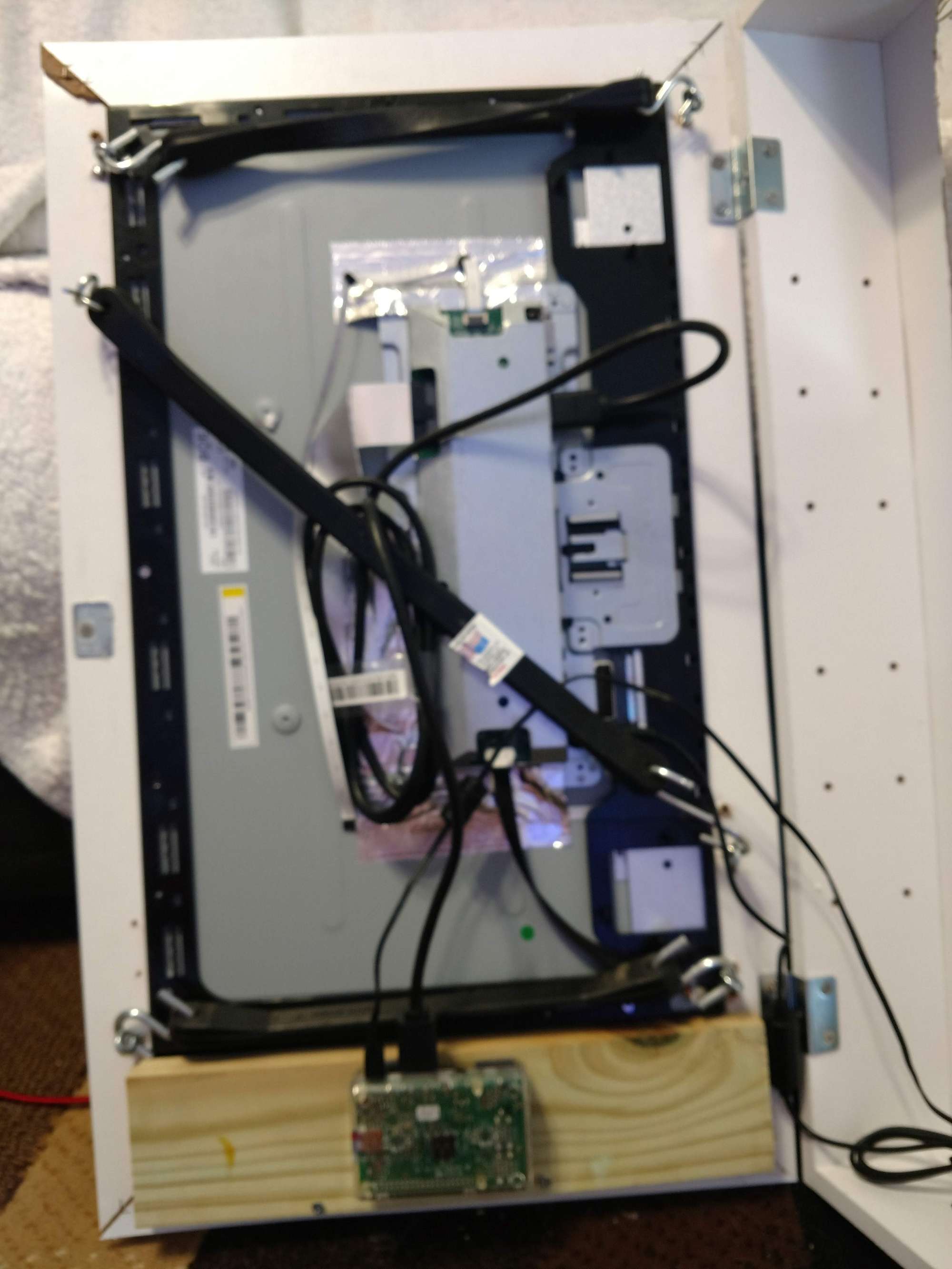
https://docs.smart-mirror.io/docs/hardware.html I didn’t buy the monitor he suggested and went with a 24 inch monitor I found on Craigslist. After stripping it down to bare bones, I placed on top of the mirror and of course it was about 1/4 inch too big. Ugh. Gambled and bought a 23 inch monitor and after stripping it down it was perfect
https://www.bestbuy.com/site/dell-s2319nx-23-ips-led-fhd-monitor-black-silver/6237640.p?skuId=6237640] It was marked down to $85 with an open box model.
Removing the mirror from medicine cabinet was not as easy as described. I had to pry the wood apart on 3 sides and after putting the new mirror in, I used wood glue and large clamps to rebuild.
I called a bunch of local glass companies and found one who would sell me a 13x26 one way mirror for $75. That was less than the cost of an acrylic one from the vendor many use. Call around for sure. This was my 7th call. Most other places wanted $125 or more.
I am not hanging it on a wall, but resting on top of my mantle. I added a few eye hooks and 100 pound picture wire. I added a few 100 pound picture frame holders into the wall and put the wire over the hooks to prevent any chance of it tipping over.
To control the screen I am using an Alexa enabled smart plug. I have an Echo in my living room so I didn’t build Alexa into the mirror. I choose the smart plug for a few reasons. It allowed me to add it to my morning and evening rituals so it turns on and off at certain times. I also added an applet from IFTTT that is based on location. It turns on or off automatically when I leave or enter my subdivision.
Modules used
Default Time/calendar
Default Compliments with a few custom insults
MMM-EyeCandy
MMM-MyScoreboard
MMM-NOAA3
MMM-NowPlayingonSpotify
MMM-DadJokesHere is what it looks like mounted on the mirror. I used tarp straps to keep everything tight.
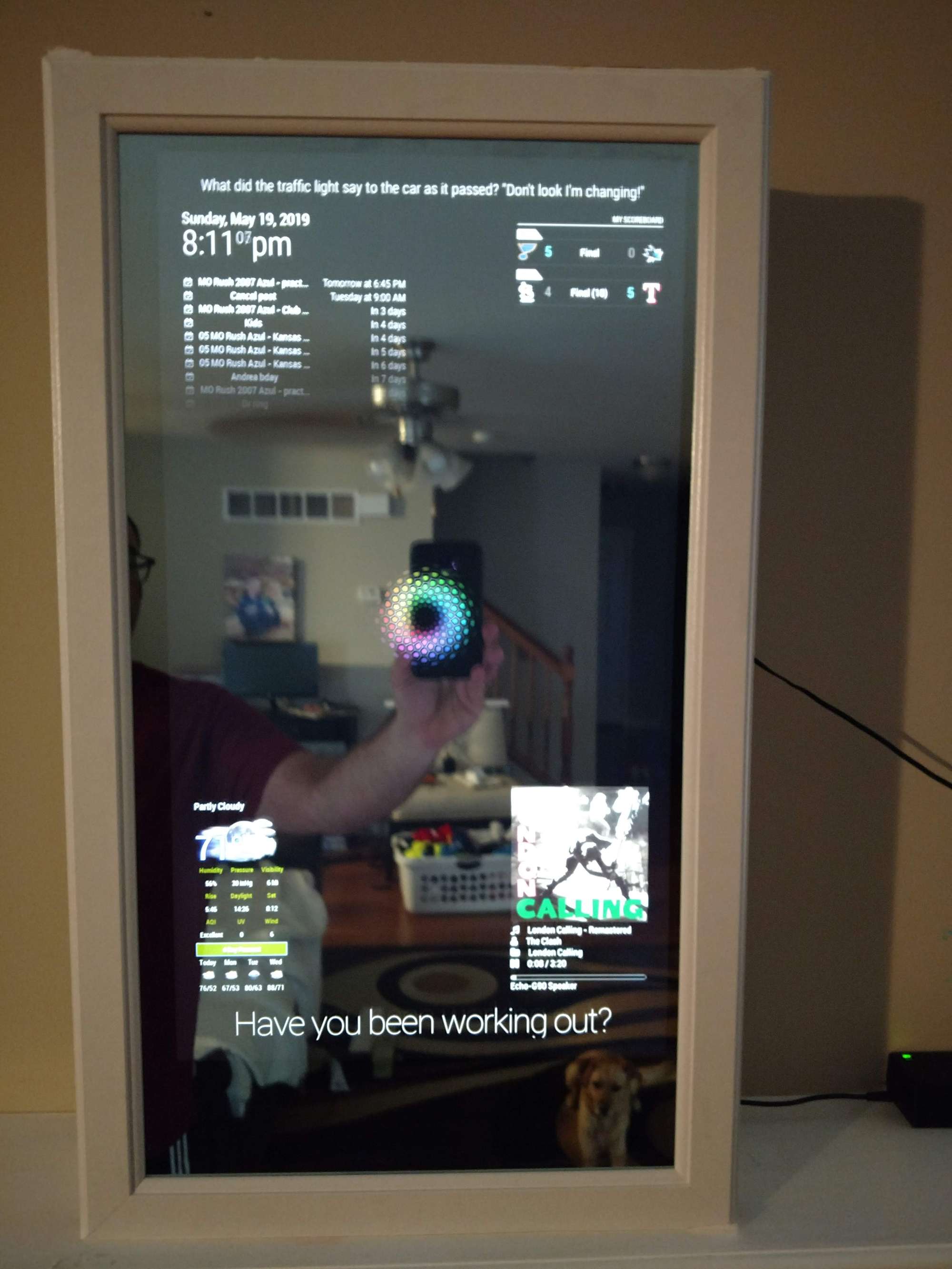
Video of it in action
-
RE: MMM-DarkSkyForecast - Yet ANOTHER weather module
@humdinger44 longitude should have - you have _ that could be it
-
RE: Would this cause a conflict with MMM-RemoteControl
@sdetweil it was the same IP address that I used before installing VNC cloud. Even if I’m not accessing the mirror through VNC the error occurs. I did go into VNC on the mirror, went to settings and disabled accept cloud connections. Still no luck.
I was wanting to make it easier to shut down for moving the mirror but me having remote access is more important so I can troubleshoot.
-
Would this cause a conflict with MMM-RemoteControl
Ok, so right now I have 2 mirrors running in my house. On one of the mirrors I can get the remote control function to work with no issue when I am in my house. I just tried the other and its not working. The config is the same on both, I copied/pasted to make sure.
Yes I am using the proper IP of the 2nd mirror. I get the can not get remote/html error.
The only thing I can think of is on the 2nd mirror I have the VNC cloud service turned on as this is a gift mirror and I want to be able to access it remotely for changes etc. If it doesn’t work because of this no biggie, I can add a usb keyboard & mouse to the gift for shut down purposes.
Everything else looks the same. I guess I could turn off vnc cloud but I havent.
Thanks in advance
-
RE: Screen Rotation Help
@sdetweil I will. It’s a vga connection not hdmi if that matters. Since it’s a gift I don’t want to have to enter code on every reboot so worse case I have the frame turned to landscape vs portrait
-
Screen Rotation Help
So I’m finally building the mirror I’m gifting next Sat and need to change display to portrait. The threads I’ve seen have been on older versions of the software. Has anything changed since the new version? What’s the easiest way to do this?
I’m using a 3b+.
I read something about MMM-RemoteControl being wonky if you do this. Any help for clueless dude would be awesome
-
RE: Beginner
@wdmark I “bugged” people when I couldn’t figure things out. Then you start to know what to look for. I am picking up my one way mirror tomorrow and will build in the next week or so. Just make sure you have a good working backup before trying to install a new module or changing the configuration of one you have working. It allows you to see what was working and prevents you from pulling your hair out.
-
RE: Beginner
I was a complete beginner when I started working on my mirror. I watched a bunch of youtube videos, skipping the ones dedicated to building frames, and learned about installation. There is an asian woman on youtube who does a tutorial walking through the installation of the magic mirror and its modules. It wasn’t perfect but it helped me learn.
Read everything you can. Look at the stuff on reddit. Read this forum. Understand the problems people went through and bookmark pages that seem interesting to you. Learn from people’s mistakes. Ask questions. Experiment and get frustrated when it doesn’t work. Read code carefully as a slight deviation at all will mess things up. Ask questions, have fun. Use the search feature. Ask questions.
-
RE: MMM-NowPlayingOnSpotify does not work
@Stef my guess is that it’s something with the Spotify api that you set up. If you are seeing the logo but it’s not recognizing when you play music to me it’s a config issue with Spotify or the form thing from the module owner that isn’t right. Was pretty easy to set up. Do a search on the board too. I know there is a multi page thread elsewhere
-
RE: Removing lines
if you are talking about under the header, I believe the only way to get rid of the line is to get rid of the header in the config file for example the line under My Weather would be removed by getting rid of the header in the config file, but from my understanding you would also lose the words my weather
-
RE: MMM-NowPlayingOnSpotify does not work
Mine works fine. Are you a premium member?
-
RE: Remote SSH Access to the Mirrors You Give Away
@bhepler ok thanks. The first one I am giving away is a college student thats why dataplicity seems like the way to go for me. Hopefully it works
-
RE: Remote SSH Access to the Mirrors You Give Away
@bhepler I have no idea at this point if it works, I just didn’t want to spend cash for this. In no way was I trying to be critical of your write up. Super detailed and if I had a reason to use a cloud provider or had a bunch to administer this would be perfect for me.
My apologies if I came across any other way.