@plainbroke You can target the selectors specifically in your custom.css like this:
#wotd-we {
  color: orange;
  font-size: 50px;
}
 M
Offline
M
Offline
@plainbroke You can target the selectors specifically in your custom.css like this:
#wotd-we {
color: orange;
font-size: 50px;
}
@sdetweil So, I have not seen any issues thus far other than having to figure out the screen blanking for me on Labwc, I have to test the wlopm, but for now I have switched back to Wayfire. No other issues in logs etc.
@uros76 Looks very nice and clean. Like the “no wires” idea. Well done.
I have been using the MMM-OpeningHours module for a few years now and it has always been working great and probably still works for all users of the modules by @Menturan . Thanks for an awesome module.
Google has replaced the library @google/maps with a newer library @googlemaps/google-maps-services-js. I must mention that the old library still works.
I have updated the module to use the latest library from google and have refactored the node_helper.js code a bit. I have also update the package.json and the README and have opened a PR. As the module has been last updated about 3 years ago I am not sure if it is still maintained.
If anybody want to switch to the newer version you are welcome to use my fork. I just love this module as I can track all my fav places.
You can find the fork here: MMM-OpeningHours
@monark Maybe just my pennies worth as well, a lot of the module developers develop modules for own use and they choose to share it with community. A lot of the plugins that get used are not made by the module developers, OpenCV being case-in-point. It is a plugin and it has its own complexities.
As Sam mentioned earlier, MM is a learning platform and users of the platform get to learn as they go along.
I can understand the pain you having but the learning is what makes it fun, solving problems is what keeps most users going with the platform.
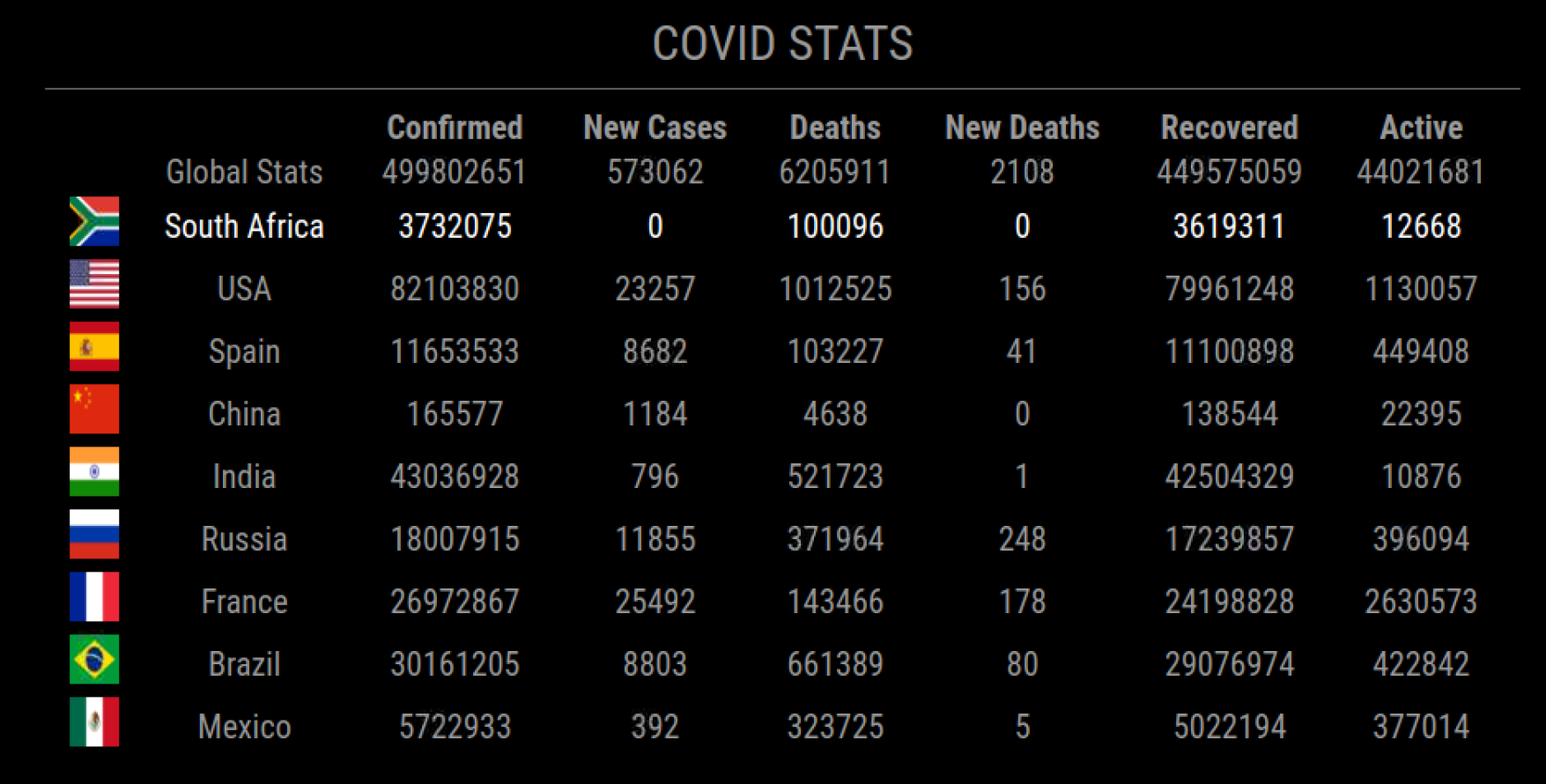
I have had an issue with the MMM-COVID19 module as it has stopped pulling stats since the 2nd March 2022. I decided t0 make my own from a different source. No API keys required. :clinking_glasses:
See Github module page:
MMM-CovidStats
In order to get the module you need to follow these steps:
Module includes a country flag for the selected countries to display.
Module is best positioned in position middle_center
cd ~/MagicMirror/modules
git clone https://github.com/mumblebaj/MMM-CovidStats.git
cd MMM-CovidStats
npm install
Options:
Include multiple countries
Include World Stats
Screenshots
@theaddies said in Exclude certain events from Calendar:
excludedEvents [ ‘Workout’],
I might be wrong but I think you might be missing a colon. It should read like this: excludedEvents: [ 'Workout'],
@sdetweil I have now found it in the /node_modules/luxon/build/global
I should have searched some more. :beaming_face_with_smiling_eyes:
But, yes, you are correct. You can just point to that location.
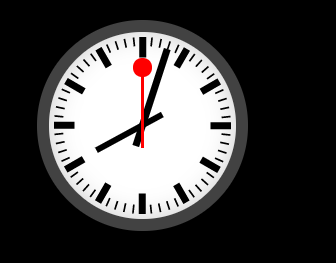
Created a module based on a classic railway clock using code from manuelmeister
Installation
cd ~/MagicMirror/modules/
git clone https://github.com/mumblebaj/MMM-SweepClock.git
Add to config.js
{
	module: "MMM-SweepClock",
	position: "top_left", //can use top_right as well or top_center
  },
Updates
V1.1.2
Add timezone feature which allows a user to specify a timezone. This will override the timezone of the system MM is running on.
@sdetweil Right now, not. MM runs perfect as is. I’ll leave it for now. :beaming_face_with_smiling_eyes:
@johans Have a look at this thread.
https://forum.magicmirror.builders/topic/15778/fix-for-black-screen-in-2-16-and-later/11
Your error Error: Cannot find module 'xml2js'
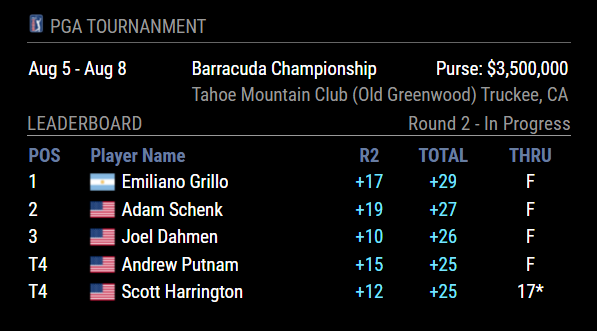
@swvalenti The issue is in the ESPN.js at line 49 or so. It is looking for defendingChampion.athlete but there isn’t one and it fails. I see you have created an issue on GitHub but sometimes the guys abandon their modules. Maybe the developer responds to you issue. You could change line 49 to the below and it should work.
I would have done it this way:
tournament.defendingChamp = event.defendingChampion ? event.defendingChampion.athlete.displayName : ""
@Mitchfarino What a pity though. The module works perfectly for me though. There are some instructions missing though but I managed to get it up and running when I first implemented it a few months ago. Great module.
@cowboysdude Same to you too from South Africa.
@sdetweil Thanks Sam. Managed to resolve this. Everything works fine now and plays well with the other modules.
@levon That message just says that the module will not work on an older version of the mirror. It is not an error. Are there any other errors in NPM? Can you check the developer window for any errors, Do a Ctrl + i which should open the developer window. MMM-Strava seems to be working fine for me.
Overview
Apologies for only showing this here now. Module has been around for almost 8 months now.
For those who do not know what this is, the state power utility operator describes it as follows:
Load shedding is a controlled process that responds to unplanned events in order to protect the electricity power system from a total blackout.
For those who know what this is… You know the feeling… :-)
So, we have a rotational system whereby the local municipality will switch off your power for a period of 2.5hrs depending on the stage we are on at that given time. There are instances where we go without 4.5hrs of power when we are at stage 6 or above. Most often we can be without power for up to 12hrs per day.
I have created this module for users to monitor their load shedding schedule and help them plan accordingly.
Link to module:
EskomSePush
Some pics:
No loadshedding:

With loadshedding:

With 4.5hr schedule:

Latest Update:
@mcgroo Have a look at this one.
https://github.com/mumblebaj/MMM-WOTD
has multiple language support etc.