@Kastore You have to be in the module directory when you run git checkout withsuspend, so you do
git clone https://github.com/sdetweil/MMM-TomTomCalculateRouteTraffic
then run
cd MMM-TomTomCalculateRouteTraffic
then
git checkout withsuspend
 M
Offline
M
Offline
@Kastore You have to be in the module directory when you run git checkout withsuspend, so you do
git clone https://github.com/sdetweil/MMM-TomTomCalculateRouteTraffic
then run
cd MMM-TomTomCalculateRouteTraffic
then
git checkout withsuspend
@1a2a3a For the latest Wayland on off I use the new adjusted scripts.
mon.sh
#!/bin/bash
export WAYLAND_DISPLAY=wayland-0
export XDG_RUNTIME_DIR=/run/user/1000
/usr/bin/wlr-randr --output HDMI-A-1 --on --mode 1920x1080@60Hz --transform 270
mof.sh
#!/bin/bash
export WAYLAND_DISPLAY=wayland-0
export XDG_RUNTIME_DIR=/run/user/1000
/usr/bin/wlr-randr --output HDMI-A-1 --off
This works pretty well for me. The screen eventually times out as there is no input and it turns off.
In addition to these I have these cron entries to call the scripts.
Turns the screen on at 6am and off at 9pm.
00 06 * * * /home/pi/mon.sh >> /home/pi/mon.log 2>&1
00 21 * * * /home/pi/mof.sh >> /home/pi/mof.log 2>&1
@1a2a3a I am a little confused. I am not having any issues after implementing my solution in this post. I thought you were having issues.
Hi @1a2a3a . Honestly, no idea. I remember seeing a few posts from people having that exact same issue. Maybe if you search the forum for related content you may find something. I have not had the same issue myself.
The module has been updated to move to the latest supported API and support for the latest beta API has been added with new functionality.
The module now uses the latest 3.0 API for loadshedding. There were slight changes to the area name, please check the README to determine how to obtain the new name.
I have also added support for the new 3.1 API which is currently in beta. This lets users see water and internet outages reported in their area. See the README for how to get your report area. This is different to your loadshedding area.
If there is no loadshedding then that remains hidden and only the report section is show as per below screenshot.

@sdetweil I see some major changes coming down the line for npm v12.
https://github.blog/changelog/2026-07-08-npm-install-time-security-and-gat-bypass2fa-deprecation/
@sdetweil Just ran it quickly and it seems like it installed 22.22.2
mumble@pi:~ $ sudo n
     copying : node/22.21.1
   installed : v22.21.1 (with npm 10.9.4)
mumble@pi:~ $ node -v
v22.21.1
mumble@pi:~ $ bash -c  "$(curl -sL https://raw.githubusercontent.com/sdetweil/MagicMirror_scripts/master/upgrade-script.sh)" force
update log will be in /home/mumble/MagicMirror/installers/upgrade.log
doing test run = false
Node currently installed. Checking version number.
Minimum Node version: v22.22.2
Installed Node version: v22.21.1
installing correct version of node and npm, please wait
Check current Node installation ...
Node currently installed. Checking version number.
Minimum Node version: v22.21.1
Installed Node version: v22.22.2
No Node.js upgrade necessary.
Check current NPM installation ...
NPM currently installed. Checking version number.
Minimum npm version: V10.9.7
Installed npm version: V10.9.7
No npm upgrade necessary.


upgrading from version 2.37.0 to 2.37.0
force: line 762: pm2: command not found
some node app still running, please shutdown those apps, maybe MagicMirror, and restart
here is a list of those processes
@sdetweil No worries. I will check tomorrow after work and downgrade node and install again. Will advise
@sdetweil Yeah, I saw that so not sure where that 22.22.2 came from but it was there as can bee seen in the previous post. I had to install 22.22.2 and then only would MM install. Was weird.
As for the SD card failure, I don’t know why this is but when I upgraded in April the card failed. When I upgraded now the first time the card failed so I had to setup a new one again.
@sdetweil Hi Sam. Apologies for the late reply. See below.
mble@pi:~ $ bash -c  "$(curl -sL https://raw.githubusercontent.com/sdetweil/MagicMirror_scripts/master/raspberry.sh)"

$$\      $$\                     $$\           $$\      $$\ $$\                                          $$$$$$\
$$$\    $$$ |                    \__|          $$$\    $$$ |\__|                                        $$  __$$\
$$$$\  $$$$ | $$$$$$\   $$$$$$\  $$\  $$$$$$$\ $$$$\  $$$$ |$$\  $$$$$$\   $$$$$$\   $$$$$$\   $$$$$$\  \__/  $$ |
$$\$$\$$ $$ | \____$$\ $$  __$$\ $$ |$$  _____|$$\$$\$$ $$ |$$ |$$  __$$\ $$  __$$\ $$  __$$\ $$  __$$\  $$$$$$  |
$$ \$$$  $$ | $$$$$$$ |$$ /  $$ |$$ |$$ /      $$ \$$$  $$ |$$ |$$ |  \__|$$ |  \__|$$ /  $$ |$$ |  \__|$$  ____/
$$ |\$  /$$ |$$  __$$ |$$ |  $$ |$$ |$$ |      $$ |\$  /$$ |$$ |$$ |      $$ |      $$ |  $$ |$$ |      $$ |
$$ | \_/ $$ |\$$$$$$$ |\$$$$$$$ |$$ |\$$$$$$$\ $$ | \_/ $$ |$$ |$$ |      $$ |      \$$$$$$  |$$ |      $$$$$$$$\
\__|     \__| \_______| \____$$ |\__| \_______|\__|     \__|\__|\__|      \__|       \______/ \__|      \________|
                       $$\   $$ |
                       \$$$$$$  |
                        \______/

install log being saved to /home/mumble/install.log
Updating packages ...
Installing helper tools ...
nvm_command is sudo n v22.21.1
installing correct version of node and npm, please wait
Check current Node installation ...
Node currently installed. Checking version number.
Minimum Node version: v22.21.1
Installed Node version: v22.21.1
No Node.js upgrade necessary.
Check current NPM installation ...
NPM currently installed. Checking version number.
Minimum npm version: V10.9.4
Installed npm version: V10.9.4
No npm upgrade necessary.
Cloning MagicMirror ...
Cloning into 'MagicMirror'...
remote: Enumerating objects: 509, done.
remote: Counting objects: 100% (509/509), done.
remote: Compressing objects: 100% (406/406), done.
remote: Total 509 (delta 118), reused 319 (delta 93), pack-reused 0 (from 0)
Receiving objects: 100% (509/509), 572.14 KiB | 9.54 MiB/s, done.
Resolving deltas: 100% (118/118), done.
Cloning MagicMirror Done!
Installing dependencies ...
npm error code EBADENGINE
npm error engine Unsupported engine
npm error engine Not compatible with your version of node/npm: eslint-plugin-package-json@1.5.0
npm error notsup Not compatible with your version of node/npm: eslint-plugin-package-json@1.5.0
npm error notsup Required: {"node":"^22.22.2 || >=24.15.0"}
npm error notsup Actual:   {"npm":"10.9.4","node":"v22.21.1"}
npm notice
npm notice New major version of npm available! 10.9.4 -> 11.18.0
npm notice Changelog: https://github.com/npm/cli/releases/tag/v11.18.0
npm notice To update run: npm install -g npm@11.18.0
npm notice
npm error A complete log of this run can be found in: /home/mumble/.npm/_logs/2026-07-04T07_32_18_929Z-debug-0.log
Unable to install dependencies!
I had to manually install v22.22.2 before I could install MM.
Hi @sdetweil Howzit Sam? I upgraded using the upgrade script this weekend on my Mirror. However, I ran into an issue. The script installed Node 22.21.1 but MM requires 22.22.2. Not sure if this is just an oversight? I also noticed that it installed an earlier version of npm that is also not supported.
I checked the install log and there is not much going on in there.
I had to manually install node 22.22.2 and npm v11 before it worked.
Just thought I would give you the heads-up.
Besides the issue with the install, the upgrade is the second one that crashed my MicroSD. The one in April and now this one as well. I suspect something might be doing this. My SD card could not have gone within 4 month. But hey, i might be wrong.
@kasperb So, verdict is as follows:
Reddit no longer allows anonymous JSON fetches. This is now officially dead.
I can maybe make it work for users who have OAuth creds, but I would need to know if it would be worth the while me making those changes, i.e. are there current users of the module who have OAuth creds or not? If not then this module is unfortunately “as good as dead”.
They, Reddit, have moved onto Devvit which is hosted inside Reddit’s platform and handles authentication for apps built on the platform. Not used for external apps.
If there are any users who have OAuth creds, let me know and I will update the module, else I will have to shelve this one.
@kasperb Reddit has started to explicitly block unknown browser/user activity. I am busy researching what has changed and how to get this working. Thought supplying an explicit userAgent would resolve the issue with that is not working.
@smegbadger Not sure if this would work for you but you can set this in you docker-compose.yml under volumes:
- /etc/timezone:/etc/timezone:ro this should take the timezone from the host.
@miriamburrell If those can be linked to Strava then MMM-Strava can be used. I still use MMM-Strava and it still works fine but I am using Suunto watch connected to Strava and I can then display that via the MMM-Strava module.
@Thring I belive that there is NO API for this anymore, not since 2020 I think.
@nowayto I have made changes to the module to accommodate the API key, however, when I tested it, it did not work for me.
The Growatt NPM module states the following:
You can get the key by having an email sent to you on the Grwatt website for a third party to display the data. The key is the combination of numbers and letters in the link. It has 96 characters.
The API key I am seeing is much shorter than the 96 character key mentioned above and as a result I was getting a 500 error when I was testing it.
This is obviously the wrong key.
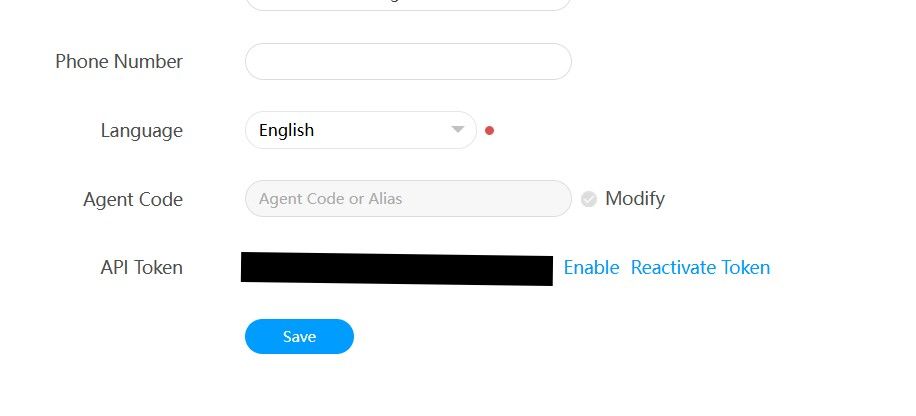
As such, I am reluctant to push changes I am unable to test successfully.
For users who are having issues with monitor on and monitor off and looking for a cron job to start their wayland setup. See my original post with updates.