@Niggich Have you also check for any errors in the Dev console (shift + ctrl + i)
 M
Offline
M
Offline
A New Chapter for MagicMirror: The Community Takes the Lead
Read the statement by Michael Teeuw here.
Read the statement by Michael Teeuw here.
Posts
-
RE: MMM-WOTD
-
RE: MMM-WOTD
not working with more pages and server mode
Not sure I understand the above.
The module works fine, works with MMM-pages and in Container (server only mode) I have tested this.
Can you check in the logs if you see any errors in the logs and advise?
-
RE: mumblebaj MMM-WOTD fonts
@plainbroke You can target the selectors specifically in your custom.css like this:
#wotd-we { color: orange; font-size: 50px; } -
RE: MagicMirror Container
@sdetweil You provide your own list of modules and config alongside your compose and it all gets imported into the container. No need to go fiddle in the container itself.
-
RE: MagicMirror Container
@plainbroke There are instructions on the Docker website. Follow the link in my post above.
-
RE: MagicMirror Container
@KristjanESPERANTO Well, I wanted to see how it works? 😉 Wanted to build one that was preloaded with my own modules for my own use but then rethought the design a bit and see if I could build a generic one based on trixie. So yeah, just pure curiosity and to see if I could…🤣
-
MagicMirror Container
Hi,
Firstly, I know there are a few out there and by far the one from @karsten13 seems to be the best and most well maintained out there.
I have created my container based on
Debian Trixieand MMv2.31.0.I am looking for testers to see if I have missed anything or if there is room for improvements. I have only been able to test this on my Windows laptop, don’t have a spare RPi at the moment to test this with.
All instructions can be found here mumblebaj/magicmirror:latest
Contributions are most welcome.
Thanks
-
RE: ChatGpt intergration
@Nage1951 ChatGPT has been around for a while now. There is even a module built on it already. Checkout the 3rd party modules list, hamburger menu on top. Not sure if it still works but it is there.
-
RE: Restart MagicMirror once a day
@sdetweil Yeah, was reading that earlier when you posted it from another issue. Will see if I can pull the MM repo and have a look at the code in there.
-
RE: MMM-Carousel and modules that are currently generating an empty div
@sdetweil and @redfishbluefish When I had the same issue with my MMM-NewsAPI module where if a user opted not to show a QR Code, it would create an empty div which took up space. I had to implement the following in code to dynamically remove the div for it if the option is not selected. You would need to have similar logic for if no alert results are returned you remove all traces of the parent div.
else {
                const qrCodeElement = document.getElementById("NEWSAPI_QRCODE")
                if (qrCodeElement) {
                    qrCodeElement.parentNode.removeChild(qrCodeElement)
                }
            }
This is how I have implemented it in my module, may not be the most elegant but works for me and the QR div no longer takes up the space if the user did not opt to show it.
-
RE: MMM-NOAA3 - Revived
@htilburgs Thanks for confirming. I double checked the icons available from weatherbit and compared to the list and they are all covered. Hopefully it was just a once off thing. 🙏
-
RE: MMM-NOAA3 - Revived
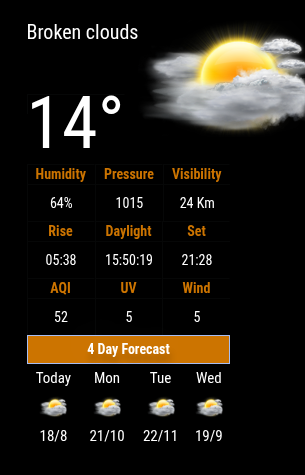
@htilburgs Good morning. I have just tested weatherbit using you lat and lon and not seeing any errors.
-
RE: MMM-NOAA3 - Revived
@htilburgs I will have a look at weatherbit. They may have changed icons.
Just a little busy today but when I get a moment I will definitely have a look.
I also require your lat and lon so I can get the data/icons for your region/area
-
RE: MMM-NOAA3 - Revived
@htilburgs Hi, thanks for the complement. I have updated accordingly. Thanks for that.
-
RE: Long time no see and need a help.
@MMRIZE Major hit to the community. Hope things work out for you an hope you find a solution around this. Till later…
-
RE: Default Weather Updates not working
@Freddy_boy You can have a look at the following link.
This is my forked version which works and caters for different providers.
-
RE: Default Weather Updates not working
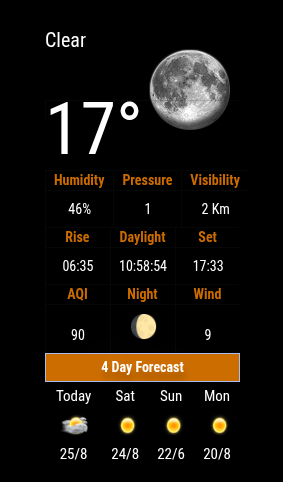
@Freddy_boy Just out of interest, why use multiple instances for current and forecast if you can get both in a single module? There are a few different modules that provide the combined view.
My apologies, just want to know out of interest.
Below is an example of both rolled into one.
-
RE: new Raspi OS release
@sdetweil So, I have not seen any issues thus far other than having to figure out the screen blanking for me on Labwc, I have to test the
wlopm, but for now I have switched back to Wayfire. No other issues in logs etc. -
RE: new Raspi OS release
@rkorell Just read that X11 is still there in Trixie. So no stress yet, but yes, it is old and may be on it’s way out one of these good ol days.